
1. ບົດແນະນຳ
Thank you for choosing the Greadio MD-T26 Portable AM/FM/SW Radio. This manual provides detailed instructions for the proper setup, operation, and maintenance of your radio. Please read this manual thoroughly before use to ensure optimal performance and longevity of your device.
The Greadio MD-T26 is a versatile portable radio featuring AM, FM, and Shortwave (SW) bands, an LCD display for clear frequency and time viewing, and dual power options for both indoor and outdoor use. It is designed for ease of use with large, accessible controls and a built-in speaker for clear audio.

ຮູບ 1: ດ້ານຫນ້າ view of the Greadio MD-T26 Portable AM/FM/SW Radio.
2. ຄຸນລັກສະນະຂອງຜະລິດຕະພັນ
- ການຮັບສັນຍານຫຼາຍແຖບຄວາມຖີ່: Receives AM, FM, and Shortwave (SW) frequencies.
- ຈໍ LCD: Clear digital display for frequency and time settings.
- ທາງເລືອກພະລັງງານສອງ: Operates via AC power or 4 x D cell batteries (not included).
- ລໍາໂພງຄຸນນະພາບສູງ: Integrated 2W speaker for clear sound output.
- ການຄວບຄຸມໂຕນ: Adjustable tone settings (Low/High) for personalized audio.
- ຫູຟັງຫູຟັງ: 3.5mm stereo earphone jack for private listening.
- ການອອກແບບແບບພົກພາ: Equipped with a sturdy handle for easy transport.
3. ຕັ້ງຄ່າ
3.1 ການເປີດວິທະຍຸ
The Greadio MD-T26 radio offers two methods for power supply:
- ການສະ ໜອງ ພະລັງງານ AC: For indoor use, connect the included AC power cable to the radio's AC input jack and then plug it into a standard wall outlet.
- ການສະຫນອງພະລັງງານຫມໍ້ໄຟ: For portable use, insert four (4) D cell batteries (not included) into the battery compartment located on the back of the radio. Ensure correct polarity (+/-) as indicated inside the compartment.
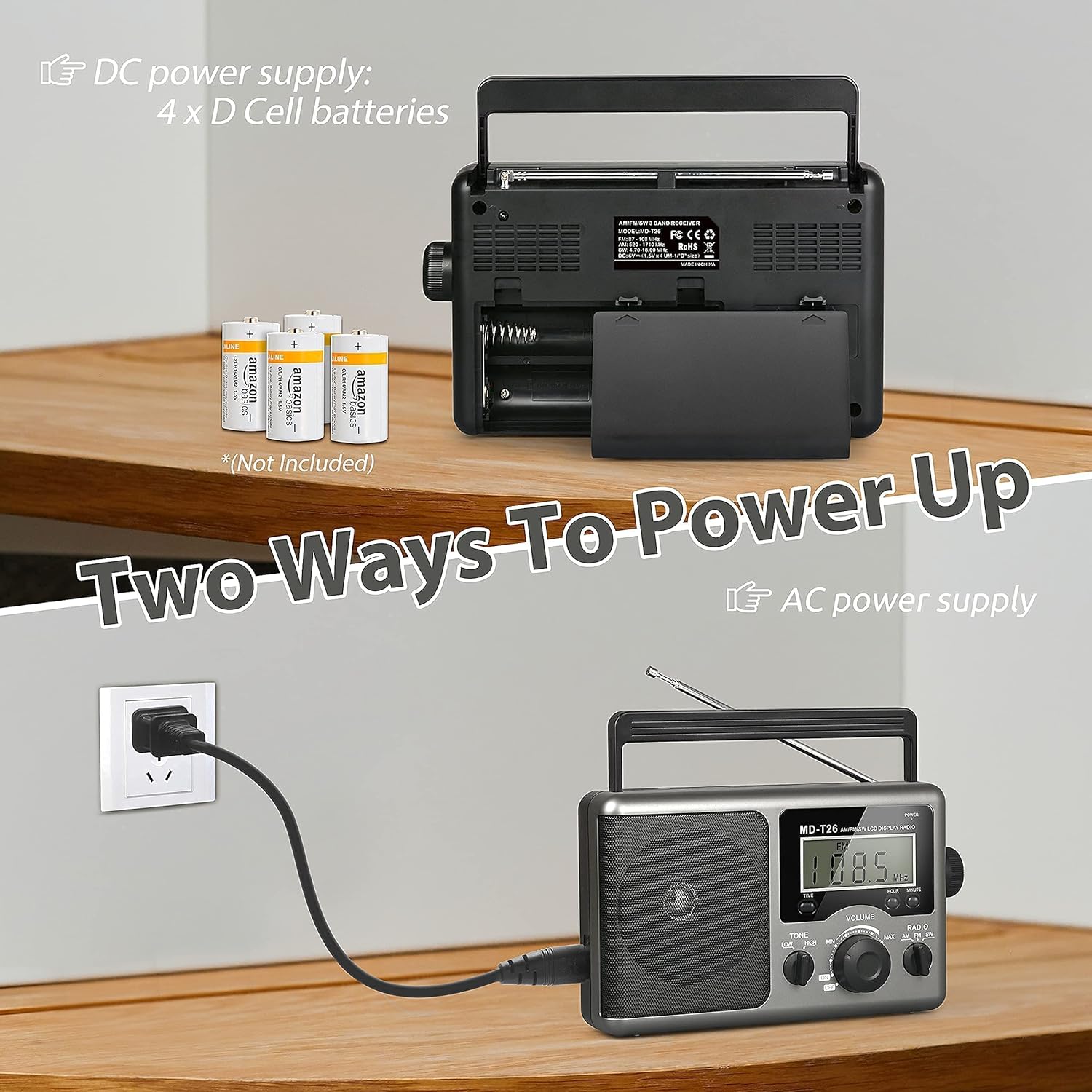
Figure 2: Illustration of AC power connection and battery compartment for D cell batteries.
3.2 ການປັບສາຍອາກາດ
For optimal reception, adjust the antenna as follows:
- FM/SW Reception: Extend the telescopic antenna fully and adjust its angle for the clearest signal.
- AM Reception: The radio uses a built-in ferrite rod antenna for AM. Rotate the entire radio unit to find the strongest signal.
4. ຄໍາແນະນໍາການດໍາເນີນງານ
4.1 ຄວບຄຸມview

ຮູບທີ 3: ລາຍລະອຽດ view of the radio's control panel.
- ປຸ່ມພະລັງງານ: Located on the top right, press to turn the radio ON/OFF.
- ປຸ່ມປັບ: Located on the right side, rotate to select radio stations.
- ປຸ່ມລະດັບສຽງ: Located on the front panel, rotate to adjust the sound level.
- RADIO Band Selector: Switch between AM, FM, and SW bands.
- TONE Switch: Select between LOW and HIGH tone settings.
- ປຸ່ມເວລາ/ຊົ່ວໂມງ/ນາທີ: Used for setting the time on the LCD display.
4.2 Turning On and Selecting a Band
- ກົດ ພະລັງງານ button to turn on the radio. The LCD display will illuminate.
- ໃຊ້ ວິທະຍຸ band selector switch to choose your desired band: AM, FM, or SW.
4.3 ການປັບປ່ຽນໄປຫາສະຖານີ
ເມື່ອເລືອກແຖບໃດນຶ່ງແລ້ວ, ຄ່ອຍໆຫມຸນແຖບ Tuning knob on the right side of the radio. Observe the frequency displayed on the LCD screen. Stop rotating when you hear your desired station clearly.
4.4 ການປັບລະດັບສຽງແລະໂທນ
- ປະລິມານ: ໝຸນ ປະລິມານ ກົດປຸ່ມຢູ່ແຜງດ້ານໜ້າຕາມເຂັມໂມງເພື່ອເພີ່ມລະດັບສຽງ ແລະ ທວນເຂັມໂມງເພື່ອຫຼຸດລະດັບສຽງ.
- ໂຕນ: ໃຊ້ ໂທນ switch to select between 'LOW' for a warmer sound or 'HIGH' for a brighter sound, according to your preference.
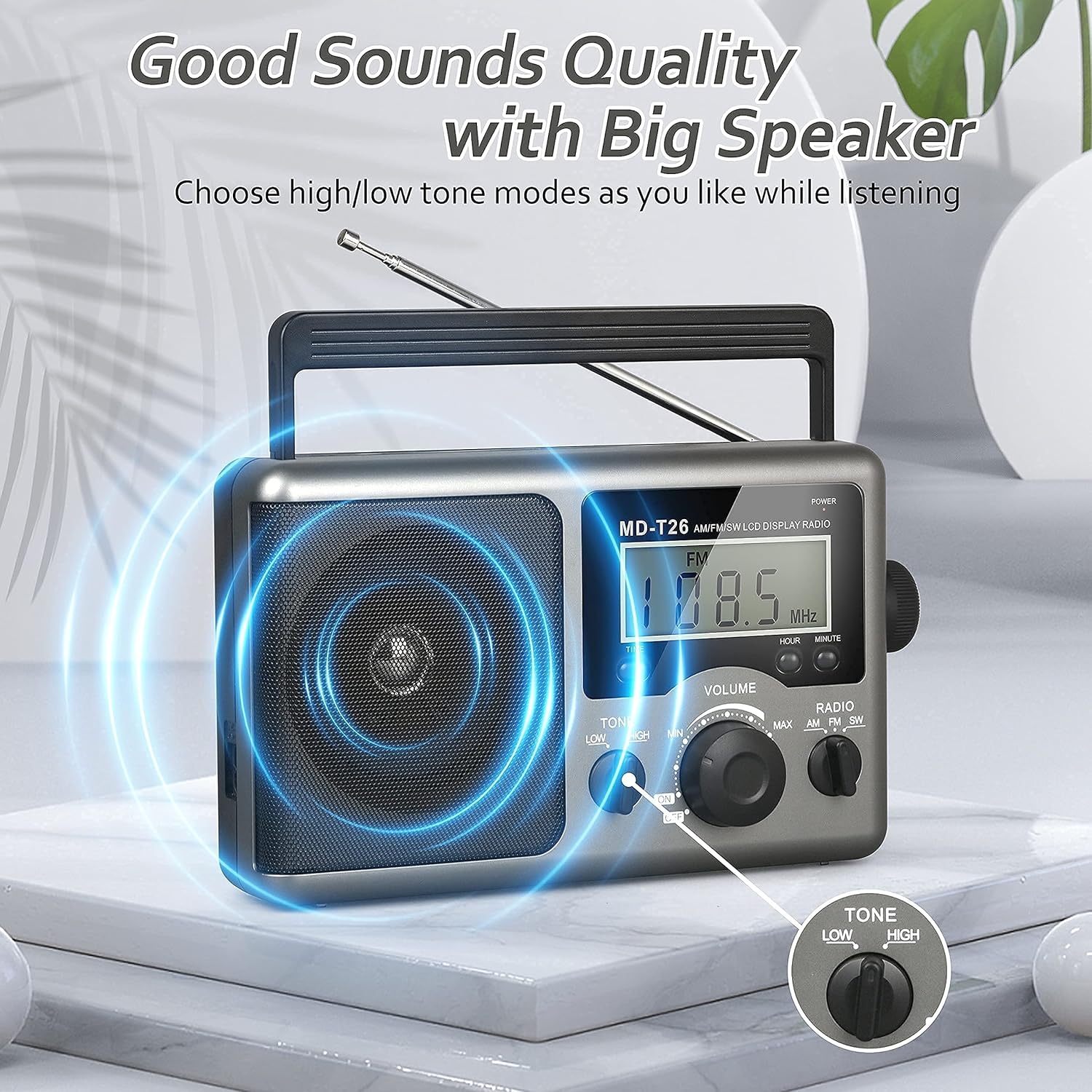
Figure 4: Speaker and Tone control detail.
4.5 ການ ກຳ ນົດເວລາ
The LCD display can also show the current time. To set the time:
- ກົດ TIME button once to enter time setting mode.
- ໃຊ້ ຊົ່ວໂມງ ປຸ່ມເພື່ອປັບຊົ່ວໂມງ.
- ໃຊ້ ນາທີ ປຸ່ມເພື່ອປັບນາທີ.
- The time system is 24-hour format.
4.6 ການໃຊ້ຊ່ອງສຽບຫູຟັງ
For private listening, plug any standard 3.5mm stereo earphones (not included) into the ແຈັກກີ້ EARPHONE located on the side of the radio. The internal speaker will automatically mute when earphones are connected.
5. ບໍາລຸງຮັກສາ
- ທໍາຄວາມສະອາດ: Wipe the radio's exterior with a soft, dry cloth. Do not use abrasive cleaners or solvents.
- ການດູແລຫມໍ້ໄຟ: If the radio will not be used for an extended period, remove the D cell batteries to prevent leakage and damage.
- ການເກັບຮັກສາ: ເກັບຮັກສາວິທະຍຸໃນບ່ອນທີ່ເຢັນ, ແຫ້ງ, ຫ່າງຈາກແສງແດດໂດຍກົງແລະອຸນຫະພູມທີ່ສຸດ.
- ຄວາມຕ້ານທານນ້ໍາ: ວິທະຍຸນີ້ແມ່ນ ບໍ່ທົນທານຕໍ່ນ້ໍາ. Avoid exposure to rain, moisture, or splashing water.
6. ການແກ້ໄຂບັນຫາ
| ບັນຫາ | ສາເຫດທີ່ເປັນໄປໄດ້ | ການແກ້ໄຂ |
|---|---|---|
| ບໍ່ມີພະລັງງານ | AC cable not connected, batteries depleted or incorrectly inserted. | Check AC cable connection. Replace batteries or ensure correct polarity. |
| ການຕ້ອນຮັບທີ່ບໍ່ດີ / Static | Antenna not extended/adjusted, weak signal area, interference. | Extend and adjust telescopic antenna (FM/SW). Rotate radio for AM. Move to an area with better signal. Avoid sources of electronic interference. |
| ບໍ່ມີສຽງຈາກລຳໂພງ | Volume too low, earphones connected. | Increase volume. Disconnect earphones if not intended for private listening. |
| ຈໍ LCD ບໍ່ເຮັດວຽກ | ບັນຫາພະລັງງານ, ຄວາມຜິດປົກກະຕິພາຍໃນ. | Check power supply. If problem persists, contact customer support. |
7. ຂໍ້ມູນຈໍາເພາະ
| ຄຸນສົມບັດ | ລາຍລະອຽດ |
|---|---|
| ຍີ່ຫໍ້ | ເກຣດີໂອ |
| ໝາຍເລກຕົວແບບ | MD-T26 |
| ເຕັກໂນໂລຊີການເຊື່ອມຕໍ່ | Auxiliary (for earphone) |
| ເທກໂນໂລຍີ Tuner | AM, FM, SW |
| ແຫຼ່ງພະລັງງານ | AC Power, 4 x D Cell Batteries |
| ອຸປະກອນທີ່ເຂົ້າກັນໄດ້ | ຫູຟັງ |
| ປະເພດການສະແດງ | ຈໍ LCD |
| ການໂຕ້ຕອບຮາດແວ | ສຽງ Jack 3.5 ມມ |
| ລະດັບຄວາມຕ້ານທານນ້ໍາ | ບໍ່ທົນທານຕໍ່ນ້ໍາ |
8. ການຮັບປະກັນແລະການສະຫນັບສະຫນູນ
8.1 ຂໍ້ມູນການຮັບປະກັນ
Greadio provides a ຮັບປະກັນ 12 ເດືອນ ສໍາລັບຜະລິດຕະພັນນີ້, ກວມເອົາຂໍ້ບົກພ່ອງການຜະລິດຈາກວັນທີຊື້. ນອກຈາກນັ້ນ, ກ ຮັບປະກັນການຄືນເງິນ 30 ວັນ ແມ່ນຖືກສະເໜີ.
ການຮັບປະກັນນີ້ບໍ່ໄດ້ກວມເອົາຄວາມເສຍຫາຍທີ່ເກີດຈາກການນໍາໃຊ້ທີ່ບໍ່ຖືກຕ້ອງ, ອຸປະຕິເຫດ, ການປ່ຽນແປງທີ່ບໍ່ໄດ້ຮັບອະນຸຍາດ, ຫຼືການສວມໃສ່ປົກກະຕິ.
8.2 ສະຫນັບສະຫນູນລູກຄ້າ
For any questions, technical assistance, or warranty claims, please contact Greadio customer service. We offer ບໍລິການລູກຄ້າຕະຫຼອດ 24 ຊົ່ວໂມງ ເພື່ອຊ່ວຍເຫຼືອທ່ານ.
Please refer to the product packaging or the retailer's webເວັບໄຊສໍາລັບຂໍ້ມູນຕິດຕໍ່ໃນປະຈຸບັນຫຼາຍທີ່ສຸດ.