
1. ບົດແນະນຳ
The ABB AD1NO-R-15m is an analog time switch designed for daily scheduling with a 15-minute switching interval. This modular device features one normally open (NO) channel and includes a power reserve function to maintain timekeeping during power outages. It is suitable for various electrical scheduling applications.
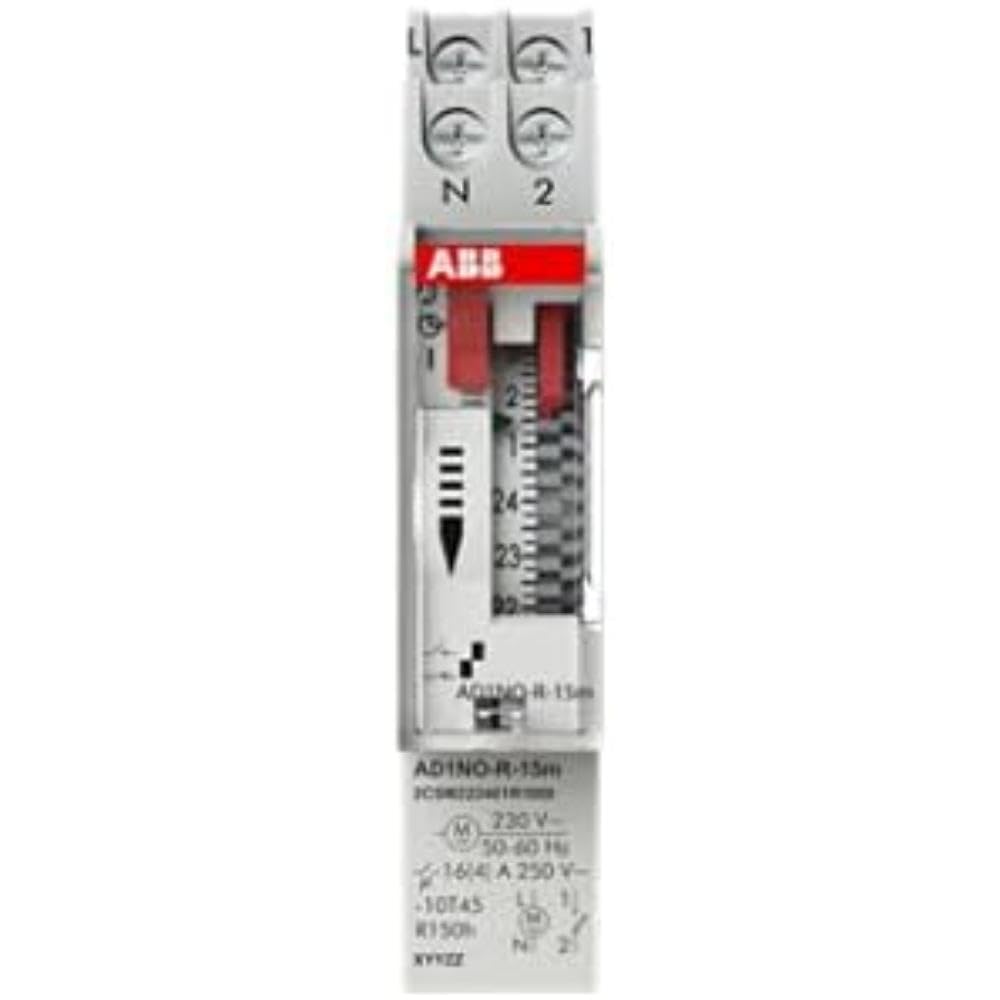
ຮູບ 1: ດ້ານຫນ້າ view of the ABB AD1NO-R-15m Modular Device Switch, highlighting its compact design and control interface.
2. ຄໍາແນະນໍາຄວາມປອດໄພທີ່ສໍາຄັນ
Please read and understand all safety instructions before installing, operating, or maintaining this device. Failure to follow these instructions may result in electric shock, fire, or serious injury.
- ການຕິດຕັ້ງແລະການບໍາລຸງຮັກສາຕ້ອງໄດ້ຮັບການປະຕິບັດໂດຍບຸກຄະລາກອນທີ່ມີຄຸນວຸດທິເທົ່ານັ້ນ.
- Disconnect power before installation, maintenance, or servicing to prevent electric shock.
- ຮັບປະກັນວ່າສາຍໄຟທັງໝົດສອດຄ່ອງກັບລະຫັດ ແລະ ລະບຽບການໄຟຟ້າຂອງທ້ອງຖິ່ນ ແລະ ລະດັບຊາດ.
- ຢ່າໃຊ້ອຸປະກອນຖ້າມັນປະກົດວ່າເສຍຫາຍ.
- ອຸປະກອນນີ້ຖືກອອກແບບມາສຳລັບໃຊ້ພາຍໃນອາຄານໃນສະພາບແວດລ້ອມແຫ້ງ.
3. ຜະລິດຕະພັນເກີນview
The AD1NO-R-15m is an analog time switch with the following key features:
- ໜ້າປັດອະນາລັອກ: For setting daily schedules.
- 15-Minute Switching: Allows precise control over connected circuits with 15-minute intervals.
- 1 Normally Open (NO) Channel: ຄວບຄຸມວົງຈອນໄຟຟ້າໜຶ່ງວົງຈອນ.
- ສະຫງວນພະລັງງານ: Maintains timekeeping for a specified duration during power interruptions.
- ການອອກແບບ Modular: Suitable for integration into standard electrical panels on a DIN rail.
Note: The power reserve ensures the timer continues to function accurately even if the main power supply is temporarily lost.
4. ການຕິດຕັ້ງແລະການຕິດຕັ້ງ
Follow these steps for proper installation of the AD1NO-R-15m Modular Device Switch:
- ການຕັດການເຊື່ອມຕໍ່ໄຟຟ້າ: Before beginning, ensure the main power supply to the installation area is completely disconnected at the circuit breaker or fuse box. Verify with a voltage ເຄື່ອງທົດສອບ.
- ການຕິດຕັ້ງ: Mount the AD1NO-R-15m switch onto a standard DIN rail within an appropriate electrical enclosure. Ensure it is securely fastened.
- ສາຍໄຟ:
- Connect the incoming phase (L) and neutral (N) wires to the designated input terminals of the time switch.
- Connect the load wire from the output terminal of the time switch to the device you wish to control.
- Ensure all connections are tight and secure. Refer to the wiring diagram printed on the device for specific terminal identification.
- ການຟື້ນຟູພະລັງງານ: Once all connections are verified and secure, close the electrical enclosure and restore power to the circuit.
Always consult a qualified electrician for installation if you are unsure or lack experience with electrical wiring.
5. ຄໍາແນະນໍາການດໍາເນີນງານ
To set the time and program the switching schedule:
- ຕັ້ງເວລາປະຈຸບັນ: Rotate the analog dial clockwise until the current time aligns precisely with the reference arrow or marker on the device's face.
- Program Switching Times: The dial features small segments around its perimeter. Push in the segments corresponding to the times you want the connected circuit to be ON. Pull out segments for OFF periods. Each segment typically represents a 15-minute interval.
- Operating Mode (if applicable): If your model includes a manual override switch (e.g., ON, AUTO, OFF), ensure it is set to "AUTO" for programmed operation.
The internal power reserve will automatically charge when the device is powered, ensuring continued accurate timekeeping during short power outages.
6. ບໍາລຸງຮັກສາ
The AD1NO-R-15m is designed for minimal maintenance. Follow these guidelines to ensure optimal performance:
- ທໍາຄວາມສະອາດ: Keep the device clean and free from dust. Use a dry, soft cloth for cleaning. Do not use liquid cleaners, abrasive materials, or solvents.
- ການກວດກາ: Periodically inspect the wiring connections for tightness and any signs of wear, corrosion, or damage. Ensure all terminals are secure.
- ເງື່ອນໄຂສິ່ງແວດລ້ອມ: ໃຫ້ແນ່ໃຈວ່າສະພາບແວດລ້ອມການດໍາເນີນງານຍັງຄົງຢູ່ພາຍໃນອຸນຫະພູມແລະຄວາມຊຸ່ມຊື່ນທີ່ກໍານົດໄວ້ເພື່ອປ້ອງກັນຄວາມເສຍຫາຍ.
There are no user-serviceable parts inside this device. Do not attempt to open the casing, ເພາະວ່າສິ່ງນີ້ຈະເຮັດໃຫ້ການຮັບປະກັນເປັນໂມຄະ ແລະ ອາດຈະເຮັດໃຫ້ທ່ານມີຄວາມສ່ຽງຕໍ່ອັນຕະລາຍທາງໄຟຟ້າ.
7. ການແກ້ໄຂບັນຫາ
If you encounter issues with your AD1NO-R-15m switch, refer to the table below for common problems and solutions:
| ບັນຫາ | ສາເຫດທີ່ເປັນໄປໄດ້ | ການແກ້ໄຂ |
|---|---|---|
| ອຸປະກອນບໍ່ສະຫຼັບ | ບໍ່ມີການສະຫນອງພະລັງງານ | Check the circuit breaker or fuse. Ensure wiring connections are correct and secure. |
| ອຸປະກອນບໍ່ສະຫຼັບ | ການຂຽນໂປຼແກຼມທີ່ບໍ່ຖືກຕ້ອງ | Re-check the dial settings and ensure the correct segments are pushed in or pulled out for desired ON/OFF times. |
| ອຸປະກອນບໍ່ສະຫຼັບ | ກຳລັງໃຊ້ການລົບລ້າງດ້ວຍຕົນເອງແລ້ວ | Set the operating mode switch to "AUTO" for programmed operation. |
| ເວລາບໍ່ຖືກຕ້ອງຫຼັງຈາກພະລັງງານ outage | Power reserve depleted or faulty | Allow the device to charge its power reserve by keeping it connected to power. If the issue persists, contact customer support. |
If the problem persists after attempting these solutions, please contact ABB customer support for further assistance.
8. ຂໍ້ກໍານົດດ້ານວິຊາການ
- ຕົວແບບ: AD1NO-R-15m
- ເລກສ່ວນ: 2CSM222461R1000
- ຜູ້ຜະລິດ: ເອບີບີ
- ປະເພດ: ສະຫຼັບເວລາອະນາລັອກ
- Switching Interval: 15 ນາທີ
- ຊ່ອງ: 1 ເປີດປົກກະຕິ (ບໍ່)
- ສະຫງວນພະລັງງານ: ແມ່ນແລ້ວ
- ນ້ໍາຫນັກລາຍການ: ປະມານ 2.82 ອໍ (80 ກຣາມ)
- ຂະໜາດຜະລິດຕະພັນ: ປະມານ 3.54 x 0.69 x 2.6 ນິ້ວ (90 x 17.5 x 66 ມມ)
- ປະເພດການຕິດຕັ້ງ: DIN Rail (Wall Mount)
- ອົງປະກອບລວມ: Modular device switch
- ແບັດເຕີຣີທີ່ຕ້ອງການ: No (features internal power reserve)
- ASIN: B09BP4PFMF
- ທໍາອິດທີ່ມີຢູ່: ວັນທີ 21 ທັນວາ 2024
ຫມາຍເຫດ: ຂໍ້ມູນຈໍາເພາະແມ່ນມີການປ່ຽນແປງໂດຍບໍ່ມີການແຈ້ງລ່ວງຫນ້າ.
9. ການຮັບປະກັນແລະການສະຫນັບສະຫນູນ
ຂໍ້ມູນການຮັບປະກັນ
For detailed warranty terms and conditions, please refer to the official ABB warranty statement provided with your purchase or visit the official ABB webເວັບໄຊ. ຮັກສາຫຼັກຖານການຊື້ຂອງທ່ານສໍາລັບການຮ້ອງຂໍການຮັບປະກັນ.
ການຊ່ວຍເຫຼືອລູກຄ້າ
For technical assistance, troubleshooting, or service inquiries, please contact ABB customer support through their official webເວັບໄຊ ຫຼືຂໍ້ມູນການຕິດຕໍ່ທີ່ສະໜອງໃຫ້ຢູ່ໃນການຫຸ້ມຫໍ່ຜະລິດຕະພັນຂອງທ່ານ.
ABB ຢ່າງເປັນທາງການ Webເວັບໄຊ: www.abb.com