
ສິນຄ້າເກີນview
The EWO'S XRT140 Universal Remote Control is designed as a direct replacement for various VIZIO Smart TV remotes. This product has been professionally inspected and tested to ensure it functions and appears like new. It offers seamless control over your VIZIO Smart TV, providing a reliable and user-friendly experience.

ຮູບພາບ: ດ້ານຫນ້າແລະດ້ານຂ້າງ view of the EWO'S XRT140 Universal Remote Control, showcasing ການອອກແບບ ergonomic ແລະຮູບແບບປຸ່ມຂອງມັນ.
ຄູ່ມືການຕິດຕັ້ງ
The EWO'S XRT140 remote control is designed for immediate use with compatible VIZIO Smart TVs. No pairing or programming is required.
ການຕິດຕັ້ງຫມໍ້ໄຟ
- ຊອກຫາຊ່ອງໃສ່ຫມໍ້ໄຟຢູ່ດ້ານຫຼັງຂອງການຄວບຄຸມໄລຍະໄກ.
- ເລື່ອນເປີດcoverາປົກຊ່ອງຂອງbatteryໍ້ໄຟ.
- Insert two (2) 1.5V AAA batteries, ensuring the positive (+) and negative (-) terminals align correctly with the indicators inside the compartment.
- ປິດຝາປິດຊ່ອງໃສ່ຫມໍ້ໄຟຢ່າງປອດໄພ.
Once batteries are installed, the remote is ready to operate your VIZIO Smart TV.
ການປະຕິບັດທາງໄກຂອງທ່ານ
This section details the functions of the buttons on your EWO'S XRT140 Universal Remote Control.
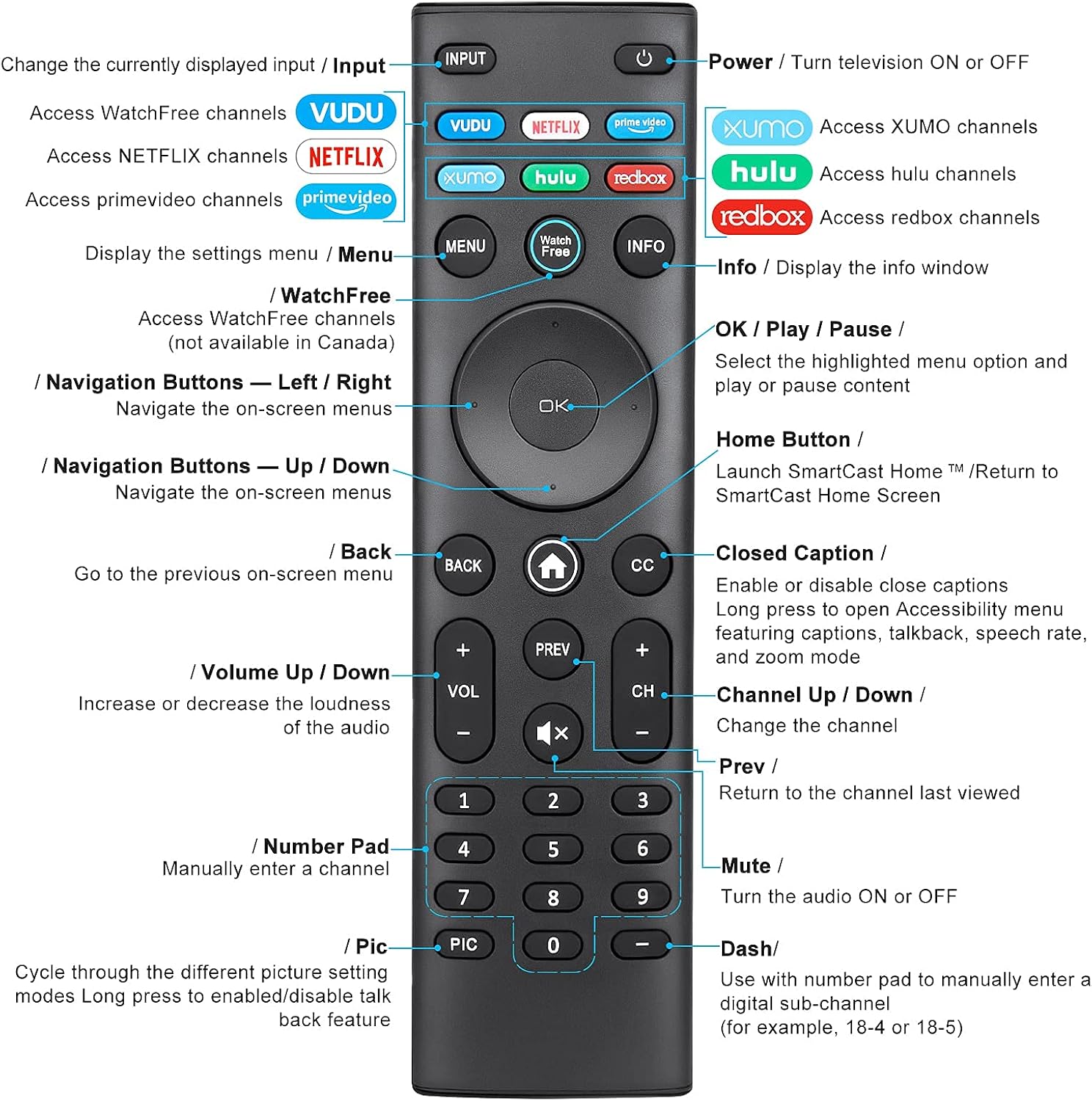
Image: Detailed diagram of the EWO'S XRT140 remote control, labeling each button with its corresponding function.
ຟັງຊັນປຸ່ມ:
- ການປ້ອນຂໍ້ມູນ: Change the currently displayed input source.
- POWER (⏻): Turn the television ON or OFF.
- VUDU: Access VUDU channels.
- NETFLIX: Access Netflix channels.
- prime video: Access Prime Video channels.
- XUMO: Access XUMO channels.
- hulu: Access Hulu channels.
- redbox: Access Redbox channels.
- ເມນູ: Display the settings menu.
- WatchFree: Access WatchFree channels (Note: May not be available in all regions, e.g., Canada).
- ຂໍ້ມູນ: Display the info window.
- OK / Play / Pause: Select the highlighted menu option and play or pause content.
- ປຸ່ມນຳທາງ (ຂຶ້ນ/ລົງ/ຊ້າຍ/ຂວາ): ທ່ອງໄປຫາເມນູເທິງໜ້າຈໍ.
- Home Button (⌂): Launch SmartCast Home or return to the SmartCast Home Screen.
- ກັບຄືນ: Go to the previous on-screen menu.
- CC (Closed Caption): Enable or disable closed captions. Long press to open Accessibility menu featuring captions, talkback, speech rate, and zoom mode.
- VOL +/- (ເພີ່ມ/ຫຼຸດສຽງ): ເພີ່ມ ຫຼືຫຼຸດຄວາມດັງຂອງສຽງ.
- ສະແດງ: Return to the channel last viewed.
- CH +/- (ຊ່ອງຂຶ້ນ/ລົງ): ປ່ຽນຊ່ອງ.
- MUTE (🔇): Turn the audio ON or OFF.
- ໝາຍເລກ Pad (0-9): Manually enter a channel number.
- PIC: Cycle through different picture setting modes. Long press to enable/disable talk back feature.
- DASH (-): Use with the number pad to manually enter a digital sub-channel (e.g., 18-4 or 18-5).
ຄຸນນະສົມບັດທີ່ສໍາຄັນ
- ການຕອບໂຕ້ທັນທີ: This remote control boasts a quick transmission and response time of 0.2 seconds, ensuring minimal delay between your command and the TV's action.
- ປຸ່ມທີ່ທົນທານ: The buttons are rigorously tested to support over 150,000 clicks, providing long-lasting reliability.
- ໄລຍະຂະຫຍາຍ: The remote transmits a signal effectively over long distances, up to 12 meters (40 feet), allowing for flexible viewຕໍາແຫນ່ງ.
- ການອອກແບບພຣີມຽມ: Upgraded with a high-end glossy finish, the remote is made from durable ABS material, making it safe for use by children.
- ປຸ່ມລັດສະເພາະ: Features 7 convenient shortcut buttons for popular streaming services like VUDU, Netflix, Prime Video, XUMO, Hulu, and Redbox, plus a WatchFree button for quick access.
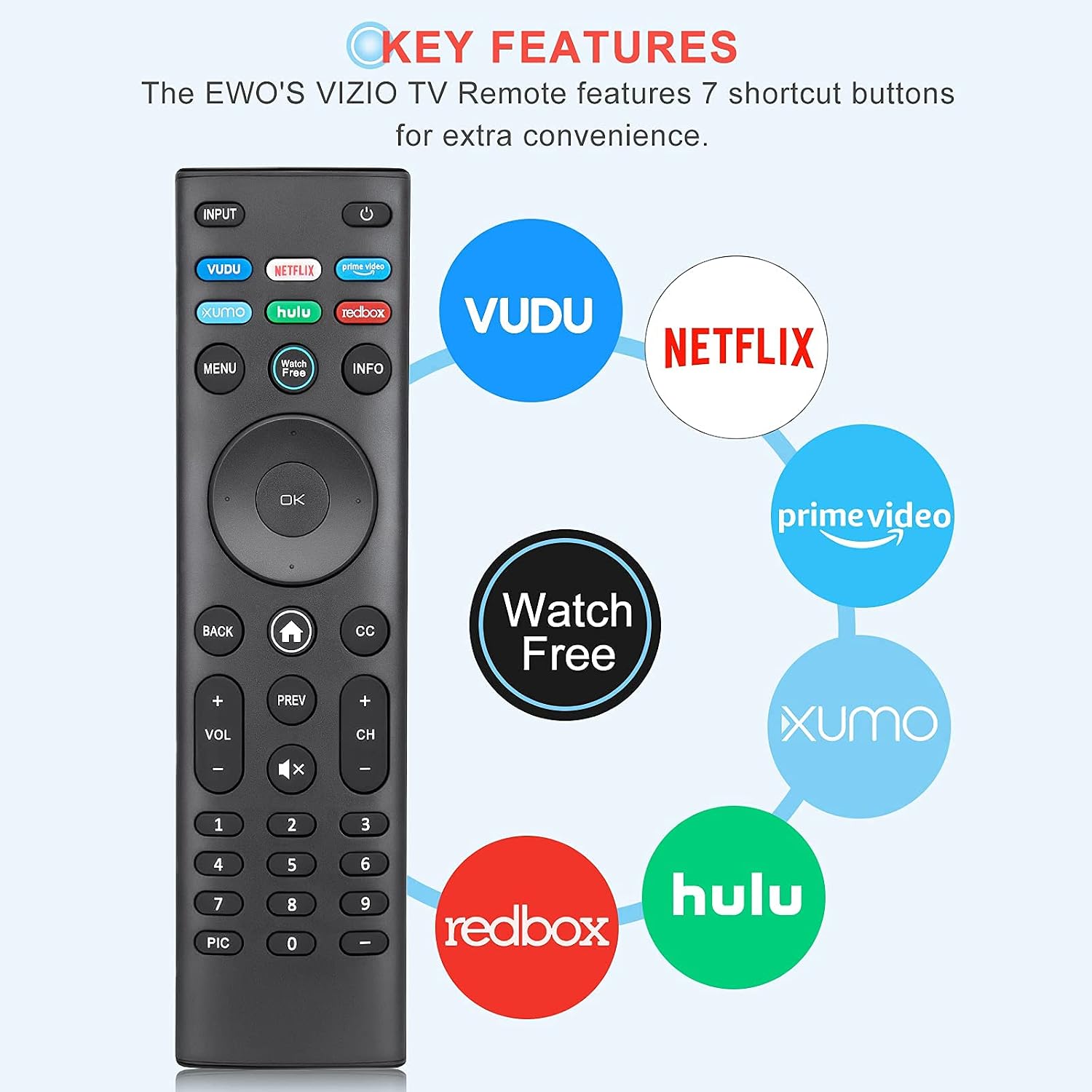
Image: The EWO'S XRT140 remote control with its 7 shortcut buttons for streaming services highlighted, emphasizing convenience.

Image: A hand holding the EWO'S XRT140 remote, with text indicating its fast response time and high click durability.

Image: An illustration demonstrating the EWO'S XRT140 remote's ability to transmit signals over 40 feet, highlighting its long-distance capability.
ຄວາມເຂົ້າກັນໄດ້
The EWO'S XRT140 Universal Remote Control is designed for broad compatibility with VIZIO Smart TVs and various VIZIO remote models.
Compatible VIZIO TV Series:
- All VIZIO LED LCD HD UHD HDR Smartcast 4K 3D Smart TVs
- Including D-Series, E-Series, M-Series, P-Series, PX-Series, V-Series, and OLED-Series.

Image: The EWO'S XRT140 remote alongside various VIZIO SmartCast TV models, illustrating its broad compatibility.
Compatible VIZIO Remote Models:
The XRT140 is a universal remote control compatible with, but not limited to, the following VIZIO remote models:
- XRT112
- XRT122
- XRT302
- XRT135
- XRT510
- XRT500
- XRT100
- XRT136
- VR1
- VR2
- VR10
- VR15

Image: The EWO'S XRT140 remote displayed next to several other VIZIO remote models, indicating its universal compatibility.
ບໍາລຸງຮັກສາ
ການດູແລ ແລະ ການບຳລຸງຮັກສາທີ່ເໝາະສົມຈະຊ່ວຍຍືດອາຍຸການໃຊ້ງານຂອງຣີໂໝດຄວບຄຸມຂອງທ່ານໄດ້.
ທໍາຄວາມສະອາດ:
- ເຊັດການຄວບຄຸມໄລຍະໄກດ້ວຍຜ້າອ່ອນ, ແຫ້ງ.
- ສໍາລັບຝຸ່ນ stubborn, ເລັກນ້ອຍ dampໃສ່ຜ້າດ້ວຍນ້ໍາຫຼືຢາເຮັດຄວາມສະອາດອ່ອນໆ, ບໍ່ມີສານຂັດ. ຢ່າສີດນໍ້າສະອາດໃສ່ຣີໂມດໂດຍກົງ.
- ຫຼີກລ່ຽງການໃຊ້ສານເຄມີທີ່ຮຸນແຮງ, ຕົວລະລາຍ ຫຼື ຜ້າເຊັດທຳຄວາມສະອາດທີ່ມີສານຂັດ, ເພາະວ່າສິ່ງເຫຼົ່ານີ້ສາມາດທຳລາຍພື້ນຜິວ ຫຼື ອົງປະກອບພາຍໃນຂອງຣີໂໝດໄດ້.
ການດູແລຫມໍ້ໄຟ:
- ໃຫ້ປ່ຽນແບັດເຕີຣີເມື່ອປະສິດທິພາບຂອງຣີໂໝດຫຼຸດລົງ ຫຼື ມັນຢຸດຕອບສະໜອງ.
- ໃຫ້ປ່ຽນແບັດເຕີຣີທັງສອງໜ່ວຍໃນເວລາດຽວກັນດ້ວຍແບັດເຕີຣີໃໝ່ທີ່ມີປະເພດດຽວກັນ (AAA).
- If the remote will not be used for an extended period (e.g., several weeks or months), remove the batteries to prevent leakage and potential damage to the remote.
ການແກ້ໄຂບັນຫາ
If you encounter issues with your remote control, refer to the following common troubleshooting steps:
| ບັນຫາ | ສາເຫດທີ່ເປັນໄປໄດ້ | ການແກ້ໄຂ |
|---|---|---|
| ຣີໂດບໍ່ຕອບສະ ໜອງ | ຫມໍ້ໄຟທີ່ຕາຍແລ້ວ ຫຼືໃສ່ບໍ່ຖືກຕ້ອງ | ປ່ຽນແບັດເຕີຣີດ້ວຍແບັດເຕີຣີ AAA 1.5V ໃໝ່, ຮັບປະກັນວ່າຂົ້ວຖືກຕ້ອງ. |
| ໄລຍະໄກເຮັດວຽກເປັນໄລຍະໆ | Low battery power; Obstruction between remote and TV; Remote sensor on TV is blocked. | Replace batteries. Ensure a clear line of sight between the remote and the TV's IR sensor. Remove any objects blocking the TV's sensor. |
| ປຸ່ມສະເພາະບໍ່ເຮັດວຽກ | Dirt or debris under the button; Button malfunction. | Clean the remote surface around the button. If the issue persists, the button may be faulty. |
| Remote range is reduced | Low battery power; Interference from other electronic devices. | Replace batteries. Move other electronic devices away from the TV or remote. |
ຂໍ້ມູນຈໍາເພາະຂອງຜະລິດຕະພັນ
| ຂໍ້ມູນຈໍາເພາະ | ລາຍລະອຽດ |
|---|---|
| ຍີ່ຫໍ້ | EWO'S |
| ຕົວແບບ | XRT140 |
| ອຸປະກອນທີ່ເຂົ້າກັນໄດ້ | Television (VIZIO Smart TVs) |
| ຂອບເຂດສູງສຸດ | 40 ຟຸດ (ປະມານ 12 ແມັດ) |
| ປະເພດຫມໍ້ໄຟ | 2 x AAA (ບໍ່ລວມ) |
| ນ້ໍາຫນັກລາຍການ | 2.39 ອອນ |
| ຂະໜາດແພັກເກັດ | 8.19 x 3.66 x 0.83 ນິ້ວ |
| ASIN | B098YWCB68 |
| UPC | 656942198109 |
| ວັນທີທໍາອິດທີ່ມີ | ວັນທີ 8 ກໍລະກົດ 2021 |
ການຮັບປະກັນແລະການສະຫນັບສະຫນູນ
As an Amazon Renewed product, the EWO'S XRT140 Universal Remote Control is backed by the Amazon Renewed Guarantee. This ensures that the product has been professionally inspected and tested to work and look like new.
If you are not satisfied with your purchase, renewed products are eligible for replacement or refund under the Amazon Renewed Guarantee. Please refer to the Amazon Renewed program terms and conditions for specific details regarding returns, replacements, and refunds.
For further assistance or inquiries, please contact Amazon customer support or refer to the Amazon Renewed Store for more information.
Amazon Renewed Store Link: ໄປຢ້ຽມຢາມ Amazon Renewed Store