
ແນະນຳ
The Poly DA75 is a versatile USB-A/USB-C digital adapter designed to connect Poly Quick Disconnect (QD) headsets to computers. It ensures clear audio quality for call center environments, supporting both USB-A and USB-C connections for compatibility with various systems. This adapter is engineered to work seamlessly with platforms such as Avaya, Genesys, and Cisco, providing a reliable audio solution for professionals.
ຄຸນນະສົມບັດທີ່ສໍາຄັນປະກອບມີ:
- ການເຊື່ອມຕໍ່ທົ່ວໄປ: Equipped with both USB-A and USB-C connectors on the cable for broad compatibility with new and legacy equipment.
- Intelligent Headset Recognition: Automatically adjusts audio performance to the specific Poly Quick Disconnect headset for optimized call quality.
- ການປ້ອງກັນສຽງ: Incorporates features to manage safe volume levels, protecting user hearing.
- ການເຊື່ອມໂຍງແພລດຟອມ: Fully compatible with leading call center platforms including Avaya, Genesys, and Cisco.
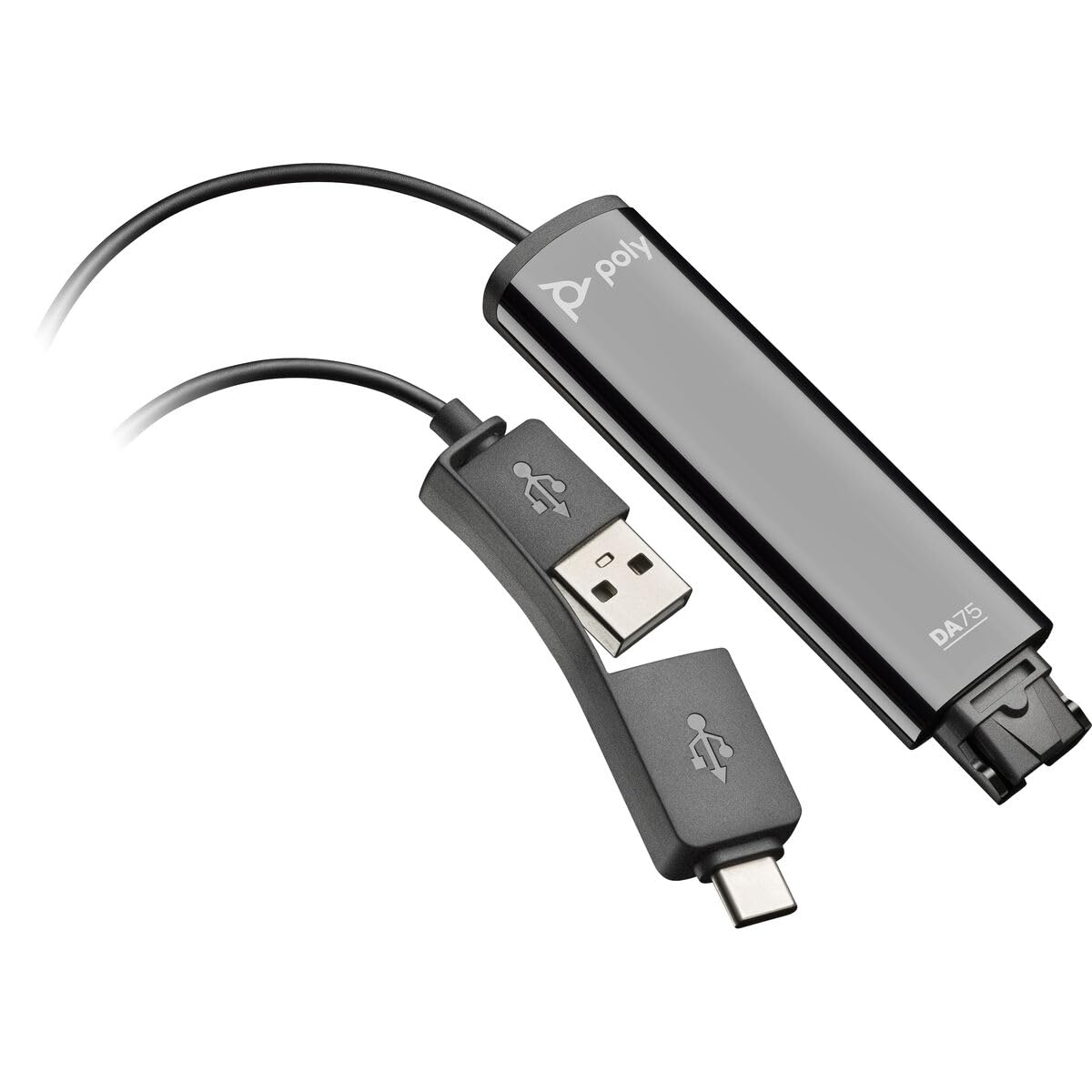
Image: The Poly DA75 USB-A/USB-C Digital Adapter, showing its dual USB-A and USB-C connectors and the Quick Disconnect port for headsets.
ແມ່ນຫຍັງຢູ່ໃນກ່ອງ
The Poly DA75 package typically includes the following items:
- Poly DA75 USB-A/USB-C Digital Adapter
- ເອກະສານ (ຄູ່ມືເລີ່ມຕົ້ນດ່ວນ, ຂໍ້ມູນຄວາມປອດໄພ)
Note: Headsets are sold separately and are not included with the DA75 adapter.
ຕັ້ງຄ່າ
Follow these steps to set up your Poly DA75 Digital Adapter:
- ເຊື່ອມຕໍ່ຫູຟັງ: Connect your Poly Quick Disconnect (QD) headset to the QD port on the Poly DA75 adapter. Ensure the connection is secure.
- ເຊື່ອມຕໍ່ກັບຄອມພິວເຕີ:
- If your computer has a USB-A port, use the USB-A connector on the DA75 cable.
- If your computer has a USB-C port, use the USB-C connector on the DA75 cable.
Plug the appropriate USB connector into an available USB port on your computer.
- ການຕິດຕັ້ງໄດເວີ: The DA75 is a plug-and-play device. Your operating system (Windows, macOS) should automatically detect the device and install the necessary drivers. This process may take a few moments.
- ຢືນຢັນການຮັບຮູ້ອຸປະກອນ:
- Windows: ໄປທີ່ Settings > System > Sound or ແຜງຄວບຄຸມ > ສຽງ. The Poly DA75 should appear as an audio input and output device.
- macOS: ໄປທີ່ System Settings > Sound. The Poly DA75 should appear as an input and output device.
Select the Poly DA75 as your default communication device for both playback and recording.
- ການຕັ້ງຄ່າຊອບແວຣ: If you are using communication software (e.g., Avaya, Genesys, Cisco, Microsoft Teams, Zoom), ensure that the Poly DA75 is selected as the audio device within the application's settings.
ຄໍາແນະນໍາການດໍາເນີນງານ
The Poly DA75 adapter facilitates audio communication through your connected Poly QD headset. Its operation is primarily managed through your computer's operating system and communication software.
- ໂທອອກ/ຮັບສາຍ: Use your communication software to initiate or answer calls. The audio will be routed through your connected Poly QD headset via the DA75 adapter.
- ການຄວບຄຸມລະດັບສຽງ: Adjust the listening volume using your computer's system volume controls or the volume controls within your communication application.
- ປິດສຽງໄມໂຄຣໂຟນ: Mute and unmute your microphone using the controls provided by your communication software.
- Audio Optimization: The DA75 automatically optimizes audio for your specific Poly QD headset. No manual adjustments are typically required for audio profiles.
ບໍາລຸງຮັກສາ
To ensure the longevity and optimal performance of your Poly DA75 Digital Adapter, follow these maintenance guidelines:
- ທໍາຄວາມສະອາດ: Gently wipe the adapter with a soft, dry, anti-static cloth. Do not use liquid cleaners or abrasive materials.
- ການເກັບຮັກສາ: ເກັບຮັກສາອະແດບເຕີໄວ້ໃນບ່ອນທີ່ເຢັນ, ແຫ້ງ, ຫ່າງຈາກແສງແດດໂດຍກົງແລະອຸນຫະພູມທີ່ຮຸນແຮງ.
- ການຈັດການ: Avoid bending or twisting the cable excessively, especially near the connectors, to prevent internal damage.
- ການເຊື່ອມຕໍ່: Ensure the Quick Disconnect (QD) connection and USB connections are clean and free of debris before connecting.
ການແກ້ໄຂບັນຫາ
If you encounter issues with your Poly DA75 Digital Adapter, refer to the following troubleshooting steps:
| ບັນຫາ | ສາເຫດທີ່ເປັນໄປໄດ້ | ການແກ້ໄຂ |
|---|---|---|
| ບໍ່ມີສຽງຈາກຊຸດຫູຟັງ |
|
|
| ໄມໂຄຣໂຟນບໍ່ເຮັດວຽກ |
|
|
| Adapter not recognized by computer |
|
|
ຂໍ້ມູນຈໍາເພາະ
| ຄຸນສົມບັດ | ລາຍລະອຽດ |
|---|---|
| ໝາຍເລກຕົວແບບ | 218266-01 |
| ຍີ່ຫໍ້ | ໂພລີ |
| ປະເພດຕົວເຊື່ອມຕໍ່ | USB-A, USB-C (dual connector) |
| ອຸປະກອນທີ່ເຂົ້າກັນໄດ້ | Poly Quick Disconnect (QD) Headsets |
| ການນໍາໃຊ້ສະເພາະ | PC, Call Center Platforms (Avaya, Genesys, Cisco) |
| ສີ | ດຳ |
| ຂະໜາດລາຍການ (L x W x H) | 0.98 x 0.39 x 2.95 ນິ້ວ |
| ນ້ໍາຫນັກລາຍການ | 30 ກຣາມ |
| ຈໍານວນພອດ | 2 (USB-A/USB-C to QD) |
| UPC | 197029650054, 017229175112 |
ການຮັບປະກັນແລະການສະຫນັບສະຫນູນ
ຂໍ້ມູນການຮັບປະກັນ: The Poly DA75 Digital Adapter comes with a ການຮັບປະກັນຂອງຜູ້ຜະລິດ 2 ປີຈໍາກັດ. ການຮັບປະກັນນີ້ກວມເອົາຂໍ້ບົກພ່ອງຂອງວັດສະດຸແລະການເຮັດວຽກພາຍໃຕ້ການນໍາໃຊ້ປົກກະຕິ. ກະລຸນາຮັກສາຫຼັກຖານການຊື້ຂອງທ່ານສໍາລັບການຮຽກຮ້ອງການຮັບປະກັນ.
ສະຫນັບສະຫນູນດ້ານວິຊາການ: For technical assistance, product inquiries, or warranty service, please contact Poly customer support. Visit the official Poly website for the most up-to-date support contact information, FAQs, and additional resources.
ຊັບພະຍາກອນອອນໄລນ໌: ສະຫນັບສະຫນູນ Poly Webເວັບໄຊ