
1. ບົດແນະນຳ
Thank you for choosing the AUKEY Sprint Wireless Power Bank PB-Y32. This device is designed to provide portable power for your mobile devices, featuring both wired and wireless fast charging capabilities. Please read this manual carefully before use to ensure optimal performance and safety.
2. ຄຸນລັກສະນະຂອງຜະລິດຕະພັນ
- ຄວາມຈຸ 10000 mAh: High-capacity battery to charge your devices multiple times.
- ຮອງຮັບການສາກໄວ: Supports Quick Charge 3.0 and Power Delivery for rapid charging of compatible devices.
- ການສາກໄຟໄຮ້ສາຍ: Conveniently charge Qi-compatible devices at up to 10W.
- ຜອດຜົນຜະລິດຫຼາຍອັນ: Equipped with USB-C and USB-A ports for versatile charging.
- ການອອກແບບກະທັດລັດແລະ Portable: Easy to carry for on-the-go power.
- ຄຸນນະສົມບັດຄວາມປອດໄພ: Built-in protections against overcharge, over-discharge, overcurrent, and short circuits.
3. ເນື້ອໃນຊຸດ
- AUKEY Sprint Wireless Power Bank PB-Y32
- ສາຍ USB-A ຫາ C
- ຄູ່ມືຜູ້ໃຊ້
4. ການຕິດຕັ້ງແລະການນໍາໃຊ້ເບື້ອງຕົ້ນ
4.1 ການສາກໄຟ Power Bank
Before first use, fully charge the power bank. It takes approximately 7 hours to fully charge the power bank using a compatible USB-C power adapter.
- Connect the included USB-A to C cable to the power bank's USB-C input port.
- ເຊື່ອມຕໍ່ອີກສົ້ນຂອງສາຍກັບສາຍສາກ USB ໃສ່ຝາ (ບໍ່ລວມ).
- The LED indicators will light up to show the charging status. All four LEDs will be solid when fully charged.
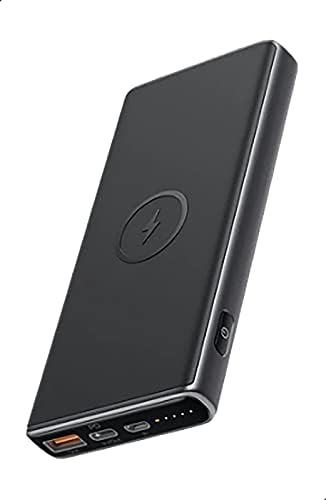
Image: The AUKEY Sprint Wireless Power Bank PB-Y32, showcasinການອອກແບບສີດຳທີ່ທັນສະໄໝ ແລະ ຮູບແບບທ່າເຮືອ.
5. ຄໍາແນະນໍາການດໍາເນີນງານ
5.1 ການສາກໄຟດ້ວຍສາຍ
To charge your device using a cable:
- Connect your device's charging cable to either the USB-A output port or the USB-C output port on the power bank.
- ເຊື່ອມຕໍ່ສົ້ນສາຍໄຟອື່ນໆໃນອຸປະກອນຂອງທ່ານ.
- ທະນາຄານພະລັງງານຈະເລີ່ມສາກໄຟອຸປະກອນຂອງທ່ານໂດຍອັດຕະໂນມັດ.
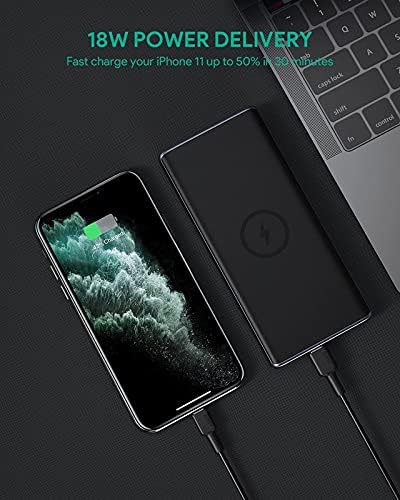
Image: The power bank connected via cable to a smartphone, demonstrating 18W Power Delivery fast charging.

Image: A smartphone connected to the power bank, illustrating Qualcomm Quick Charge 3.0 capabilities for rapid charging.
5.2 ການສາກໄຟໄຮ້ສາຍ
To charge your Qi-compatible device wirelessly:
- Place your Qi-compatible device directly onto the wireless charging pad located on the top surface of the power bank. Ensure the device is centered on the charging symbol.
- The power bank will automatically detect your device and begin wireless charging.

Image: A smartphone placed on the power bank's surface, demonstrating the wireless charging feature.

ຮູບພາບ: A close-up view of the power bank showing the silicone ring designed to keep the phone stable during wireless charging.
5.3 ໂຫມດການສາກໄຟກະແສໄຟຟ້າຕໍ່າ
This mode is ideal for charging low-power devices like wireless earbuds or smartwatches.
- Press and hold the power button for 2 seconds to enter low-current charging mode. The first LED indicator will blink green.
- Connect your low-power device or place it on the wireless charging pad.
- To exit low-current charging mode, press the power button once, or it will automatically exit after 2 hours.
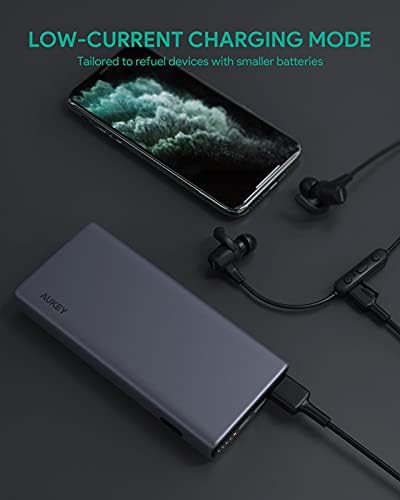
Image: The power bank connected to a smartphone and wireless earbuds, demonstrating its low-current charging mode for smaller devices.

Image: An illustration showing the power bank's broad compatibility with various devices, including smartphones, tablets, and gaming consoles.
6. ບໍາລຸງຮັກສາ
- Keep the power bank away from liquids, extreme heat, and strong magnetic fields.
- ຫ້າມເຮັດຕົກ ຫຼື ກະທົບທີ່ຮຸນແຮງໃສ່ Power Bank.
- Clean the power bank with a dry, soft cloth. Do not use corrosive cleaners.
- ເກັບຮັກສາ Power bank ໃນບ່ອນທີ່ເຢັນ, ແຫ້ງເມື່ອບໍ່ໄດ້ໃຊ້.
- ສາກໄຟແບດເຕີຣີຢ່າງນ້ອຍໜຶ່ງຄັ້ງໃນທຸກໆ 3 ເດືອນເພື່ອຮັກສາສຸຂະພາບຂອງແບັດເຕີຣີ.
7. ການແກ້ໄຂບັນຫາ
7.1 Power Bank ບໍ່ສາກໄຟ
- ກວດໃຫ້ແນ່ໃຈວ່າສາຍສາກໄດ້ເຊື່ອມຕໍ່ຢ່າງປອດໄພກັບທັງ power bank ແລະ charger wall.
- ລອງໃຊ້ສາຍ USB-C ຫຼືສາຍສາກຕິດຝາ.
- Verify the wall charger's output meets the power bank's input requirements (DC 5V-3A / 9V-2A).
7.2 ອຸປະກອນບໍ່ໄດ້ສາກຈາກ Power Bank
- ໃຫ້ແນ່ໃຈວ່າ power bank ມີສາກໄຟພຽງພໍ.
- ລອງໃຊ້ສາຍສາກໄຟແບບອື່ນສຳລັບອຸປະກອນຂອງທ່ານ.
- For wireless charging, ensure your device is Qi-compatible and properly aligned on the charging pad. Remove any thick cases that might interfere.
- If charging a low-power device, ensure low-current charging mode is activated.
7.3 Power Bank ຄວາມຮ້ອນເກີນ
- ມັນເປັນເລື່ອງປົກກະຕິທີ່ພາວເວີແບນຈະອຸ່ນຂຶ້ນເລັກນ້ອຍໃນລະຫວ່າງການສາກ ຫຼືສາກໄຟ.
- If it becomes excessively hot, disconnect all devices and the charging cable immediately. Allow it to cool down before resuming use.
- Ensure proper ventilation and avoid covering the power bank during use.
8. ຂໍ້ມູນຈໍາເພາະ
| ຄຸນສົມບັດ | ລາຍລະອຽດ |
|---|---|
| ຊື່ຕົວແບບ | ແລ່ນ |
| ໝາຍເລກຕົວແບບ | PB-Y32 |
| ຄວາມອາດສາມາດຫມໍ້ໄຟ | 10000 mAh |
| ການປ້ອນຂໍ້ມູນ USB Type-C | DC 5V-3A / 9V-2A |
| USB Type-C Output | DC 5V-3A / 9V-2A / 12V-1.5A |
| USB Type-A Output | 18W |
| ພະລັງງານອອກສູງສຸດ | 18W |
| ຜົນຜະລິດສາກໄຟໄຮ້ສາຍ | 5W, 7.5W, 10W |
| ຂະໜາດ | 144 x 67 x 17 ມມ |
| ນ້ຳໜັກ | 210 ກຣາມ |
| ອົງປະກອບຂອງຈຸລັງຫມໍ້ໄຟ | ລີໂທມໂພລີເມີ |
| ຄຸນນະສົມບັດພິເສດ | Short Circuit Protection, Wireless Charging |
| ສີ | ດຳ |
| ເວລາສາກແບັດເຕີຣີ | 7 ຊົ່ວໂມງ |
9. ການຮັບປະກັນແລະການສະຫນັບສະຫນູນ
According to the product specifications, this product comes with ບໍ່ມີການຮັບປະກັນ. For any product-related inquiries or support, please refer to the retailer or manufacturer's official webເວັບໄຊສໍາລັບຂໍ້ມູນຕິດຕໍ່.