
1. ບົດແນະນຳ
Thank you for choosing the Foneng Stereo Music Earphone White, Model T34. These earphones are designed to provide a comfortable listening experience with clear audio and convenient controls for both music playback and phone calls. This manual will guide you through the proper use and care of your new earphones.
2. ຜະລິດຕະພັນເກີນview
The Foneng T34 earphones feature a lightweight, in-ear design with comfortable ear cushions that sit securely without needing to be crammed into the ear canal. They are smaller than typical earbuds, making them suitable for users with smaller ears, including children.

ຮູບ 2.1: ດ້ານຫນ້າ view of the Foneng Stereo Music Earphone White, highlighting its sleek, in-ear design.
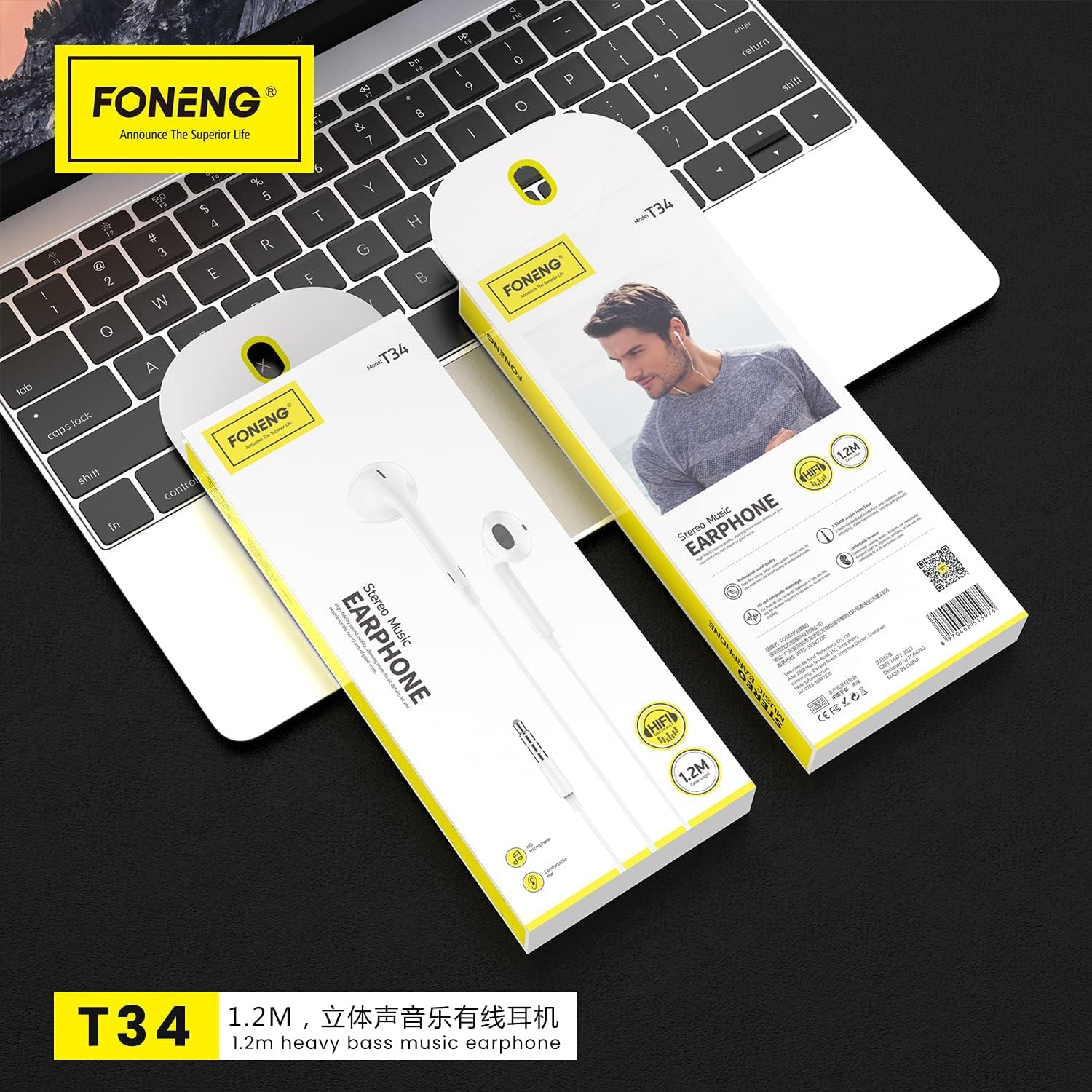
Figure 2.2: Packaging of the Foneng T34 earphones, illustrating the product and its integrated control unit.
ອົງປະກອບທີ່ສໍາຄັນ:
- Earphone Units: Left and right earpieces with comfortable ear cushions.
- ໜ່ວຍຄວບຄຸມໃນສາຍ: Integrated remote with multi-function button and volume controls.
- ໄມໂຄຣໂຟນໃນຕົວ: Located on the control unit for clear voice pickup during calls.
- Jack ສຽງ 3.5mm: Standard connector for compatible devices.
3. ຕັ້ງຄ່າ
Setting up your Foneng T34 earphones is simple and requires no complex installation.
- ແກະກ່ອງ: Carefully remove the earphones from their packaging.
- ເຊື່ອມຕໍ່: Insert the 3.5mm audio jack firmly into the headphone port of your audio device (smartphone, tablet, laptop, MP3 player, etc.).
- ໃສ່: Place the earphone units comfortably into your ears. Ensure a snug fit for optimal sound quality and noise isolation.
4. ຄໍາແນະນໍາການດໍາເນີນງານ
The Foneng T34 earphones feature an intuitive in-line control unit for managing your audio and calls.
Multi-function Button Control:
The single button on the control unit allows for various functions:
- ຫຼິ້ນ/ຢຸດດົນຕີ: Press once to play or pause the current track.
- ເພງຕໍ່ໄປ: Press twice quickly to skip to the next song.
- ຕິດຕາມກ່ອນ ໜ້າ ນີ້: Press three times quickly to go back to the previous song.
- ຮັບ/ສາຍໂທ: Press once to answer an incoming call or end an ongoing call.
- ປະຕິເສດການໂທ: Press and hold for approximately 2 seconds to reject an incoming call.
- ເປີດໃຊ້ຜູ້ຊ່ວຍສຽງ (Siri, Google Assistant, ແລະອື່ນໆ): Press and hold for approximately 3 seconds (functionality may vary by device).
ການຄວບຄຸມລະດັບສຽງ:
Use the dedicated volume buttons on the control unit to adjust the audio level:
- ປະລິມານຂຶ້ນ: ກົດປຸ່ມ '+' ເພື່ອເພີ່ມລະດັບສຽງ.
- ປະລິມານລົງ: ກົດປຸ່ມ '-' ເພື່ອຫຼຸດລະດັບສຽງ.
ການນຳໃຊ້ໄມໂຄຣໂຟນ:
The built-in microphone is positioned to pick up your voice clearly while minimizing background noise, ensuring clear conversations during phone calls. No special activation is required; it functions automatically when a call is initiated or received.
5. ການບໍາລຸງຮັກສາແລະການດູແລ
Proper care will extend the lifespan and maintain the performance of your Foneng T34 earphones.
- ທໍາຄວາມສະອາດ: Gently wipe the earphone units and cable with a soft, dry cloth. Do not use harsh chemicals or abrasive materials. For ear cushions, a slightly damp ສາມາດໃຊ້ຜ້າໄດ້, ຮັບປະກັນວ່າພວກມັນແຫ້ງໝົດກ່ອນການນຳໃຊ້.
- ການເກັບຮັກສາ: When not in use, store the earphones in a clean, dry place, preferably in a small pouch or case to prevent tangling and damage to the cable.
- ຫຼີກເວັ້ນຄວາມຊຸ່ມ: Do not expose the earphones to water, rain, or excessive humidity. They are not waterproof.
- ຈັດການດ້ວຍຄວາມລະມັດລະວັງ: Avoid pulling the cable forcefully when disconnecting from a device. Always grasp the 3.5mm jack. Do not bend or twist the cable excessively.
- ອຸນຫະພູມ: Avoid exposing the earphones to extreme temperatures (very hot or very cold), as this can affect the materials and internal components.
6. ການແກ້ໄຂບັນຫາ
If you encounter issues with your Foneng T34 earphones, try the following basic troubleshooting steps:
- ບໍ່ມີສຽງ:
- ໃຫ້ແນ່ໃຈວ່າແຈັກ 3.5 ມມ ຖືກສຽບເຂົ້າໄປໃນພອດສຽງຂອງອຸປະກອນຢ່າງຄົບຖ້ວນແລ້ວ.
- Check the volume level on your device and on the earphone's in-line control.
- Try the earphones with a different audio device to rule out a device-specific issue.
- ກວດໃຫ້ແນ່ໃຈວ່າແຫຼ່ງສຽງກຳລັງຫຼິ້ນຢູ່.
- ສຽງບິດເບືອນ:
- Lower the volume on your device and earphones.
- Check if the audio jack is clean and free of debris.
- ທົດສອບກັບແຫຼ່ງສຽງ ຫຼືອຸປະກອນອື່ນ.
- ໄມໂຄຣໂຟນບໍ່ເຮັດວຽກ:
- ກວດໃຫ້ແນ່ໃຈວ່າໄດ້ສຽບຫູຟັງໃສ່ອຸປະກອນແລ້ວ.
- ກວດເບິ່ງການຕັ້ງຄ່າສຽງຂອງອຸປະກອນຂອງທ່ານເພື່ອຮັບປະກັນວ່າໄມໂຄຣໂຟນພາຍນອກຖືກເລືອກ.
- Test the microphone function with a different application or device.
If these steps do not resolve the issue, please refer to the warranty and support information.
7. ຂໍ້ມູນຈໍາເພາະ
| ຄຸນສົມບັດ | ລາຍລະອຽດ |
|---|---|
| ຊື່ຍີ່ຫໍ້ | Foneng |
| ໝາຍເລກຕົວແບບ | T34 |
| ປັດໄຈແບບຟອມຫູຟັງ | ຫູ |
| ການຄວບຄຸມສິ່ງລົບກວນ | ການແຍກສຽງ |
| Jack ຫູຟັງ | Jack ຂະ ໜາດ 3.5 ມມ |
| ອົງປະກອບລວມ | ເບາະຫູ |
| ວັດສະດຸ | ພາດສະຕິກ |
| ປະເພດການຄວບຄຸມ | ການຄວບຄຸມປະລິມານ |
| ຜູ້ຜະລິດ | ຟອນ |
8. ການຮັບປະກັນແລະການສະຫນັບສະຫນູນ
For warranty information and customer support, please refer to the documentation provided with your purchase or visit the official Foneng webເວັບໄຊ. ຮັກສາຫຼັກຖານການຊື້ຂອງທ່ານສໍາລັບການຮຽກຮ້ອງການຮັບປະກັນໃດໆ.
ຂໍ້ມູນຕິດຕໍ່: Please consult your retailer or the manufacturer's official website for the most up-to-date contact details for support.