
Redzeo BH510A
Redzeo MDots Wireless Earbuds Instruction Manual
ຮູບແບບ: BH510A
ແນະນຳ
Thank you for choosing Redzeo MDots Wireless Earbuds. This manual provides detailed instructions on how to set up, operate, maintain, and troubleshoot your new earbuds. Please read this manual carefully before use to ensure optimal performance and longevity of your device.
ເນື້ອໃນຊຸດ
- Redzeo MDots Wireless Earbuds (Left and Right)
- ກໍລະນີສາກໄຟໄຮ້ສາຍ
- ສາຍສາກ USB
- ຫຼາຍຂະໜາດຂອງ Eartips (S/M/L)
- Multiple Sizes of Earwings (S/M/L)
- ຄູ່ມືຜູ້ໃຊ້
ຕັ້ງຄ່າ
1. ການສາກໄຟເບື້ອງຕົ້ນ
ກ່ອນທີ່ຈະໃຊ້ຄັ້ງທຳອິດ, ໃຫ້ສາກຊ່ອງສາກ ແລະຫູຟັງຫູຟັງໃຫ້ເຕັມ.
- ວາງຫູຟັງໃສ່ຊ່ອງສາກໄຟ. ໃຫ້ແນ່ໃຈວ່າເຂົາເຈົ້ານັ່ງຢ່າງຖືກຕ້ອງຢູ່ໃນຊ່ອງຂອງເຂົາເຈົ້າ.
- ເຊື່ອມຕໍ່ສາຍສາກ USB ກັບຜອດສາກໄຟຢູ່ບ່ອນສາກ ແລະອີກສົ້ນກັບແຫຼ່ງໄຟ USB (ເຊັ່ນ: ຄອມພິວເຕີ, ອະແດັບເຕີຝາ).
- The indicator light on the charging case will show charging status. A full charge for the case takes approximately 2.0 hours. The earbuds provide 4.0 hours of playback per charge, and the case provides up to 4 full charges, totaling 20 hours of enjoyment.

Image: The Redzeo MDots earbuds and charging case, illustrating the 20 hours total playtime with the case, 4.0 hours playback per earbud charge, and 2.0 hours to fully charge the case.
2. ການຈັບຄູ່ກັບອຸປະກອນຂອງທ່ານ
ຫູຟັງເອຍບັດຈະເຂົ້າສູ່ໂໝດຈັບຄູ່ໂດຍອັດຕະໂນມັດເມື່ອເອົາອອກຈາກກ່ອງສາກໄຟ.
- ເປີດກ່ອງສາກໄຟ ແລະ ຖອດຫູຟັງທັງສອງຂ້າງອອກ. ພວກມັນຈະເປີດໂດຍອັດຕະໂນມັດ ແລະ ພະຍາຍາມເຊື່ອມຕໍ່ກັນ.
- ໃນອຸປະກອນທີ່ເປີດໃຊ້ Bluetooth ຂອງທ່ານ (ໂທລະສັບສະຫຼາດ, ແທັບເລັດ, ແລະອື່ນໆ), ໄປທີ່ການຕັ້ງຄ່າ Bluetooth.
- ຊອກຫາ new devices and select "Redzeo MDots" from the list.
- ເມື່ອເຊື່ອມຕໍ່ແລ້ວ, ທ່ານຈະໄດ້ຍິນສຽງຢືນຢັນ, ແລະຫູຟັງເອຍບັດຈະພ້ອມໃຫ້ໃຊ້.

Image: The Redzeo MDots wireless earbuds resting inside their open charging case, ready for pairing or charging.
3. ພໍດີກັບຫູຟັງ
For optimal sound quality and comfort, choose the correct size of eartips and earwings.
- Experiment with the different sizes of eartips (S/M/L) to find the best seal for your ear canal. A good seal is crucial for bass response and noise isolation.
- Select the appropriate earwings (S/M/L) that fit snugly into your ear's concha, providing stability during movement.
- Gently insert the earbuds into your ears and twist slightly until they feel secure and comfortable.
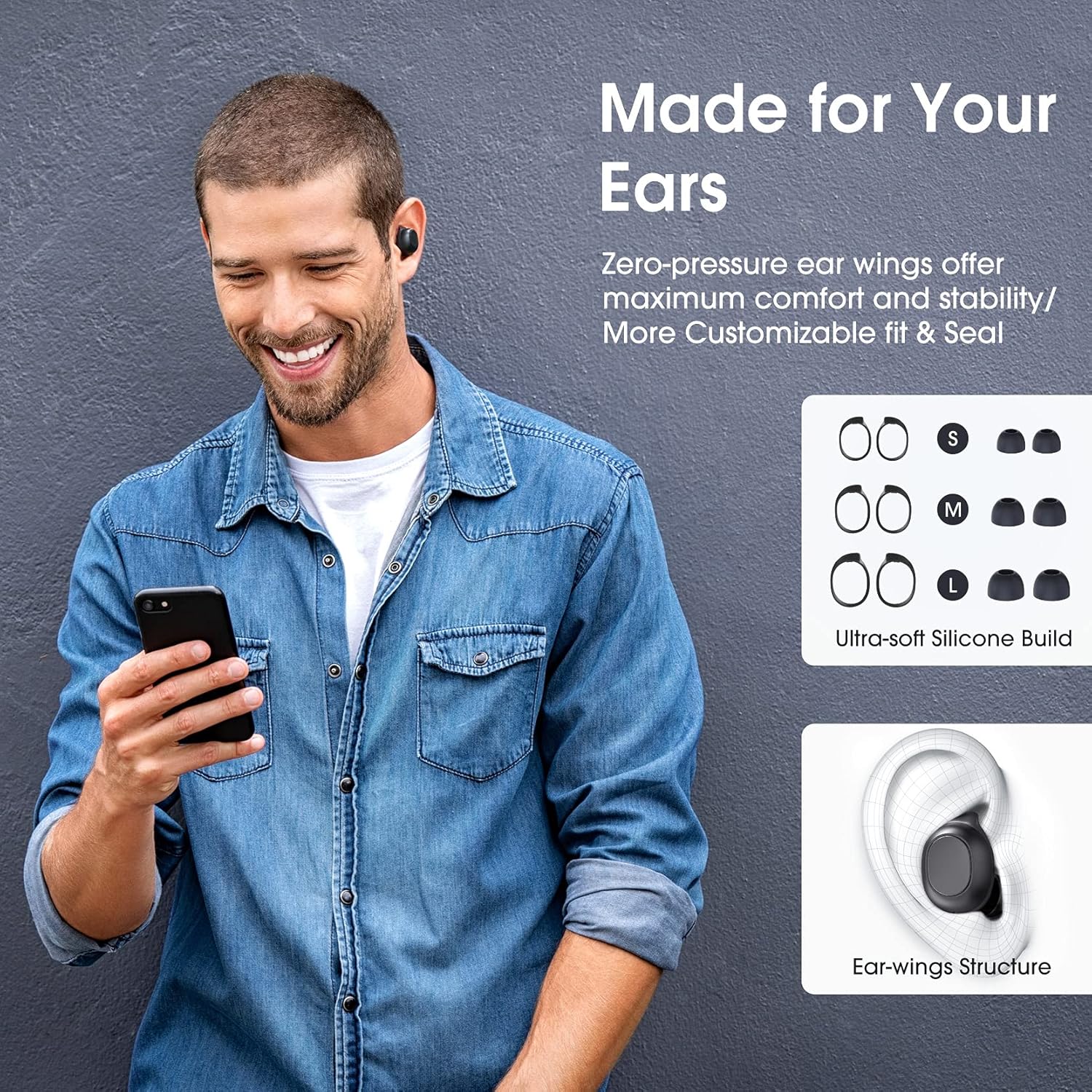
Image: A man wearing the Redzeo MDots earbuds, demonstrating their comfortable fit. The image also shows diagrams of various earwing sizes (S, M, L) and an illustration of how the earwing structure fits into the ear for maximum comfort and stability.
ຄໍາແນະນໍາການດໍາເນີນງານ
ການຄວບຄຸມປຸ່ມ
The Redzeo MDots earbuds feature two easy-to-press buttons on each earbud for comprehensive control.
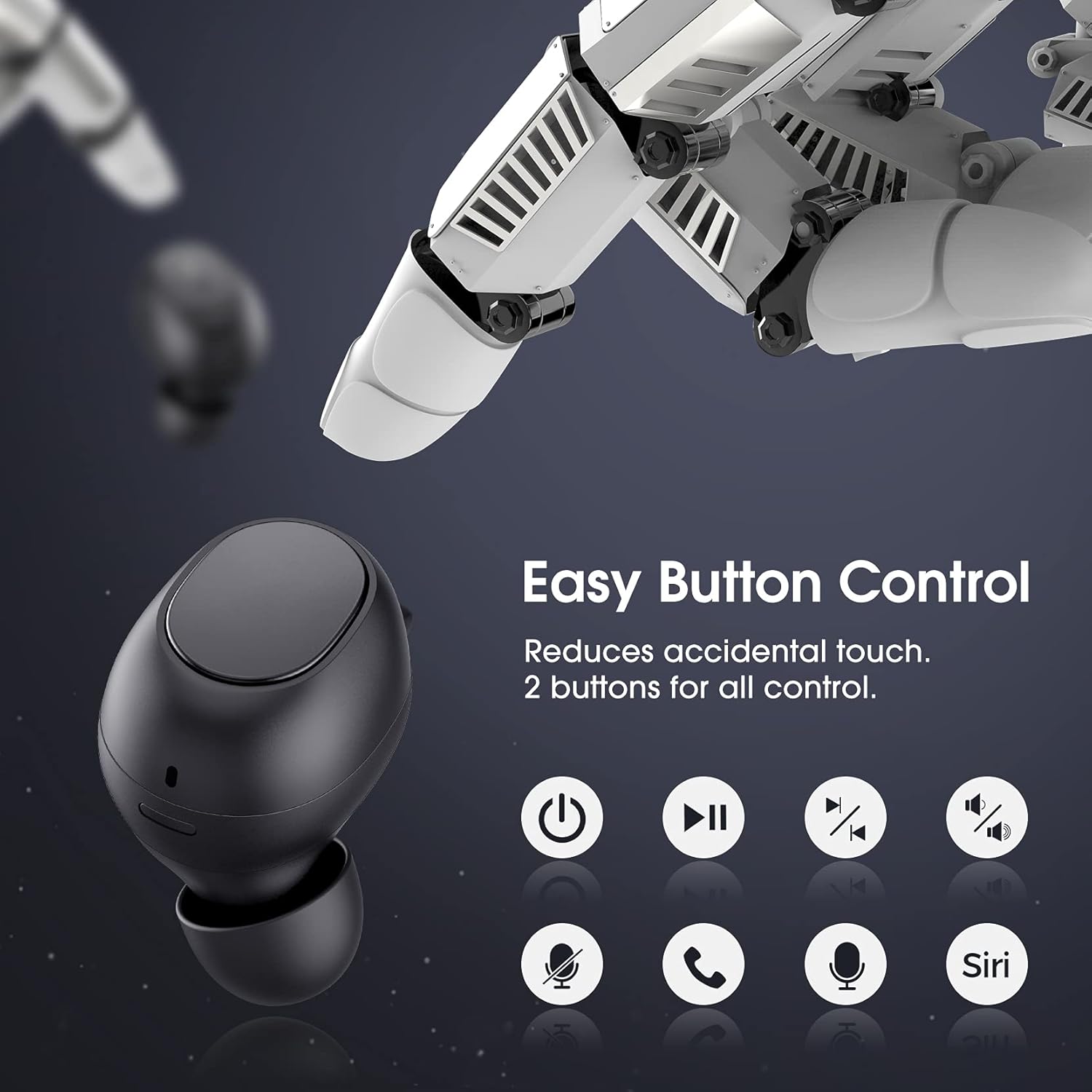
Image: A visual representation of the easy button controls on the Redzeo MDots earbuds, with icons indicating functions such as power on/off, play/pause, skip track, volume control, microphone mute, call answer/end, and voice assistant activation (Siri/Google Assistant).
| ຟັງຊັນ | ການປະຕິບັດ |
|---|---|
| ເປີດເຄື່ອງ | ເອົາອອກຈາກກ່ອງສາກໄຟ |
| ປິດເຄື່ອງ | Place back into charging case |
| ຫຼິ້ນ/ຢຸດຊົ່ວຄາວ | ກົດຄັ້ງດຽວໃສ່ຫູຟັງຂ້າງໃດກໍໄດ້ |
| ຕິດຕາມຕໍ່ໄປ | Double press on the Right earbud |
| ເພງກ່ອນໜ້າ | Double press on the Left earbud |
| ປະລິມານຂຶ້ນ | Press and hold Right earbud |
| ປະລິມານລົງ | Press and hold Left earbud |
| ຕອບ/ວາງສາຍ | ກົດຄັ້ງດຽວໃສ່ຫູຟັງຂ້າງໃດກໍໄດ້ |
| ປະຕິເສດການໂທ | ກົດຄ້າງໃສ່ຫູຟັງທັງສອງຂ້າງ |
| ເປີດໃຊ້ຜູ້ຊ່ວຍສຽງ (Siri/Google Assistant) | Triple press on either earbud |
Mono Mode and Twin Stereo Mode
The Redzeo MDots earbuds offer flexible listening options:
- ໂມໂນໂມດ: Each earbud can be used independently. This allows you to leave one ear free to hear your surroundings while still enjoying audio. Simply take one earbud out of the case to use it in mono mode.
- ໂໝດສະເຕີລິໂອຄູ່: Use both earbuds simultaneously for an immersive true wireless stereo sound experience. This mode is ideal for enjoying music or blocking out surrounding noise.

Image: A visual guide demonstrating the different listening modes: Right Mono Mode (using only the right earbud), Left Mono Mode (using only the left earbud to hear ambient sound), and Twin Stereo Mode (using both earbuds for immersive sound).
ຄຸນະພາບສຽງ
The MDots wireless earbuds deliver well-balanced sound with stereo bass. For the best audio experience, ensure you have selected the optimal eartips for a proper seal, which enhances bass and overall sound clarity.

Image: An exploded diagram illustrating the internal components of the Redzeo MDots earbud, highlighting the driver and acoustic structure responsible for delivering magical immersive sound with rich, high-quality audio.
ບໍາລຸງຮັກສາ
ທໍາຄວາມສະອາດ
ການທໍາຄວາມສະອາດເປັນປົກກະຕິຊ່ວຍຮັກສາຄຸນນະພາບສຽງແລະສຸຂະອະນາໄມ.
- ໃຊ້ຜ້າແພທີ່ອ່ອນ, ແຫ້ງ, ບໍ່ມີເສັ້ນດ່າງເພື່ອເຊັດຫູຟັງຫູຟັງ ແລະ ກ່ອງສາກ.
- For eartips, remove them from the earbuds and clean with a mild soap solution if necessary, then rinse thoroughly and dry completely before reattaching.
- ຄ່ອຍໆເອົາຂີ້ຫູ ຫຼືສິ່ງເສດເຫຼືອອອກຈາກຕາໜ່າງຫູຟັງ ໂດຍໃຊ້ແປງນ້ອຍໆ ຫຼືຜ້າຝ້າຍອ່ອນໆ.
ການເກັບຮັກສາ
ເກັບຫູຟັງເອຍບັດໃສ່ໃນກະເປົ໋າສາກໄຟທຸກຄັ້ງເມື່ອບໍ່ໄດ້ໃຊ້ເພື່ອປົກປ້ອງພວກມັນ ແລະ ສືບຕໍ່ສາກໄຟ.
ກັນນໍ້າ (IPX6)
The Redzeo MDots earbuds feature an IPX6 waterproof nano-coating design, making them resistant to sweat, water splashes, and rain. They are suitable for strenuous exercise and all-weather conditions.

Image: The Redzeo MDots earbuds resting on a wet surface, visually representing their IPX6 waterproof capability, which provides water protection for daily use and resistance to sweat, water, and rain, making them ideal for running, yoga, and gym activities.
ໝາຍເຫດສຳຄັນ: Do not use the earbuds for swimming or immerse them in heavy rain. The IPX6 rating protects against strong jets of water, but not continuous submersion.
ການແກ້ໄຂບັນຫາ
ບັນຫາທົ່ວໄປແລະການແກ້ໄຂ
- ຫູຟັງຫູຟັງບໍ່ໄດ້ຈັບຄູ່ກັບອຸປະກອນ:
- ໃຫ້ແນ່ໃຈວ່າ Bluetooth ຖືກເປີດໃຊ້ຢູ່ໃນອຸປະກອນຂອງທ່ານ.
- ກວດໃຫ້ແນ່ໃຈວ່າໄດ້ສາກຫູຟັງຫູຟັງແລ້ວ.
- Place earbuds back in the case, close it, wait a few seconds, then open and remove them to re-enter pairing mode.
- Forget/delete "Redzeo MDots" from your device's Bluetooth list and try pairing again.
- ຫູຟັງຫູຟັງອັນດຽວທີ່ເຮັດວຽກ:
- ກວດໃຫ້ແນ່ໃຈວ່າໄດ້ສາກຫູຟັງທັງສອງອັນແລ້ວ.
- Place both earbuds back into the charging case, close the lid, and then open it again. This should force them to re-sync.
- ຖ້າບັນຫາຍັງຄົງຢູ່, ໃຫ້ລອງຣີເຊັດຫູຟັງຫູຟັງ (ອ້າງອີງຈາກຜູ້ຜະລິດ website or contact support for specific reset instructions if not detailed here).
- ບໍ່ມີສຽງ ຫຼືສຽງຕໍ່າ:
- ກວດເບິ່ງລະດັບສຽງໃນທັງອຸປະກອນຂອງທ່ານ ແລະຫູຟັງ.
- ກວດໃຫ້ແນ່ໃຈວ່າຫູຟັງເອຍບັດຖືກເຊື່ອມຕໍ່ຢ່າງຖືກຕ້ອງກັບອຸປະກອນຂອງທ່ານ.
- Clean any debris from the earbud mesh that might be obstructing sound.
- Try different eartip sizes to ensure a proper seal in your ear.
- ກ່ອງສາກບໍ່ສາກ:
- ໃຫ້ແນ່ໃຈວ່າສາຍສາກໄດ້ເຊື່ອມຕໍ່ຢ່າງປອດໄພກັບທັງກໍລະນີ ແລະແຫຼ່ງພະລັງງານ.
- ລອງໃຊ້ສາຍ USB ຫຼືອະແດັບເຕີໄຟອື່ນ.
- ກວດເບິ່ງຊ່ອງສຽບໄຟສໍາລັບສິ່ງເສດເຫຼືອໃດໆ.
ຂໍ້ມູນຈໍາເພາະ
| ຄຸນສົມບັດ | ລາຍລະອຽດ |
|---|---|
| ໝາຍເລກຕົວແບບ | ບໍລິສັດ BH510A |
| ຍີ່ຫໍ້ | Redzeo |
| ເຕັກໂນໂລຊີການເຊື່ອມຕໍ່ | ໄຮ້ສາຍ (Bluetooth 5.0) |
| ການຈັດວາງຫູ | ໃນຫູ |
| ປັດໄຈແບບຟອມ | ໃນຫູ |
| Jack ຫູຟັງ | USB |
| ສີ | ດຳອ່ອນ |
| ວັດສະດຸ | ພາດສະຕິກ |
| ຂະໜາດສິນຄ້າ | 6.35 x 2.49 x 1.98 cm |
| ນ້ໍາຫນັກລາຍການ | 91 g |
| ການຈັດອັນດັບຄວາມຕ້ານທານນ້ໍາ | IPX6 |
| ເວລາຫຼິ້ນ (ຫູຟັງ) | ສູງສຸດ 4 ຊົ່ວໂມງ |
| ເວລາຫຼິ້ນທັງໝົດ (ພ້ອມກ່ອງສາກ) | ສູງສຸດ 20 ຊົ່ວໂມງ |
| ເວລາສາກໄຟ (ກໍລະນີ) | ປະມານ. 2 ຊົ່ວໂມງ |
| ອົງປະກອບລວມ | ກໍລະນີສາກໄຟໄຮ້ສາຍ |
| ວັນທີທໍາອິດທີ່ມີ | 31 ພຶດສະພາ 2021 |
ການຮັບປະກັນແລະການສະຫນັບສະຫນູນ
Redzeo products are designed and manufactured to the highest quality standards. For information regarding warranty coverage, technical support, or customer service, please refer to the warranty card included in your product packaging or visit the official Redzeo webເວັບໄຊ. ກະລຸນາຮັກສາຫຼັກຖານການຊື້ຂອງທ່ານສໍາລັບການຮຽກຮ້ອງການຮັບປະກັນໃດໆ.
For further assistance, you may contact Redzeo customer support through the contact information provided on their official webເວັບໄຊ.
Ask a question about this manual
Ask about setup, troubleshooting, compatibility, parts, safety, or missing instructions. Manuals+ will review the question and use this page’s manual context to help answer it.