
ແນະນຳ
Thank you for choosing the Hbada Ergonomic Gaming Chair. This manual provides essential information for the safe and efficient assembly, operation, and maintenance of your new chair. Please read these instructions carefully before use and retain them for future reference.

Image: The Hbada Ergonomic Gaming Chair in a modern gaming environment, showcasing its design and presence.
ຂໍ້ມູນຄວາມປອດໄພ
- ໃຫ້ແນ່ໃຈວ່າອົງປະກອບທັງຫມົດມີຢູ່ແລະບໍ່ເສຍຫາຍກ່ອນທີ່ຈະປະກອບ. ຢ່າໃຊ້ຖ້າຊິ້ນສ່ວນໃດຂາດຫຼືແຕກ.
- ປະຕິບັດຕາມຄໍາແນະນໍາການປະກອບຢ່າງແນ່ນອນ. ການປະກອບທີ່ບໍ່ຖືກຕ້ອງສາມາດນໍາໄປສູ່ຄວາມບໍ່ສະຖຽນລະພາບແລະການບາດເຈັບ.
- ຢ່າຢືນຢູ່ເທິງເກົ້າອີ້. ໃຊ້ມັນພຽງແຕ່ສໍາລັບການນັ່ງ.
- Do not exceed the maximum weight capacity (refer to specifications).
- ຮັກສາເດັກນ້ອຍ ແລະສັດລ້ຽງຢູ່ຫ່າງຈາກຕັ່ງນັ່ງໃນລະຫວ່າງການຊຸມນຸມ.
- ຫຼີກລ້ຽງການເປີດຕັ່ງໃຫ້ຖືກແສງແດດໂດຍກົງ ຫຼືອຸນຫະພູມທີ່ສຸດ ເພື່ອປ້ອງກັນການເສື່ອມໂຊມຂອງວັດສະດຸ.
ຂະໜາດສິນຄ້າ
Understanding the dimensions of your chair is important for proper placement and comfortable use. Below are the key measurements:
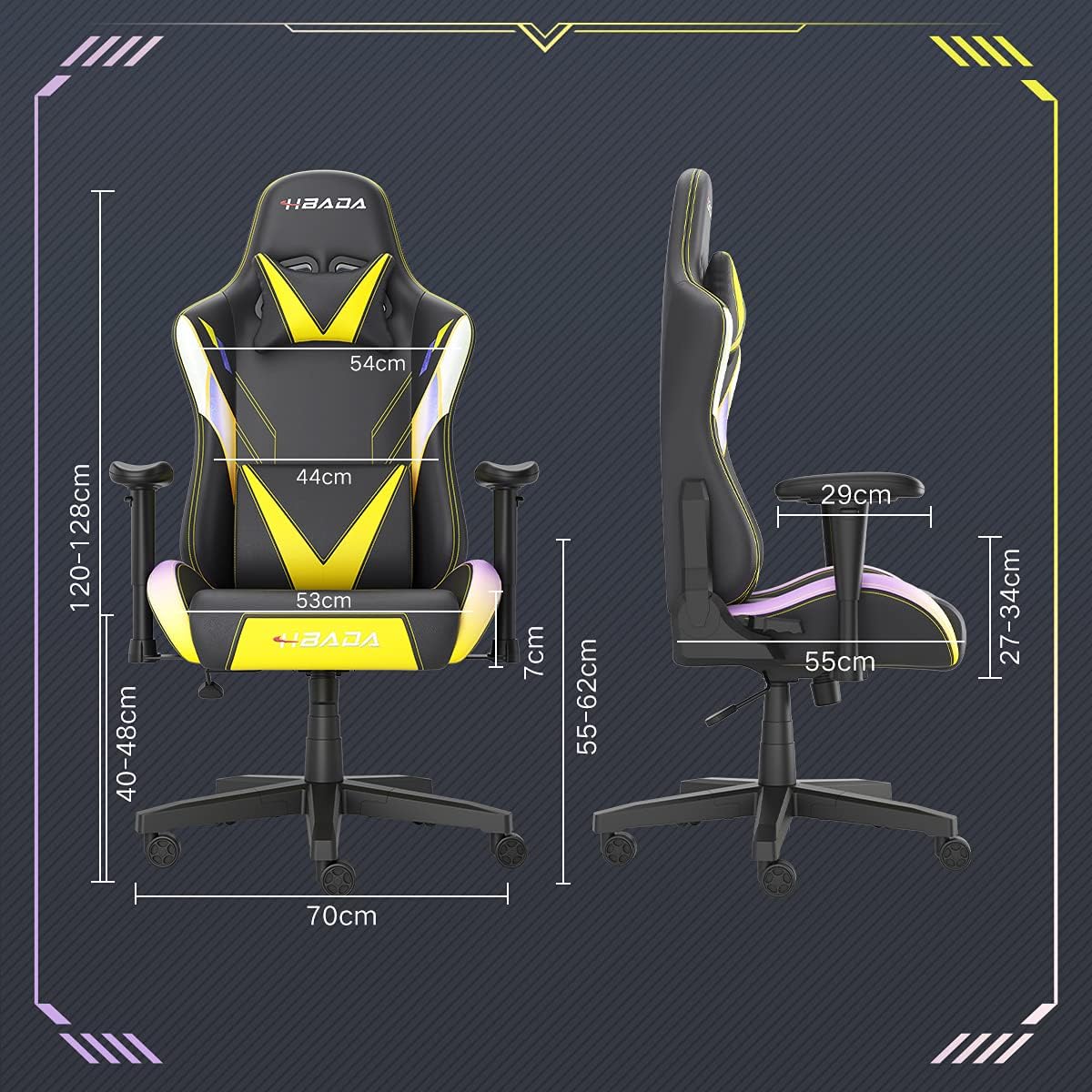
Image: A detailed diagram illustrating the various dimensions of the Hbada Gaming Chair, including height, width, and depth measurements.
- ຄວາມສູງໂດຍລວມ: 120-128 cm (adjustable)
- ຄວາມສູງບ່ອນນັ່ງ: 40-48 cm (adjustable)
- ກວ້າງຂອງບ່ອນນັ່ງ: 53 ຊຕມ
- ຄວາມເລິກບ່ອນນັ່ງ: 55 ຊຕມ
- ຄວາມກວ້າງຂອງພຶງ: 54 cm (shoulder area), 44 cm (lumbar area)
- ຄວາມສູງທີ່ວາງແຂນ (ຈາກບ່ອນນັ່ງ): 7 ຊມ (ສາມາດປັບໄດ້)
- ເສັ້ນຜ່າສູນກາງພື້ນຖານ: 70 ຊຕມ
ການຕິດຕັ້ງແລະການປະກອບ
Please follow these steps carefully to assemble your Hbada Gaming Chair. It is recommended to have a clear, spacious area for assembly.
ຂັ້ນຕອນການປະກອບ:
- Step 1: Assemble the Base and Wheels
Insert the five casters into the holes on the star base. Then, place the gas lift cylinder into the center hole of the base.

Image: Illustration of attaching the five casters to the chair's star-shaped base and inserting the gas lift cylinder.
- Step 2: Attach the Seat and Backrest
Connect the backrest to the seat using the provided screws and mounting plates. Ensure all screws are tightened securely.

Image: Diagram showing the process of securing the backrest to the seat cushion using screws and brackets.
- ຂັ້ນຕອນທີ 3: ຕິດຕັ້ງບ່ອນວາງແຂນ
Attach the armrests to the sides of the seat using the designated screws. Make sure they are firmly attached.

Image: Visual guide for attaching the armrests to the chair's seat base.
- Step 4: Connect Seat to Base
Carefully place the assembled seat onto the gas lift cylinder, ensuring it is properly seated and stable.

Image: Depiction of lowering the assembled seat onto the gas lift cylinder, connecting the upper and lower parts of the chair.
- Step 5: Attach Headrest and Lumbar Pillow
Secure the detachable headrest and lumbar support pillow to the chair as desired for optimal comfort.

Image: Instructions for attaching the headrest and lumbar support pillows to the gaming chair.
ຄໍາແນະນໍາການດໍາເນີນງານ
Your Hbada Gaming Chair is designed with several adjustable features to provide personalized comfort and support.
Key Adjustable Functions:
- Adjustable Sitting Height: Use the lever located under the seat on the right side to raise or lower the chair. Pull the lever up to adjust the height, then release it at your desired position. The seat has an 8 cm elevation range.
- Reclining Backrest (90° to 155°): The backrest can be reclined from 90 degrees (upright) to 155 degrees (nearly flat). Use the recline lever on the side of the chair to adjust the angle. Lean back to your preferred position and lock the lever.
- ທີ່ວາງແຂນສາມາດປັບໄດ້: The armrests can be adjusted in height by 7 cm. Locate the button or lever on the side of each armrest to unlock, adjust, and then lock them into your desired height.
- 360° Free Swivel: The chair features a full 360-degree swivel function, allowing for easy movement and access to your surroundings without needing to move the entire chair.
- Detachable Headrest and Lumbar Support: The chair includes a removable headrest pillow and lumbar support cushion for enhanced ergonomic comfort. Adjust their positions or remove them based on your preference.

ຮູບພາບ: ຫຼາຍກວ່າview of the chair's ergonomic systems, highlighting adjustable sitting height, armrests, 155° reclining, 360° swivel, cool racing casters, and durable base.

Image: The Hbada Gaming Chair demonstrated in its 155-degree reclined position, illustrating the recline controller.
ບໍາລຸງຮັກສາ
Regular maintenance will help prolong the life and appearance of your Hbada Gaming Chair.
- ການເຮັດຄວາມສະອາດໜັງ PU: ເຊັດພື້ນຜິວໜັງ PU ດ້ວຍຜ້າອ່ອນໆ, ຜ້າເຊັດໂຕ.amp ຜ້າ. ສໍາລັບຮອຍເປື້ອນທີ່ແຂງ, ໃຫ້ໃຊ້ສະບູອ່ອນໆ ແລ້ວເຊັດດ້ວຍນໍ້າສະອາດ, ງamp ຜ້າ. ຫຼີກເວັ້ນການສານເຄມີທີ່ຮຸນແຮງຫຼືເຄື່ອງເຮັດຄວາມສະອາດຂັດ, ເພາະວ່າສິ່ງເຫຼົ່ານີ້ສາມາດທໍາລາຍວັດສະດຸ.
- ການດູແລ Caster: Periodically check the casters for accumulated dust or hair. Clean them with a brush or vacuum cleaner to ensure smooth movement and prevent damage to your flooring.
- ກອບ ແລະ ອົງປະກອບຕ່າງໆ: Regularly inspect all screws and bolts to ensure they are tight. Re-tighten if necessary to maintain stability.
- ຫຼີກເວັ້ນແສງແດດໂດຍກົງ: Prolonged exposure to direct sunlight can cause the PU leather to fade and crack. Position your chair away from direct sunlight when possible.
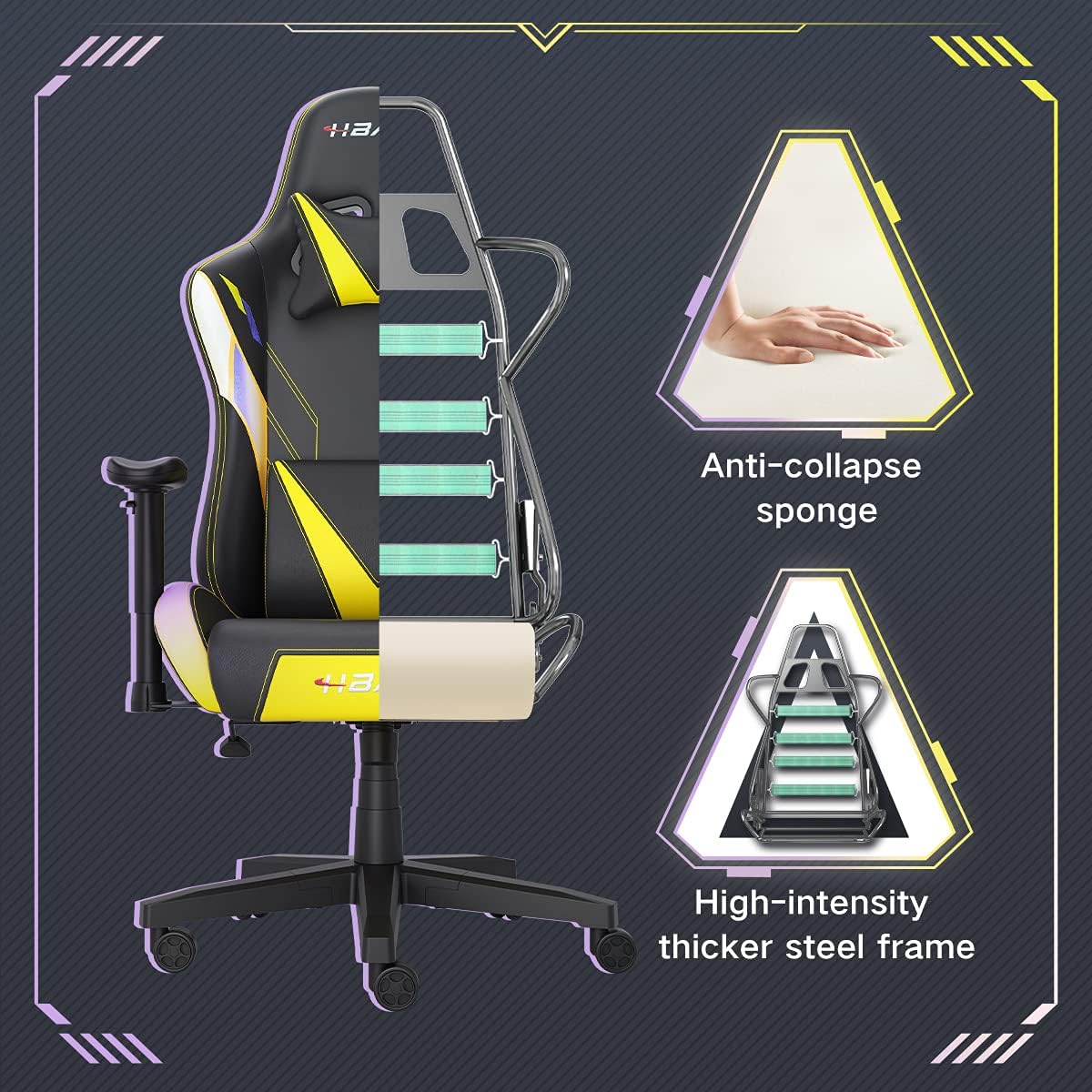
ຮູບພາບ: A cutaway view of the chair's internal structure, highlighting the anti-collapse sponge padding and the high-intensity thicker steel frame, indicating durable construction.
ການແກ້ໄຂບັນຫາ
If you encounter any issues with your Hbada Gaming Chair, refer to the following common problems and solutions:
| ບັນຫາ | ສາເຫດທີ່ເປັນໄປໄດ້ | ການແກ້ໄຂ |
|---|---|---|
| ເກົ້າອີ້ບໍ່ໄດ້ປັບຄວາມສູງ | ການຍົກອາຍແກັສເຮັດວຽກຜິດປົກກະຕິຫຼື lever ບໍ່ມີສ່ວນຮ່ວມ. | ຮັບປະກັນວ່າຕົວປັບຄວາມສູງແມ່ນມີສ່ວນຮ່ວມຢ່າງເຕັມທີ່. ຖ້າບັນຫາຍັງຄົງຢູ່, ການຍົກອາຍແກັສອາດຈະຕ້ອງການປ່ຽນແທນ. ຕິດຕໍ່ສະຫນັບສະຫນູນລູກຄ້າ. |
| ເກົ້າອີ້ແມ່ນ wobbly ຫຼືບໍ່ຫມັ້ນຄົງ | screws ວ່າງຫຼືການປະກອບທີ່ບໍ່ເຫມາະສົມ. | Check all assembly screws and bolts, and tighten them securely. Refer to the assembly instructions. |
| Casters ບໍ່ມ້ວນກ້ຽງ | ຊາກຫັກພັງ (ຜົມ, ຝຸ່ນ) ຕິດຢູ່ໃນລໍ້. | ຫັນເກົ້າອີ້ແລະເອົາສິ່ງເສດເຫຼືອໃດໆອອກຈາກລໍ້ລໍ້. |
| ພະນັກພິງຫຼັງບໍ່ສາມາດປັບຕົວລົງ ຫຼື ລັອກໄດ້ | ກົນໄກປັບໄດ້ຕິດຂັດຫຼື lever ບໍ່ໄດ້ມີສ່ວນຮ່ວມ. | Ensure the recline lever is fully engaged. Check for any obstructions around the mechanism. |
ຂໍ້ມູນຈໍາເພາະ
| ຄຸນສົມບັດ | ລາຍລະອຽດ |
|---|---|
| ຍີ່ຫໍ້ | Hbada |
| ໝາຍເລກຕົວແບບ | W203YMA/EU |
| ASIN | B095PSFLKX |
| ສີ | ສີເຫຼືອງ |
| ວັດສະດຸ | ໜັງ PU, ກອບໂລຫະ |
| ຂະໜາດສິນຄ້າ | 70 x 70 x 128 cm (ຍາວ x ກວ້າງ x ສູງ) |
| ນ້ຳໜັກສິນຄ້າ | 22 ກິໂລກຣາມ |
| ຄຸນນະສົມບັດພິເສດ | Ergonomic, Swivel, Casters, Headrest Support, Adjustable Recline (90°-155°), Adjustable Seat Height (8cm range), Adjustable Armrests (7cm range) |
| ຈໍານວນຫົວຫນ່ວຍ | 1.0 ນັບ |
ການຮັບປະກັນແລະການສະຫນັບສະຫນູນ
Your Hbada Gaming Chair comes with a ການຮັບປະກັນຫນຶ່ງປີ ນັບຈາກວັນທີ່ຊື້. ການຮັບປະກັນນີ້ກວມເອົາຂໍ້ບົກພ່ອງຈາກການຜະລິດ ແລະ ຂໍ້ບົກພ່ອງຂອງວັດສະດຸພາຍໃຕ້ການນໍາໃຊ້ປົກກະຕິ.
If you experience any issues during use, including problems with installation, damage, or missing parts, please do not hesitate to contact Hbada customer service. We are committed to providing reliable service and can offer free exchanges for covered issues.
For support, please visit the official Hbada webເວັບໄຊ ຫຼືຕິດຕໍ່ຮ້ານຂາຍຍ່ອຍຂອງທ່ານ.