
ແນະນຳ
Thank you for choosing the PILOT 720p Vehicle Dash Cam. This manual provides detailed instructions for the proper installation, operation, and maintenance of your new dash camera. Please read this manual thoroughly before use to ensure optimal performance and longevity of the device.
This dash cam is designed to record video footage while driving, offering features such as 720p HD resolution, a wide viewing angle, motion detection, and loop recording. It comes with an 8GB Micro SD card and a universal window mount for convenient setup.
ເນື້ອໃນຊຸດ
ກະລຸນາກວດສອບວ່າລາຍການທັງຫມົດທີ່ລະບຸໄວ້ຂ້າງລຸ່ມນີ້ແມ່ນລວມຢູ່ໃນຊຸດຂອງທ່ານ:
- Dash Cam Unit
- 8GB Micro SD Card
- ດູດຈອກ Mount
- ເຄື່ອງສາກລົດ USB
- USB Charger and Sync Cable
- ຄູ່ມືຜູ້ໃຊ້ (ເອກະສານນີ້)
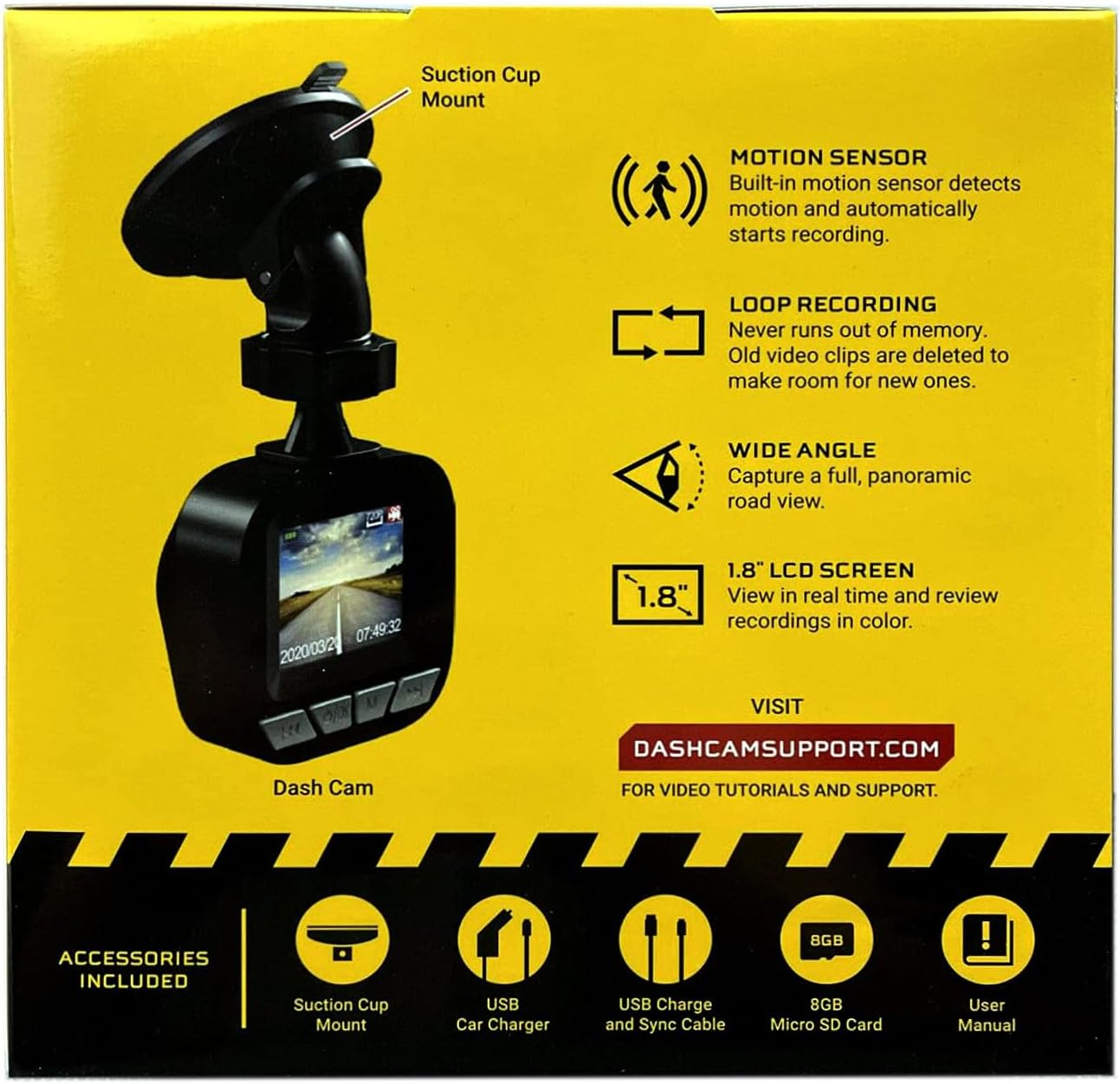
Image: The dash cam unit, suction cup mount, USB car charger, USB charge and sync cable, 8GB Micro SD card, and user manual are shown, along with a summary of key features like motion sensor, loop recording, wide angle, and 1.8" LCD screen.
ຄຸນສົມບັດຜະລິດຕະພັນ
- ຄວາມລະອຽດ: ບັນທຶກວິດີໂອ 720p HD.
- ຂະໜາດໜ້າຈໍ: 1.8-inch LCD display for real-time viewໃນແລະການຫຼິ້ນ.
- Viewໃນມຸມ: Wide-angle lens to capture a broad road view.
- ເຊັນເຊີກວດຈັບການເຄື່ອນໄຫວ: Built-in sensor detects motion and automatically initiates recording.
- ການບັນທຶກວົງ: Automatically overwrites older video clips when the memory card is full, ensuring continuous recording.
- ໄມໂຄຣໂຟນ: Built-in ສໍາລັບການບັນທຶກສຽງ.
- ການເກັບຮັກສາ: Supports Micro SD cards up to 32GB (8GB card included).
- ພະລັງງານ: Built-in rechargeable Lithium-ion battery and USB 2.0 port for charging.
ຄູ່ມືການຕິດຕັ້ງ
1. ການໃສ່ Micro SD Card
Locate the Micro SD card slot on the side or bottom of the dash cam. Gently insert the included 8GB Micro SD card into the slot until it clicks into place. Ensure the card is inserted correctly to avoid damage. The dash cam supports cards up to 32GB.
2. ການຕິດຕັ້ງ Dash Cam
- Clean the desired area on your vehicle's windshield where you intend to mount the dash cam. Ensure the surface is dry and free of dust.
- ຕິດຕັ້ງຕົວຍຶດຈອກດູດເຂົ້າກັບຊຸດກ້ອງວົງຈອນປິດ.
- ກົດຈອກດູດໃຫ້ແໜ້ນຕິດກັບກະຈົກໜ້າລົດ ແລະ ໝຸນຄັນໂຍກເພື່ອຍຶດມັນໄວ້.
- ປັບມຸມຂອງກ້ອງ dash ເພື່ອຮັບປະກັນຄວາມຊັດເຈນ view of the road ahead, avoiding any obstructions.

ຮູບພາບ: A close-up view of the front of the PILOT dash cam, showing the camera lens and the "PILOT" brand logo. This illustrates the main unit for mounting.
3. ການເຊື່ອມຕໍ່ພະລັງງານ
Connect the USB car charger to your vehicle's 12V power outlet (cigarette lighter socket). Then, connect the USB charger and sync cable from the car charger to the USB port on the dash cam. The dash cam will typically power on automatically when the vehicle starts and power is supplied.
ຄໍາແນະນໍາການດໍາເນີນງານ
ເປີດ/ປິດ
- ອັດຕະໂນມັດ: The dash cam will power on and begin recording automatically when connected to a power source and the vehicle ignition is turned on. It will power off automatically when the vehicle is turned off and power is disconnected.
- ຄູ່ມື: To manually power on or off, press and hold the power button (usually located on the side or bottom of the unit) for a few seconds.
ບັນທຶກວິທີ
- ການບັນທຶກ Loop ຢ່າງຕໍ່ເນື່ອງ: The dash cam records video in continuous loops (e.g., 1, 3, or 5-minute segments). When the Micro SD card is full, the oldest unlocked files will be overwritten by new recordings. This ensures you always have the most recent footage.
- ການບັນທຶກການຊອກຄົ້ນຫາ Motion: When enabled in the settings, the dash cam will automatically start recording if it detects motion in front of the camera while the vehicle is parked and the dash cam is powered on. This feature is useful for monitoring your vehicle when stationary.
Viewໃນການບັນທຶກ
The 1.8-inch LCD screen allows you to view ດໍາລົງຊີວິດ footage ແລະ review recorded videos directly on the device. Use the navigation buttons (typically labeled 'Menu', 'Up', 'Down', 'OK') to browse through the menu options and playback recorded files. Refer to the on-screen interface for specific navigation prompts.
ວັນທີ ແລະເວລາ Stamp
Ensure the date and time are set correctly in the dash cam's settings menu. This is crucial for accurate record-keeping of video footage.
ບໍາລຸງຮັກສາ
- ທໍາຄວາມສະອາດ Lens: Regularly clean the camera lens with a soft, lint-free cloth to ensure clear video quality. Avoid abrasive materials or harsh chemicals.
- ການຄຸ້ມຄອງບັດ SD: It is recommended to format the Micro SD card periodically (e.g., once a month) within the dash cam's settings menu. This helps maintain card performance and prevents data corruption. Back up any important footage ກ່ອນທີ່ຈະຈັດຮູບແບບ.
- ການດູແລຫມໍ້ໄຟ: The built-in Lithium-ion battery is primarily for emergency recording and saving settings. For continuous operation, keep the dash cam connected to the vehicle's power supply. Avoid exposing the device to extreme temperatures for extended periods.
- ການອັບເດດເຟີມແວ: Check the manufacturer's support webເວັບໄຊ (DASHCAMSUPPORT.COM) periodically for any available firmware updates to improve performance and add new features.
ການແກ້ໄຂບັນຫາ
| ບັນຫາ | ການແກ້ໄຂທີ່ເປັນໄປໄດ້ |
|---|---|
| Dash cam ບໍ່ເປີດ. |
|
| Dash cam turns off frequently during driving. |
|
| ວິດີໂອ footage ແມ່ນມົວຫຼືບໍ່ຈະແຈ້ງ. |
|
| Dash cam is not recording. |
|
ຂໍ້ມູນຈໍາເພາະ
| ຄຸນສົມບັດ | ລາຍລະອຽດ |
|---|---|
| ຄວາມລະອຽດ | 720p HD |
| ຂະໜາດໜ້າຈໍ | 1.8 ນິ້ວ |
| Viewໃນມຸມ | Wide Angle (135 Degrees Field Of View) |
| ເຊັນເຊີກວດຈັບການເຄື່ອນໄຫວ | ໃນຕົວ |
| ການບັນທຶກ Loop | ໃນຕົວ |
| ໄມໂຄຣໂຟນ | ໃນຕົວ |
| ພອດ USB | USB 2.0 |
| ແບັດເຕີຣີ | ສາກໄຟໄດ້ໃນຕົວ lithium-ion |
| ຮອງຮັບກາດຫນ່ວຍຄວາມຈໍາ | Micro SD up to 32GB (8GB included) |
| ນ້ໍາຫນັກລາຍການ | 8 ອອນ |
| ເຕັກໂນໂລຊີການເຊື່ອມຕໍ່ | USB |
| ປະເພດການຕິດຕັ້ງ | ປ່ອງຢ້ຽມ Mount |
ສະຫນັບສະຫນູນ
For additional assistance, video tutorials, or further support, please visit the official support webເວັບໄຊ:
Please have your product model information ready when contacting support.