
1. ບົດແນະນຳ
The Alonefire SV38 is a powerful 5W 365nm UV LED flashlight designed for various professional and household applications. Its 365nm wavelength, combined with a black filter lens, ensures a pure ultraviolet output, making it effective for tasks such as detecting counterfeit documents, verifying currency, identifying pet urine stains, curing UV resin, and examining fluorescent minerals. This manual provides essential information for the safe and efficient use of your SV38 flashlight.

Figure 1: Alonefire SV38 UV LED Flashlight and USB-C charging cable.
2. ຂໍ້ມູນຄວາມປອດໄພ
ຄຳເຕືອນ: Ultraviolet (UV) light can be harmful to eyes and skin. Please read and follow all safety precautions.
- ການປົກປ້ອງຕາ: Always wear UV protective eyewear when operating the flashlight to prevent eye damage. Do not look directly into the UV light source.
- ຜິວໜັງ: Avoid prolonged exposure of skin to UV light.
- ເດັກນ້ອຍແລະສັດລ້ຽງ: Keep the flashlight out of reach of children and pets. Do not shine the light into their eyes.
- ຄວາມຮ້ອນ: The flashlight may generate heat during extended use. Handle with care.
- ຄວາມປອດໄພຫມໍ້ໄຟ: Use only the specified battery type. Do not attempt to disassemble, short-circuit, or expose the battery to high temperatures.

Figure 2: Components of the SV38 flashlight, including the anodized aluminum alloy shell, power switch/charging indicator, spring contact, and back clip.
3. ຕັ້ງຄ່າ
3.1 ການຕິດຕັ້ງຫມໍ້ໄຟ
- ຖອດຝາປິດຫາງຂອງໄຟສາຍ.
- Insert the provided 2000mAh Lithium-ion battery with the positive (+) end facing towards the flashlight head (LED).
- ໝວກຝາຫາງຄືນຢ່າງປອດໄພ.
3.2 ການສາກໄຟເບື້ອງຕົ້ນ
ກ່ອນທີ່ຈະໃຊ້ຄັ້ງທໍາອິດ, ສາກໄຟສາຍໄຟໃຫ້ເຕັມ.
- Locate the USB Type-C charging port on the side of the flashlight.
- Connect the provided USB Type-C cable to the flashlight and the other end to a compatible USB power source (e.g., computer, power bank, wall adapter).
- The charging indicator light will illuminate red during charging. It will turn green when fully charged.

Figure 3: Charging indicator status. Red indicates charging or low battery, green indicates fully charged.
4. ການດໍາເນີນງານ
4.1 ເປີດ/ປິດ
- Press the power button located on the side of the flashlight to turn the UV light ON.
- Press the power button again to turn the UV light OFF.
4.2 Black UV Filter Lens
The SV38 is equipped with a hardened black optical filter lens. This lens is designed to filter out ambient visible light, ensuring that the emitted ultraviolet light is purer and more effective for detection tasks.

Figure 4: The black UV filter lens blocks undesired ambient light, making the UV output purer.
4.3 ຄໍາຮ້ອງສະຫມັກ
The Alonefire SV38 UV flashlight can be used for various purposes:
- ການກວດຫາການປອມແປງ: Verify currency, passports, and other official documents with UV security features.
- ການກວດຫາຮອຍເປື້ອນສັດລ້ຽງ: Locate invisible pet urine stains on carpets, rugs, and furniture.
- Mineral and Gemstone Inspection: Identify fluorescent minerals and authenticate amber.
- Resin Curing: Accelerate the curing process of UV-sensitive resins.
- ການກວດຫາການຮົ່ວໄຫຼ: Detect leaks in HVAC systems, automotive, and industrial machinery when used with UV dye.
- Scorpion Spotting: Scorpions fluoresce under UV light, making them visible in dark environments.
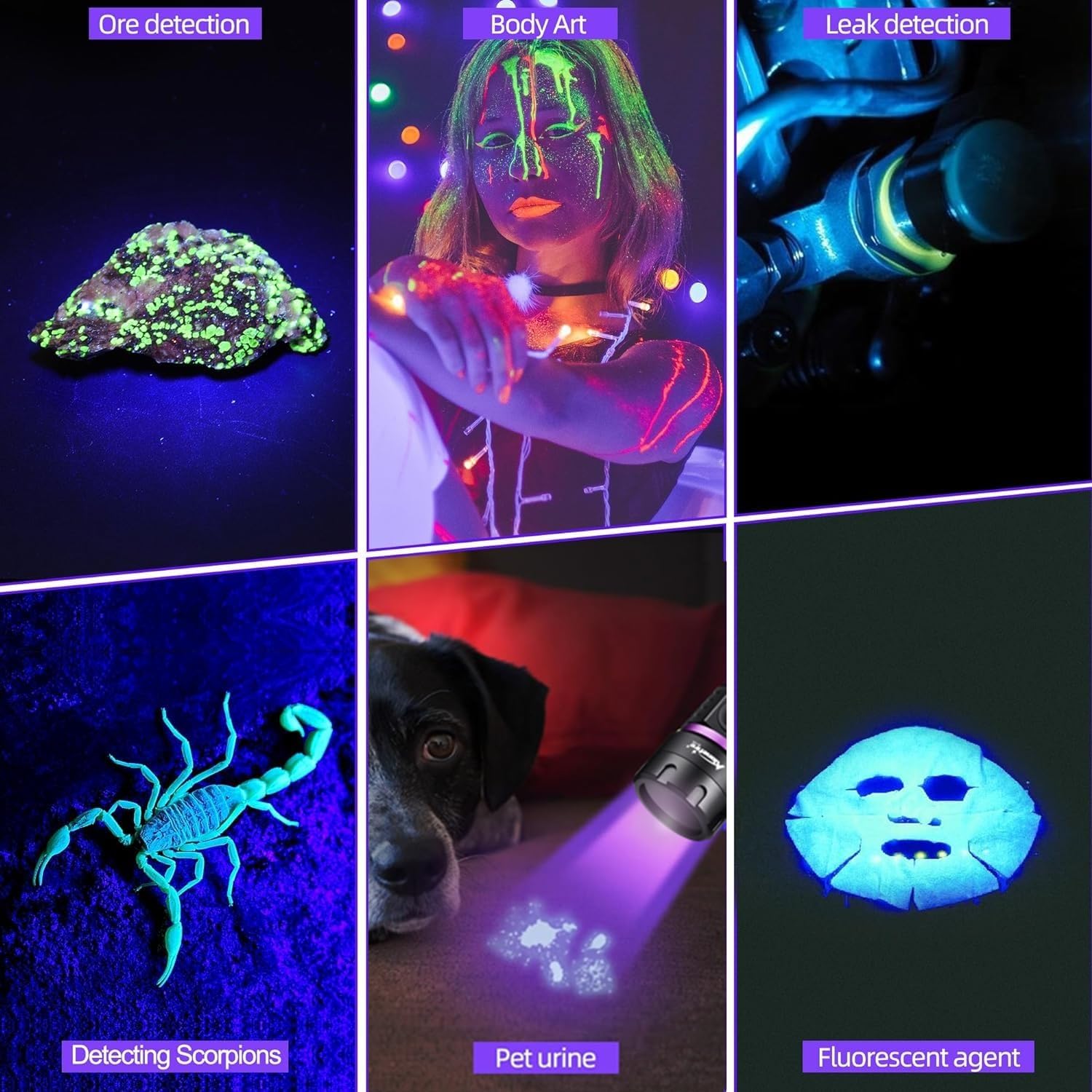
ຮູບທີ 5: ຕົວຢ່າງamples of SV38 UV flashlight applications.

Figure 6: Detecting pet urine stains with the UV flashlight.
5. ບໍາລຸງຮັກສາ
- ທໍາຄວາມສະອາດ: ເຊັດຮ່າງກາຍໄຟສາຍດ້ວຍຄວາມອ່ອນ, ງamp ຜ້າ. ຢ່າໃຊ້ເຄື່ອງເຮັດຄວາມສະອາດຂັດຫຼືສານລະລາຍ.
- ການດູແລເລນ: Gently clean the lens with a lens cleaning cloth to maintain optimal UV output.
- ການດູແລຫມໍ້ໄຟ: If the flashlight will not be used for an extended period, remove the battery to prevent leakage. Recharge the battery every 3-6 months to maintain its lifespan.
- ການເກັບຮັກສາ: ເກັບຮັກສາໄຟສາຍໄວ້ໃນບ່ອນທີ່ເຢັນ, ແຫ້ງ, ຫ່າງຈາກແສງແດດໂດຍກົງແລະອຸນຫະພູມທີ່ຮຸນແຮງ.
6. ການແກ້ໄຂບັນຫາ
| ບັນຫາ | ສາເຫດທີ່ເປັນໄປໄດ້ | ການແກ້ໄຂ |
|---|---|---|
| ໄຟສາຍບໍ່ເປີດ. | Low battery or battery incorrectly installed. | Charge the battery or ensure it is installed with the correct polarity. |
| UV light appears dim. | ແບັດເຕີຣີຕໍ່າ ຫຼື ເລນເປື້ອນ. | Recharge the battery. Clean the lens with a soft cloth. |
| ຕົວຊີ້ວັດການສາກໄຟບໍ່ເຮັດວຽກ. | ສາຍ USB ຫຼືແຫຼ່ງພະລັງງານຜິດພາດ. | Try a different USB cable or power source. Ensure the cable is fully inserted. |
| Flashlight gets hot during use. | Normal operation for high-power LED. | This is normal. If it becomes excessively hot, turn it off and allow it to cool. Avoid prolonged continuous use. |
7. ຂໍ້ມູນຈໍາເພາະ
| ຄຸນສົມບັດ | ລາຍລະອຽດ |
|---|---|
| ຍີ່ຫໍ້ | ALONEFIRE |
| ໝາຍເລກຕົວແບບ | SV38 |
| ປະເພດແຫຼ່ງແສງ | UV LED (365nm) |
| ການບໍລິໂພກພະລັງງານ | 5W |
| ວັດສະດຸ | ໂລຫະປະສົມອາລູມິນຽມ |
| ສີ | ດຳ |
| ປະເພດຫມໍ້ໄຟ | 1 x 2000mAh Lithium-ion (included) |
| ພອດສາກໄຟ | USB Type-C |
| ຄຸນນະສົມບັດພິເສດ | Durable, Lightweight, Rechargeable, Black Filter Lens |
| ຂະໜາດສິນຄ້າ | ຂະໜາດປະມານ 14.5 x 7.3 x 3.3 cm |
| ນ້ໍາຫນັກລາຍການ | ປະມານ 105 g |
8. ການຮັບປະກັນແລະການສະຫນັບສະຫນູນ
Alonefire products are manufactured to high-quality standards. For warranty information or technical support, please refer to the seller's return policy or contact Alonefire customer service through their official channels. Spare parts availability is guaranteed for 5 years.