
1. ບົດແນະນຳ
Thank you for choosing the MEDION X64060 Party Speaker. This manual provides essential information for the safe and efficient use of your device. Please read it thoroughly before operating the speaker and keep it for future reference.
The MEDION X64060 is a versatile party speaker designed for various entertainment needs, featuring powerful audio output, integrated DJ and karaoke functions, and dynamic light effects.
2. ຄໍາແນະນໍາຄວາມປອດໄພ
- ອ່ານຄໍາແນະນໍາທັງຫມົດຢ່າງລະອຽດກ່ອນທີ່ຈະໃຊ້.
- ຮັກສາລຳໂພງໃຫ້ຫ່າງຈາກນໍ້າ, ຄວາມຊຸ່ມຊື່ນ, ແລະອຸນຫະພູມທີ່ຮຸນແຮງ.
- ຫ້າມກີດຂວາງການເປີດລະບາຍອາກາດ.
- ໃຊ້ສະເພາະສາຍໄຟທີ່ມາພ້ອມກັບອຸປະກອນເທົ່ານັ້ນ.
- ຢ່າພະຍາຍາມສ້ອມແປງອຸປະກອນດ້ວຍຕົນເອງ. ອ້າງອີງການບໍລິການທັງໝົດໃຫ້ກັບບຸກຄະລາກອນທີ່ມີຄຸນວຸດທິ.
- Ensure the speaker is placed on a stable, level surface to prevent tipping.
- ຫຼີກເວັ້ນການສໍາຜັດກັບລະດັບສຽງສູງເປັນເວລາດົນນານເພື່ອປ້ອງກັນຄວາມເສຍຫາຍຂອງການໄດ້ຍິນ.
3. ເນື້ອໃນຊຸດ
ກະລຸນາກວດເບິ່ງຊຸດສຳລັບລາຍການຕໍ່ໄປນີ້:
- MEDION X64060 Party Speaker
- 1 x ໄມໂຄຣໂຟນ
- ສາຍໄຟ
- ຄູ່ມືຜູ້ໃຊ້ (ເອກະສານນີ້)
4. ຜະລິດຕະພັນເກີນview
Familiarize yourself with the main components and controls of your MEDION X64060 Party Speaker.

Image: Control Panel Overview
This image displays a close-up of the speaker's top control panel, showing various knobs and buttons for audio adjustments, DJ functions, and input selections.

Image: Speaker Dimensions and Connections
This image illustrates the overall dimensions of the speaker (980mm height, 350mm width, 340mm depth) and highlights the available connection ports: 1x USB, 2x Microphone (6.3 mm), 1x Guitar (6.3 mm), 1x Audio Input (3.5 mm), and 1x Audio Input (RCA).
4.1 ກະດານດ້ານ ໜ້າ
- ລໍາໂພງ: Two main speakers with integrated LED lighting.
- ຜົນກະທົບແສງສະຫວ່າງ: Dynamic LED lights that synchronize with music.
4.2 ແຜງຄວບຄຸມດ້ານເທິງ
- ປຸ່ມເປີດປິດ: ເພື່ອເປີດ/ປິດລຳໂພງ.
- ການຄວບຄຸມລະດັບສຽງ: Main volume, microphone volume (MIC1 VOL, MIC2 VOL), guitar volume (GUITAR VOL), and echo volume (ECHO VOL).
- ຕົວສະເີພາບ (EQ): 5-band equalizer for sound adjustment.
- ຕົວເລືອກການປ້ອນຂໍ້ມູນ: Buttons for Bluetooth, USB, AUX.
- DJ Functions: Cross-fader, scratch wheel, drum pads (HI-HAT, SNARE, BASS DRUM, CYMBAL, TOM1, TOM2), and record function.
- ພອດ USB: ສຳລັບການຫຼິ້ນຜ່ານ USB.
- ການປ້ອນຂໍ້ມູນໄມໂຄຣໂຟນ: Two 6.3 mm jack inputs.
- ການປ້ອນຂໍ້ມູນກີຕ້າ: One 6.3 mm jack input.
- AUX Input: 3.5 mm jack input.
4.3 ແຜງດ້ານຫລັງ
- ການປ້ອນຂໍ້ມູນພະລັງງານ: ສໍາລັບການເຊື່ອມຕໍ່ສາຍໄຟ.
- RCA Audio Input: Additional audio input.
4.4 Mobility Features
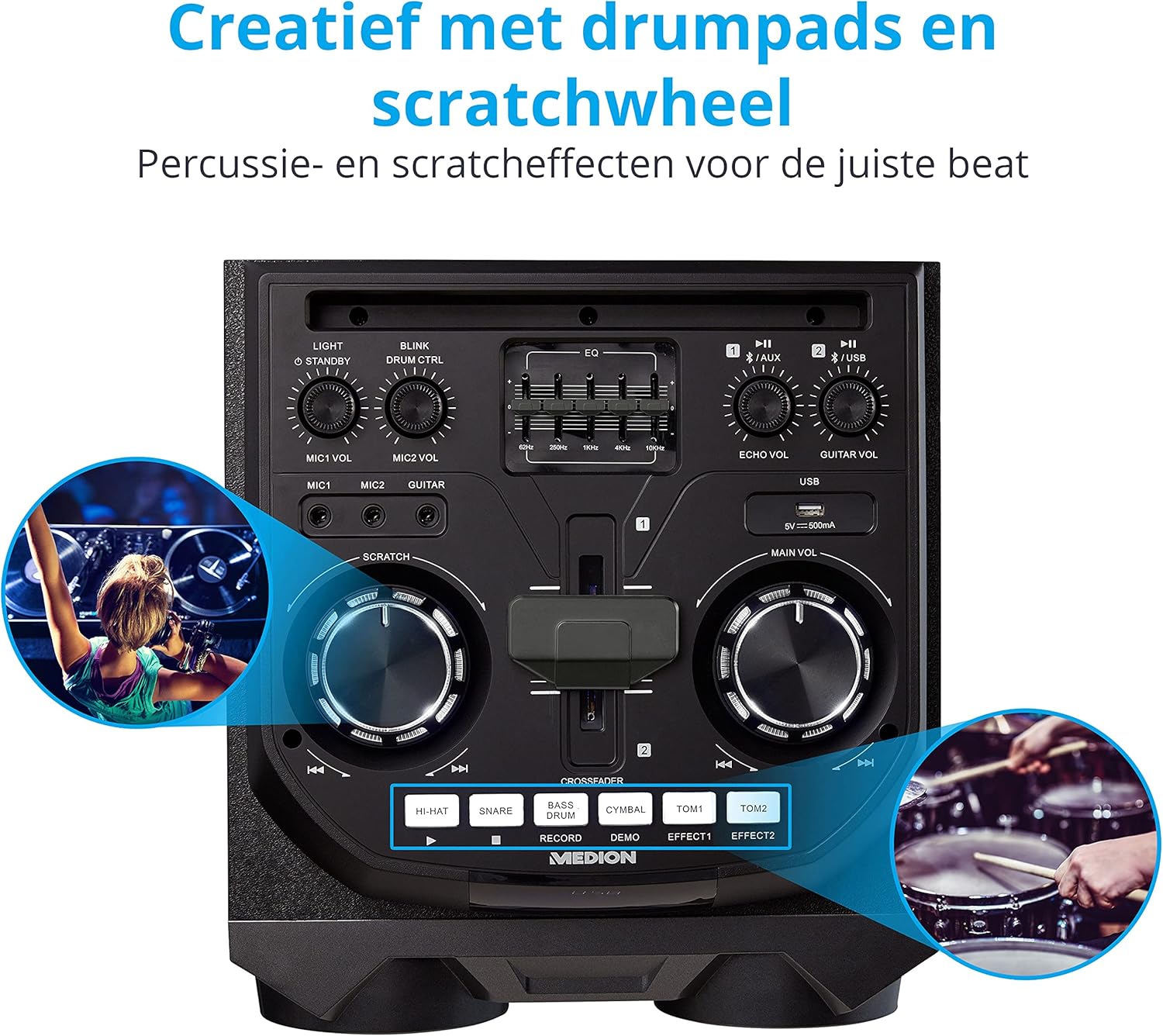
Image: Integrated Wheels for Portability
This image shows the back of the speaker, highlighting the integrated wheels at the bottom, designed for easy transport.
- Integrated Wheels: For easy transportation of the speaker.
- ມືຈັບ: Ergonomic handles for lifting and moving.
5. ຕັ້ງຄ່າ
5.1 ການຈັດວາງເບື້ອງຕົ້ນ
ວາງລຳໂພງໄວ້ເທິງພື້ນຜິວທີ່ໝັ້ນຄົງ ແລະ ຮາບພຽງ. ຮັບປະກັນວ່າມີລະບາຍອາກາດພຽງພໍອ້ອມຮອບຕົວເຄື່ອງ. ຫຼີກລ່ຽງການວາງມັນໄວ້ໃກ້ແຫຼ່ງຄວາມຮ້ອນ ຫຼື ແສງແດດໂດຍກົງ.
5.2 ການເຊື່ອມຕໍ່ພະລັງງານ
- ເຊື່ອມຕໍ່ສາຍໄຟທີ່ສະໜອງໃຫ້ເຂົ້າກັບຊ່ອງສຽບພະລັງງານທີ່ຢູ່ດ້ານຫຼັງຂອງລຳໂພງ.
- ສຽບສາຍໄຟອີກດ້ານໜຶ່ງເຂົ້າໄປໃນປລັກສຽບໄຟທີ່ເໝາະສົມ.
- Press the power button on the top control panel to turn on the speaker. The LED lights will illuminate.
5.3 Connecting a Microphone or Guitar
For karaoke or live instrument performance:
- Plug your microphone(s) into the MIC1 or MIC2 6.3 mm jack inputs on the top panel.
- Plug your guitar into the GUITAR 6.3 mm jack input on the top panel.
- Adjust the respective volume knobs (MIC1 VOL, MIC2 VOL, GUITAR VOL) and ECHO VOL to your preference.
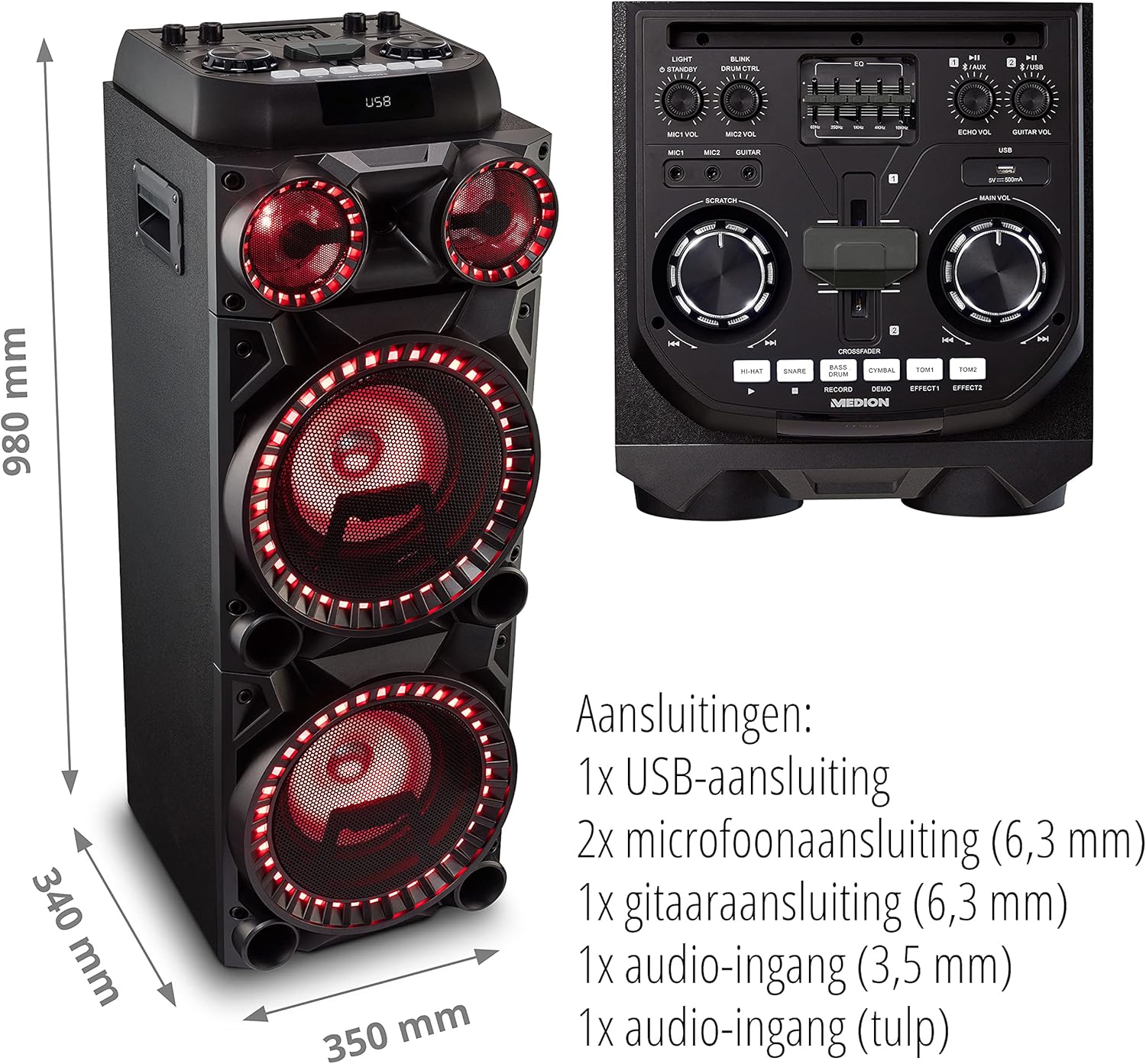
Image: Microphone and Guitar Connection for Karaoke
This image shows individuals enjoying karaoke, demonstrating the use of a microphone connected to the speaker for singing.
6. ຄໍາແນະນໍາການດໍາເນີນງານ
6.1 ການເຊື່ອມຕໍ່ Bluetooth
- ກົດ Bluetooth button on the control panel. The Bluetooth indicator will blink.
- ເປີດໃຊ້ Bluetooth ໃນໂທລະສັບສະຫຼາດ, ແທັບເລັດ ຫຼື ອຸປະກອນສຽງອື່ນໆຂອງທ່ານ.
- ຊອກຫາ "MEDION X64060" in your device's Bluetooth settings and select it to pair.
- Once connected, the Bluetooth indicator will stop blinking and remain solid. You can now play music wirelessly.

Image: Bluetooth Music Playback
This image shows a smartphone displaying a music application, indicating a wireless Bluetooth connection to the speaker for audio streaming.
6.2 ການຫຼິ້ນ USB
- ໃສ່ USB flash drive ທີ່ບັນຈຸສຽງ files into the USB port on the top panel.
- ກົດ USB ປຸ່ມເພື່ອເລືອກໂຫມດ USB.
- The speaker will automatically detect and begin playing audio files from the USB drive. Use the playback controls (play/pause, skip track) on the control panel.
6.3 AUX Input
- Connect an external audio device (e.g., MP3 player, laptop) to the 3.5 mm AUX input or the RCA audio input on the rear panel using an appropriate audio cable (not included).
- ກົດ AUX ປຸ່ມເພື່ອເລືອກໂໝດ AUX.
- ຫຼິ້ນສຽງຈາກອຸປະກອນທີ່ເຊື່ອມຕໍ່ຂອງທ່ານ. ລຳໂພງຈະສົ່ງສຽງອອກມາ.
6.4 ໜ້າທີ່ຂອງດີເຈ
The MEDION X64060 includes various DJ features for creative sound mixing.

Image: DJ Function Controls
ຮູບພາບນີ້ໃຫ້ລາຍລະອຽດ view of the DJ control section, including the cross-fader, scratch wheel, and various drum pads.
- Cross-fader: Use the cross-fader to smoothly transition between different audio sources or effects.
- Scratch Wheel: Manipulate the scratch wheel for classic DJ scratch effects.
- Drum Pads: ກົດ HI-HAT, SNARE, ບາສດຣໍາ, CYMBAL, TOM1, ແລະ TOM2 pads to add drum sound effects to your music.
- ຟັງຊັນບັນທຶກ: ໃຊ້ ບັນທຶກ button to record your drum pad sequences.
6.5 ຟັງຊັນຄາຣາໂອເກະ
Connect a microphone as described in section 5.3. Play your chosen karaoke track via Bluetooth, USB, or AUX. Adjust the microphone and echo volumes for the desired effect.
6.6 ຜົນກະທົບແສງສະຫວ່າງ
The speaker features dynamic LED light effects that respond to the music. These lights automatically activate when the speaker is on. There may be a dedicated button (e.g., "LIGHT" or "BLINK") to control or cycle through different light modes, refer to the control panel for specific options.

Image: Dynamic Blue Light Effects
This image showcases the speaker with its blue LED lights illuminated, demonstrating the atmospheric light effects.

Image: Dynamic Red Light Effects
This image shows the speaker with its red LED lights illuminated, highlighting another color option for the atmospheric light effects.
7. ບໍາລຸງຮັກສາ
7.1 ການທໍາຄວາມສະອາດ
- ຖອດລຳໂພງອອກຈາກປລັກສຽບໄຟກ່ອນທຳຄວາມສະອາດທຸກຄັ້ງ.
- ໃຊ້ຜ້າປຽກອ່ອນໆເຊັດພື້ນຜິວພາຍນອກ.
- ຢ່າໃຊ້ນໍ້າຢາເຮັດຄວາມສະອາດ, ນໍ້າຢາສີດ ຫຼື ວັດສະດຸຂັດ, ເພາະວ່າສິ່ງເຫຼົ່ານີ້ສາມາດທໍາລາຍສີຜິວ ຫຼື ອົງປະກອບພາຍໃນໄດ້.
7.2 ການເກັບຮັກສາ
When not in use for extended periods, store the speaker in a cool, dry place, away from direct sunlight and extreme temperatures. Cover the unit to protect it from dust.
8. ການແກ້ໄຂບັນຫາ
| ບັນຫາ | ສາເຫດທີ່ເປັນໄປໄດ້ | ການແກ້ໄຂ |
|---|---|---|
| ບໍ່ມີພະລັງງານ | Power cord not connected properly; Power outlet not working. | Ensure the power cord is securely plugged into both the speaker and a working wall outlet. Test the outlet with another device. |
| ບໍ່ມີສຽງ | Volume too low; Incorrect input selected; Device not paired (Bluetooth); Cable not connected (AUX/Guitar/Mic). | Increase the main volume and individual input volumes. Select the correct input source (Bluetooth, USB, AUX). Re-pair Bluetooth device. Check all cable connections. |
| ການເຊື່ອມຕໍ່ Bluetooth ລົ້ມເຫລວ | ລຳໂພງບໍ່ຢູ່ໃນໂໝດຈັບຄູ່; ອຸປະກອນໄກເກີນໄປ; ແຊກແຊງ. | Ensure the speaker is in Bluetooth pairing mode (blinking indicator). Move your device closer to the speaker. Avoid obstacles and other wireless devices. |
| ໄມໂຄຣໂຟນ/ກີຕ້າບໍ່ເຮັດວຽກ | Volume too low; Cable faulty; Incorrect input. | Increase MIC/GUITAR VOL. Check microphone/guitar cable. Ensure the instrument is properly connected. |
9. ຂໍ້ມູນຈໍາເພາະ
| ຍີ່ຫໍ້ | MEDION |
| ໝາຍເລກຕົວແບບ | X64060 | MD44060 |
| ພະລັງງານຜົນຜະລິດ | 2 x 100 W RMS (2 x 1000 W max. music output power) |
| ເຕັກໂນໂລຊີການເຊື່ອມຕໍ່ | Bluetooth 5.0, USB, AUX (3.5mm, RCA) |
| ການປ້ອນຂໍ້ມູນສຽງ | 2 x Microphone (6.3 mm), 1 x Guitar (6.3 mm), 1 x AUX (3.5 mm), 1 x RCA |
| Equalizer | 5-ແຖບ |
| ສີ | ດຳ |
| ວັດສະດຸ | ພາດສະຕິກ |
| ຂະໜາດສິນຄ້າ (L x W x H) | 38.8 x 35 x 101 cm |
| ນ້ໍາຫນັກລາຍການ | 15 ກິໂລ |
| ປະເພດການຕິດຕັ້ງ | Floor Standing |
| ແຫຼ່ງພະລັງງານ | ໄຟຟ້າສາຍ |
| ອຸປະກອນທີ່ເຂົ້າກັນໄດ້ | ແລັບທັອບ, ໂທລະສັບສະຫຼາດ |
10. ການຮັບປະກັນແລະການສະຫນັບສະຫນູນ
For warranty information and technical support, please refer to the warranty card included with your product or visit the official MEDION webເວັບໄຊ. ຮັກສາຫຼັກຖານການຊື້ຂອງທ່ານສໍາລັບການຮຽກຮ້ອງການຮັບປະກັນໃດໆ.
ບໍລິການລູກຄ້າ MEDION: For assistance, please contact MEDION customer support through their official channels. Contact details can typically be found on the MEDION webສະຖານທີ່ຫຼືຢູ່ໃນການຫຸ້ມຫໍ່ຜະລິດຕະພັນ.