
1. ບົດແນະນຳ
Thank you for choosing the ThruNite TW10 Weaponlight. This compact and powerful tactical flashlight is designed for reliable performance, featuring USB-C recharging, dual-switch operation, and robust construction. Please read this manual carefully before use to ensure proper operation and maintenance.
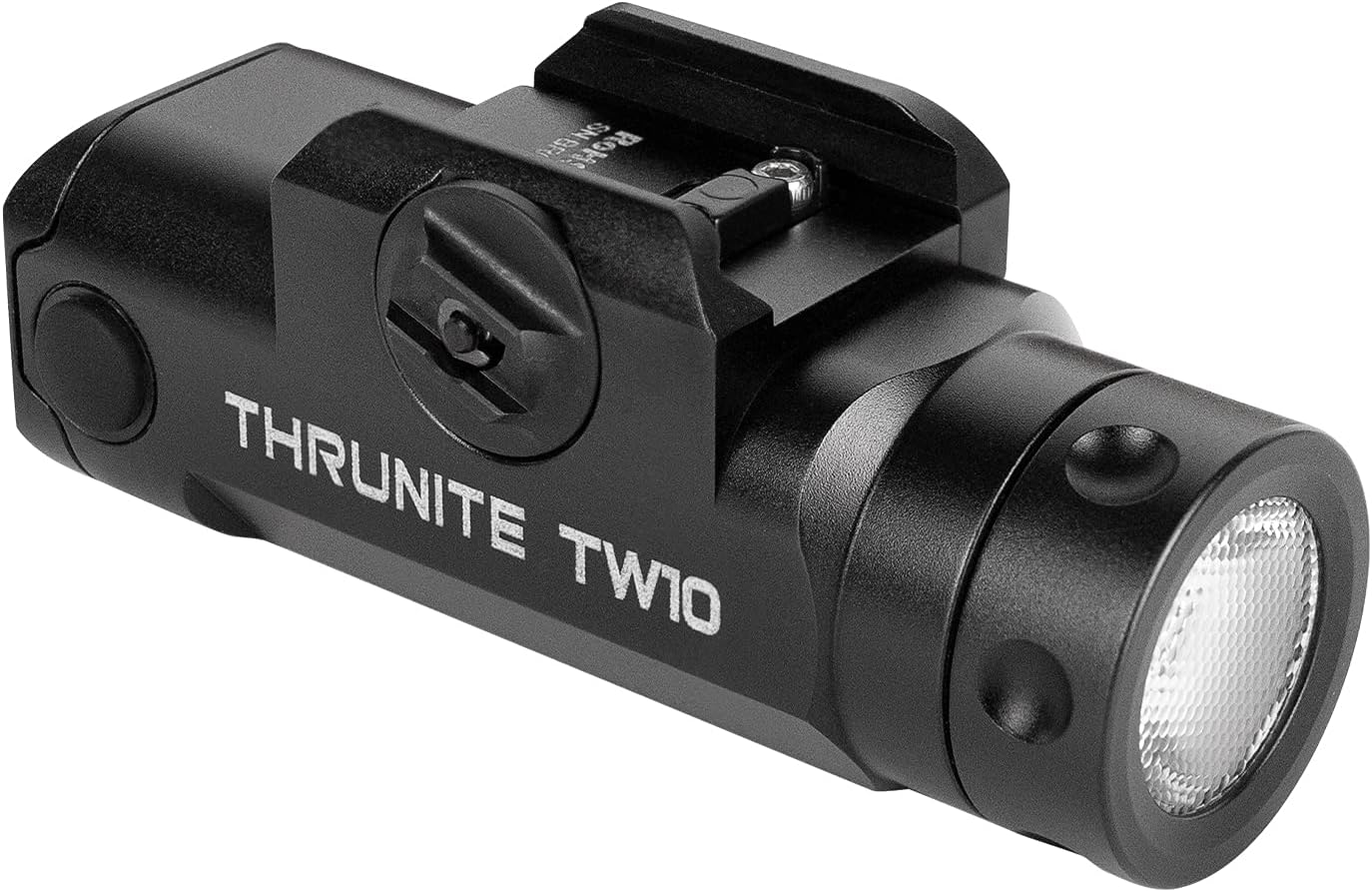
Figure 1: ThruNite TW10 Weaponlight
2. ຂໍ້ມູນຄວາມປອດໄພ
- ຄວາມປອດໄພຕາ: Do not shine the light directly into eyes. The powerful beam can cause temporary vision impairment or permanent eye damage.
- ຄຳ ເຕືອນໃຫ້ລະວັງຄວາມຮ້ອນ: ໄຟສາຍອາດຈະຮ້ອນໃນລະຫວ່າງການໃຊ້ງານເປັນເວລາດົນໃນລະດັບຜົນຜະລິດສູງ. ໃຫ້ໃຊ້ດ້ວຍຄວາມລະມັດລະວັງເພື່ອຫຼີກເວັ້ນການໄໝ້.
- ຄວາມປອດໄພຫມໍ້ໄຟ: Use only the specified rechargeable battery. Do not attempt to disassemble, short-circuit, or dispose of batteries in fire. Keep batteries away from children.
- ການຕິດຕັ້ງ: Ensure the weaponlight is securely mounted to prevent accidental detachment during use. Verify compatibility with your rail system before installation.
- ເດັກນ້ອຍ: Keep the flashlight and its accessories out of reach of children.
3. ເນື້ອໃນຊຸດ
ກວດສອບວ່າລາຍການທັງຫມົດແມ່ນມີຢູ່ໃນຊຸດຂອງທ່ານ:
- ThruNite TW10 Weaponlight
- ສາຍສາກ USB-C
- GL Rail Adapter
- 1913 Rail Adapter
- ອະໄຫລ່ O-rings
- Spare USB Port Cover
- Hex Key & Screws
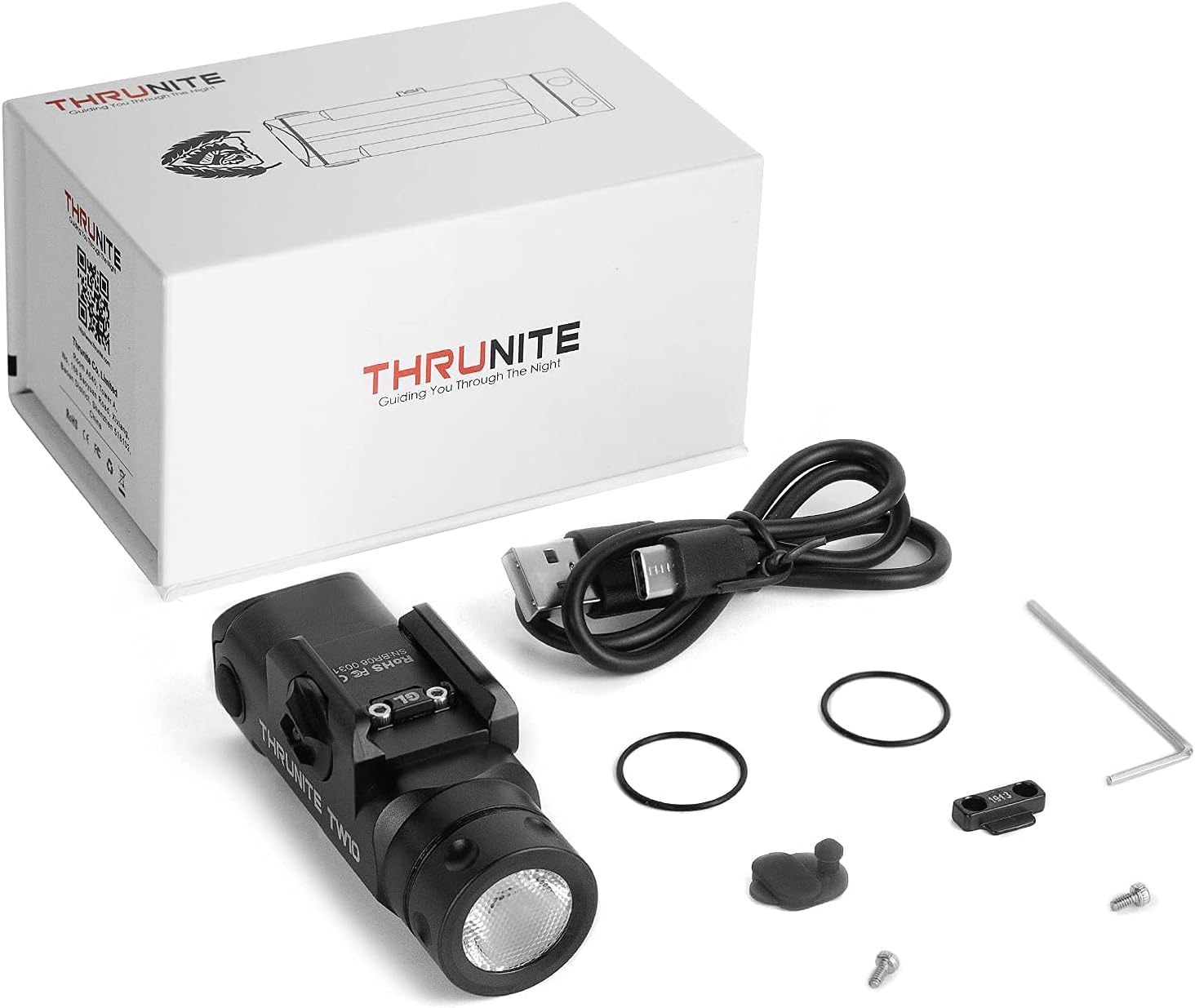
Figure 2: Included accessories with the TW10 Weaponlight
4. ຂໍ້ມູນຈໍາເພາະ
| ຄຸນສົມບັດ | ລາຍລະອຽດ |
|---|---|
| ຜົນຜະລິດສູງສຸດ | 900 Lumens |
| ເວລາແລ່ນສູງສຸດ | 130 ນາທີ |
| ໄລຍະຫ່າງສູງສຸດຂອງ Beam | 125 ແມັດ |
| ແຫຼ່ງພະລັງງານ | ແບັດເຕີຣີ USB-C ທີ່ສາມາດສາກໄດ້ |
| ປະເພດຫມໍ້ໄຟ | 1 x 1100mAh 18350 Lithium Ion (included) |
| ວັດສະດຸ | Anodized Aviation Aluminum Alloy, Rubber |
| ການຕໍ່ຕ້ານນ້ໍາ | IPX8 (ກັນນໍ້າ) |
| ຄວາມຕ້ານທານຜົນກະທົບ | 1.5 ແມັດ |
| ປະເພດການຕິດຕັ້ງ | Gun Mount (GL & 1913 Rail Adapters included) |
| ນ້ໍາຫນັກລາຍການ | 78 ກຣາມ / 2.75 ອໍ |

Figure 3: Key performance specifications
5. ຕັ້ງຄ່າ
5.1 ການຕິດຕັ້ງໄຟອາວຸດ
- Loosen the screw: Use the provided hex key to loosen the mounting screw on the weaponlight.
- ເປີດ clamp: Push the screw to open the clamp ກົນໄກ.
- Insert adapter: Select the appropriate GL or 1913 rail adapter and slide it into the guide rail slot on your firearm.
- Tighten the screw: Once positioned correctly, tighten the screw firmly to secure the weaponlight. Ensure it is stable and does not wobble.
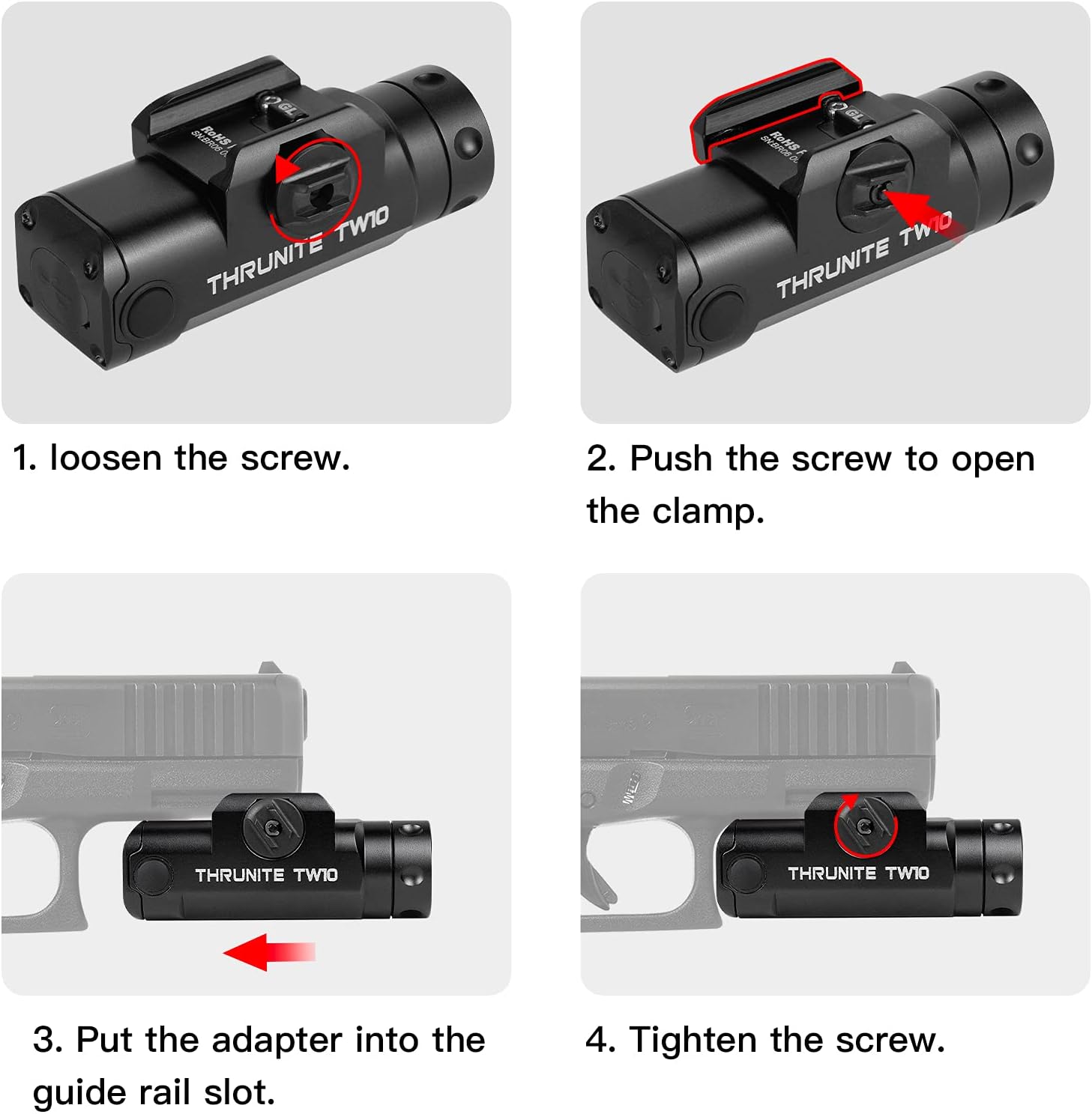
Figure 4: Weaponlight mounting instructions
5.2 ການສາກແບັດເຕີຣີ
The TW10 Weaponlight features a built-in rechargeable battery with a USB-C charging port.
- Locate the USB-C port: The USB-C charging port is located at the rear of the weaponlight, protected by a rubber cover.
- ເປີດຝາປິດ: Gently lift the rubber cover to expose the USB-C port.
- ເຊື່ອມຕໍ່ສາຍ: Plug the provided USB-C charging cable into the port and connect the other end to a USB power source (e.g., wall adapter, computer).
- ຕົວຊີ້ບອກການສາກໄຟ: The indicator light (if present) will typically show red during charging and turn green when fully charged.
- ປິດຝາປິດ: After charging, ensure the rubber cover is securely closed to maintain water resistance.

ຮູບ 5: ການສາກ USB-C
6. ຄໍາແນະນໍາການດໍາເນີນງານ
The TW10 Weaponlight is equipped with dual side switches for easy operation.
6.1 ໂLightດແສງ
- Stay-on Mode: Single press either side switch for constant illumination. Press the switch again to turn the light off.
- ຊ່ວງເວລານີ້: Press and hold down either side switch for momentary illumination. The light will turn off when the switch is released.
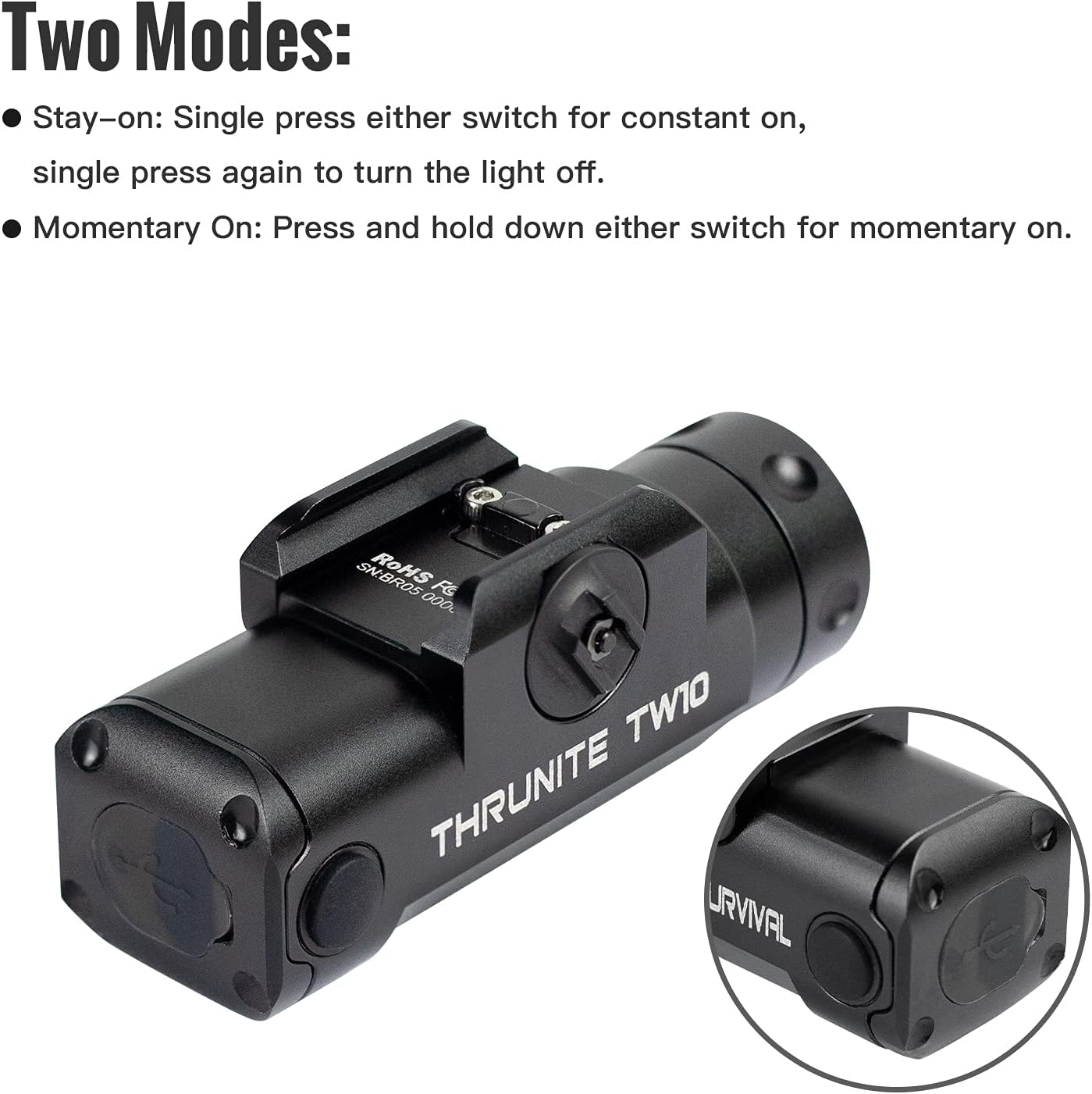
Figure 6: Operating modes
6.2 ວິດີໂອຜະລິດຕະພັນຢ່າງເປັນທາງການ
THRUNITE TW10 Tactical Flashlight
ວິດີໂອທີ 1: ສະຫຼຸບໂດຍຫຍໍ້view of the ThruNite TW10 Tactical Flashlight, showcasing its design and basic features.
THRUNITE TW10 Light
Video 2: Another short demonstration of the ThruNite TW10 Light, highlighting its compact size and illumination.
THRUNITE TW10 tactical light
Video 3: A detailed look at the ThruNite TW10 tactical light, including its features and functionality.
BSS V6 Tactical Flashlight Nightshot Testing
Video 4: Nightshot testing of a ThruNite BSS V6 Tactical Flashlight, demonstrating beam performance in low-light conditions. While not the exact TW10 model, it provides a general idea of ThruNite's tactical flashlight capabilities.
7. ບໍາລຸງຮັກສາ
- ທໍາຄວາມສະອາດ: Clean the lens and body of the flashlight with a soft, clean cloth. Avoid using abrasive materials or harsh chemicals.
- O-rings: Periodically inspect the O-rings for wear and tear. Replace them with the provided spares if necessary to maintain water resistance. Apply silicone grease to O-rings to keep them supple.
- ຊ່ອງສາກໄຟ: Keep the USB-C charging port clean and free of debris. Ensure the rubber cover is always sealed when not charging.
- ການເກັບຮັກສາ: Store the flashlight in a cool, dry place when not in use. For long-term storage, it is recommended to charge the battery periodically to maintain its health.
8. ການແກ້ໄຂບັນຫາ
- ແສງບໍ່ເປີດ:
- ໃຫ້ແນ່ໃຈວ່າໄດ້ສາກໄຟແລ້ວ.
- Check if the switches are functioning correctly.
- ໄຟກະພິບ ຫຼື ມືດມົວ:
- ຫມໍ້ໄຟອາດຈະຕ່ໍາ; ຕື່ມຂໍ້ມູນໃສ່ມັນ.
- Ensure the battery is properly seated.
- ນໍ້າເຂົ້າ:
- Check the O-rings for damage or improper seating.
- Ensure the USB-C port cover is fully closed.
9. ການຮັບປະກັນແລະການສະຫນັບສະຫນູນ
ThruNite products are typically covered by a manufacturer's warranty. For specific warranty details, including duration and coverage, please refer to the warranty card included in your product packaging or visit the official ThruNite webເວັບໄຊ.
For technical support, troubleshooting assistance, or any other inquiries, please contact ThruNite customer service through their official channels. Contact information can usually be found on their webສະຖານທີ່ຫຼືຢູ່ໃນການຫຸ້ມຫໍ່ຜະລິດຕະພັນ.
ThruNite Official Webເວັບໄຊ: www.thrunite.com