
PGST PG-107
PGST PG-107 Wireless GSM WiFi Home Alarm System User Manual
ແບບ: PG-107
1. ບົດແນະນຳ
This manual provides comprehensive instructions for the installation, operation, and maintenance of your PGST PG-107 Wireless GSM WiFi Home Alarm System. Please read this manual carefully before using the product to ensure proper functionality and safety.
The PG-107 is a dual-network alarm system, supporting both WiFi and GSM/4G connectivity, offering robust security for your home. It features an LCD screen with capacitive touch buttons and integrates with the "Tuyasmart" or "Smartlife" mobile applications for intelligent control.
2. ຜະລິດຕະພັນເກີນview
The PGST PG-107 alarm system is designed for easy DIY installation and provides comprehensive home security. Key features include:
- ການເຊື່ອມຕໍ່ເຄືອຂ່າຍຄູ່: Operates on both WiFi and GSM/4G networks for reliable communication.
- ການຄວບຄຸມ Smart App: Compatible with "Tuyasmart" or "Smartlife" apps for remote management on Android and Apple devices.
- Expandable Zones: Supports 4 wired zones and 99 wireless zones, allowing for extensive sensor integration.
- ເຂດທີ່ສາມາດປັບແຕ່ງໄດ້: Each zone can be named individually for easy identification.
- ການແຈ້ງເຕືອນ: Prerecord up to 5 groups for SMS alerts or alarm calls.
- Wireless Code Learning: Simplifies the addition of new wireless accessories.
- ຄວາມເຂົ້າກັນໄດ້ຂອງການຄວບຄຸມດ້ວຍສຽງ: Supports voice control for arming, disarming, and home modes (2.4 GHz Wi-Fi only).
- ແບັດເຕີຣີສຳຮອງ: Integrated lithium-polymer battery provides up to 4 hours of operation during power outages.
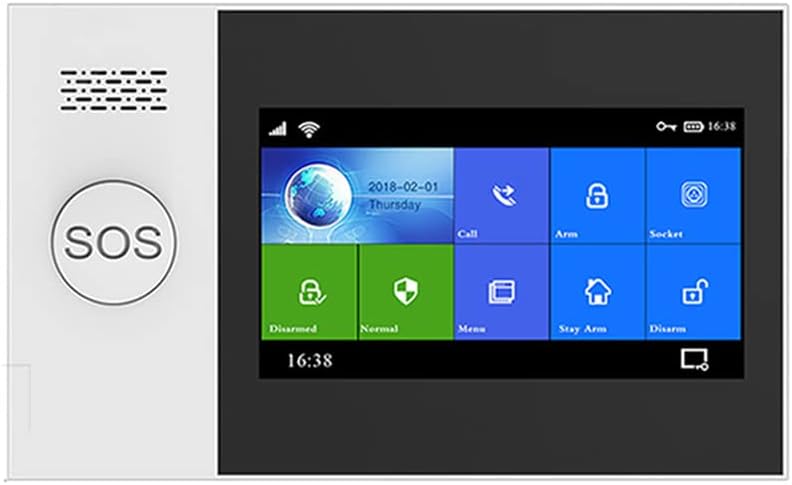
Figure 2.1: The main control panel of the PGST PG-107 Wireless GSM WiFi Home Alarm System, featuring an LCD screen, touch buttons, and an SOS button.
3. ເນື້ອໃນຊຸດ
The PGST PG-107 system typically comes as an 8-piece kit. Please verify that all components are present and in good condition upon unboxing.
- PGST PG-107 Main Alarm Panel (with integrated Lithium-polymer battery)
- Power Adapter
- ເຊັນເຊີປະຕູ/ປ່ອງຢ້ຽມໄຮ້ສາຍ
- Wireless Motion Detector (PIR Sensor)
- ການຄວບຄຸມໄລຍະໄກ
- ຄູ່ມືຜູ້ໃຊ້ (ເອກະສານນີ້)
- ຮາດແວຕິດຕັ້ງ
4. ການຕິດຕັ້ງແລະການຕິດຕັ້ງ
The PG-107 system is designed for DIY installation without the need for specialized tools. Follow these steps for initial setup:
4.1. Powering On the Main Panel
- Connect the power adapter to the main alarm panel and plug it into a standard electrical outlet.
- The panel will power on automatically. The integrated backup battery will charge and provide power in case of an outage.

Figure 4.1: The PGST PG-107 system features low power consumption and an integrated backup battery, providing continued operation during power failures.
4.2. ການຕິດຕັ້ງແອັບຯ ແລະການເຊື່ອມຕໍ່ Wi-Fi
- Download the "Tuyasmart" or "Smartlife" application from your smartphone's app store (available for Android and Apple devices).
- ລົງທະບຽນສຳລັບບັນຊີໃໝ່ ຫຼື ເຂົ້າສູ່ລະບົບຖ້າທ່ານມີບັນຊີແລ້ວ.
- On the app, follow the instructions to add a new device. Select the alarm system category.
- Ensure your smartphone is connected to a 2.4 GHz Wi-Fi network. The PG-107 does not support 5 GHz networks.
- Follow the on-screen prompts in the app and on the alarm panel to connect the system to your Wi-Fi network. This typically involves entering your Wi-Fi password.
4.3. Adding Wireless Sensors and Remotes
The system supports wireless code learning for easy addition of accessories.
- Access the "Add Accessory" or "Zone Management" section on the alarm panel or through the mobile app.
- Activate the sensor (e.g., open a door for a door sensor, trigger motion for a PIR sensor, press a button on a remote). The panel will detect the signal.
- Assign the detected sensor to a specific zone and give it a descriptive name (e.g., "Front Door," "Living Room Motion").
- Repeat for all additional sensors and remote controls. The system supports up to 99 wireless zones and 5 remote controls.

Figure 4.2: Illustration of wireless sensor operation, including low battery alerts sent to the mobile application. The system monitors battery levels of connected sensors.
4.4. Setting Up GSM/4G (Optional)
If you wish to use the GSM/4G functionality for SMS alerts and calls, insert a compatible SIM card into the designated slot on the main panel. Ensure the SIM card has an active plan for calls and SMS.
- Power off the main panel before inserting the SIM card.
- Insert the SIM card correctly into the slot.
- Power on the panel. The system will attempt to register with the cellular network.
- Configure up to 5 emergency contact numbers for SMS alerts and alarm calls via the panel's menu or the mobile app.
5. ຄໍາແນະນໍາການດໍາເນີນງານ
5.1. ການເປີດໃຊ້ ແລະ ການປິດລະບົບ
The system offers several arming modes:
- ແຂນ (ໂໝດບໍ່ຢູ່ເຮືອນ): Activates all sensors. Ideal when no one is home.
- ແຂນຢືດ (ໂໝດຢູ່ເຮືອນ): ເປີດໃຊ້ເຊັນເຊີຂອບເຂດ (ເຊັ່ນ: ເຊັນເຊີປະຕູ/ປ່ອງຢ້ຽມ) ໃນຂະນະທີ່ອະນຸຍາດໃຫ້ມີການເຄື່ອນໄຫວພາຍໃນເຮືອນ.
- ປົດອາວຸດ: Deactivates all alarm functions.
You can arm/disarm using the control panel, remote control, mobile app, or voice commands (if configured).

Figure 5.1: The PGST PG-107 system supports voice control through compatible smart assistants like Amazon Alexa, allowing for convenient arming and disarming.
5.2. Emergency SOS Function
ກົດ SOS button on the main panel in case of an emergency. This will trigger an immediate alarm and send alerts to your pre-configured emergency contacts.
5.3. Two-Way Voice Intercom
The system supports two-way voice communication through the mobile app. This allows you to make and receive calls via the alarm panel, send voice messages, and communicate with individuals at home remotely.

Figure 5.2: The PGST PG-107 features a two-way voice intercom function, enabling users to make and receive calls and voice messages through the system for enhanced communication.
5.4. Zone Management and Naming
You can customize the name of each wired and wireless zone through the panel's settings or the mobile app. This helps in quickly identifying the location of an triggered alarm.
5.5. APP Notifications and Alarm Sound
When an alarm is triggered, the system will emit a 100 dB audible alarm and send instant notifications to your mobile app. If GSM is configured, SMS alerts and calls will also be made to the preset numbers.
6. ບໍາລຸງຮັກສາ
- ກວດສອບຫມໍ້ໄຟ: Regularly check the battery status of wireless sensors via the mobile app. Replace batteries promptly when low to ensure continuous protection.
- Main Panel Battery: The main panel's internal lithium-polymer battery provides backup power. Ensure the panel remains connected to power for optimal battery health.
- ທໍາຄວາມສະອາດ: Clean the main panel and sensors with a soft, dry cloth. Avoid using abrasive cleaners or solvents.
- ການອັບເດດເຟີມແວ: Check the mobile app periodically for any available firmware updates for the alarm system to ensure optimal performance and security.
7. ການແກ້ໄຂບັນຫາ
| ບັນຫາ | ສາເຫດທີ່ເປັນໄປໄດ້ | ການແກ້ໄຂ |
|---|---|---|
| ລະບົບບໍ່ໄດ້ເຊື່ອມຕໍ່ກັບ Wi-Fi. | Incorrect Wi-Fi password; 5 GHz network selected; too far from router. | Ensure correct password. Connect to a 2.4 GHz network. Move panel closer to router or use a Wi-Fi extender. |
| Wireless sensor not triggering alarm. | Sensor battery low/dead; sensor not properly paired; sensor out of range. | Check/replace sensor battery. Re-pair the sensor with the main panel. Relocate sensor closer to the panel. |
| ບໍ່ມີການແຈ້ງເຕືອນ SMS/ການໂທ. | SIM card not inserted correctly; no active plan on SIM; incorrect emergency numbers. | Ensure SIM card is properly inserted and active. Verify emergency contact numbers in settings. |
| Alarm panel powers off when unplugged. | Backup battery not charged or faulty. | Allow sufficient time for the backup battery to charge (at least 4 hours). If issue persists, contact support. |
8. ຂໍ້ກໍານົດດ້ານວິຊາການ
- ຕົວແບບ: PG-107
- ຍີ່ຫໍ້: PGST
- ການເຊື່ອມຕໍ່: Wi-Fi (2.4 GHz only), GSM/4G
- ແອັບທີ່ເຂົ້າກັນໄດ້: Tuyasmart, Smartlife
- ເຂດທີ່ມີສາຍ: 4
- ເຂດໄຮ້ສາຍ: 99
- Remote Controls Supported: 5
- ລະດັບສຽງປຸກ: 100 dB
- ແບັດເຕີຣີສຳຮອງ: 1 x Lithium-polymer (included)
- ອາຍຸແບັດເຕີຣີສຳຮອງ: ສູງສຸດ 4 ຊົ່ວໂມງ
- ຂະໜາດ (L x W x H): 25 x 18 x 6 cm (ປະມານ 9.8 x 7.1 x 2.4 ນິ້ວ)
- ນ້ຳໜັກ: 610 ກຣາມ (ປະມານ 1.34 ປອນ)
- UPC: 748095622027
9. ການຮັບປະກັນແລະການສະຫນັບສະຫນູນ
For warranty information and technical support, please refer to the documentation provided with your purchase or visit the official PGST webເວັບໄຊ. ຮັກສາໃບຮັບເງິນການຊື້ຂອງທ່ານໄວ້ເປັນຫຼັກຖານການຊື້ສໍາລັບການຮ້ອງຂໍການຮັບປະກັນ.
If you encounter issues not covered in this manual, please contact PGST customer service for assistance.
Ask a question about this manual
Ask about setup, troubleshooting, compatibility, parts, safety, or missing instructions. Manuals+ will review the question and use this page’s manual context to help answer it.