
ແນະນຳ
ຂອບໃຈສໍາລັບການຊື້asing the Whirlpool 1.1 cu. ft. (30L) Microwave Oven, Model WM-1811B. This manual provides essential information for the safe and efficient operation, maintenance, and troubleshooting of your new appliance. Please read these instructions thoroughly before use and retain them for future reference.
ຄໍາແນະນໍາຄວາມປອດໄພທີ່ສໍາຄັນ
ເມື່ອນໍາໃຊ້ເຄື່ອງໃຊ້ໄຟຟ້າ, ຄວນລະມັດລະວັງຄວາມປອດໄພຂັ້ນພື້ນຖານ, ລວມທັງດັ່ງຕໍ່ໄປນີ້:
- ອ່ານຄໍາແນະນໍາທັງຫມົດກ່ອນທີ່ຈະໃຊ້ເຄື່ອງໃຊ້.
- ຫ້າມໃຊ້ເຕົາອົບຖ້າປະທັບຕາປະຕູຫຼືປະຕູເສຍຫາຍ.
- ຫ້າມບໍ່ໃຫ້ຄວາມຮ້ອນຂອງນໍ້າ ຫຼືອາຫານອື່ນໆຢູ່ໃນຖັງທີ່ຜະນຶກເຂົ້າກັນ ເພາະມັນມີຄວາມຜິດທີ່ຈະລະເບີດ.
- Only allow children to use the oven without supervision when adequate instructions have been given.
- ຫ້າມໃຊ້ສານເຄມີຫຼືສານລະເຫີຍທີ່ລະລາຍໃນເຄື່ອງໃຊ້ນີ້.
- Do not use this microwave for commercial purposes. It is designed for household use only.
- ສະເຫມີໃຫ້ແນ່ໃຈວ່າ turntable ແລະວົງ roller ໄດ້ຖືກຕໍາແຫນ່ງຢ່າງຖືກຕ້ອງກ່ອນທີ່ຈະດໍາເນີນການ.
WARNING: To reduce the risk of fire, electric shock, injury to persons or exposure to excessive microwave energy:
- ຢ່າພະຍາຍາມໃຊ້ເຕົາອົບນີ້ດ້ວຍການເປີດປະຕູ.
- ຫ້າມວາງວັດຖຸໃດໆລະຫວ່າງໜ້າເຕົາອົບກັບປະຕູ ຫຼືປ່ອຍໃຫ້ດິນ ຫຼືສິ່ງເສດເຫຼືອທີ່ສະອາດສະສົມຢູ່ເທິງໜ້າຝາປິດ.
- ຢ່າເຮັດວຽກເຕົາອົບຖ້າມັນເສຍຫາຍ.
ເນື້ອໃນຊຸດ
ກວດສອບວ່າອົງປະກອບທັງຫມົດແມ່ນມີແລະບໍ່ເສຍຫາຍ:
- Whirlpool Microwave Oven Model WM-1811B
- ໂຕະໂຕະແກ້ວ
- ວົງແຫວນ
- ຄູ່ມືຜູ້ໃຊ້ (ເອກະສານນີ້)
- ຂໍ້ມູນການຮັບປະກັນ
ການຕິດຕັ້ງແລະການຕິດຕັ້ງ
- ການຫຸ້ມຫໍ່: Remove all packaging materials from inside and outside the microwave oven. Check for any damage such as dents or a misaligned door. Do not operate the oven if it is damaged.
- ການຈັດວາງ: Place the microwave on a flat, stable surface that can support its weight and the heaviest food item likely to be cooked in it. Ensure adequate ventilation by leaving at least 10 cm (4 inches) of space at the back, 20 cm (8 inches) at the top, and 5 cm (2 inches) on the sides. Do not block any ventilation openings.
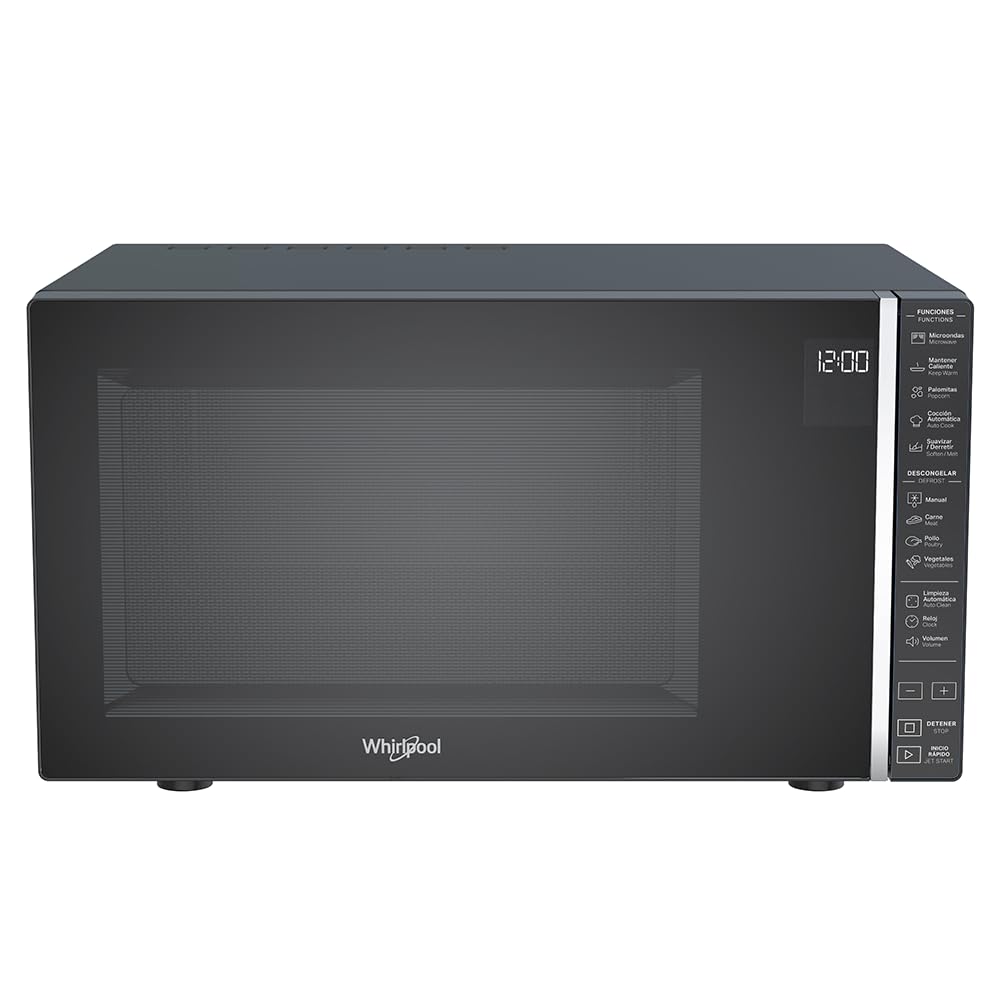
ຮູບ 1: ດ້ານຫນ້າ view of the Whirlpool WM-1811B Microwave Oven. Ensure proper clearance around the unit for ventilation.
- ການຕິດຕັ້ງແບບ Turntable:
- ວາງແຫວນມ້ວນຢູ່ໃຈກາງຂອງຊັ້ນຂອງເຕົາອົບ.
- ວາງແຜ່ນແກ້ວໃສ່ເທິງຂອງວົງແຫວນ, ໃຫ້ແນ່ໃຈວ່າມັນນັ່ງຢູ່ໃຈກາງຂອງສູນ.

ຮູບ 2: ພາຍໃນ view of the microwave with the door open, showing the glass turntable and roller ring in place.
- ການເຊື່ອມຕໍ່ພະລັງງານ: Plug the microwave oven into a properly grounded electrical outlet. Do not use extension cords or adapters.
ຄໍາແນະນໍາການດໍາເນີນງານ
Your Whirlpool WM-1811B microwave oven features a touch control panel and an LCD display for easy operation. It offers 7 power levels and 25 pre-programmed functions, including specialized options like Keep Warm and Automatic Cleaning.

ຮູບທີ 3: ລາຍລະອຽດ view of the touch control panel and LCD display.
ການຕັ້ງຄ່າໂມງ
- ກົດປຸ່ມ "ໂມງ".
- Use the number pads to enter the current time.
- ກົດປຸ່ມ "ໂມງ" ອີກເທື່ອຫນຶ່ງເພື່ອຢືນຢັນ.
ປຸງແຕ່ງອາຫານໄມໂຄເວຟ
- ວາງອາຫານໃສ່ຖັງທີ່ປອດໄພດ້ວຍໄມໂຄເວຟຢູ່ເທິງໂຕະແກ້ວ.
- ປິດປະຕູເຕົາອົບຢ່າງປອດໄພ.
- ໃສ່ເວລາປຸງແຕ່ງອາຫານທີ່ຕ້ອງການໂດຍໃຊ້ແຜ່ນຕົວເລກ.
- Press the "Power Level" button repeatedly to select the desired power level (1-7). The default is usually P100 (full power).
- ກົດ "ເລີ່ມຕົ້ນ" ເພື່ອເລີ່ມຕົ້ນການປຸງແຕ່ງອາຫານ.
Quick Start / Jet Start
For quick heating at full power, simply press the "Jet Start" button. Each press adds 30 seconds of cooking time at 100% power.
Automatic Cooking Programs (25 Pre-programmed Functions)
The microwave features 25 pre-programmed functions for various food types, ensuring optimal cooking results. Refer to the icons on the control panel for specific programs such as Popcorn, Pizza, Potato, Beverage, Reheat, etc.
- ເອົາອາຫານໃສ່ເຕົາອົບ.
- Press the "Automatic Cooking" button or the specific program icon (e.g., "Popcorn").
- Select the desired quantity or weight if prompted (e.g., for popcorn, select bag size).
- ກົດ "ເລີ່ມຕົ້ນ" ເພື່ອເລີ່ມຕົ້ນ.
Defrosting (Manual and Automatic)
The microwave offers both manual and automatic defrosting options for meat, poultry, and vegetables.
- ການລະລາຍນ້ ຳ ດ້ວຍມື:
- ກົດປຸ່ມ "Defrost".
- Enter the desired defrosting time.
- ກົດ "ເລີ່ມຕົ້ນ".
- Defrost ອັດຕະໂນມັດ:
- Press the specific defrost program icon (e.g., "Meat", "Poultry", "Vegetables").
- ໃສ່ນ້ໍາຫນັກຂອງອາຫານ.
- Press "Start". The oven will automatically calculate the defrosting time and power level.
ຮັກສາຫນ້າທີ່ອົບອຸ່ນ
This specialized function helps maintain the temperature of cooked food without further cooking. Press the "Keep Warm" button and then "Start".

ຮູບທີ 4: ຕົວຢ່າງample of food being heated inside the microwave oven.
ການບໍາລຸງຮັກສາແລະການທໍາຄວາມສະອາດ
ການທໍາຄວາມສະອາດແລະການບໍາລຸງຮັກສາເປັນປົກກະຕິຈະຮັບປະກັນອາຍຸຍືນແລະປະສິດທິພາບທີ່ດີທີ່ສຸດຂອງເຕົາອົບໄມໂຄເວຟຂອງທ່ານ.
ການອະນາໄມພາຍນອກ
- ເຊັດພາຍນອກດ້ວຍການໂຄສະນາamp ຜ້າແລະຢາຊັກຜ້າອ່ອນໆ.
- ຫຼີກລ້ຽງການເຮັດຄວາມສະອາດຂັດຫຼື pads scouring.
ທໍາຄວາມສະອາດພາຍໃນ
- ທໍາຄວາມສະອາດທົ່ວໄປ: ເຊັດຝາພາຍໃນດ້ວຍການໂຄສະນາamp ຜ້າຫຼັງຈາກການນໍາໃຊ້ແຕ່ລະຄົນ. ສຳລັບເຄື່ອງປັ້ນດິນເຜົາ, ເອົານ້ຳໝາກນາວໃສ່ໃນຖ້ວຍ ແລະ ໄມໂຄເວຟ ປະມານ 2-3 ນາທີ ເພື່ອລ້າງສານຕົກຄ້າງ, ຈາກນັ້ນເຊັດໃຫ້ສະອາດ.
- ໂຕະໝຸນແກ້ວ ແລະ ວົງແຫວນລູກກິ້ງ: These can be removed and washed in warm soapy water or in the dishwasher. Ensure they are dry before placing them back in the oven.
- ຟັງຊັນເຮັດຄວາມສະອາດອັດຕະໂນມັດ: Your microwave features an auto-clean function. Consult the control panel for the specific icon and follow the on-screen instructions. This function typically uses steam to loosen food particles for easier wiping.
Door and Seal Cleaning
Keep the door seals and adjacent parts clean. Use a mild soap and water solution. Never use abrasive sprays or pads.
ການແກ້ໄຂບັນຫາ
ກ່ອນທີ່ຈະຕິດຕໍ່ກັບຝ່າຍບໍລິການລູກຄ້າ, ລອງໃຊ້ວິທີແກ້ໄຂຕໍ່ໄປນີ້ສໍາລັບບັນຫາທົ່ວໄປ:
| ບັນຫາ | ສາເຫດທີ່ເປັນໄປໄດ້ | ການແກ້ໄຂ |
|---|---|---|
| ເຕົາອົບບໍ່ເລີ່ມຕົ້ນ. | ສາຍໄຟບໍ່ໄດ້ສຽບ; ປະຕູປິດບໍ່ຖືກຕ້ອງ; ຟິວເປົ່າ ຫຼືຕົວຕັດວົງຈອນຕິດ. | Plug in power cord; Close door securely; Check household fuse or reset circuit breaker. |
| ອາຫານບໍ່ຮ້ອນ. | ເວລາປຸງອາຫານບໍ່ຖືກຕ້ອງ / ລະດັບພະລັງງານທີ່ກໍານົດໄວ້; ປະຕູປິດບໍ່ຖືກຕ້ອງ. | Adjust cooking time/power level; Ensure door is fully closed. |
| Turntable ບໍ່ rotating. | Turntable or roller ring not correctly positioned; Obstruction under turntable. | ປ່ຽນຕຳແໜ່ງຂອງໂຕະໝຸນ ແລະ ວົງແຫວນລູກກິ້ງ; ເອົາສິ່ງກີດຂວາງອອກ. |
| ສຽງຜິດປົກກະຕິໃນລະຫວ່າງການປະຕິບັດງານ. | ຖັງອາຫານສໍາຜັດກັບຝາເຕົາອົບ; ໂຕະຕັ້ງໂຕະບໍ່ໄດ້ຕັ້ງໄວ້ກາງ. | Ensure container is not touching walls; Center turntable. |
ຂໍ້ມູນຈໍາເພາະ
| ຍີ່ຫໍ້ | ວັງນ້ຳ |
| ໝາຍເລກຕົວແບບ | WM1811B |
| ຄວາມອາດສາມາດ | 1.1 ລູກບາດຟຸດ (30 ລິດ) |
| ສີ | ດຳ |
| ຂະ ໜາດ (D x W x H) | 40ຊມ x 53.9ຊມ x 30ຊມ (15.75 x 21.22 x 11.81 ນິ້ວ) |
| ນ້ຳໜັກ | 17.7 ກິໂລກຣາມ (39 ປອນ) |
| ວັດtage | 1000 ວັດ |
| ລະດັບພະລັງງານ | 7 |
| ໂຄງການ | 25 (Pre-programmed functions) |
| ປະເພດການຄວບຄຸມ | Touch Control / Touch Screen |
| ຄຸນນະສົມບັດພິເສດ | Automatic Cleaning, Keep Warm Function, Timer Function |
| ວັດສະດຸ | Plastic (Exterior and Interior) |
| ປະເພດການຕິດຕັ້ງ | ອິດສະລະ |
| GTIN | 07501545633287 |
| ປະເທດຕົ້ນກໍາເນີດ | ເມັກຊິໂກ |

Figure 5: Dimensional diagram of the microwave oven (Depth: 40 cm, Width: 53.9 cm, Height: 30 cm).
ການຮັບປະກັນແລະການສະຫນັບສະຫນູນ
Your Whirlpool WM-1811B Microwave Oven comes with a ການຮັບປະກັນຂອງຜູ້ຜະລິດ 12 ເດືອນ. ການຮັບປະກັນນີ້ກວມເອົາຂໍ້ບົກພ່ອງຂອງວັດສະດຸແລະການເຮັດວຽກພາຍໃຕ້ການນໍາໃຊ້ປົກກະຕິ.
For warranty claims, technical support, or service inquiries, please contact Whirlpool customer service directly. Refer to the warranty card included in your package for specific contact details and terms.
Please have your model number (WM-1811B) and proof of purchase ready when contacting support.