
1. ບົດແນະນຳ
Thank you for choosing the Caliber HPG318DAB Portable DAB+/FM Radio. This device offers high-quality digital and analog radio reception, a compact design for portability, and convenient alarm functions. This manual provides essential information for the safe and efficient use of your radio.
2. ຂໍ້ມູນຄວາມປອດໄພ
- ອ່ານຄໍາແນະນໍາທັງຫມົດຢ່າງລະອຽດກ່ອນທີ່ຈະນໍາໃຊ້ແລະເກັບຮັກສາໄວ້ສໍາລັບການອ້າງອີງໃນອະນາຄົດ.
- ຢ່າເຮັດໃຫ້ອຸປະກອນຖືກຝົນ, ຄວາມຊຸ່ມຊື່ນ, ຫຼືອຸນຫະພູມທີ່ຮຸນແຮງ.
- ຫຼີກເວັ້ນການວາງອຸປະກອນຢູ່ໃກ້ກັບແຫຼ່ງຄວາມຮ້ອນ ຫຼືຢູ່ໃນແສງແດດໂດຍກົງ.
- ຢ່າຖອດ ຫຼືພະຍາຍາມສ້ອມແປງອຸປະກອນດ້ວຍຕົນເອງ. ອ້າງອີງການບໍລິການທັງໝົດໃຫ້ກັບບຸກຄະລາກອນທີ່ມີຄຸນວຸດທິ.
- ໃຊ້ແຕ່ສາຍສາກ ແລະອະແດັບເຕີທີ່ໃຫ້ມາເທົ່ານັ້ນ.
- ຮັກສາໃຫ້ໄກຈາກເດັກນ້ອຍ.
3. ເນື້ອໃນຊຸດ
ໃຫ້ແນ່ໃຈວ່າທຸກລາຍການຢູ່ໃນຊຸດ:
- Caliber HPG318DAB Portable DAB+/FM Radio Unit
- ຄູ່ມືຜູ້ໃຊ້
- ສາຍສາກ USB
- Power Adapter
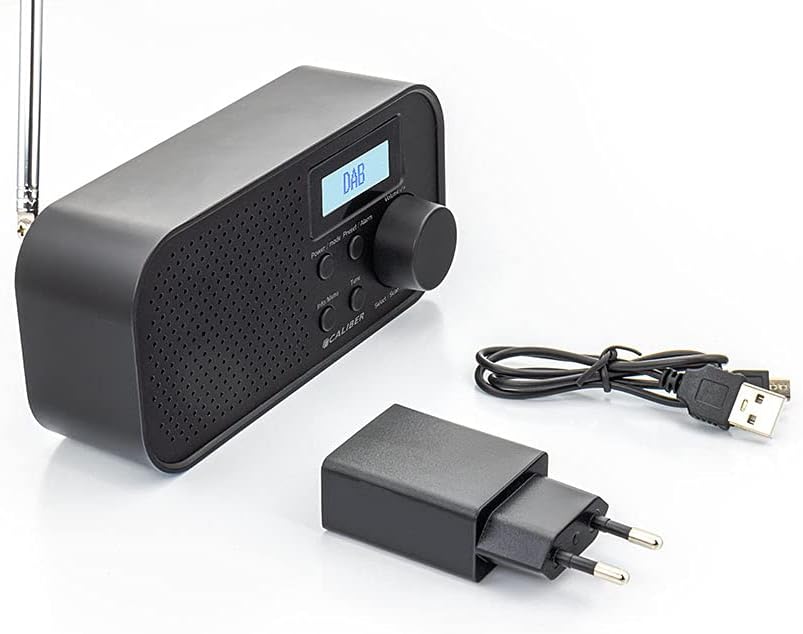
Image: Caliber HPG318DAB radio unit, USB charging cable, and power adapter.
4. ຜະລິດຕະພັນເກີນview
4.1 ແຜງຄວບຄຸມດ້ານໜ້າ
ຮູບພາບ: ທາງຫນ້າ view of the Caliber HPG318DAB radio, highlighting the LCD screen, speaker grille, and control buttons.
- ຈໍ LCD: Displays station information, time, and menu options.
- ປຸ່ມ Power / Mode: Turns the radio on/off and switches between DAB+ and FM modes.
- ປຸ່ມເມນູ/ຂໍ້ມູນ: Accesses menu settings and displays additional information.
- ຕັ້ງໄວ້ລ່ວງໜ້າ/ປຸ່ມປຸກ: Saves/recalls preset stations and sets alarm functions.
- Select/Scan Button: Confirms selections and initiates station scans.
- ປຸ່ມເລື່ອນ: ປິດສຽງປຸກຊົ່ວຄາວ.
- ປຸ່ມລະດັບສຽງ: ປັບລະດັບສຽງ.
- Grille ລໍາໂພງ: ສຽງອອກ.
4.2 ການເຊື່ອມຕໍ່ແຜງດ້ານຫລັງ

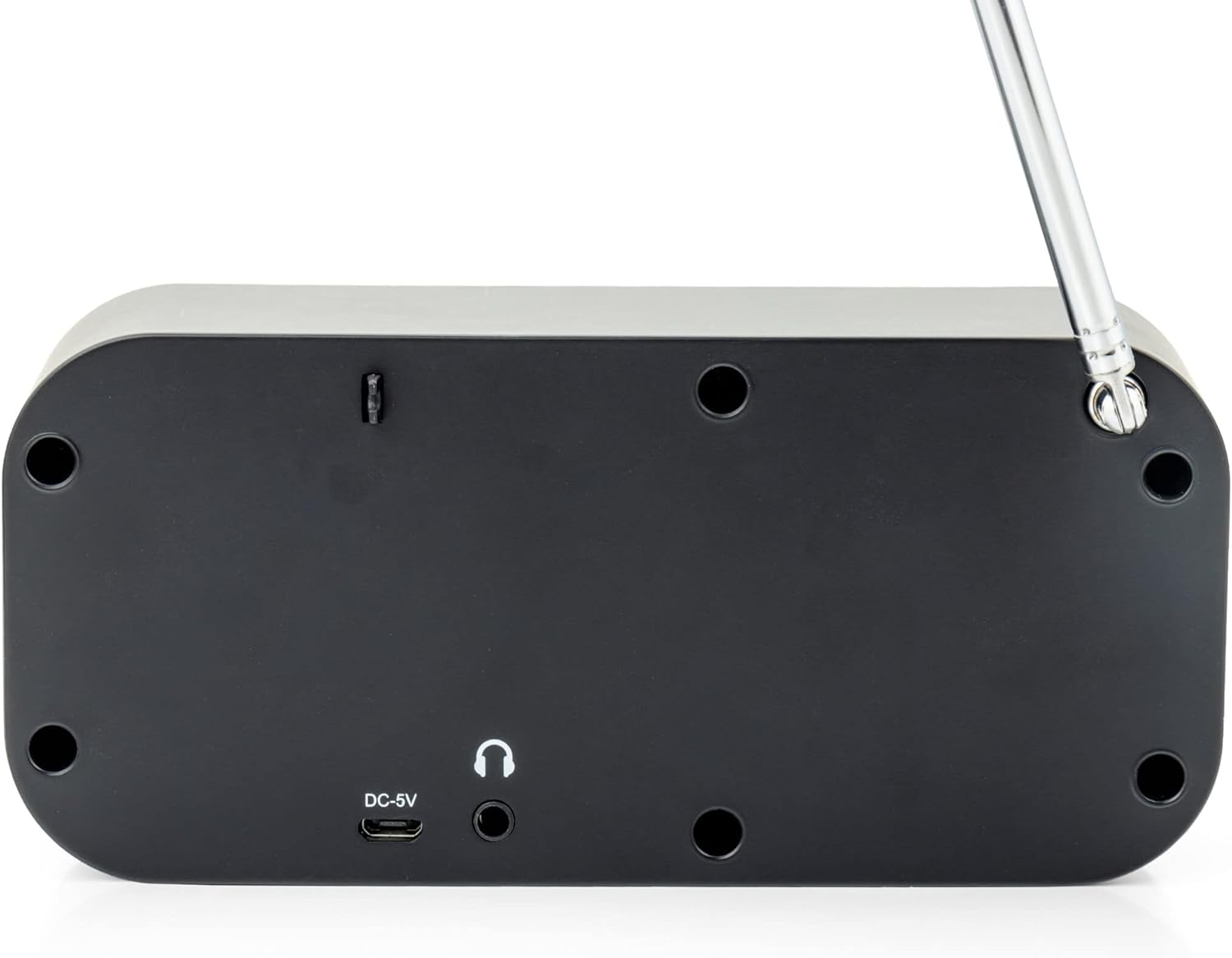
ຮູບພາບ: ດ້ານຫລັງ view of the Caliber HPG318DAB radio, showing the DC-5V charging port, 3.5mm headphone jack, and telescopic antenna.
- DC-5V Input: ເຊື່ອມຕໍ່ສາຍສາກໄຟ USB ຢູ່ບ່ອນນີ້.
- Jack ຫູຟັງ 3.5 ມມ: For connecting headphones or earphones.
- ເສົາອາກາດ Telescopic: ຂະຫຍາຍສໍາລັບການຮັບວິທະຍຸທີ່ດີທີ່ສຸດ.
5. ຕັ້ງຄ່າ
5.1 ການສາກແບັດເຕີຣີ
The Caliber HPG318DAB features a built-in rechargeable battery, providing up to 8 hours of playback on a full charge.
- Connect the small end of the provided USB charging cable to the DC-5V Input port on the rear of the radio.
- Connect the larger end of the USB cable to the provided power adapter.
- ສຽບອະແດບເຕີໄຟເຂົ້າໄປໃນເຕົ້າສຽບຝາມາດຕະຖານ.
- The charging indicator on the LCD screen will show the charging status. Once fully charged, the indicator will change.
Note: It is recommended to fully charge the battery before first use.
5.2 ການປັບສາຍອາກາດ
For optimal radio reception, fully extend the telescopic antenna located on the rear of the device. Adjust its position to improve signal strength if reception is poor.
6. ຄໍາແນະນໍາການດໍາເນີນງານ
6.1 ເປີດ/ປິດ ແລະເລືອກໂໝດ
- ເພື່ອຫັນວິທະຍຸ ON, ກົດຄ້າງໄວ້ ພະລັງງານ/ໂໝດ ປຸ່ມ.
- ເພື່ອຫັນວິທະຍຸ ປິດ, ກົດຄ້າງໄວ້ ພະລັງງານ/ໂໝດ ປຸ່ມອີກເທື່ອຫນຶ່ງ.
- ເພື່ອປ່ຽນລະຫວ່າງ DAB+ ແລະ FM modes, short press the ພະລັງງານ/ໂໝດ button while the radio is on. The current mode will be displayed on the LCD screen.
6.2 ການດໍາເນີນງານວິທະຍຸ DAB+
- ປ່ຽນໄປໃຊ້ໂໝດ DAB+ ໂດຍໃຊ້ ພະລັງງານ/ໂໝດ ປຸ່ມ.
- The radio will automatically perform a full scan for available DAB+ stations upon first use or if no stations are found. To initiate a manual scan, press the ເມນູ/ຂໍ້ມູນ button, navigate to 'Full Scan', and press Select/Scan.
- ໃຊ້ ປະລິມານດັງ to scroll through the list of available stations. Press Select/Scan ໃນການເລືອກສະຖານີ.
- To save a station as a preset (up to 10 presets): While listening to a station, press and hold the ຕັ້ງໄວ້ລ່ວງໜ້າ/ປຸກ ປຸ່ມ. ໃຊ້ ປະລິມານດັງ ເພື່ອເລືອກຕົວເລກທີ່ກໍານົດໄວ້ກ່ອນ (1-10), ຈາກນັ້ນກົດ Select/Scan ເພື່ອຢືນຢັນ.
- To recall a preset station: Short press the ຕັ້ງໄວ້ລ່ວງໜ້າ/ປຸກ ປຸ່ມ, ໃຊ້ ປະລິມານດັງ ເພື່ອເລືອກໝາຍເລກທີ່ຕັ້ງໄວ້ລ່ວງໜ້າທີ່ຕ້ອງການ, ຈາກນັ້ນກົດ Select/Scan.
- ກົດ ເມນູ/ຂໍ້ມູນ ປຸ່ມ view additional information (e.g., program type, signal strength, time) provided by Radio Data System (RDS).
6.3 ການດໍາເນີນງານວິທະຍຸ FM
- ສະຫຼັບໄປໃຊ້ໂໝດ FM ພະລັງງານ/ໂໝດ ປຸ່ມ.
- To automatically scan for stations: Press and hold the Select/Scan ປຸ່ມ. ວິທະຍຸຈະສະແກນ ແລະ ຢຸດຢູ່ສະຖານີທີ່ແຮງຕໍ່ໄປ.
- To manually tune: Rotate the ປະລິມານດັງ to adjust the frequency in small increments.
- To save a station as a preset (up to 10 presets): While listening to a station, press and hold the ຕັ້ງໄວ້ລ່ວງໜ້າ/ປຸກ ປຸ່ມ. ໃຊ້ ປະລິມານດັງ ເພື່ອເລືອກຕົວເລກທີ່ກໍານົດໄວ້ກ່ອນ (1-10), ຈາກນັ້ນກົດ Select/Scan ເພື່ອຢືນຢັນ.
- To recall a preset station: Short press the ຕັ້ງໄວ້ລ່ວງໜ້າ/ປຸກ ປຸ່ມ, ໃຊ້ ປະລິມານດັງ ເພື່ອເລືອກໝາຍເລກທີ່ຕັ້ງໄວ້ລ່ວງໜ້າທີ່ຕ້ອງການ, ຈາກນັ້ນກົດ Select/Scan.
- ກົດ ເມນູ/ຂໍ້ມູນ ປຸ່ມ view additional information (e.g., station name, program type) provided by Radio Data System (RDS).
6.4 ການຄວບຄຸມປະລິມານ
ຫມຸນຂະຫນາດໃຫຍ່ ປະລິມານດັງ clockwise to increase the volume and counter-clockwise to decrease it.
6.5 ການໃຊ້ຫູຟັງ
Connect any standard 3.5mm headphones or earphones to the ຊ່ອງສຽບຫູຟັງ 3.5 ມມ on the rear of the radio for private listening. The internal speaker will automatically mute when headphones are connected.
6.6 ຟັງຊັນປຸກ
The radio includes alarm clock and sleep timer functions.
ການຕັ້ງຄ່າໂມງປຸກ:
- ກົດຄ້າງໄວ້ ຕັ້ງໄວ້ລ່ວງໜ້າ/ປຸກ button until the alarm setup menu appears.
- ໃຊ້ ປະລິມານດັງ to navigate through options like Alarm 1, Alarm 2, Time, Source (Buzzer/DAB/FM), and Volume. Press Select/Scan ເພື່ອຢືນຢັນການຕັ້ງຄ່າແຕ່ລະອັນ.
- Set the desired alarm time, choose your preferred alarm source (buzzer, DAB+ station, or FM station), and set the alarm volume.
- Ensure the alarm is set to 'On' in the menu.
ການນໍາໃຊ້ຟັງຊັນ Snooze:
ເມື່ອສຽງສັນຍານເຕືອນ, ກົດປຸ່ມ ເລື່ອນ button to temporarily pause the alarm for a short period (e.g., 9 minutes). The alarm will sound again after the snooze period.
ການຕັ້ງເວລານອນ:
- ກົດ ເມນູ/ຂໍ້ມູນ ປຸ່ມ.
- Navigate to the 'Sleep' option using the ປະລິມານດັງ ແລະກົດ Select/Scan.
- Select the desired sleep timer duration (e.g., 15, 30, 45, 60, 90 minutes, or Off). The radio will automatically turn off after the selected time.
7. ບໍາລຸງຮັກສາ
7.1 ການທໍາຄວາມສະອາດ
To clean the radio, use a soft, dry cloth. Do not use abrasive cleaners, waxes, or solvents as they may damage the finish.
7.2 ການເກັບຮັກສາ
When not in use for extended periods, store the radio in a cool, dry place away from direct sunlight and extreme temperatures. Ensure the battery is partially charged before storage to maintain its lifespan.
7.3 ການດູແລຫມໍ້ໄຟ
To prolong the life of the built-in Lithium-ion battery, avoid fully discharging it frequently. Charge the radio regularly, even if not in constant use.
8. ການແກ້ໄຂບັນຫາ
| ບັນຫາ | ສາເຫດທີ່ເປັນໄປໄດ້ | ການແກ້ໄຂ |
|---|---|---|
| ວິທະຍຸບໍ່ເປີດ. | ແບັດເຕີຣີໝົດ. | Connect the radio to power using the USB cable and adapter to charge the battery. |
| ການຮັບວິທະຍຸບໍ່ດີ (DAB+/FM). | ເສົາອາກາດບໍ່ໄດ້ຂະຫຍາຍ ຫຼືພື້ນທີ່ສັນຍານບໍ່ດີ. | Fully extend the telescopic antenna and adjust its position. Try moving the radio to a different location. |
| ບໍ່ມີສຽງ. | Volume is too low or headphones are connected. | ເພີ່ມປະລິມານການນໍາໃຊ້ ປະລິມານດັງ. Disconnect headphones if you want sound from the speaker. |
| ໂມງປຸກບໍ່ມີສຽງ. | ປຸກບໍ່ໄດ້ຕັ້ງຢ່າງຖືກຕ້ອງ ຫຼືປິດ. | Check alarm settings (time, source, volume, 'On' status) in the menu. |
9. ຂໍ້ມູນຈໍາເພາະ
| ຄຸນສົມບັດ | ຂໍ້ມູນຈໍາເພາະ |
|---|---|
| ໝາຍເລກຕົວແບບ | HPG318DAB |
| ຂະໜາດ (L x W x H) | 15 x 4 x 6.5 cm |
| ນ້ຳໜັກ | 255 g |
| ແຫຼ່ງພະລັງງານ | Battery-Powered (1 Lithium-ion battery required) |
| ຊີວິດຫມໍ້ໄຟ | ສູງສຸດ 8 ຊົ່ວໂມງ |
| ແຖບວິທະຍຸທີ່ຮອງຮັບ | DAB+, FM |
| ເຕັກໂນໂລຊີການເຊື່ອມຕໍ່ | AUX (for headphones), USB (for charging) |
| Maximum Speaker Output | 25 ວັດ |
| ວັດສະດຸ | ພາດສະຕິກ |
| ສີ | ດຳ |
| ຄຸນນະສົມບັດພິເສດ | Portable, Alarm Function, RDS, LCD Screen |
10. ການຮັບປະກັນແລະການສະຫນັບສະຫນູນ
For warranty information and customer support, please refer to the documentation provided with your purchase or visit the official Caliber webເວັບໄຊ. ຮັກສາຫຼັກຖານການຊື້ຂອງທ່ານສໍາລັບການຮຽກຮ້ອງການຮັບປະກັນໃດໆ.