
ແນະນຳ
Welcome to the user manual for your AWOW Funtab 701 Kids Tablet. This guide provides essential information on setting up, operating, maintaining, and troubleshooting your device to ensure a safe and enjoyable experience for your child. Please read this manual thoroughly before using the tablet.
ເນື້ອໃນຊຸດ
ກະລຸນາກວດສອບວ່າລາຍການທັງຫມົດທີ່ລະບຸໄວ້ຂ້າງລຸ່ມນີ້ແມ່ນລວມຢູ່ໃນຊຸດຂອງທ່ານ:
- AWOW Funtab 701 Kids Tablet (7 inch)
- Exclusive Kid-Proof Case
- ປາກກາທີ່ໃຊ້ໄດ້
- ຄູ່ມືຜູ້ໃຊ້ (ເອກະສານນີ້)
- Power Adapter
ສິນຄ້າເກີນview
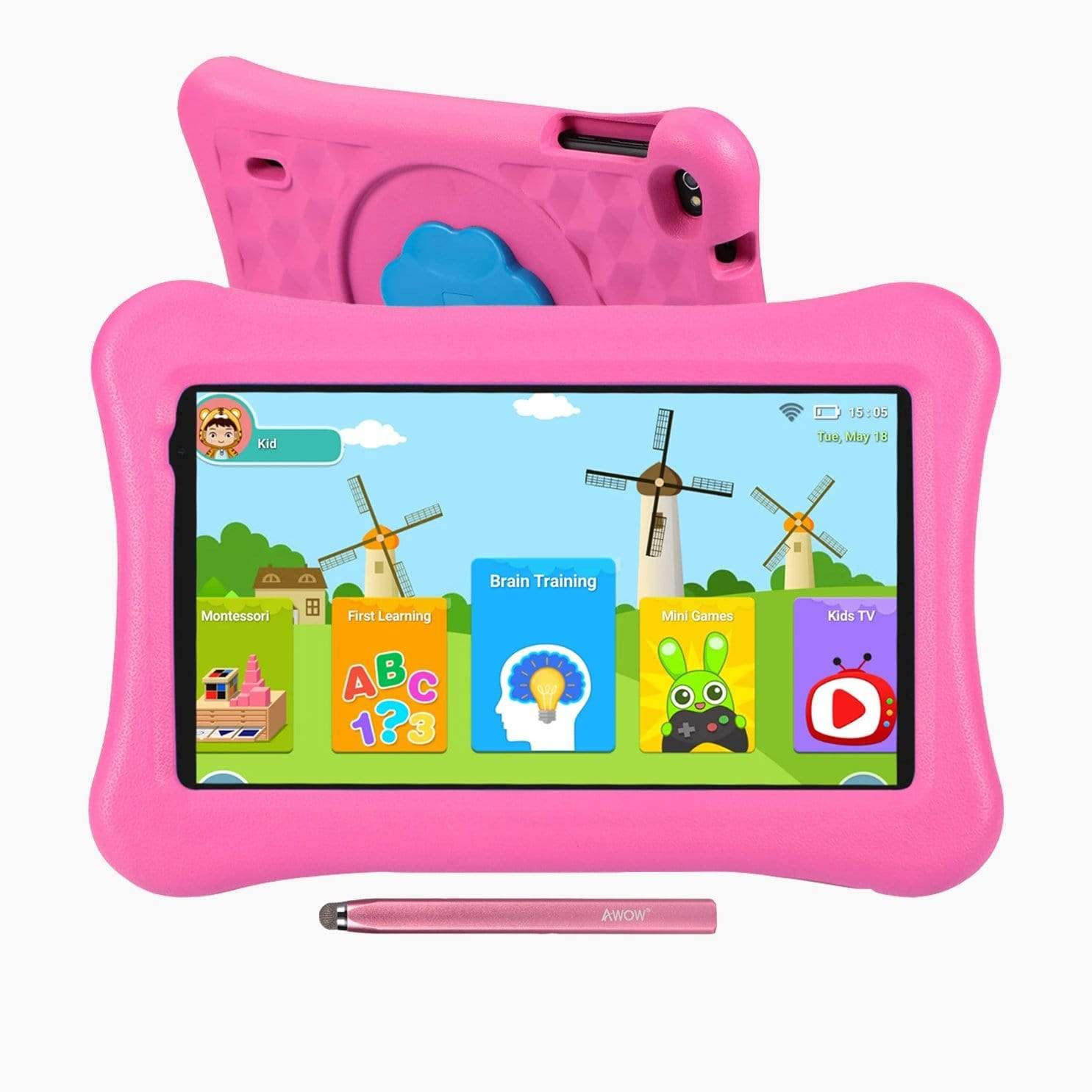
Image: The AWOW Funtab 701 Kids Tablet, shown with its protective pink kid-proof case and the accompanying active pen. The tablet features a 7-inch display.
The AWOW Funtab 701 is a 7-inch kids tablet designed for educational and entertainment purposes. It runs on Android 10 Go, powered by a 1.5GHz Quad-core processor, with 2GB RAM and 16GB ROM. It features a 1024x600 IPS HD display and supports 2.4G Wi-Fi connectivity. The tablet comes with a durable kid-proof case and an active pen for interactive learning and creativity.
ຕັ້ງຄ່າ
1. ການສາກແທັບເລັດ
Before first use, fully charge the tablet. Connect the provided power adapter to the tablet's charging port and plug it into a wall outlet. The charging indicator will typically light up. A full charge may take several hours.
2. ເປີດ / ປິດພະລັງງານ
- ເພື່ອເປີດເຄື່ອງ: Press and hold the Power button (usually located on the side or top edge) until the screen lights up.
- ປິດເຄື່ອງ: ກົດປຸ່ມເປີດ/ປິດຄ້າງໄວ້ຈົນກວ່າເມນູປິດເຄື່ອງຈະປາກົດຢູ່ໜ້າຈໍ. ເລືອກ 'ປິດເຄື່ອງ' ແລະຢືນຢັນ.
3. ການຕິດຕັ້ງເບື້ອງຕົ້ນ
ເມື່ອເປີດເຄື່ອງທຳອິດ, ແທັບເລັດຈະແນະນຳທ່ານຜ່ານຂັ້ນຕອນການຕັ້ງຄ່າເບື້ອງຕົ້ນ:
- ການເລືອກພາສາ: ເລືອກພາສາທີ່ເຈົ້າມັກ.
- ການເຊື່ອມຕໍ່ Wi-Fi: Select your 2.4G Wi-Fi network from the list and enter the password.
- ບັນຊີ Google: Sign in with an existing Google account or create a new one. This is necessary for accessing the Google Play Store and other Google services.
- ວັນທີ ແລະເວລາ: ຕັ້ງວັນທີ ແລະ ເວລາທີ່ຖືກຕ້ອງ ຫຼື ອະນຸຍາດໃຫ້ເຄືອຂ່າຍຕັ້ງຄ່າມັນໂດຍອັດຕະໂນມັດ.
4. iWawa App and Parental Controls
The AWOW Funtab 701 comes with the iWawa app pre-installed, offering a safe environment for children and robust parental controls.
- ການສ້າງ Profiles: Open the iWawa app to create individual profiles for each child.
- Content Management: Within the parental control mode, you can hand-pick specific apps, games, videos, and websites that your child can access.
- Screen Time Control: Set daily time limits for tablet usage and specific play periods.
- ການທ່ອງເວັບທີ່ປອດໄພ: Ensure children browse only safe and approved webສະຖານທີ່.
- ປັບການຕັ້ງຄ່າ: Parental control settings can be adjusted as your child grows to tailor content to their age and development.
ປະຕິບັດການແທັບເລັດ
1. ການນໍາທາງພື້ນຖານ
The tablet uses a touchscreen interface. Common gestures include:
- ແຕະ: ເພື່ອເລືອກລາຍການ ຫຼືເປີດແອັບໃດໜຶ່ງ.
- ປັດ: ເພື່ອເລື່ອນຜ່ານໜ້າ ຫຼື ເມນູ.
- ເມື່ອເຂົ້າຕາຈົນ: ເພື່ອຊູມເຂົ້າ ຫຼືອອກໃນຮູບພາບ ແລະ web ໜ້າ.
- ຂ່າວຍາວ: ເພື່ອເຂົ້າເຖິງເມນູບໍລິບົດ ຫຼືຍ້າຍໄອຄອນແອັບ.
2. Using the Active Pen
The included active pen allows for more precise interaction, drawing, and writing. Simply touch the pen to the screen as you would with your finger. No pairing is typically required for basic functionality.
3. ການຄຸ້ມຄອງຄໍາຮ້ອງສະຫມັກ
- ກຳລັງດາວໂຫຼດແອັບ: Access the Google Play Store to download new applications. Ensure parental controls are set to manage app downloads for children.
- ຖອນການຕິດຕັ້ງແອັບ: Long-press an app icon on the home screen or in the app drawer, then drag it to the 'Uninstall' option that appears. Alternatively, go to Settings > Apps & notifications > See all apps, select the app, and tap 'Uninstall'.
4. ການເຊື່ອມຕໍ່ Wi-Fi
To connect or reconnect to a Wi-Fi network:
- ໄປທີ່ ການຕັ້ງຄ່າ > ເຄືອຂ່າຍ ແລະອິນເຕີເນັດ > Wi-Fi.
- ໃຫ້ແນ່ໃຈວ່າ Wi-Fi ເປີດຢູ່ On.
- Select your desired 2.4G network from the list of available networks.
- ໃສ່ລະຫັດຜ່ານເຄືອຂ່າຍຖ້າຖືກເຕືອນ, ຈາກນັ້ນແຕະ ເຊື່ອມຕໍ່.
ບໍາລຸງຮັກສາ
1. ທໍາຄວາມສະອາດ
ເພື່ອທຳຄວາມສະອາດໜ້າຈໍແທັບເລັດ, ໃຫ້ໃຊ້ຜ້າອ່ອນໆທີ່ບໍ່ມີຂົນ. ສຳລັບຮອຍເປື້ອນທີ່ຝັງແໜ້ນ, ໃຫ້ເຊັດອອກເລັກນ້ອຍ.ampen the cloth with water or a screen-specific cleaning solution. Avoid harsh chemicals or abrasive materials. The kid-proof case can be cleaned with mild soap and water.
2. ການດູແລຫມໍ້ໄຟ
ເພື່ອຍືດອາຍຸແບັດເຕີຣີ:
- ຫຼີກເວັ້ນການເປີດເຜີຍແທັບເລັດກັບອຸນຫະພູມທີ່ຮຸນແຮງ (ຮ້ອນຫຼືເຢັນ).
- ຢ່າປ່ອຍໃຫ້ແບດເຕີລີ່ໄຫຼເຕັມເລື້ອຍໆເລື້ອຍໆ.
- ໃຊ້ພຽງແຕ່ອະແດັບເຕີໄຟທີ່ໃຫ້ມາສຳລັບການສາກໄຟ.
- Reduce screen brightness and close unused apps to conserve power.
3. ການເກັບຮັກສາ
When not in use for extended periods, store the tablet in a cool, dry place away from direct sunlight. Ensure the battery has at least a 50% charge before storing.
ການແກ້ໄຂບັນຫາ
If you encounter issues with your AWOW Funtab 701, refer to the solutions below:
- ແທັບເລັດບໍ່ເປີດ: Ensure the tablet is fully charged. Connect it to the power adapter and wait a few minutes before attempting to power it on again. If it still doesn't turn on, try holding the power button for 10-15 seconds.
- ບັນຫາການເຊື່ອມຕໍ່ Wi-Fi: Check if your Wi-Fi router is working correctly. Restart both the tablet and the router. Ensure you are connecting to a 2.4G network and have entered the correct password.
- Apps are slow or crashing: Close unused applications. Clear the cache of problematic apps (Settings > Apps & notifications > App info > Storage & cache > Clear cache). If the issue persists, consider uninstalling and reinstalling the app.
- ແບັດເຕີຣີໝົດໄວ: The average battery life is approximately 4 hours. To optimize, reduce screen brightness, disable Wi-Fi when not needed, and close background apps. Avoid running multiple demanding applications simultaneously.
- ໜ້າຈໍບໍ່ຕອບສະໜອງ: Try restarting the tablet. If the issue persists, ensure the screen is clean and free of debris.
ຂໍ້ມູນຈໍາເພາະ
| ຄຸນສົມບັດ | ລາຍລະອຽດ |
|---|---|
| ຍີ່ຫໍ້ | ອ້າວ |
| ຊື່ຕົວແບບ | Funtab 701 |
| ລະບົບປະຕິບັດການ | Android 10 Go |
| ຂະໜາດໜ້າຈໍ | 7 ນິ້ວ |
| ຄວາມລະອຽດການສະແດງ | 1024 x 600 ພິກເຊລ |
| ໂຮງງານຜະລິດ | 1.5 GHz Quad-core (Qualcomm) |
| RAM | 2 GB |
| ການເກັບຮັກສາພາຍໃນ | 16 GB |
| ການເກັບຮັກສາທີ່ຂະຫຍາຍໄດ້ | Micro SD slot (up to 512GB) |
| ກ້ອງຫຼັງ | 2.0 MP |
| ກ້ອງໜ້າ | 2.0 MP |
| ການເຊື່ອມຕໍ່ໄຮ້ສາຍ | 2.4G Wi-Fi (802.11b) |
| ອາຍຸຫມໍ້ໄຟສະເລ່ຍ | 4 ຊົ່ວໂມງ |
| ຂະໜາດສິນຄ້າ | 18.5 x 10.5 x 1 cm |
| ນ້ໍາຫນັກລາຍການ | 453.59 g |
ການຮັບປະກັນແລະການສະຫນັບສະຫນູນ
For warranty information, please refer to the documentation provided at the time of purchase. This typically includes details on coverage duration and terms. For technical assistance or further inquiries, please contact AWOW customer service through their official support channels.