
Bytech BY-AU-BS-152-BK
Bytech True Wireless Bluetooth Boost Link True Speaker User Manual
Model: BY-AU-BS-152-BK
ແນະນຳ
ຂອບໃຈສໍາລັບການຊື້asing the Bytech True Wireless Bluetooth Boost Link True Speaker. This manual provides essential information for setting up, operating, and maintaining your new speakers. Please read this manual thoroughly before use to ensure proper operation and to maximize your listening experience. These speakers feature True Wireless Stereo (TWS) functionality, Bluetooth connectivity, FM Radio, and Bass Boost for rich audio.
ຂໍ້ມູນຄວາມປອດໄພ
- ຢ່າໃຫ້ລຳໂພງຖືກອຸນຫະພູມ, ຄວາມຊຸ່ມຊື່ນ ຫຼື ແສງແດດໂດຍກົງ ຫຼື ແສງແດດທີ່ຮຸນແຮງເກີນໄປ.
- ຫຼີກລ້ຽງການລຸດລົງ ຫຼື ວາງລຳໂພງໃຫ້ມີຜົນກະທົບອັນແຮງ.
- Do not disassemble, repair, or modify the speakers yourself. Refer all servicing to qualified personnel.
- Keep the speakers away from water and other liquids.
- ໃຊ້ພຽງແຕ່ສາຍສາກ ແລະອະແດັບເຕີໄຟທີ່ລະບຸໄວ້ເທົ່ານັ້ນ.
- ເຊັດລຳໂພງດ້ວຍຜ້າອ່ອນໆແຫ້ງ. ຢ່າໃຊ້ນໍ້າຢາທຳຄວາມສະອາດທີ່ມີສີຂັດ ຫຼື ຕົວລະລາຍ.
- Listen at moderate volume levels to avoid hearing damage.
ເນື້ອໃນຊຸດ

Image: The Bytech Boost Link True Wireless Speakers shown in their retail packaging, highlighting the two speakers and the Bluetooth connectivity feature.
ກະລຸນາກວດສອບວ່າທຸກລາຍການມີຢູ່ໃນສະພາບທີ່ດີ:
- 2 x Bytech Boost Link True Wireless Speakers
- 1 x ສາຍສາກ (USB)
- 1 x ຄູ່ມືຜູ້ໃຊ້ (ເອກະສານນີ້)
ສິນຄ້າເກີນview

ຮູບພາບ: ດ້ານໜ້າໃກ້ໆ view of the two Bytech Boost Link True Wireless Speakers, showing the speaker grilles and control buttons at the bottom.
ເຮັດຄວາມຄຸ້ນເຄີຍກັບອົງປະກອບ ແລະການຄວບຄຸມຂອງລຳໂພງ:
- Grille ລໍາໂພງ: Protects the speaker driver.
- ປຸ່ມຄວບຄຸມ:
- ປຸ່ມເປີດປິດ: Power On/Off, Play/Pause.
- ປຸ່ມໂໝດ: Switch between Bluetooth, FM Radio, etc.
- ປຸ່ມຕິດຕາມ/ປະລິມານລົງກ່ອນໜ້າ: ກົດສັ້ນສຳລັບເພງກ່ອນໜ້ານີ້, ກົດຄ້າງໄວ້ເພື່ອຫຼຸດສຽງລົງ.
- ປຸ່ມຕິດຕາມ/ເພີ່ມສຽງຕໍ່ໄປ: ກົດສັ້ນສຳລັບເພງຕໍ່ໄປ, ກົດຄ້າງໄວ້ເພື່ອເພີ່ມສຽງຂຶ້ນ.
- ຊ່ອງສາກໄຟ: ສໍາລັບການເຊື່ອມຕໍ່ສາຍສາກ USB.
- ຕົວຊີ້ວັດ LED: Shows power status, charging status, and pairing status.
ຕັ້ງຄ່າ
ກຳລັງສາກລຳໂພງ
Before first use, fully charge both speakers. Connect the supplied USB charging cable to the charging port on each speaker and plug the other end into a USB power adapter (not included) or a computer's USB port. The LED indicator will show charging status and turn off or change color when fully charged.
ເປີດ/ປິດ
- ເພື່ອເປີດເຄື່ອງ: Press and hold the Power button on each speaker until the LED indicator lights up and you hear a power-on prompt.
- ປິດເຄື່ອງ: Press and hold the Power button on each speaker until the LED indicator turns off and you hear a power-off prompt.
ຄໍາແນະນໍາການດໍາເນີນງານ
ການຈັບຄູ່ Bluetooth (ໂໝດລຳໂພງດ່ຽວ)
- ໃຫ້ແນ່ໃຈວ່າລຳໂພງເປີດຢູ່ ແລະ ຢູ່ໃນໂໝດຈັບຄູ່ Bluetooth (ໄຟ LED ຈະກະພິບ).
- ໃນອຸປະກອນຂອງທ່ານ (ໂທລະສັບສະຫຼາດ, ແທັບເລັດ, ແລັບທັອບ), ເປີດໃຊ້ Bluetooth ແລະຊອກຫາອຸປະກອນທີ່ມີຢູ່.
- Select "BYTECH BOOST LINK" (or similar name) from the list.
- Once paired, the LED indicator will stop flashing and remain solid, and you will hear a confirmation sound.
True Wireless Stereo (TWS) Pairing (Two Speakers)
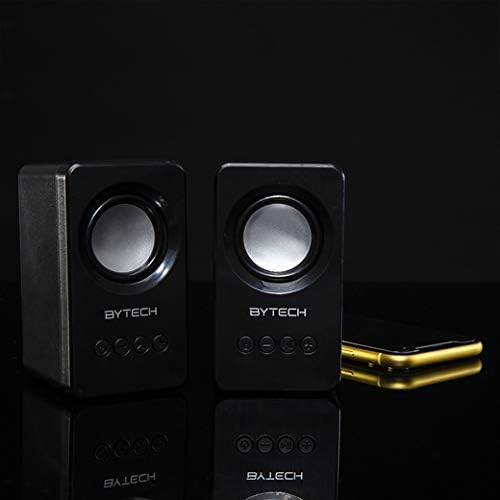
Image: The two Bytech Boost Link True Wireless Speakers positioned next to a smartphone, symbolizing their ability to connect wirelessly to each other and a device for stereo sound.
For a true stereo sound experience, you can pair both speakers together:
- Power on both Bytech Boost Link speakers. Do not connect them to your Bluetooth device yet.
- The speakers will automatically attempt to pair with each other. You will hear a confirmation sound when they are successfully linked for TWS. One speaker will become the master (left channel) and the other the slave (right channel).
- Once TWS paired, the master speaker will enter Bluetooth pairing mode (LED flashing).
- On your device, enable Bluetooth and search for "BYTECH BOOST LINK". Connect to this single entry.
- ດຽວນີ້ລຳໂພງທັງສອງຈະຫຼິ້ນສຽງເປັນສະເຕີລິໂອ.
- ໝາຍເຫດ: If the speakers do not automatically pair, try double-pressing the Mode button on one of the speakers to initiate TWS pairing.
ການດໍາເນີນງານວິທະຍຸ FM
- Power on the speaker(s).
- ກົດ ໂໝດ button repeatedly until you hear the FM radio prompt.
- ເພື່ອສະແກນອັດຕະໂນມັດ ແລະ ບັນທຶກສະຖານີ, ໃຫ້ກົດປຸ່ມຄ້າງໄວ້ ຫຼິ້ນ/ຢຸດຊົ່ວຄາວ ປຸ່ມ. ລຳໂພງຈະສະແກນ ແລະ ເກັບຮັກສາສະຖານີ FM ທີ່ມີຢູ່.
- ໃຊ້ ເພງກ່ອນໜ້າ ແລະ ຕິດຕາມຕໍ່ໄປ ປຸ່ມເພື່ອນຳທາງລະຫວ່າງສະຖານີທີ່ບັນທຶກໄວ້.
ການຫຼິ້ນສຽງ ແລະ ການຄວບຄຸມລະດັບສຽງ
- ຫຼິ້ນ/ຢຸດ: ກົດປຸ່ມເປີດປິດສັ້ນ.
- ເພງຕໍ່ໄປ: Short press the Next Track/Volume Up button.
- ຕິດຕາມກ່ອນ ໜ້າ ນີ້: Short press the Previous Track/Volume Down button.
- ປະລິມານຂຶ້ນ: Long press the Next Track/Volume Up button.
- ປະລິມານລົງ: Long press the Previous Track/Volume Down button.
ບໍາລຸງຮັກສາ
- ທໍາຄວາມສະອາດ: Use a soft, dry, lint-free cloth to clean the surface of the speakers. Do not use liquid cleaners, aerosols, or solvents.
- ການເກັບຮັກສາ: ເມື່ອບໍ່ໄດ້ໃຊ້ເປັນເວລາດົນ, ໃຫ້ເກັບຮັກສາລຳໂພງໄວ້ໃນບ່ອນເຢັນ, ແຫ້ງແລ້ງ ຫ່າງຈາກແສງແດດໂດຍກົງ ແລະ ອຸນຫະພູມທີ່ຮ້າຍກາດ.
- ການດູແລຫມໍ້ໄຟ: To prolong battery life, avoid fully discharging the battery frequently. Charge the speakers regularly, even if not in use.
ການແກ້ໄຂບັນຫາ
| ບັນຫາ | ສາເຫດທີ່ເປັນໄປໄດ້ | ການແກ້ໄຂ |
|---|---|---|
| ລຳໂພງບໍ່ເປີດ. | ແບັດເຕີຣີຕໍ່າ. | ສາກລຳໂພງໃຫ້ເຕັມ. |
| ບໍ່ສາມາດຈັບຄູ່ຜ່ານ Bluetooth ໄດ້. | ລຳໂພງບໍ່ຢູ່ໃນໂໝດຈັບຄູ່; ອຸປະກອນ Bluetooth ປິດ; ໄກຈາກອຸປະກອນເກີນໄປ. | Ensure speaker LED is flashing; Turn on Bluetooth on your device; Move speaker closer to device (within 10 meters). |
| ບໍ່ມີສຽງ. | Volume too low; Speaker not connected; Incorrect mode. | Increase volume on speaker and device; Re-pair Bluetooth; Ensure correct mode (Bluetooth/FM). |
| ການຈັບຄູ່ TWS ລົ້ມເຫລວ. | ລຳໂພງໄດ້ເຊື່ອມຕໍ່ກັບອຸປະກອນແລ້ວ; ລຳໂພງຢູ່ຫ່າງກັນເກີນໄປ. | Disconnect speakers from any device; Power off and on both speakers, then try TWS pairing again; Ensure speakers are close to each other. |
| ການຮັບວິທະຍຸ FM ບໍ່ດີ. | ສັນຍານອ່ອນ; ແຊກແຊງ. | Relocate the speaker to an area with better reception; Extend the charging cable (can act as an antenna). |
ຂໍ້ມູນຈໍາເພາະ
- ຕົວແບບ: BY-AU-BS-152-BK
- ຍີ່ຫໍ້: Bytech
- ເຕັກໂນໂລຍີການເຊື່ອມຕໍ່: ໄຮ້ສາຍ (Bluetooth)
- ໂModeດອອກສຽງ: ອ້ອມຮອບ
- ປະເພດລຳໂພງ: ສຽງອ້ອມຮອບ
- ຄຸນນະສົມບັດພິເສດ: Wireless Bluetooth, Bass Boost, FM Radio, True Wireless Stereo (TWS)
- ການນໍາໃຊ້ທີ່ແນະນໍາ: ສໍາລັບຜູ້ນດົນຕີ
- ອຸປະກອນທີ່ເຂົ້າກັນໄດ້: ແລັບທັອບ, ແທັບເລັດ, ໂທລະສັບສະຫຼາດ
- ປະເພດຄວບຄຸມ: ປຸ່ມຕ່າງໆໃນອຸປະກອນ
- ຂະໜາດແພັກເກດ: 20.7 x 16 x 9 cm
- ນ້ຳໜັກ: 560 g
ການຮັບປະກັນແລະການສະຫນັບສະຫນູນ
Bytech products are designed and manufactured to the highest quality standards. For information regarding warranty coverage, technical support, or service inquiries, please refer to the warranty card included with your purchase or visit the official Bytech webເວັບໄຊ. ກະລຸນາຮັກສາຫຼັກຖານການຊື້ຂອງທ່ານສໍາລັບການຮຽກຮ້ອງການຮັບປະກັນ.
For further assistance, please contact Bytech customer support.
Ask a question about this manual
Ask about setup, troubleshooting, compatibility, parts, safety, or missing instructions. Manuals+ will review the question and use this page’s manual context to help answer it.