
1. ບົດແນະນຳ
ຂອບໃຈສໍາລັບການຊື້asing the QFX E-B3 Bluetooth Professional High-Power Speaker. This manual provides essential information for the safe and efficient operation of your speaker. Please read it thoroughly before use and retain it for future reference.
The QFX E-B3 is designed to deliver powerful audio with features including Bluetooth connectivity, FM radio, USB/SD card playback, LED party lights, and a 250W power amplifier. It also supports True Wireless System (TWS) for stereo pairing with another compatible speaker.
2. ຂໍ້ມູນຄວາມປອດໄພ
- ແຫຼ່ງພະລັງງານ: Connect the speaker only to the specified power supply as indicated on the unit.
- ການລະບາຍອາກາດ: ຮັບປະກັນການລະບາຍອາກາດທີ່ພຽງພໍອ້ອມຮອບລຳໂພງ. ຢ່າປິດກັ້ນຊ່ອງລະບາຍອາກາດໃດໆ.
- ນ້ໍາແລະຄວາມຊຸ່ມ: This speaker is not waterproof. Do not expose it to rain, moisture, or any liquids to prevent electric shock or fire.
- ຄວາມຮ້ອນ: ເກັບຮັກສາລຳໂພງໃຫ້ຫ່າງຈາກແຫຼ່ງຄວາມຮ້ອນ ເຊັ່ນ: ເຄື່ອງເຮັດຄວາມຮ້ອນ, ເຄື່ອງບັນທຶກຄວາມຮ້ອນ, ເຕົາໄຟ ຫຼື ອຸປະກອນອື່ນໆທີ່ຜະລິດຄວາມຮ້ອນ.
- ທໍາຄວາມສະອາດ: Unplug the speaker from the power outlet before cleaning. Use a dry cloth for cleaning. Do not use liquid cleaners or aerosol cleaners.
- ການບໍລິການ: ຢ່າພະຍາຍາມບໍລິການຜະລິດຕະພັນນີ້ດ້ວຍຕົນເອງ. ອ້າງເຖິງການບໍລິການທັງtoົດໃຫ້ກັບພະນັກງານບໍລິການທີ່ມີຄຸນວຸດທິ.
- ການຈັດວາງ: ວາງລຳໂພງໄວ້ເທິງພື້ນຜິວທີ່ໝັ້ນຄົງ ແລະ ຮາບພຽງເພື່ອປ້ອງກັນບໍ່ໃຫ້ມັນຕົກ.
3. ເນື້ອໃນຊຸດ
ກວດສອບວ່າລາຍການທັງຫມົດແມ່ນມີຢູ່ໃນຊຸດ:
- QFX E-B3 High-Power Speaker
- ໄມໂຄຣໂຟນ
- ການຄວບຄຸມໄລຍະໄກ
- ສາຍໄຟຟ້າ AC
- ຄູ່ມືຜູ້ໃຊ້ (ເອກະສານນີ້)
4. ຜະລິດຕະພັນເກີນview
The QFX E-B3 speaker features dual 15-inch woofers and a 1-inch tweeter, protected by a metal grill. It includes integrated handles and wheels for portability.

ຮູບ 4.1: ດ້ານຫນ້າ view of the QFX E-B3 Speaker.
Rear Panel Controls and Ports
The rear panel houses all input/output connections and control knobs.
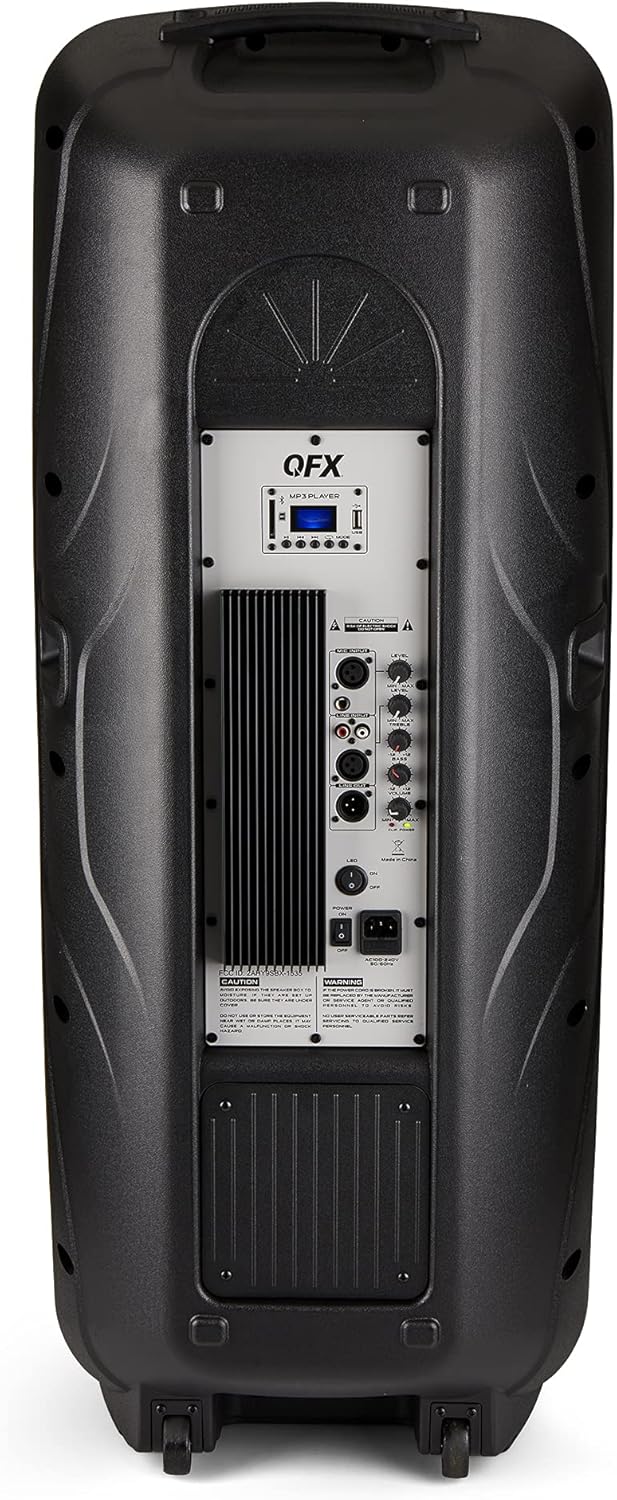
Figure 4.2: Rear panel with controls and ports.
- ສັບປ່ຽນພະລັງງານ: ເປີດ/ປິດລຳໂພງ.
- AC Input: ເຊື່ອມຕໍ່ສາຍໄຟ AC.
- USB/SD Card Ports: ສໍາລັບການຫຼິ້ນສຽງ files ຈາກ USB drives ຫຼື SD ກາດ.
- ຈໍສະແດງຜົນ: ສະແດງໂໝດປັດຈຸບັນ ແລະ ຂໍ້ມູນການຕິດຕາມ.
- ປຸ່ມໂໝດ: Switches between input modes (Bluetooth, FM, USB, SD, RCA).
- ປຸ່ມຫຼິ້ນ/ຢຸດຊົ່ວຄາວ: ຄວບຄຸມການຫຼິ້ນສຳລັບ USB/SD/Bluetooth.
- ປຸ່ມຕິດຕາມກ່ອນໜ້າ/ຕໍ່ໄປ: ນຳທາງເພງ ຫຼື ສະຖານີ FM.
- ປຸ່ມປະລິມານຕົ້ນສະບັບ: ປັບລະດັບສຽງໂດຍລວມ.
- Bass/Treble Control Knobs: Adjusts low and high frequencies.
- ການປ້ອນຂໍ້ມູນໄມໂຄຣໂຟນ XLR: Connects a wired microphone.
- Microphone Volume/Echo Knobs: Adjusts microphone volume and echo effect.
- ອິນພຸດ RCA (ຊ້າຍ/ຂວາ): Connects external audio devices via RCA cables.
- XLR Line Input/Output: For connecting to other audio equipment.
5. ຕັ້ງຄ່າ
ການຈັດວາງເບື້ອງຕົ້ນ
Place the speaker on a stable, flat surface. For optimal sound, position it in a central location within the listening area. The integrated wheels and handle allow for easy transport.

Figure 5.1: Speaker being moved with handle and wheels.
ການເຊື່ອມຕໍ່ພະລັງງານ
- ໃຫ້ແນ່ໃຈວ່າສະວິດໄຟຂອງລຳໂພງຢູ່ໃນຕຳແໜ່ງປິດ.
- Connect the AC power cable to the AC input on the rear panel of the speaker.
- Plug the other end of the AC power cable into a standard wall outlet.
- Flip the power switch to the ON position. The display screen will illuminate.
6. ຄໍາແນະນໍາການດໍາເນີນງານ
ການຈັບຄູ່ Bluetooth
- Turn on the QFX E-B3 speaker.
- ກົດ ໂໝດ button on the speaker or remote control until "BLUE" appears on the display screen, indicating Bluetooth mode.
- ເປີດໃຊ້ Bluetooth ໃນອຸປະກອນມືຖືຂອງທ່ານ (ໂທລະສັບສະຫຼາດ, ແທັບເລັດ, ແລະອື່ນໆ).
- ຊອກຫາ available Bluetooth devices and select "QFX E-B3" from the list.
- ເມື່ອຈັບຄູ່ແລ້ວ, ລຳໂພງຈະສົ່ງສຽງຢືນຢັນ. ດຽວນີ້ທ່ານສາມາດຫຼິ້ນສຽງຈາກອຸປະກອນຂອງທ່ານຜ່ານລຳໂພງໄດ້ແລ້ວ.
True Wireless System (TWS) Pairing
TWS allows two QFX E-B3 speakers to connect wirelessly for a stereo sound experience. This feature works only in Bluetooth mode.
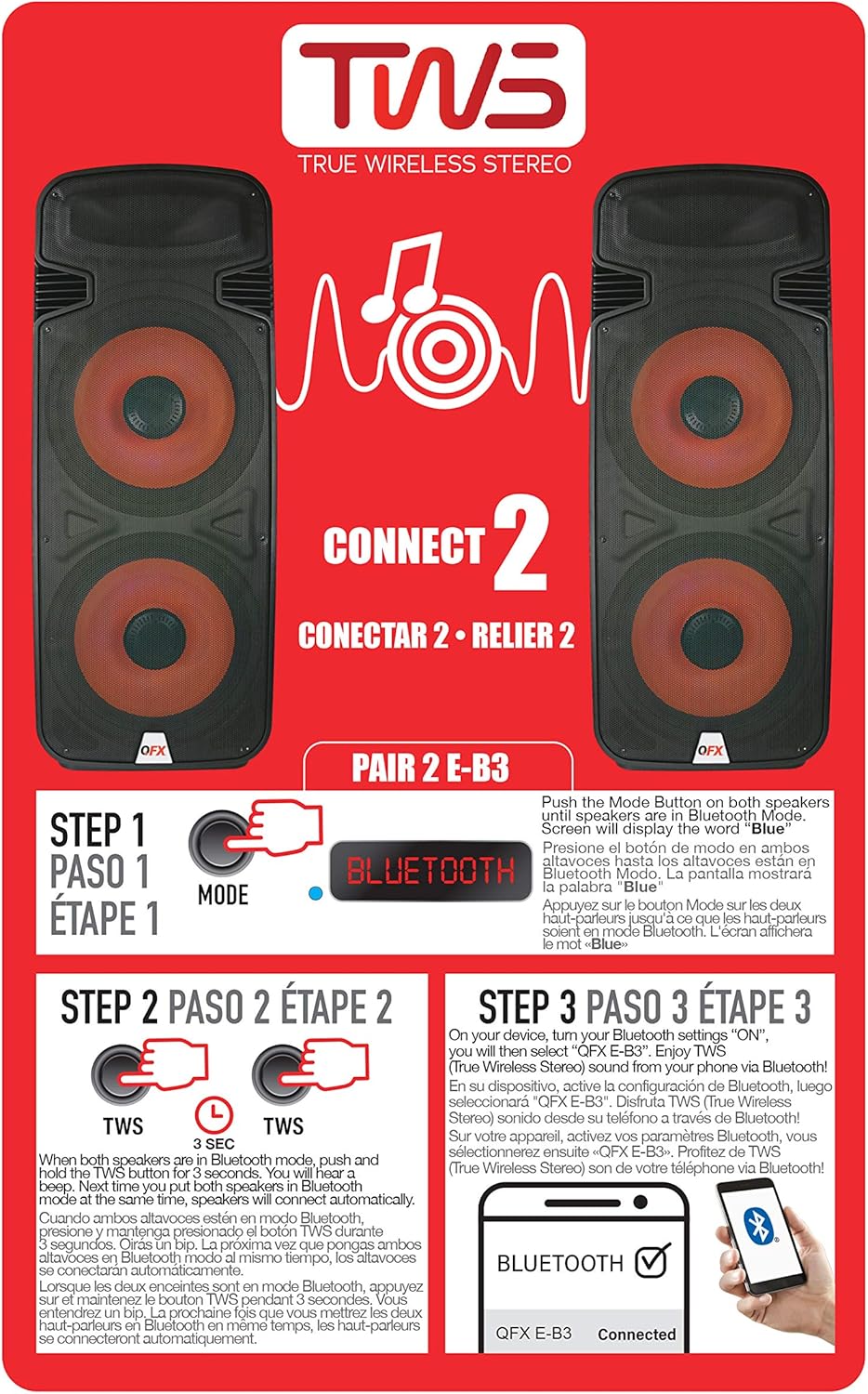
Figure 6.1: TWS Pairing Instructions.
- Ensure both QFX E-B3 speakers are powered on and in Bluetooth mode. The display on both speakers should show "BLUE".
- On one of the speakers (this will be your primary speaker), press and hold the TWS button for approximately 3 seconds. The speakers will attempt to connect to each other.
- Once successfully paired, you will hear a confirmation sound, and the display on the primary speaker will show "BLUE" while the secondary speaker will show "BLUE" as well.
- On your Bluetooth-enabled device, search for and select "QFX E-B3". The two speakers will now play audio in stereo.
ການດໍາເນີນງານວິທະຍຸ FM
- ກົດ ໂໝດ button to switch to FM radio mode. The display will show the FM frequency.
- ກົດຄ້າງໄວ້ ຫຼິ້ນ/ຢຸດຊົ່ວຄາວ button to initiate an automatic scan for FM stations. The speaker will save all found stations.
- ໃຊ້ ເພງກ່ອນ ໜ້າ/ຖັດໄປ ປຸ່ມເພື່ອນຳທາງຜ່ານສະຖານີ FM ທີ່ບັນທຶກໄວ້.
ການຫຼິ້ນບັດ USB/SD
- Insert a USB flash drive or SD card (with compatible audio files) into the respective port on the rear panel.
- The speaker will automatically switch to USB/SD mode and begin playing the audio fileຖ້າບໍ່, ໃຫ້ກົດປຸ່ມ ໂໝດ button to select USB or SD mode.
- ໃຊ້ ຫຼິ້ນ/ຢຸດຊົ່ວຄາວ ແລະ ເພງກ່ອນ ໜ້າ/ຖັດໄປ ປຸ່ມເພື່ອຄວບຄຸມການຫຼິ້ນ.
ການປ້ອນຂໍ້ມູນໄມໂຄຣໂຟນ
- Connect a microphone to the XLR Microphone Input on the rear panel.
- Adjust the Microphone Volume and Echo knobs to achieve the desired sound.
ການປ້ອນຂໍ້ມູນ RCA
- Connect an external audio source (e.g., CD player, mixer) to the RCA Input (L/R) ports using appropriate RCA cables.
- ກົດ ໂໝດ button to select RCA input mode.
- Adjust the master volume on the speaker and the volume on your external audio source.
ໄຟ LED ພັກ
The speaker features integrated LED party lights that activate automatically when the speaker is powered on. There are no specific controls for the LED lights mentioned; they are designed to enhance the audio experience.
7. ບໍາລຸງຮັກສາ
ທໍາຄວາມສະອາດ
- Always unplug the speaker before cleaning.
- ໃຊ້ຜ້າອ່ອນ, ແຫ້ງເພື່ອເຊັດພື້ນຜິວພາຍນອກຂອງລໍາໂພງ.
- ຢ່າໃຊ້ເຄື່ອງເຮັດຄວາມສະອາດຂັດ, ຂີ້ເຜີ້ງ, ຫຼືສານລະລາຍເພາະວ່າພວກມັນອາດຈະທໍາລາຍການສໍາເລັດຮູບ.
- ຮັກສາຊ່ອງລະບາຍອາກາດໃຫ້ສະອາດຂອງຂີ້ຝຸ່ນແລະສິ່ງເສດເຫຼືອ.
ການເກັບຮັກສາ
When not in use for extended periods, store the speaker in a cool, dry place, away from direct sunlight and extreme temperatures. Cover the speaker to protect it from dust.
8. ການແກ້ໄຂບັນຫາ
If you encounter issues with your QFX E-B3 speaker, refer to the following common problems and solutions:
| ບັນຫາ | ສາເຫດທີ່ເປັນໄປໄດ້ | ການແກ້ໄຂ |
|---|---|---|
| ບໍ່ມີພະລັງງານ | Power cable not connected; Power outlet not active; Speaker power switch off. | Ensure AC cable is securely connected to speaker and outlet. Check if outlet is working. Turn speaker power switch ON. |
| ບໍ່ມີສຽງ | ລະດັບສຽງຕໍ່າເກີນໄປ; ເລືອກໂໝດການປ້ອນຂໍ້ມູນບໍ່ຖືກຕ້ອງ; ບໍ່ສາມາດຫຼິ້ນແຫຼ່ງສຽງໄດ້. | Increase master volume. Press MODE button to select correct input. Ensure audio source is playing and its volume is up. |
| Bluetooth ບໍ່ເຊື່ອມຕໍ່ | Speaker not in Bluetooth mode; Device Bluetooth off; Speaker already paired to another device; Device too far. | Ensure speaker is in Bluetooth mode ("BLUE" on display). Turn on device Bluetooth. Disconnect from other devices. Move device closer to speaker (within 30 feet). |
| ການຈັບຄູ່ TWS ລົ້ມເຫລວ | ລຳໂພງບໍ່ໄດ້ຢູ່ໃນໂໝດ Bluetooth; ປຸ່ມ TWS ບໍ່ໄດ້ກົດໄວ້ດົນພໍ. | Ensure both speakers are in Bluetooth mode. Press and hold the TWS button on one speaker for 3 seconds. |
| ການຫຼິ້ນ USB/SD ບໍ່ໄດ້ຜົນ | ຮູບແບບບໍ່ຖືກຕ້ອງ; ບໍ່ເຂົ້າກັນໄດ້ file format; Corrupted USB/SD card. | Press MODE to select USB/SD. Ensure audio files are in a compatible format (e.g., MP3). Try a different USB/SD card. |
9. ຂໍ້ມູນຈໍາເພາະ
| ຄຸນສົມບັດ | ຂໍ້ມູນຈໍາເພາະ |
|---|---|
| ຍີ່ຫໍ້ | QFX |
| ໝາຍເລກຕົວແບບ | E-B3 |
| ລຳໂພງກຳລັງຜົນຜະລິດສູງສຸດ | 250 ວັດ |
| ເຕັກໂນໂລຊີການເຊື່ອມຕໍ່ | USB, Bluetooth |
| ຮູບແບບການອອກສຽງ | ສະເຕຣິໂອ |
| ປະເພດການຕິດຕັ້ງ | Plug Mount, Wheel Mount |
| ປະເພດລຳໂພງ | Woofer (Dual 15 Inches) |
| ປະເພດການຄວບຄຸມ | ການຄວບຄຸມໄລຍະໄກ |
| ສີ | Party LED |
| ແມ່ນກັນນ້ໍາ | ບໍ່ຖືກຕ້ອງ |
| ວິທີການຄວບຄຸມ | ໄລຍະໄກ |
| Woofer ເສັ້ນຜ່າສູນກາງ | 15 ນິ້ວ |
| ຈຳນວນຊ່ອງສຽງ | 2.0 |
| ເຕັກໂນໂລຊີໄຮ້ສາຍ | Bluetooth |
| ອະນຸສັນຍາການເຊື່ອມຕໍ່ | Bluetooth |
| ແຫຼ່ງພະລັງງານ | ໄຟຟ້າສາຍ |
| ປະເພດໄດເວີສຽງ | ໄດນາມິກໄດເວີ |
| ຂະໜາດໄດເວີສຽງ | 15 ນິ້ວ |
| ຂະໜາດລາຍການ (D x W x H) | 16.77"D x 13.98"W x 23.74"H |
| ນ້ໍາຫນັກລາຍການ | 13.2 ປອນ |
| ອຸປະກອນທີ່ເຂົ້າກັນໄດ້ | ແລັບທັອບ, ເຄື່ອງຫຼິ້ນ MP3, ໂທລະສັບສະຫຼາດ, ແທັບເລັດ, ໂທລະພາບ |
| UPC | 606540039618 |
10. ຂໍ້ມູນການຮັບປະກັນ
This product is covered by a limited warranty. For specific details regarding warranty coverage and terms, please refer to the warranty information provided at the point of purchase or contact QFX customer support directly. The warranty is typically per contract with the retailer.
11. ສະຫນັບສະຫນູນ
For technical assistance, troubleshooting beyond this manual, or inquiries about your QFX E-B3 speaker, please contact QFX customer support or your retailer. Contact information can usually be found on the manufacturer's webເວັບໄຊ ຫຼືຢູ່ໃນໃບຮັບເງິນຊື້ຂອງທ່ານ.