
1. ບົດແນະນຳ
The Mackie SRT212 is a 12-inch, 1600W professional powered loudspeaker designed for various audio applications including live sound, DJ events, and installations. It integrates advanced acoustic processing technology, powerful amplification, and the versatile SRT Mix Control for efficient setup and reliable performance.
ຄຸນນະສົມບັດທີ່ສໍາຄັນປະກອບມີ:
- SRT Mix Control with a built-in 4-channel digital mixer and Bluetooth connectivity.
- Advanced Impulse DSP for enhanced audio clarity.
- Sym-X Horn technology for smooth mid-range and high-frequency reproduction.
- Integrated system and transducer protection.
2. ສິ່ງທີ່ຢູ່ໃນກ່ອງ
ພາຍຫຼັງການຫຸ້ມຫໍ່, ໃຫ້ແນ່ໃຈວ່າອົງປະກອບທັງໝົດມີຢູ່:
- Mackie SRT212 Powered Loudspeaker
- ສາຍໄຟ
- ຄູ່ມືເລີ່ມຕົ້ນດ່ວນ (QSG)

Image: The Quick Start Guide and power cord included with the SRT series loudspeakers.
3. ຂໍ້ມູນຄວາມປອດໄພ
Before operating the Mackie SRT212 loudspeaker, please read and understand all safety instructions. Retain this manual for future reference.
- ແຫຼ່ງພະລັງງານ: Connect the unit only to the type of power source indicated on the unit.
- ການລະບາຍອາກາດ: ຢ່າອຸດຕັນຊ່ອງລະບາຍອາກາດ. ຮັບປະກັນໃຫ້ມີກະແສລົມໄຫຼວຽນພຽງພໍອ້ອມຮອບເຄື່ອງ.
- ນ້ໍາແລະຄວາມຊຸ່ມ: Do not expose the unit to rain or moisture. Do not use near water.
- ຄວາມຮ້ອນ: ຢ່າວາງຢູ່ໃກ້ກັບແຫຼ່ງຄວາມຮ້ອນເຊັ່ນ: radiators, ເຄື່ອງບັນທຶກຄວາມຮ້ອນ, ເຕົາ, ຫຼືອຸປະກອນອື່ນໆທີ່ຜະລິດຄວາມຮ້ອນ.
- ທໍາຄວາມສະອາດ: ເຮັດຄວາມສະອາດດ້ວຍຜ້າແຫ້ງເທົ່ານັ້ນ.
- ການບໍລິການ: ອ້າງອີງການບໍລິການທັງໝົດໃຫ້ກັບພະນັກງານບໍລິການທີ່ມີຄຸນວຸດທິ.
4. ຕັ້ງຄ່າ
4.1 ການຈັດວາງທາງດ້ານຮ່າງກາຍ
The SRT212 can be used as a floor-standing speaker or mounted on a pole. Ensure stable placement to prevent tipping.

ຮູບພາບ: ດ້ານຫນ້າ view of the Mackie SRT212 12-inch powered loudspeaker, showcasing ການອອກແບບທີ່ເຂັ້ມແຂງຂອງມັນ.
4.2 ການເຊື່ອມຕໍ່ພະລັງງານ
Connect the provided power cord to the AC inlet on the rear panel of the loudspeaker and then to a suitable power outlet. Ensure the power switch is in the OFF position before connecting.
4.3 ການເຊື່ອມຕໍ່ສຽງ
The SRT212 features a built-in 4-channel digital mixer. Refer to the rear panel for input and output options.
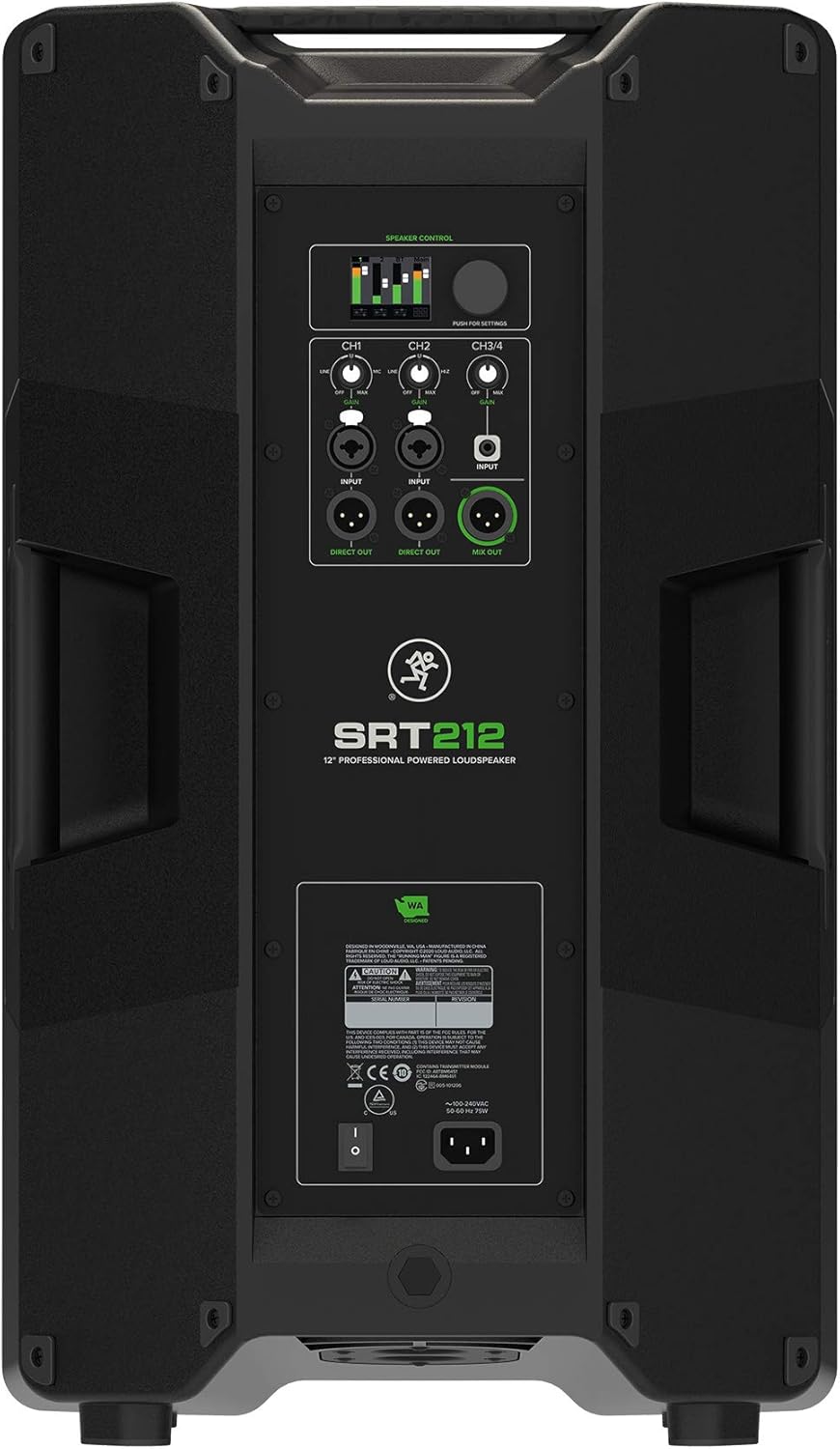
Image: Rear panel of the Mackie SRT212, showing the SRT Mix Control, input/output jacks, and power connection.
- Inputs (CH1, CH2, CH3/4): Connect your audio sources (microphones, instruments, mixers) to the appropriate input channels.
- ໂດຍກົງ: Provides a direct output of individual channels.
- ປະສົມອອກ: Sends the combined mix of all active channels to another speaker or recording device.
4.4 ການຈັບຄູ່ Bluetooth
The SRT212 supports Bluetooth connectivity for audio streaming and control via the SRT Connect app.
- ໃຫ້ແນ່ໃຈວ່າ Bluetooth ຖືກເປີດໃຊ້ງານຢູ່ໃນອຸປະກອນມືຖືຂອງທ່ານ.
- Power on the SRT212 loudspeaker.
- Open the SRT Connect app and follow the on-screen instructions to pair with the loudspeaker.
4.5 ການເປີດເຄື່ອງເບື້ອງຕົ້ນ
After all connections are made, switch the power button to the ON position. The power indicator will illuminate.
5. ການດໍາເນີນງານ
5.1 SRT Mix Control
The integrated SRT Mix Control allows for comprehensive management of audio settings. Use the physical controls on the rear panel or the SRT Connect app for adjustments.
- ການປັບລະດັບສຽງ: Adjust individual channel volumes and the master volume to achieve desired levels.
- DSP Presets: Utilize the Advanced Impulse DSP for various sound optimization presets tailored to different applications.
- ການຕັ້ງຄ່າ EQ: Fine-tune the equalization for each channel or the overall mix.
5.2 SRT Connect App
The SRT Connect app provides remote control over all mixer functions, including levels, EQ, and system settings. Download the app from your device's app store.
5.3 ການປົກປ້ອງລະບົບ
The SRT212 incorporates next-generation system and transducer protection to ensure longevity and consistent performance, even under demanding conditions.
6. ບໍາລຸງຮັກສາ
6.1 ການທໍາຄວາມສະອາດ
Regular cleaning helps maintain the appearance and functionality of your loudspeaker.
- Use a soft, dry cloth to wipe down the cabinet.
- Avoid abrasive cleaners, solvents, or waxes.
- Do not spray liquids directly onto the speaker.
6.2 ການເກັບຮັກສາ
When not in use, store the loudspeaker in a cool, dry environment, away from direct sunlight and extreme temperatures.
6.3 ການຈັດການ
While the SRT212 features a rugged construction, care should be taken during transport and setup to prevent cosmetic damage to the cabinet finish.
7. ການແກ້ໄຂບັນຫາ
If you encounter issues with your SRT212 loudspeaker, refer to the following common problems and solutions:
| ບັນຫາ | ສາເຫດທີ່ເປັນໄປໄດ້ | ການແກ້ໄຂ |
|---|---|---|
| ບໍ່ມີພະລັງງານ | Power cord disconnected, power switch off, faulty outlet. | Check power cord connection, ensure power switch is ON, test outlet with another device. |
| ບໍ່ມີສຽງ | Input cables disconnected, volume too low, incorrect input selected, source device issue. | Verify all audio cable connections, increase volume levels, check input selection, test source device. |
| ສຽງບິດເບືອນ | Input level too high, faulty cable, speaker overload. | Reduce input gain/volume, try a different cable, ensure speaker is not overdriven. |
| ການເຊື່ອມຕໍ່ Bluetooth | Out of range, interference, device issue. | Move device closer to speaker, minimize interference, restart Bluetooth on device and speaker. |
If the problem persists after attempting these solutions, contact Mackie customer support.
8. ຂໍ້ມູນຈໍາເພາະ
Detailed technical specifications for the Mackie SRT212 12-Inch 1600W Professional Powered Loudspeaker:
| ຄຸນສົມບັດ | ຂໍ້ມູນຈໍາເພາະ |
|---|---|
| ຍີ່ຫໍ້ | ແມັກກີ້ |
| ໝາຍເລກຕົວແບບ | SRT212 |
| ປະເພດລຳໂພງ | Powered Loudspeaker |
| ລຳໂພງກຳລັງຜົນຜະລິດສູງສຸດ | 1600 ວັດ |
| Woofer ເສັ້ນຜ່າສູນກາງ | 12 ນິ້ວ |
| ການຕອບສະໜອງຄວາມຖີ່ | ເຖິງ 20 KHz |
| ເຕັກໂນໂລຊີການເຊື່ອມຕໍ່ | Bluetooth |
| ຮູບແບບການອອກສຽງ | ສະເຕຣິໂອ |
| ປະເພດການຕິດຕັ້ງ | Floor Standing |
| ວັດສະດຸຫຸ້ມຫໍ່ | ສະແຕນເລດ |
| ວິທີການຄວບຄຸມ | ແອັບ |
| ຈຳນວນຊ່ອງສຽງ | 5.1 (Mixer Channels) |
| ແຫຼ່ງພະລັງງານ | ໄຟຟ້າສາຍ |
| ນ້ໍາຫນັກລາຍການ | 37.47 ປອນ |
| ຂະໜາດລາຍການ (D x W x H) | 14.21"D x 15.2"W x 25.91"H |
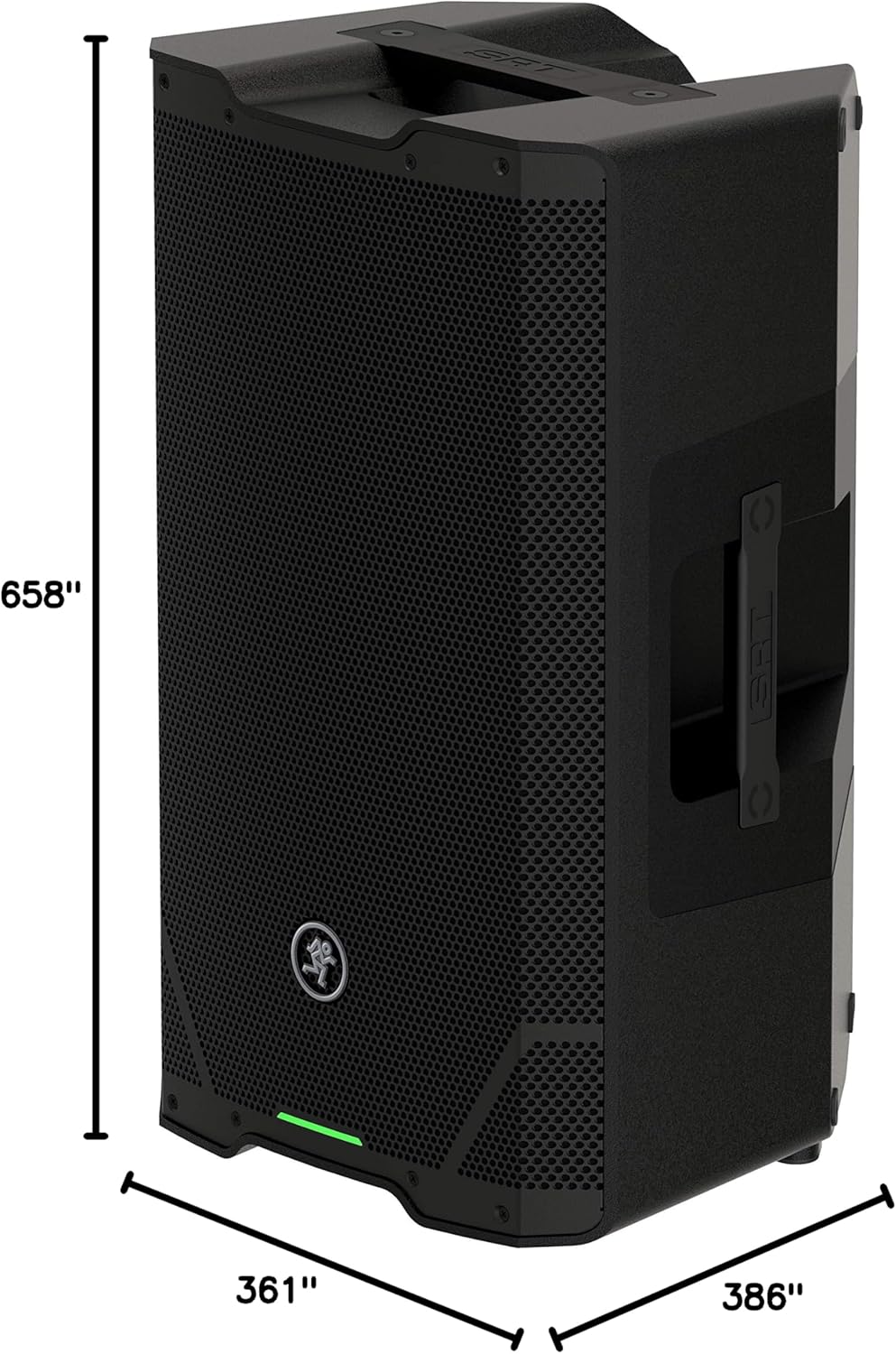
Image: Dimensional drawing of the Mackie SRT212 loudspeaker, showing height, width, and depth measurements.
9. ການຮັບປະກັນແລະການສະຫນັບສະຫນູນ
9.1 ຂໍ້ມູນການຮັບປະກັນ
The Mackie SRT212 loudspeaker comes with a limited warranty:
- ເອເລັກໂຕຣນິກ: ຮັບປະກັນ 3 ປີ
- ຄົນຂັບລົດ: ຮັບປະກັນ 2 ປີ
ກະລຸນາເກັບຫຼັກຖານການຊື້ຂອງທ່ານໄວ້ເພື່ອການຮຽກຮ້ອງການຮັບປະກັນ. ການຮັບປະກັນກວມເອົາຂໍ້ບົກຜ່ອງດ້ານວັດສະດຸ ແລະ ຝີມືການຜະລິດພາຍໃຕ້ການນຳໃຊ້ປົກກະຕິ.
9.2 ສະຫນັບສະຫນູນລູກຄ້າ
For technical assistance, warranty service, or further inquiries, please visit the official Mackie website or contact their customer support department. Refer to the Quick Start Guide or Mackie's webເວັບໄຊສໍາລັບຂໍ້ມູນຕິດຕໍ່ໃນປະຈຸບັນຫຼາຍທີ່ສຸດ.