
1. ບົດແນະນຳ
This instruction manual provides detailed guidance for the proper use and maintenance of your Zeerkeer Electronic Automatic Pill Dispenser. This device is designed to assist with timely medication management through timed reminders and organized storage. Please read this manual thoroughly before operating the device to ensure safe and effective use.
2. ຄຸນລັກສະນະຂອງຜະລິດຕະພັນ
- Timed Reminders: Features timed vibration and audible reminders for medication.
- ຈໍດິຈິຕອນ: Clear digital display shows time and timer settings.
- ການກໍ່ສ້າງທົນທານ: Made from high-quality, food-grade ABS and PP materials, ensuring safety and durability.
- Partitioned Storage: Multiple compartments for easy classification and organization of different medications.
- ການປົກປ້ອງຄວາມຊຸ່ມຊື່ນ ແລະຝຸ່ນ: Designed to protect medication from moisture, dust, and deterioration.
- ກະທັດຮັດ ແລະ ແບບພົກພາ: Slim and lightweight design for easy carrying in a pocket or bag.
- Clock and Timer Function: Displays time in 12-hour or 24-hour format and includes a countdown timer function.
3. ເນື້ອໃນຊຸດ
ເມື່ອເປີດກ່ອງ, ໃຫ້ກວດສອບວ່າທຸກລາຍການມີຢູ່ແລ້ວ ແລະ ບໍ່ເສຍຫາຍ:
- Zeerkeer Electronic Automatic Pill Dispenser (1 unit)
Note: Batteries may not be included and might need to be purchased separately.
4. ຜະລິດຕະພັນເກີນview
Familiarize yourself with the main components of your pill dispenser:
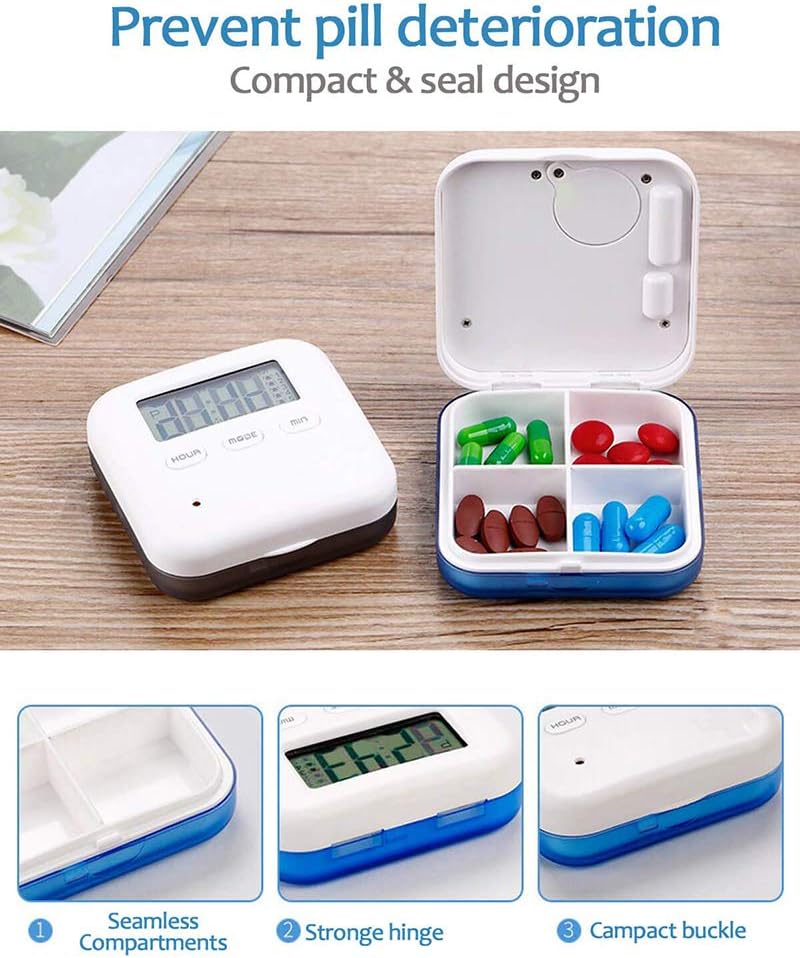
Image: This image displays the Zeerkeer Electronic Automatic Pill Dispenser. On the left, the main unit with a digital display showing time and control buttons (HOUR, MODE, MIN). On the right, the pill dispenser is open, revealing four internal compartments, each containing different colored pills. Below, three detailed close-up images highlight key features: (1) "Seamless Compartments" showing the smooth, easy-to-clean interior, (2) "Strong Hinge" illustrating the durable connection between the lid and base, and (3) "Compact Buckle" demonstrating the secure closing mechanism.
The device consists of a main unit with a digital display and control buttons, and a hinged lid that opens to reveal four internal compartments for medication storage. It features a secure buckle and a robust hinge for durability.
5. ຕັ້ງຄ່າ
5.1. ການຕິດຕັ້ງຫມໍ້ໄຟ
The pill dispenser requires batteries for operation. Locate the battery compartment, usually on the back or bottom of the device. Insert the required batteries, ensuring correct polarity (+/-). Close the battery compartment securely.
5.2. ການຕັ້ງເວລາເບື້ອງຕົ້ນ
After battery installation, the display may show a default time or be blank. To set the current time:
- ກົດ ໂໝດ ເພື່ອເຂົ້າສູ່ໂໝດຕັ້ງເວລາ. ຕົວເລກຊົ່ວໂມງອາດຈະກະພິບ.
- ໃຊ້ ຊົ່ວໂມງ ປຸ່ມເພື່ອປັບຊົ່ວໂມງ.
- ໃຊ້ ນາທີ ປຸ່ມເພື່ອປັບນາທີ.
- ກົດ ໂໝດ ອີກຄັ້ງເພື່ອຢືນຢັນເວລາ ແລະ ອອກຈາກໂໝດການຕັ້ງຄ່າເວລາ.
- Select 12-hour or 24-hour format if available, typically by pressing ໂໝດ or ຊົ່ວໂມງ while in time display mode.
6. ຄໍາແນະນໍາການດໍາເນີນງານ
6.1. Setting Medication Reminders (Alarms)
The device supports up to 5 daily medication reminders. To set an alarm:
- ຈາກຈໍສະແດງຜົນທີ່ໃຊ້ເວລາຕົ້ນຕໍ, ກົດປຸ່ມ ໂໝດ button repeatedly until "ALARM 1" (or similar indicator) appears.
- The hour digits for the alarm will flash. Use the ຊົ່ວໂມງ ປຸ່ມເພື່ອຕັ້ງໂມງປຸກທີ່ຕ້ອງການ.
- ໃຊ້ ນາທີ ປຸ່ມເພື່ອກໍານົດນາທີປຸກທີ່ຕ້ອງການ.
- ກົດ ໂໝດ to save "ALARM 1" and proceed to "ALARM 2" if needed, or exit alarm setting mode.
- Repeat for up to 5 alarms.
- To activate or deactivate an alarm, there may be a dedicated switch or a combination of button presses (refer to on-screen indicators).
6.2. ການໃຊ້ໂມງນັບຖອຍຫຼັງ
The device includes a countdown timer function (up to 23 hours 59 seconds).
- From the main time display, press ໂໝດ until the countdown timer display appears (e.g., "00:00").
- ໃຊ້ ຊົ່ວໂມງ ແລະ ນາທີ ເພື່ອຕັ້ງໄລຍະເວລານັບຖອຍຫຼັງທີ່ຕ້ອງການ.
- ກົດ ໂໝດ or a dedicated START/STOP button to begin the countdown.
- When the countdown reaches zero, an alarm will sound or vibrate.
6.3. Filling the Compartments
Open the lid of the pill dispenser. Carefully place your medications into the four separate compartments. Ensure the lid closes securely to protect the contents.

Image: This image shows the Zeerkeer Electronic Automatic Pill Dispenser with its lid open, revealing four distinct compartments. Each compartment is filled with different types and colors of pills, demonstrating its organizational capacity. Above the dispenser, two icons are visible: one representing "Vibration" (a battery with vibration waves) and another representing "Voice" (an alarm clock), indicating the reminder features of the device.
7. ບໍາລຸງຮັກສາ
7.1. ທໍາຄວາມສະອາດ
To clean your pill dispenser:
- Ensure all medication is removed from the compartments.
- ເຊັດພື້ນຜິວພາຍນອກ ແລະ ພາຍໃນໃຫ້ອ່ອນນຸ້ມ, ງamp ຜ້າ.
- For stubborn spots, use a mild soap solution, then wipe clean with a damp ຜ້າແລະແຫ້ງຢ່າງລະອຽດ.
- Do not immerse the device in water or use harsh chemical cleaners, as this can damage the electronic components.
7.2. ການທົດແທນຫມໍ້ໄຟ
When the display dims or the alarms become weak, it is time to replace the batteries. Follow the battery installation steps (Section 5.1) to replace old batteries with new ones.
8. ການແກ້ໄຂບັນຫາ
| ບັນຫາ | ສາເຫດທີ່ເປັນໄປໄດ້ | ການແກ້ໄຂ |
|---|---|---|
| Device does not power on or display is blank. | ບໍ່ມີແບັດເຕີຣີ, ການຕິດຕັ້ງແບັດເຕີຣີບໍ່ຖືກຕ້ອງ, ຫຼື ແບັດເຕີຣີໝົດ. | Check battery installation, ensure correct polarity, or replace batteries. |
| Alarms are not sounding/vibrating. | Alarms not set, alarms deactivated, or low battery. | Verify alarm settings, ensure alarms are activated, or replace batteries. |
| ການສະແດງເວລາບໍ່ຖືກຕ້ອງ. | Time not set correctly or battery removed/replaced. | Reset the current time following Section 5.2. |
| ຝາປິດບໍ່ໄດ້ປິດຢ່າງປອດໄພ. | Obstruction in hinge or buckle area, or overfilled compartments. | Check for debris, ensure compartments are not overfilled, and inspect hinge/buckle for damage. |
9. ຂໍ້ມູນຈໍາເພາະ
- ຕົວແບບ: 9A03088
- ຍີ່ຫໍ້: Zeerkeer
- ວັດສະດຸ: ABS + PP (Acrylonitrile Butadiene Styrene + Polypropylene)
- ສີ: ສີຟ້າ
- ຂະໜາດ: 6.5 cm (L) x 6.5 cm (W) x 2 cm (H)
- ນ້ຳໜັກ: ປະມານ 60 ກຣາມ
- ຟັງຊັນ: 12/24 hour time display, 5-time 24-hour timing vibration reminder, 23-hour 59-second countdown reminder.
- UPC: 699900277805

Image: This image provides a top-down view of the Zeerkeer Electronic Automatic Pill Dispenser, clearly showing its digital display and control buttons. Overlaid on the image are precise dimensions: 6.5 cm (2.55 inches) for both length and width, and 2 cm (0.78 inches) for height, illustrating the compact size of the device.
10. ຂໍ້ມູນຄວາມປອດໄພ
- ຮັກສາອຸປະກອນໃຫ້ໄກຈາກເດັກນ້ອຍ ແລະສັດລ້ຽງ.
- ຢ່າໃຫ້ອຸປະກອນຖືກອຸນຫະພູມສູງ ຫຼື ແສງແດດໂດຍກົງ ຫຼື ຄວາມຊຸ່ມ.
- ຢ່າພະຍາຍາມຖອດປະກອບ ຫຼືສ້ອມແປງອຸປະກອນດ້ວຍຕົນເອງ. ຕິດຕໍ່ຝ່າຍຊ່ວຍເຫຼືອລູກຄ້າຖ້າມີບັນຫາເກີດຂຶ້ນ.
- ຖິ້ມແບດເຕີຣີເກົ່າຢ່າງມີຄວາມຮັບຜິດຊອບຕາມກົດລະບຽບທ້ອງຖິ່ນ.
- This device is intended for organizing and reminding about medication. It is not a substitute for professional medical advice. Always consult with a healthcare professional regarding your medication regimen.
11. ການຮັບປະກັນແລະການສະຫນັບສະຫນູນ
For warranty information or technical support, please refer to the contact details provided with your purchase or visit the official Zeerkeer website. Please have your model number (9A03088) and purchase date available when contacting support.