
ແນະນຳ
This manual provides detailed instructions for the installation, operation, and maintenance of your Frienda Dual Laser Garage Parking Assistant. Please read this manual thoroughly before use to ensure proper function and safety.
ຂໍ້ມູນຄວາມປອດໄພ
- Ensure the device is securely mounted to prevent falling.
- Do not look directly into the laser beam. Lasers can cause eye damage.
- ຮັກສາອຸປະກອນໃຫ້ຫ່າງຈາກນ້ໍາແລະຄວາມຊຸ່ມ.
- ໃຊ້ພຽງແຕ່ອະແດບເຕີພະລັງງານຫຼືຫມໍ້ໄຟທີ່ລະບຸ.
- ຮັກສາໃຫ້ໄກຈາກເດັກນ້ອຍ.
- Do not attempt to disassemble or repair the device yourself. Contact customer support if needed.
ເນື້ອໃນຊຸດ
ກວດສອບວ່າລາຍການທັງຫມົດແມ່ນມີຢູ່ໃນຊຸດຂອງທ່ານ:
- 1 x Dual Laser Garage Parking Assistant Unit
- 1 x Power Supply (US regulation adapter)
- 3 x screws
- 3 x ຍຶດWallາ
- 1 x Bottom Plate for mounting

ຄຸນສົມບັດຜະລິດຕະພັນ
- Dual Adjustable Lasers: Two laser lights provide precise parking guidance, accommodating two vehicles or offering flexible positioning for one.
- ໝຸນ 360 ອົງສາ: Each laser module can be rotated 360 degrees for optimal beam placement.
- ກວດຈັບການເຄື່ອນໄຫວ: Automatically detects vehicle movement up to 10 feet away, activating the lasers.
- ປິດອັດຕະໂນມັດ: Lasers turn off after 30 seconds of idle movement, conserving energy.
- ທາງເລືອກພະລັງງານສອງ: Can be powered by the included AC adapter or 3x AAA batteries (not included).
- ການກໍ່ສ້າງທົນທານ: Made from quality ABS material, resistant to deformation, rust, and erosion.

ການຕິດຕັ້ງແລະການຕິດຕັ້ງ
- ເລືອກສະຖານທີ່ຕິດຕັ້ງ: Select an ideal spot on your garage ceiling where the laser beams can be clearly seen from your car's window or dashboard. Ensure it's centrally located for your parking needs.
- Mount the Bottom Plate:
Using the included screws and wall anchors, securely attach the bottom plate to the chosen ceiling location. Ensure it is firmly fixed to prevent movement.

Image: Step-by-step guide showing how to screw the bottom plate to the ceiling. - ຄັດຕິດຫົວຫນ່ວຍ:
Align the main laser unit with the mounted bottom plate and attach it securely. The unit should click or twist into place.
Image: Step-by-step guide showing how to attach the main unit to the mounted bottom plate. - ເຊື່ອມຕໍ່ພະລັງງານ:
Connect the included power supply to the unit and plug it into a standard electrical outlet. Alternatively, insert 3x AAA batteries (not included) into the battery compartment. Ensure the power switch is in the OFF position before connecting power.
Image: Illustration of the dual power options, showing the battery compartment for 3x AAA batteries and the port for the AC adapter. Image: Step-by-step guide showing how to connect the power supply to the unit. - ເປີດ:
Flip the power switch to the ON position. The device is now ready for operation.
Image: Step-by-step guide showing the location of the power switch for control.
ຄໍາແນະນໍາການດໍາເນີນງານ
- Initial Laser Adjustment:
Drive your car into the garage to your desired parking position. Adjust the two laser modules by rotating them 360 degrees until the laser beams project onto a specific point on your car's dashboard or hood that you wish to use as your parking marker. Remember this spot.

Image: A car parked in a garage, with red laser beams from the ceiling-mounted device indicating the precise parking position on the vehicle's hood. - ການເປີດໃຊ້ໂດຍອັດຕະໂນມັດ:
When you drive your car into the garage, the built-in motion sensor will detect the vehicle's movement from up to 10 feet away and automatically activate the laser beams.
- Parking Guidance:
Continue driving until the laser beam(s) align with the predetermined spot on your car (dashboard, hood, etc.). This indicates you have reached your correct parking position.
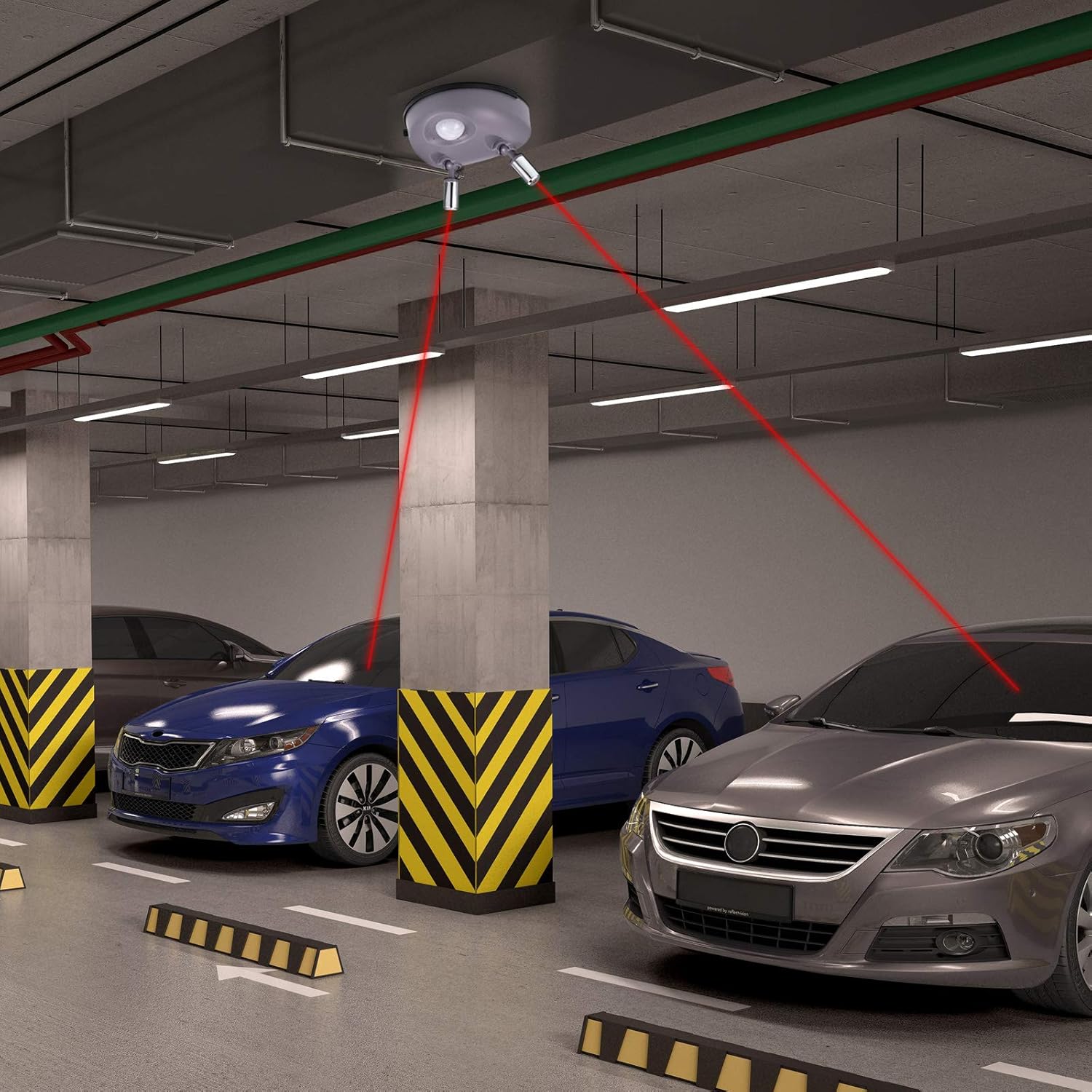
Image: An underground parking garage scene showing multiple cars, with a laser parking assistant mounted on the ceiling, guiding a car into its spot with red laser lines. - ປິດການນຳໃຊ້ອັດຕະໂນມັດ:
After 30 seconds of no detected movement, the laser beams will automatically turn off to conserve power.
ບໍາລຸງຮັກສາ
- ທໍາຄວາມສະອາດ: ເຊັດອຸປະກອນດ້ວຍຜ້າອ່ອນໆ, ແຫ້ງ. ຢ່າໃຊ້ເຄື່ອງເຮັດຄວາມສະອາດຂັດຫຼືສານລະລາຍ.
- ການປ່ຽນແບັດເຕີຣີ: If using batteries, replace them when the laser beams become dim or the device fails to activate. Ensure correct polarity when inserting new batteries.
- ກວດສອບການຕິດຕັ້ງ: Periodically check that the device and its mounting plate are securely fastened to the ceiling.
ການແກ້ໄຂບັນຫາ
| ບັນຫາ | ສາເຫດທີ່ເປັນໄປໄດ້ | ການແກ້ໄຂ |
|---|---|---|
| Lasers do not turn on. | No power; Power switch off; Batteries dead/incorrectly inserted; Motion sensor obstructed. | Check power adapter connection or replace batteries. Ensure power switch is ON. Clear any obstructions from the motion sensor. Ensure vehicle is within 10 feet of the sensor. |
| Lasers are dim. | ພະລັງງານຫມໍ້ໄຟຕ່ໍາ. | ປ່ຽນແບັດເຕີລີ ຫຼືໃຊ້ອະແດັບເຕີ AC. |
| Lasers turn off too quickly or stay on too long. | Motion sensor sensitivity issue; Continuous movement detected. | Ensure no continuous movement is occurring near the sensor after parking. The device is designed to turn off after 30 seconds of idle movement. |
| Device falls from ceiling. | ການຕິດຕັ້ງທີ່ບໍ່ຖືກຕ້ອງ. | Re-install the bottom plate and main unit, ensuring all screws and anchors are securely fastened into a suitable surface. |
ຂໍ້ມູນຈໍາເພາະ
| ໝາຍເລກຕົວແບບ | Frienda-7982 |
| ຍີ່ຫໍ້ | ເພື່ອນ |
| ວັດສະດຸ | ABS |
| ນ້ຳໜັກສິນຄ້າ | 231 g |
| ຂະໜາດແພັກເກັດ | 15.29 x 15.29 x 5.21 cm |
| ການສະຫນອງພະລັງງານ | AC Adapter (US regulation) or 3x AAA Batteries (not included) |
| ໄລຍະການກວດຈັບການເຄື່ອນໄຫວ | ສູງເຖິງ 10 ຟຸດ (ປະມານ 3 ແມັດ) |
| ການປິດອັດຕະໂນມັດ | 30 seconds of idle movement |

ການຮັບປະກັນແລະການສະຫນັບສະຫນູນ
For warranty information or technical support, please refer to the seller's policy on the purchase platform or contact Frienda customer service directly. Keep your purchase receipt for warranty claims.
For returns, please refer to the 30-day free return policy mentioned at the time of purchase.