
ແນະນຳ
Thank you for choosing the Tangkula L-Shaped Corner Computer Desk. This manual provides essential information for the safe assembly, operation, and maintenance of your new desk. Please read these instructions carefully before beginning assembly and retain them for future reference.
ຂໍ້ມູນຄວາມປອດໄພ
- Always ensure the desk is properly assembled and stable before use.
- Do not use on uneven or unstable surfaces without additional support.
- ບໍ່ເກີນຄວາມອາດສາມາດນ້ໍາຫນັກສູງສຸດຂອງ 220 ປອນ (100 ກິໂລກໍາ).
- ເກັບຮັກສາຊິ້ນສ່ວນນ້ອຍໆ ແລະວັດສະດຸຫຸ້ມຫໍ່ໄວ້ຫ່າງຈາກເດັກນ້ອຍເພື່ອປ້ອງກັນອັນຕະລາຍຈາກການສຳຜັດ.
- ຫຼີກເວັ້ນການວາງຂອງຮ້ອນໂດຍກົງໃສ່ພື້ນຜິວຂອງ desk ໂດຍບໍ່ມີການປ້ອງກັນ.
Parts List and Pre-Assembly Check
Before assembly, carefully unpack all components and verify that all parts listed in the included assembly instructions are present and undamaged. If any parts are missing or damaged, please contact customer support immediately. All necessary assembly tools are included with your purchase.

ຮູບທີ 1: Desk dimensions. The desk measures 59 inches along each L-shaped side, with a depth of 35.5 inches on the main sections and 23.5 inches on the corner sections. The overall height is 30 inches.
ຄໍາແນະນໍາຂອງສະພາແຫ່ງ
Assembly of the Tangkula L-Shaped Corner Computer Desk is designed to be straightforward. Follow the step-by-step instructions provided in the separate assembly manual included in your package. Ensure all screws are tightened securely, but do not overtighten.
ຄຸນສົມບັດການປະກອບຫຼັກ:
- ການອອກແບບຮູບຊົງ L: The desk is designed to fit snugly into a corner, maximizing your workspace.
- Detachable Configuration: The desk can be assembled as a single L-shaped unit or separated into two individual straight desks by removing the middle round board.
- ຕີນປັບລະດັບໄດ້: Install the adjustable leg pads to ensure stability on uneven floor surfaces. Adjust each foot individually until the desk is level and does not wobble.
- X-Shaped Brackets: These brackets provide additional structural support and stability to the desk frame. Ensure they are correctly installed as per the instructions.
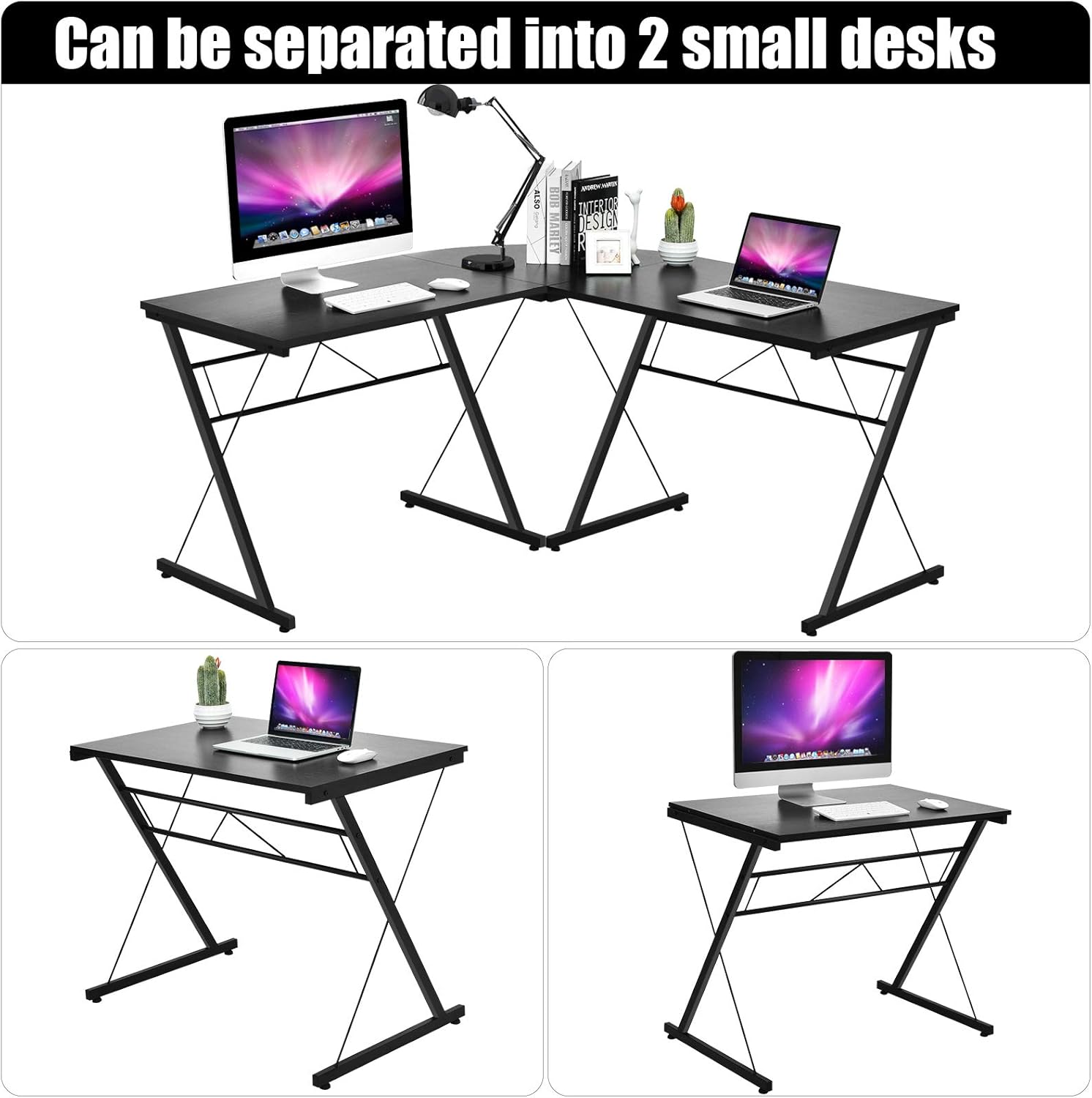
ຮູບທີ 2: Flexible detachable design. The L-shaped desk can be separated into two smaller, individual desks for versatile use.

ຮູບທີ 3: Detailed features including rounded edges for safety, adjustable leveling feet for stability, and X-shaped support structure.
ຄໍາແນະນໍາການດໍາເນີນງານ
The Tangkula L-Shaped Corner Computer Desk is designed for various uses in a home or office environment.
Usage Configurations:
- L-Shaped Workstation: Utilize the full L-shape to create a spacious corner workstation, ideal for multiple monitors, computers, and office accessories.
- Dual Straight Desks: If space requirements change or for multi-user setups, separate the desk into two independent straight desks. This provides flexibility for different room layouts or individual workspaces.
The spacious desktop provides ample room for laptops, monitors, and other office supplies, keeping everything within reach. The design also offers generous legroom underneath for comfort and storage.

ຮູບທີ 4: L-shaped desk in a home office setting, showcasing its spacious desktop and functional design.
ການດູແລແລະບໍາລຸງຮັກສາ
- ທໍາຄວາມສະອາດ: The desk features a smooth, waterproof tabletop surface. For daily cleaning, wipe with a soft, damp ຜ້າ. ຫຼີກລ້ຽງການເຮັດຄວາມສະອາດຂັດຫຼືສານເຄມີທີ່ຮຸນແຮງທີ່ອາດຈະທໍາລາຍການສໍາເລັດຮູບ.
- ການຮົ່ວໄຫລ: Wipe up spills immediately to prevent water damage, although the surface is designed to be waterproof.
- ການກວດກາ: ກວດສອບສະກູ ແລະ ຈຸດເຊື່ອມຕໍ່ທັງໝົດເປັນໄລຍະເພື່ອຮັບປະກັນວ່າພວກມັນຍັງແໜ້ນດີ. ຂັນໃຫ້ແໜ້ນຄືນຖ້າຈຳເປັນເພື່ອຮັກສາຄວາມໝັ້ນຄົງ.
- ຫຼີກເວັ້ນການໂຫຼດເກີນ: Do not place excessively heavy items on the desk, ensuring the total weight does not exceed 220 pounds.

ຮູບທີ 5: Waterproof tabletop surface for easy cleaning and maintenance.
ການແກ້ໄຂບັນຫາ
ບັນຫາທົ່ວໄປ ແລະການແກ້ໄຂ:
- Desk ແມ່ນ Wobbly:
ການແກ້ໄຂ: Check that all assembly screws are securely tightened. Adjust the individual leveling feet on the bottom of each leg to compensate for uneven floor surfaces until the desk is stable. - ຊິ້ນສ່ວນທີ່ຂາດຫາຍໄປຫຼືເສຍຫາຍ:
ການແກ້ໄຂ: Refer to the parts list in your assembly manual. If any parts are missing or damaged upon arrival, do not proceed with assembly. Contact Tangkula customer support for assistance. - ການປະກອບຄວາມຫຍຸ້ງຍາກ:
ການແກ້ໄຂ: Review the step-by-step assembly instructions carefully. Ensure you are using the correct hardware for each step. If issues persist, contact customer support for guidance.
ຂໍ້ມູນຈໍາເພາະຂອງຜະລິດຕະພັນ
| ຍີ່ຫໍ້ | ຕັງກຸລາ |
| ໝາຍເລກຕົວແບບ | GT-65902BK-HW |
| ຂະໜາດສິນຄ້າ | 59"D x 59"W x 30"H (150ຊມ x 150ຊມ x 76ຊມ) |
| ນ້ໍາຫນັກລາຍການ | 53 ປອນ (24 ກິໂລ) |
| ຄໍາແນະນໍານ້ໍາຫນັກສູງສຸດ | 220 ປອນ (100 ກິໂລ) |
| ປະເພດວັດສະດຸ | P2 MDF + Iron Pipe |
| ສີ | ດຳ |
| ຕ້ອງການສະພາແຫ່ງ | ແມ່ນແລ້ວ |
| ອົງປະກອບລວມ | L-shaped desk components, assembly tools, instruction manual |
ຂໍ້ມູນການຮັບປະກັນ
Tangkula products are manufactured to high-quality standards. For specific warranty details, including coverage and duration, please refer to the warranty card included with your product or contact Tangkula customer support directly. Please retain your proof of purchase for any warranty claims.
ການຊ່ວຍເຫຼືອລູກຄ້າ
If you have any questions, require assistance with assembly, or need to report missing/damaged parts, please contact Tangkula customer support. You can typically find contact information on the packaging, the included assembly manual, or by visiting the official Tangkula webເວັບໄຊ.
For online purchases, you may also refer to the seller's contact information on the platform where the product was purchased.