
1. ຜະລິດຕະພັນເກີນview
The ZHURUI PR10 Power Meter Plug is a device designed for measuring and monitoring the power consumption of various electrical equipment. It features a 2.4-inch TFT color LCD display and can measure parameters such as power, power factor, voltage, current, frequency, accumulated electricity consumption, accumulated electricity bill, and accumulated electricity time. It also tracks one-shot electricity consumption, bill, and time, which can be reset for specific measurements.
The PR10 is suitable for use in households, factories, and offices. It includes functions to record daily electricity usage and costs, which can be viewed in chart or list formats. Additionally, the device can be configured to power on or off connected electrical equipment based on user settings.
ຄຸນນະສົມບັດທີ່ສໍາຄັນ:
- Full digital operation and control with a 2.4-inch true color TFT LCD display.
- 0.5FS-level measuring accuracy.
- Supports 23 freely adjustable currency units.
- Four operational keys for navigation.
- Date and time settings with support for 5 date formats.
- Configurable outlet power state after power-on (automatic on, no electricity, or last working state).
- Two types of power statistics: cumulative electricity and one-shot electricity, with the ability to clear one-shot data.
- Alarm function for voltage, current, power, or temperature exceeding set limits.
- Automatic historical data recording, viewable as lists or charts, with storage for up to 30 years.
2. ຄໍາແນະນໍາການຕິດຕັ້ງ
2.1 ການເຊື່ອມຕໍ່ເບື້ອງຕົ້ນ
To begin, plug the ZHURUI PR10-E Power Meter Plug into a standard 15A wall outlet. Ensure the outlet is properly grounded. Once plugged in, the device's display will activate.

ຮູບ 2.1: ດ້ານຫນ້າ view of the PR10-E, highlighting the display and control buttons.

ຮູບ 2.2: ກັບຄືນໄປບ່ອນ view of the PR10-E, illustrating the plug design.
2.2 ການເລືອກພາສາ
Upon first use or after a factory reset, you may need to select your preferred language. Use the navigation buttons (▲/▼) to scroll through the available languages on the display. Press the 'OK' button to confirm your selection.

Figure 2.3: Language selection screen on the PR10-E.
2.3 ການຕັ້ງຄ່າວັນທີ ແລະເວລາ
Access the system settings menu to configure the current date and time. The device supports 5 different date formats. Adjust the values using the navigation buttons and confirm each entry with 'OK'. Accurate date and time are essential for correct historical data logging.
2.4 Currency Unit Configuration
The PR10-E allows you to set one of 23 currency units for electricity bill calculations. Navigate to the currency settings in the menu and select your local currency. This ensures accurate cost reporting based on your electricity rates.
2.5 Power-On State Setting
You can configure the device's behavior after a power interruption or when initially plugged in. Options typically include: automatic power on, no electricity (off), or maintaining the last working state. Select the option that best suits your application from the system settings.
3. ຄໍາແນະນໍາການດໍາເນີນງານ
3.1 Display Page Navigation
The PR10-E features three main display pages: the Overview page, the One-shot Electrical page, and the Real-time Electrical Parameters page. The default display is the Overview page. Press the '▲' or '▼' key to switch between these different display pages.
3.2 Real-time Parameter Monitoring
On the Real-time Electrical Parameters page, you can view live measurements of:
- ສະບັບtage: The current electrical potential difference.
- ປັດຈຸບັນ: The flow rate of electrical charge.
- ພະລັງງານ: The instantaneous rate at which electrical energy is transferred.
- ປັດໄຈພະລັງງານ (PF): The ratio of real power to apparent power.
- ຄວາມຖີ່: The rate at which the current changes direction.

Figure 3.1: Real-time electrical parameters display.
3.3 Accumulated and One-shot Data
The device tracks both cumulative and one-shot electricity data. Cumulative data provides a running total of consumption, bill, and time. One-shot data can be cleared, making it useful for measuring the consumption of a specific appliance or during a particular period. To clear one-shot data, navigate to the One-shot Electrical page and follow the on-screen prompts or refer to the system settings.
3.4 Historical Data Review
The PR10-E automatically records historical data, which can be reviewed in the form of charts or lists. This data includes daily electricity consumption and associated costs. To access historical records, navigate to the 'History Records' section within the menu. You can view data by year or month, presented as bar charts or detailed lists.
ຮູບທີ 3.2: ຕົວຢ່າງample of a monthly energy consumption chart.

Figure 3.3: Historical data views, including charts and lists.
3.5 ຟັງຊັນປຸກ
The device includes an alarm function that can be configured to alert you when voltage, current, power, or temperature exceed predefined limits. Access the alarm settings in the menu to set your desired thresholds. When an alarm condition is met, the device can provide an audible alert or trigger an output protection action.
3.6 Output Protection Function
The PR10-E features an output protection function that can automatically cut off the power supply to the connected appliance if the measured voltage, current, power, or temperature exceeds the set protection values. This helps prevent damage to the appliance or the meter itself. This function can be enabled and configured in the system settings.
4. ບໍາລຸງຮັກສາ
4.1 ການທໍາຄວາມສະອາດ
To maintain the device's performance and appearance, wipe the exterior with a soft, dry cloth. Avoid using abrasive cleaners, solvents, or harsh chemicals, as these can damage the display or casing. Ensure the device is unplugged before cleaning.
4.2 ການທົດແທນຫມໍ້ໄຟ
The PR10-E contains an internal CR2032 battery (included) for maintaining settings and historical data during power outages. If the device consistently loses settings or time, the battery may need replacement. This is typically a user-serviceable part, often socketed for easy replacement. Refer to the back of the device or contact support for detailed instructions if needed.
5. ການແກ້ໄຂບັນຫາ
5.1 ອຸປະກອນບໍ່ເປີດ
- Ensure the PR10-E is securely plugged into a functional wall outlet.
- Verify that the wall outlet itself is receiving power by testing it with another appliance.
5.2 Screen Issues (e.g., White Screen)
- Unplug the device from the wall outlet, wait for 30 seconds, and then plug it back in.
- ຖ້າບັນຫາຍັງຄົງຢູ່, ໃຫ້ຕິດຕໍ່ຝ່າຍຊ່ວຍເຫຼືອລູກຄ້າ.
5.3 Overload Shutdown
- The device has an output protection function that will cut off power if current, voltage, power, or temperature limits are exceeded.
- Check the connected appliance's power requirements and compare them to the PR10-E's specifications (Max Current 15A, Max Power 3750W).
- If an overload occurred, unplug the appliance, wait for the PR10-E to reset (if auto-restart is enabled), or manually reset it.
- Reduce the load or use an appliance within the device's limits.
5.4 Difficulty with Settings/Navigation
- Familiarize yourself with the four operation keys: typically 'Menu/Back', 'OK/Enter', and two navigation keys (▲/▼).
- Practice navigating through the menus without an appliance connected to understand the flow.
- If you get lost in the menu, pressing the 'Menu/Back' button repeatedly will usually return you to the main display.
5.5 Device Obstructs Adjacent Outlet
Due to its physical size, the PR10-E may obstruct the second receptacle of a standard duplex wall outlet when plugged in. This is a design characteristic. Consider using a power strip or an extension cord if both outlets are needed.
Figure 5.1: PR10-E plugged into an outlet, showing potential obstruction.
5.6 Device Runs Warm
It is normal for the PR10-E to feel slightly warm during operation, especially when monitoring higher power loads. This is typically due to internal components such as the relay. Ensure adequate ventilation around the device and avoid covering it. If the device becomes excessively hot or emits smoke/unusual odors, unplug it immediately and contact support.
6. ຂໍ້ມູນຈໍາເພາະ
| ພາລາມິເຕີ | ມູນຄ່າ |
|---|---|
| ຜູ້ຜະລິດ | Shenzhen Zhurui Technology CO.,LTD |
| ເລກສ່ວນ | PR10-E |
| ໝາຍເລກຕົວແບບ | PR10-E-NEW |
| ນ້ໍາຫນັກລາຍການ | 320 g |
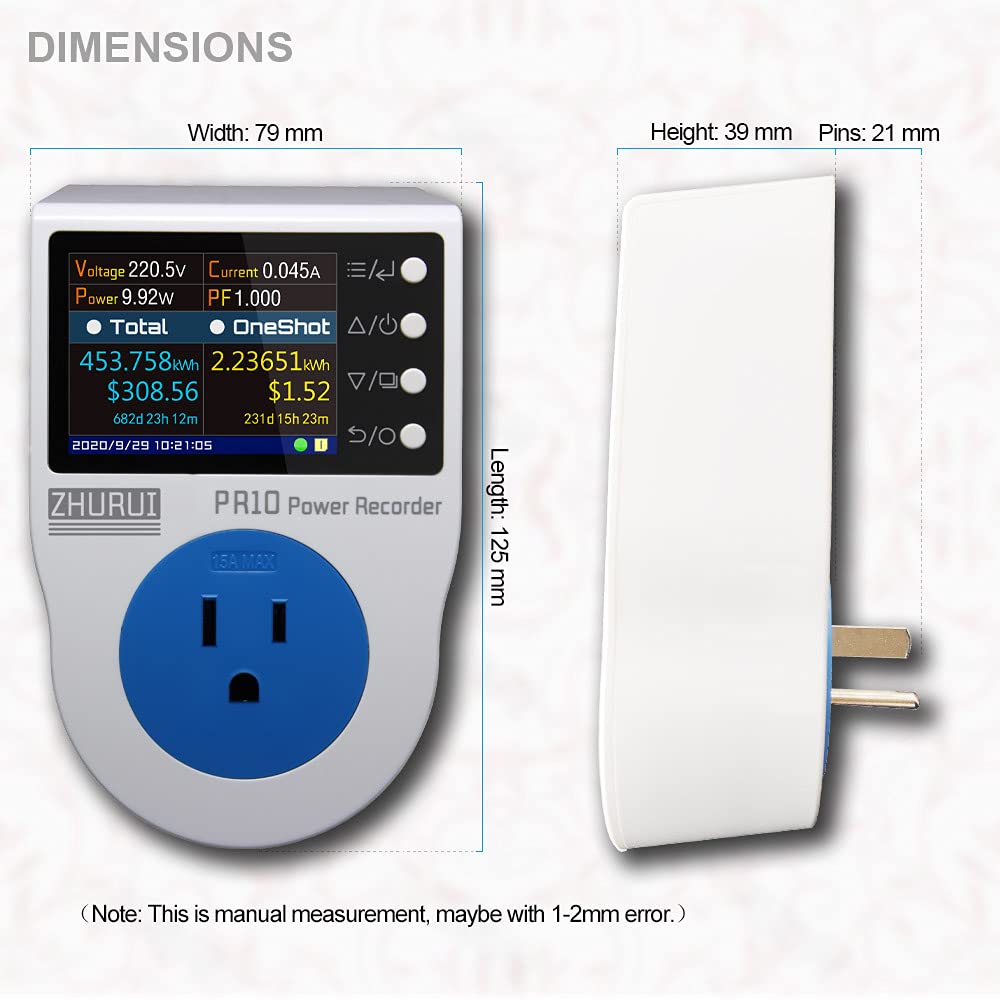
| ຂະຫນາດ Parcel | 15.2 x 11.3 x 8.4 cm |
| ສີ | ສີຟ້າ |
| ແບບ | PR10-E-NEW |
| ວັດສະດຸ | ທອງແດງ |
| ປະເພດແຫຼ່ງພະລັງງານ | ໄຟຟ້າສາຍ |
| ຕ່ຳສຸດ ປະຕິບັດການ Voltage | 100 ໂວນ |
| ລະດັບອຸນຫະພູມສູງສຸດ | 50 ອົງສາ Celsius |
| ປະເພດການວັດແທກ | ວັດແທກ |
| ຈໍານວນຊຸດລາຍການ | 1 |
| ຕ້ອງໃຊ້ແບັດເຕີຣີ? | ແມ່ນແລ້ວ |
| ແບດເຕີລີ່ລວມ? | ແມ່ນແລ້ວ |
| ປະເພດເຊລຫມໍ້ໄຟ | Lithium Manganese Dioxide (CR2032) |
| ການຢັ້ງຢືນ | CE, FCC, RoHS, UL |
| UPC | 714929297051 |

ຮູບທີ 6.1: ຂະໜາດອຸປະກອນ.
7. ການຮັບປະກັນແລະການສະຫນັບສະຫນູນ
7.1 ຂໍ້ມູນການຮັບປະກັນ
Specific warranty details for the ZHURUI PR10-E Power Meter Plug may vary by region and retailer. Please refer to the documentation included with your purchase or contact your point of sale for comprehensive warranty information.
7.2 ສະຫນັບສະຫນູນລູກຄ້າ
For technical assistance, troubleshooting, or inquiries regarding your ZHURUI PR10-E Power Meter Plug, please contact the manufacturer, Shenzhen Zhurui Technology CO.,LTD, or your authorized dealer. Contact information can typically be found on the product packaging or the manufacturer's official webເວັບໄຊ.