
ແນະນຳ
This manual provides essential information for the safe and effective use of your ProForm City L6 Folding Treadmill. Please read all instructions carefully before operating the equipment. Retain this manual for future reference.

Image: The ProForm City L6 Folding Treadmill, showcasing its compact design and console.
ຂໍ້ມູນຄວາມປອດໄພທີ່ສໍາຄັນ
To reduce the risk of serious injury, read all important precautions and instructions in this manual before using the treadmill. ProForm assumes no responsibility for personal injury or property damage sustained by or through the use of this product.
- ປຶກສາແພດກ່ອນທີ່ຈະເລີ່ມໂຄງການອອກກໍາລັງກາຍໃດໆ.
- ຮັກສາເດັກນ້ອຍ ແລະສັດລ້ຽງຢູ່ຫ່າງຈາກເຄື່ອງແລ່ນ.
- ວາງເຄື່ອງແລ່ນໃສ່ພື້ນລະດັບທີ່ມີພື້ນທີ່ຊັດເຈນຢ່າງໜ້ອຍ 2 ແມັດ (6.5 ຟຸດ) ດ້ານຫຼັງ ແລະ 0.5 ແມັດ (1.6 ຟຸດ) ໃນແຕ່ລະດ້ານ.
- ໃສ່ເຄື່ອງນຸ່ງແລະເກີບກິລາທີ່ເຫມາະສົມ.
- ຫ້າມແລ່ນເຄື່ອງແລ່ນ ຖ້າສາຍໄຟ ຫຼືປລັກສຽບເສຍຫາຍ.
- Always hold the handrails when starting or stopping the treadmill.
- ຢ່າຮັບນ້ຳໜັກຜູ້ໃຊ້ເກີນ 250 ປອນ (113 ກິໂລກຣາມ).
ຕັ້ງຄ່າ
ການຫຸ້ມຫໍ່ແລະການຈັດວາງ
Carefully remove all components from the packaging. Place the treadmill on a flat, stable surface. Ensure adequate clearance around the unit for safe operation and maintenance.
Assembly (Folding Mechanism)
The ProForm City L6 features a SpaceSaver Design for compact storage. To prepare for use, carefully unfold the treadmill deck until it locks into place. To fold for storage, lift the deck until it secures in the upright position.
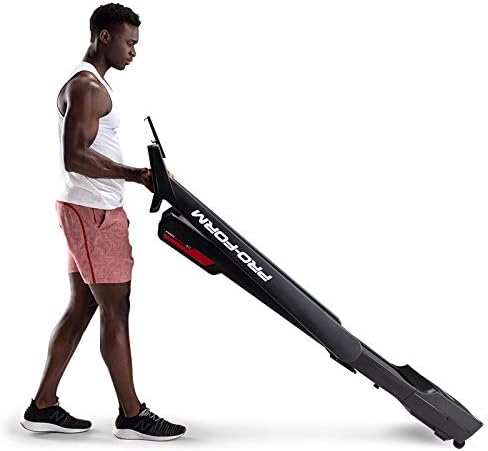
Image: A user demonstrating the folding mechanism of the ProForm City L6 Treadmill for compact storage.
ການເຊື່ອມຕໍ່ພະລັງງານ
Connect the power cord to a grounded outlet. Ensure the safety key is properly inserted into the console before attempting to power on the treadmill.
iFIT Activation
Your treadmill includes a 30-day iFIT membership. To activate, download the iFIT app on your tablet or smartphone. Connect your device to the treadmill via Bluetooth. Follow the on-screen instructions in the iFIT app to set up your account and access workouts.

Image: The treadmill console with a tablet mounted, showing the iFIT application interface.
ຄໍາແນະນໍາການດໍາເນີນງານ
ເລີ່ມ Treadmill
- ໃຫ້ແນ່ໃຈວ່າກະແຈຄວາມປອດໄພຢູ່ໃນບ່ອນ.
- ກ້າວໃສ່ສາຍແອວ treadmill, ເອົາຕີນຂອງທ່ານໃສ່ກັບ rails ຂ້າງ.
- ກົດ ເລີ່ມ ປຸ່ມ. ສາຍແອວຈະເລີ່ມເຄື່ອນທີ່ດ້ວຍຄວາມໄວຕໍ່າ.
- Gradually increase speed using the ຄວາມໄວ + buttons or Digital QuickSpeed controls.

Image: A user engaged in a running workout on the ProForm City L6 Treadmill.
ການປັບຄວາມໄວ
ໃຊ້ ຄວາມໄວ + ແລະ ຄວາມໄວ - buttons on the console to adjust the treadmill's speed. The treadmill offers speeds from 0 to 8 MPH. For iFIT workouts, the trainer may automatically adjust your speed.
Stopping the Treadmill
ກົດ ຢຸດ button to gradually slow down and stop the treadmill belt. For an emergency stop, pull the safety key from the console.
ການນໍາໃຊ້ຈໍສະແດງຜົນ
The 5-inch high-contrast display shows your workout metrics, including distance, speed, estimated calorie burn, and time. When connected to iFIT, enhanced metrics are available through the app.
ບໍາລຸງຮັກສາ
ທໍາຄວາມສະອາດ
ເຮັດຄວາມສະອາດ treadmill ເປັນປົກກະຕິດ້ວຍການໂຄສະນາamp cloth and mild soap. Avoid using abrasive cleaners or solvents. Wipe down the console and handrails after each use to remove sweat and debris.
ການດູແລສາຍແອວ
Inspect the walking belt periodically for wear and tear. Ensure the belt is properly centered and tensioned. Refer to the full product manual (if available from manufacturer) for detailed instructions on belt adjustment and lubrication, if required.
ການກວດກາທົ່ວໄປ
Check all bolts and nuts for tightness regularly. Replace any worn components immediately. Unplug the treadmill before performing any maintenance or cleaning.
ການແກ້ໄຂບັນຫາ
| ບັນຫາ | ສາເຫດທີ່ເປັນໄປໄດ້ | ການແກ້ໄຂ |
|---|---|---|
| Treadmill ບໍ່ເປີດ. | Power cord not plugged in; safety key not inserted; circuit breaker tripped. | Ensure power cord is securely plugged in. Insert safety key fully. Check household circuit breaker. |
| Walking belt slips or hesitates. | ຄວາມຕຶງຂອງສາຍແອວວ່າງເກີນໄປ; ສາຍແອວຕ້ອງການນໍ້າມັນຫລໍ່ລື່ນ. | Adjust belt tension (refer to manufacturer's detailed guide). Lubricate belt if necessary (use approved silicone lubricant). |
| ໜ້າຈໍຄອນໂຊນວ່າງເປົ່າ ຫຼື ບໍ່ສະໝໍ່າສະເໝີ. | Loose cable connection; power issue. | Check all cable connections to the console. Unplug and re-plug the treadmill. |
ຖ້າທ່ານພົບບັນຫາທີ່ບໍ່ໄດ້ລະບຸໄວ້ຢູ່ນີ້, ຫຼື ຖ້າວິທີແກ້ໄຂບໍ່ສາມາດແກ້ໄຂບັນຫາໄດ້, ໃຫ້ຕິດຕໍ່ຝ່າຍສະໜັບສະໜູນລູກຄ້າ.
ຂໍ້ມູນຈໍາເພາະ
- ຕົວແບບ: PFTL28820
- ຍີ່ຫໍ້: ແບບຟອມ
- ຂະໜາດຜະລິດຕະພັນ: 30.48 x 81.28 x 187.96 ຊມ (12 x 32 x 74 ນິ້ວ)
- ນ້ໍາຫນັກລາຍການ: 65.77 ກິໂລ (145 ປອນ)
- ນໍ້າໜັກຜູ້ໃຊ້ສູງສຸດ: 250 lbs (113 ກິໂລ)
- ຊ່ວງຄວາມໄວ: 0-8 MPH Digital QuickSpeed Controls
- ສາຍແອວ Tread: 18" x 47"
- ຈໍສະແດງຜົນ: 5-inch High-Contrast LCD
- ແຮງມ້າ: 2 HP
- ຄຸນນະສົມບັດພິເສດ: SpaceSaver Design (Foldable), iFIT Bluetooth Connectivity
- ແຫຼ່ງພະລັງງານ: ໄຟຟ້າສາຍ

Image: The ProForm City L6 Treadmill with its physical dimensions indicated.
ຮັບປະກັນ
The ProForm City L6 Folding Treadmill is protected by the following warranties:
- ກອບ: ຮັບປະກັນ 10 ປີຈໍາກັດ
- ຊິ້ນສ່ວນ ແລະແຮງງານ: ຮັບປະກັນ 1 ປີຈໍາກັດ
This warranty applies to the original owner and is valid only in the country where the product was purchased. For full warranty terms and conditions, please refer to the warranty card included with your product or visit the official ProForm webເວັບໄຊ.
ສະຫນັບສະຫນູນ
For technical assistance, parts inquiries, or warranty claims, please contact ProForm Customer Service. Have your model number (PFTL28820) and serial number ready when contacting support.
Visit the official ProForm webເວັບໄຊສໍາລັບຊັບພະຍາກອນເພີ່ມເຕີມ, FAQs, ແລະຂໍ້ມູນຕິດຕໍ່: www.proform.com