
Casio DH-12ET
Casio DH-12ET Desktop Calculator User Manual
Model: DH-12ET
ແນະນຳ
This manual provides detailed instructions for the proper use and maintenance of your Casio DH-12ET Desktop Calculator. Please read this manual thoroughly before using the calculator to ensure optimal performance and longevity.

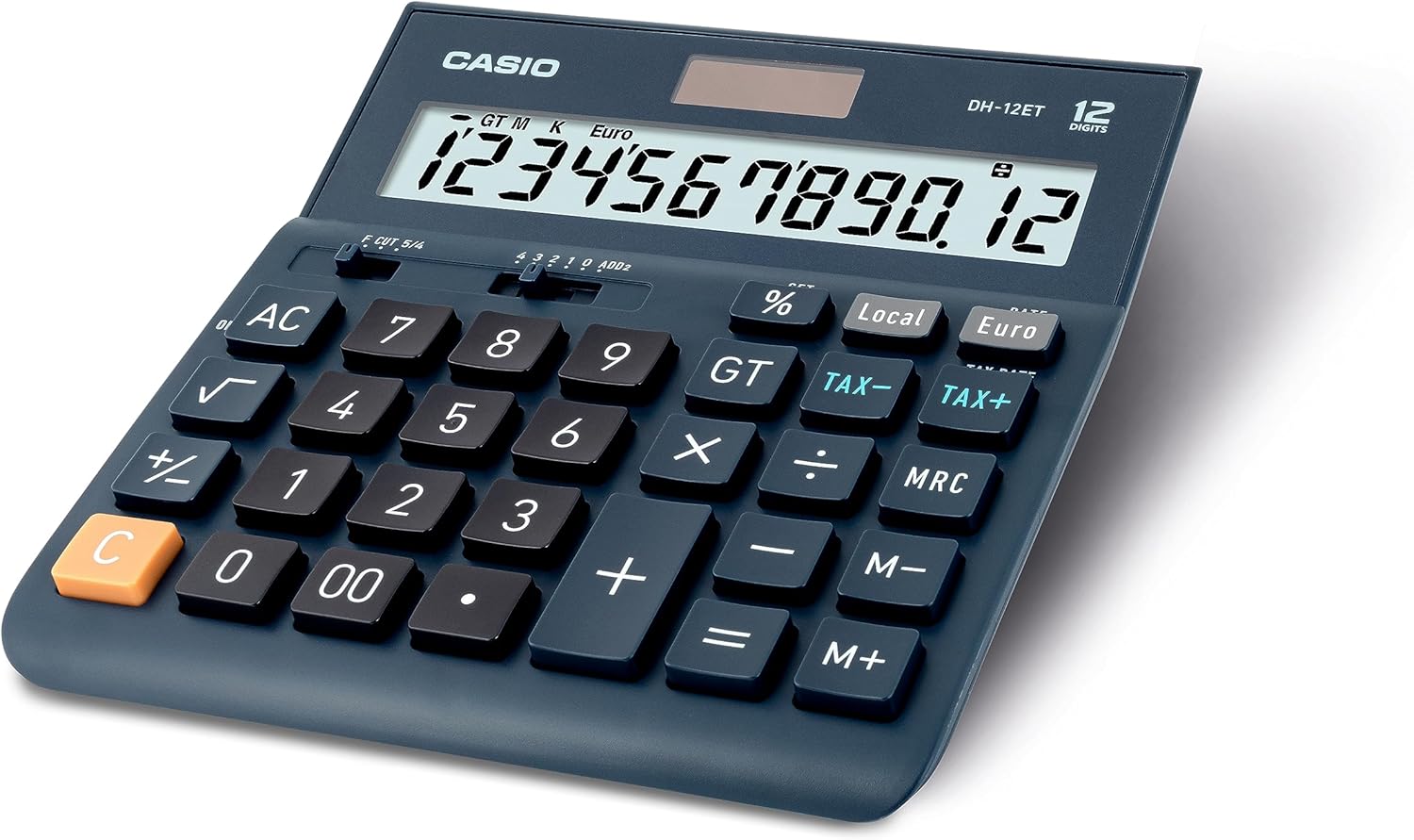
ຮູບທີ 1: ດ້ານໜ້າ view of the Casio DH-12ET Desktop Calculator, showing the display and key layout.
ຄຸນສົມບັດຜະລິດຕະພັນ
The Casio DH-12ET is a versatile 12-digit desktop calculator designed for various business and personal calculations. Key features include:
- ຈໍສະແດງຜົນ LCD 12 ຕົວເລກ: Clear display with calculation command indicators and thousands separators.
- ການຄິດໄລ່ພາສີ: Dedicated functions for easy and quick calculation of tax additions or subtractions.
- ແປງສະກຸນເງິນ: Ability to convert amounts between two currencies after setting an exchange rate.
- Professional Percentage ການຄິດໄລ່: Determine percentage increase and decrease with separate display of calculated values.
- Mark Up Function: Quickly determine margins and markups.
- Square Root Function: Calculate square roots.
- ເຊັນການປ່ຽນແປງ (+/-): Easily switch between positive and negative values.
- Total Sum Memory (GT): Automatically stores the sum of all calculation results.
- 3-Key Memory: Independent memory functions (M+, M-, MRC) for storing and recalling values.
- Solar/Battery Operated: Dual power source for reliable operation.
- ປິດເຄື່ອງອັດຕະໂນມັດ: ປະຢັດອາຍຸການໃຊ້ງານຂອງແບັດເຕີຣີໂດຍການປິດເຄື່ອງຫຼັງຈາກບໍ່ມີການເຄື່ອນໄຫວເປັນເວລາ 6 ນາທີ.
- Memory Protection Battery: Retains stored data (e.g., currency rates, tax rates) during power loss or battery change.
- ຕີນຢາງ: ໃຫ້ຄວາມໝັ້ນຄົງໃນໜ້າຜິວຕ່າງໆ.
ຕັ້ງຄ່າ
ການສະຫນອງພະລັງງານ
The Casio DH-12ET calculator operates on a dual power system: solar power and a single LR44 button cell battery. The solar panel provides power in well-lit environments, while the battery acts as a backup in low light conditions or when the solar power is insufficient. The battery also serves as a memory protection battery.
ການຕິດຕັ້ງ/ປ່ຽນແບັດ
The calculator comes with one LR44 battery pre-installed. If the display becomes dim or unresponsive in low light, the battery may need replacement.
- ໃຫ້ແນ່ໃຈວ່າເຄື່ອງຄິດເລກຖືກໝຸນແລ້ວ ປິດ.
- ຊອກຫາຊ່ອງໃສ່ຫມໍ້ໄຟຢູ່ດ້ານຫຼັງຂອງເຄື່ອງຄິດເລກ.
- ໂດຍໃຊ້ screwdriver ຂະຫນາດນ້ອຍ, ເອົາ screw ຍຶດຝາປິດຊ່ອງຫມໍ້ໄຟ.
- Carefully remove the old LR44 battery.
- Insert a new LR44 battery with the positive (+) side facing upwards.
- ປ່ຽນຝາປິດຊ່ອງໃສ່ໝໍ້ໄຟ ແລະຍຶດມັນດ້ວຍສະກູ.
ໝາຍເຫດ: Dispose of used batteries according to local regulations. Do not expose batteries to excessive heat or fire.
ຄໍາແນະນໍາການດໍາເນີນງານ
ການຄິດໄລ່ພື້ນຖານ
- ເພີ່ມ: ໃສ່ຕົວເລກທໍາອິດ, ກົດ +, ໃສ່ຕົວເລກທີສອງ, ກົດ =.
- ການຫັກລົບ: ໃສ່ຕົວເລກທໍາອິດ, ກົດ -, ໃສ່ຕົວເລກທີສອງ, ກົດ =.
- ການຄູນ: ໃສ່ຕົວເລກທໍາອິດ, ກົດ x, ໃສ່ຕົວເລກທີສອງ, ກົດ =.
- ພະແນກ: ໃສ່ຕົວເລກທໍາອິດ, ກົດ ÷, ໃສ່ຕົວເລກທີສອງ, ກົດ =.
- ລຶບລ້າງລາຍການ: ກົດ C to clear the last entered number.
- All Clear: ກົດ AC to clear all entries and reset the calculator.
ການຄິດໄລ່ອາກອນ
The calculator allows for easy addition or subtraction of a pre-set tax rate.
- Setting the Tax Rate:
- ກົດ AC ແລະຖື % key until "SET" appears on the display.
- ກົດ ອັດຕາພາສີ (which is the TAX+ ກຸນແຈ).
- Enter the desired tax rate (e.g., 8 for 8%).
- ກົດ % to confirm and save the tax rate.
- Adding Tax: ໃສ່ຈຳນວນເງິນ, ຈາກນັ້ນກົດ TAX+. The display will show the amount with tax added.
- Subtracting Tax: Enter the amount with tax, then press ພາສີ-. The display will show the original amount before tax.

ຮູບທີ 2: Steps for changing the tax rate on the Casio DH-12ET calculator.
ແປງສະກຸນເງິນ
The calculator supports conversion between a local currency and a foreign currency (e.g., Euro).
- Setting the Exchange Rate:
- ກົດ AC ແລະຖື % key until "SET" appears.
- ກົດ ອັດຕາ (which is the ເອີໂຣ ກຸນແຈ).
- Enter the exchange rate (e.g., 1.25 if 1 Local unit = 1.25 Euro).
- ກົດ % to confirm and save the rate.
- Converting Local to Foreign: Enter the local amount, then press ເອີໂຣ.
- Converting Foreign to Local: Enter the foreign amount, then press ທ້ອງຖິ່ນ.
ເປີເຊັນtage ການຄິດໄລ່
- Calculate Percentage of a Number: Enter number, press x, enter percentage value, press %. (e.g., 100 x 15 % = 15)
- Add Percentage: Enter number, press +, enter percentage value, press %. (e.g., 100 + 15 % = 115)
- Subtract Percentage: Enter number, press -, enter percentage value, press %. (e.g., 100 - 15 % = 85)
ຟັງຊັນຄວາມຈໍາ
- M+: ເພີ່ມຄ່າທີ່ສະແດງໃຫ້ກັບຫນ່ວຍຄວາມຈໍາ.
- M-: ລົບຄ່າທີ່ສະແດງອອກຈາກຫນ່ວຍຄວາມຈໍາ.
- MRC:
- Press once to recall the value stored in memory.
- Press twice to clear the memory (M indicator disappears).
- GT (Grand Total):
- Automatically accumulates results of calculations (e.g., after pressing = or %).
- ກົດ GT ເພື່ອສະແດງຜົນລວມທັງໝົດ.
- ກົດ AC to clear the grand total memory.
ຟັງຊັນອື່ນໆ
- √ (ຮາກສີ່ຫຼ່ຽມ): ໃສ່ຕົວເລກ, ຈາກນັ້ນກົດ √ to calculate its square root.
- +/- (ການປ່ຽນຊື່): ປ່ຽນສັນຍາລັກຂອງຕົວເລກທີ່ສະແດງຈາກບວກເປັນລົບຫຼືໃນທາງກັບກັນ.
- Decimal Selector (F CUT 5/4, 4 3 2 1 0 ADD2):
This slider switch controls the decimal point and rounding settings:
- F (ລອຍ): Decimal point floats, displaying all digits.
- ຕັດ: Truncates results to the specified number of decimal places.
- 5/4: Rounds results to the specified number of decimal places (standard rounding).
- 4, 3, 2, 1, 0: Specifies the number of decimal places (e.g., '2' for two decimal places).
- ADD2: Automatically adds two decimal places for currency calculations.
ບໍາລຸງຮັກສາ
ທໍາຄວາມສະອາດ
To clean the calculator, wipe it gently with a soft, dry cloth. For stubborn dirt, slightly dampen the cloth with water and a mild detergent, then wipe dry immediately. Do not use strong solvents, abrasive cleaners, or spray cleaners directly onto the calculator.
ການເກັບຮັກສາ
ເກັບຮັກສາເຄື່ອງຄິດເລກໄວ້ໃນບ່ອນທີ່ເຢັນ, ແຫ້ງແລ້ງຫ່າງຈາກແສງແດດໂດຍກົງ, ອຸນຫະພູມທີ່ຮຸນແຮງ, ແລະຄວາມຊຸ່ມຊື່ນສູງ. ຖ້າເກັບຮັກສາໄວ້ເປັນເວລາດົນ, ແນະນໍາໃຫ້ຖອດຫມໍ້ໄຟອອກເພື່ອປ້ອງກັນການຮົ່ວໄຫຼ.
ການແກ້ໄຂບັນຫາ
- ຈໍສະແດງຜົນແມ່ນມືດ ຫຼືຫວ່າງເປົ່າ:
- Ensure the calculator is in a well-lit area for solar power.
- Check the battery. Replace the LR44 battery if it is depleted.
- ຜົນການຄິດໄລ່ທີ່ບໍ່ຖືກຕ້ອງ:
- ກົດ AC to clear all previous calculations and memory.
- Verify the decimal selector switch setting.
- Check if any memory functions (M, GT) are active and interfering.
- ປຸ່ມບໍ່ຕອບສະໜອງ:
- ໃຫ້ແນ່ໃຈວ່າເຄື່ອງຄິດເລກເປີດຢູ່.
- ອະນາໄມອ້ອມກະແຈເພື່ອເອົາສິ່ງເສດເຫຼືອໃດໆອອກ.
- ຖ້າບັນຫາຍັງຄົງຢູ່, ລອງປ່ຽນແບັດເຕີຣີ.
ຂໍ້ມູນຈໍາເພາະ
| ຄຸນສົມບັດ | ລາຍລະອຽດ |
|---|---|
| ຕົວແບບ | DH-12ET |
| ຈໍສະແດງຜົນ | ຈໍ LCD 12 ຕົວເລກ |
| ແຫຼ່ງພະລັງງານ | Solar / 1 x LR44 Battery (included) |
| ຂະໜາດ (L x W) | 15.9 ຊມ x 15.1 ຊມ (6.26 x 5.94 ນິ້ວ) |
| ນ້ຳໜັກ | 180 ກຣາມ |
| ວັດສະດຸ | ພາດສະຕິກ, ຢາງ |
| ການປິດອັດຕະໂນມັດ | ປະມານ 6 ນາທີທີ່ບໍ່ມີການເຄື່ອນໄຫວ |
ຮູບທີ 3: ຂ້າງ view of the Casio DH-12ET calculator with approximate dimensions.
ການຮັບປະກັນແລະການສະຫນັບສະຫນູນ
For information regarding warranty coverage, service, or technical support for your Casio DH-12ET Desktop Calculator, please refer to the warranty card included with your product or visit the official Casio webເວັບໄຊສໍາລັບພາກພື້ນຂອງທ່ານ. ລາຍລະອຽດການຕິດຕໍ່ສໍາລັບການບໍລິການລູກຄ້າໂດຍທົ່ວໄປແມ່ນມີຢູ່ໃນຜູ້ຜະລິດ webເວັບໄຊ.
ຢ່າງເປັນທາງການຂອງ Casio Webເວັບໄຊ: www.casio.com