
1. ບົດແນະນຳ
This manual provides essential instructions for the safe and efficient use of your Savio Tws-04 Wireless Bluetooth Earphones. Please read this manual thoroughly before using the product and retain it for future reference.
2. ຂໍ້ມູນຄວາມປອດໄພ
- ຢ່າວາງຫູຟັງ ຫຼືກ່ອງສາກໃສ່ກັບອຸນຫະພູມ, ຄວາມຊຸ່ມຊື່ນ, ຫຼືຂອງແຫຼວທີ່ຮຸນແຮງທີ່ສຸດ.
- ຫຼີກເວັ້ນການຫຼຸດລົງ, ຜົນກະທົບ, ຫຼືການຖອດອຸປະກອນ.
- ຮັກສາໃຫ້ໄກຈາກເດັກນ້ອຍ.
- ໃຊ້ພຽງແຕ່ເຄື່ອງສາກ ແລະສາຍທີ່ໄດ້ຮັບອະນຸມັດ.
- ການຟັງດົນໆໃນລະດັບສຽງສູງອາດເຮັດໃຫ້ເກີດຄວາມເສຍຫາຍຕໍ່ການໄດ້ຍິນ.
3. ເນື້ອໃນຊຸດ
ໃຫ້ແນ່ໃຈວ່າທຸກລາຍການຢູ່ໃນຊຸດ:
- Savio Tws-04 Wireless Bluetooth Earphones (Left and Right)
- ກ່ອງສາກ
- ສາຍສາກ USB
- ເຄັດລັບຫູຫຼາຍຂະໜາດ
- ຄູ່ມືຜູ້ໃຊ້

Image 3.1: Contents of the Savio Tws-04 package, showing the earphones, charging case, and various ear tip sizes.
4. ຜະລິດຕະພັນເກີນview
The Savio Tws-04 earphones are designed for wireless audio playback and hands-free communication. They come with a portable charging case for convenience.

Image 4.1: Savio Tws-04 earphones displayed with their charging case.
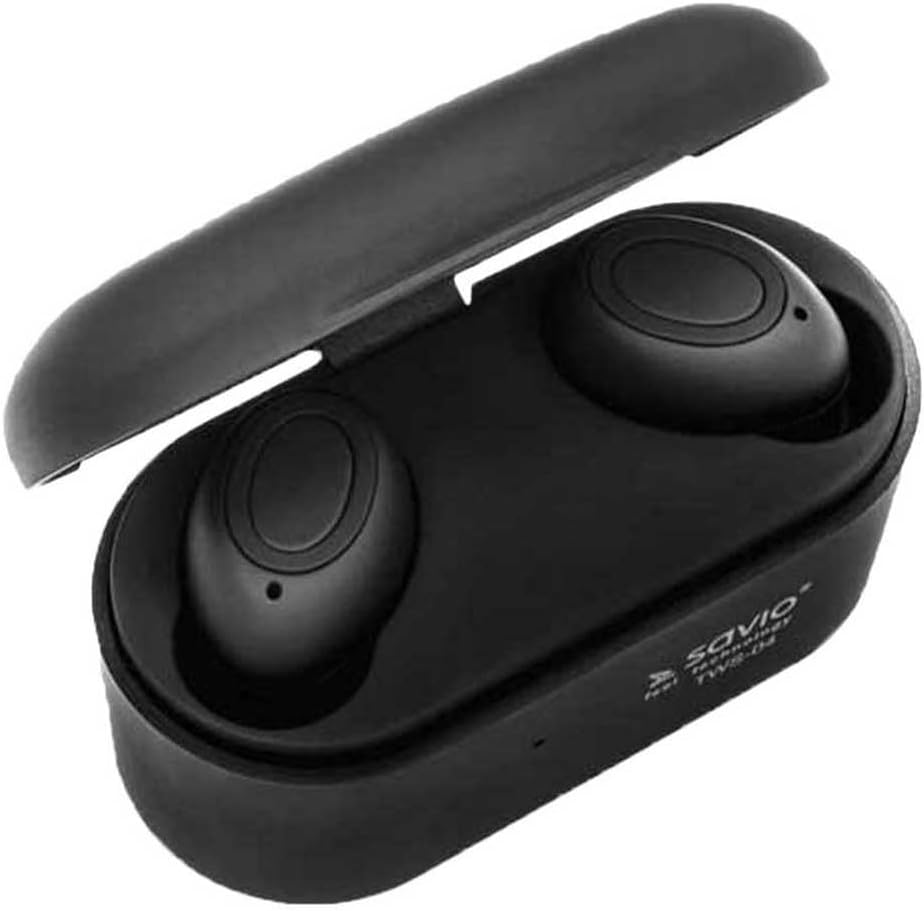
Image 4.2: The Savio Tws-04 earphones seated within their open charging case, showing charging contacts.
5. ຕັ້ງຄ່າ
5.1. ກຳລັງສາກຫູຟັງ ແລະ ເຄສ
- ຄ່າ ທຳ ນຽມ: ກ່ອນການນຳໃຊ້ຄັ້ງທຳອິດ, ໃຫ້ສາກທັງຫູຟັງ ແລະ ກ່ອງສາກໄຟໃຫ້ເຕັມ.
- ກໍລະນີເກັບເງິນ: Connect the USB charging cable to the charging port on the case and to a power source (e.g., computer USB port, wall adapter). The indicator light on the case will show charging status.
- ສາກຫູຟັງ: Place the earphones into the charging slots inside the case. Ensure they are properly seated. The indicator lights on the earphones will illuminate to show they are charging.
- ຄ່າບໍລິການເຕັມ: Once fully charged, the indicator lights will change or turn off. Disconnect the charging cable.

Image 5.1: An earphone placed in the charging case, illustrating the charging process.
5.2. ການຈັບຄູ່ກັບອຸປະກອນ Bluetooth
- ເປີດ: Take both earphones out of the charging case. They will automatically power on and attempt to pair with each other.
- ຮູບແບບການຈັບຄູ່: Once paired with each other, one earphone's indicator light will flash, indicating it is ready to pair with your device.
- ເປີດໃຊ້ Bluetooth: ໃນສະມາດໂຟນຂອງທ່ານ ຫຼືອຸປະກອນທີ່ເປີດໃຊ້ Bluetooth, ໃຫ້ໄປທີ່ການຕັ້ງຄ່າ Bluetooth ແລະເປີດໃຊ້ Bluetooth.
- ເລືອກອຸປະກອນ: ຊອກຫາ available devices and select "Savio Tws-04" from the list.
- ຢືນຢັນການເຊື່ອມຕໍ່: Once successfully paired, the earphone indicator light will stop flashing, and you may hear an audio prompt.
- ເຊື່ອມຕໍ່ຄືນໃໝ່: ຫູຟັງຈະເຊື່ອມຕໍ່ໃໝ່ໂດຍອັດຕະໂນມັດກັບອຸປະກອນທີ່ຈັບຄູ່ສຸດທ້າຍເມື່ອເອົາອອກຈາກເຄສ, ຖ້າ Bluetooth ຖືກເປີດໃຊ້ໃນອຸປະກອນ.
6. ປະຕິບັດການຫູຟັງ
6.1. ເປີດ/ປິດ
- ເປີດ: Take earphones out of the charging case. They will power on automatically. Alternatively, press and hold the multi-function button on both earphones for approximately 3 seconds.
- ປິດພະລັງງານ: Place earphones back into the charging case. They will power off automatically. Alternatively, press and hold the multi-function button on both earphones for approximately 5 seconds.
6.2. ການຫຼິ້ນເພງ
- ຫຼິ້ນ/ຢຸດ: ແຕະຄັ້ງດຽວທີ່ປຸ່ມຫຼາຍໜ້າທີ່ຢູ່ເທິງຫູຟັງຂ້າງໃດກໍໄດ້.
- ເພງຕໍ່ໄປ: ແຕະສອງຄັ້ງທີ່ປຸ່ມມັລຕິຟັງຊັນຢູ່ຫູຟັງເບື້ອງຂວາ.
- ຕິດຕາມກ່ອນ ໜ້າ ນີ້: ແຕະສອງຄັ້ງໃສ່ປຸ່ມຫຼາຍໜ້າທີ່ຢູ່ຫູຟັງເບື້ອງຊ້າຍ.
- ການຄວບຄຸມລະດັບສຽງ: (Note: Volume control may be managed directly from your connected device. Refer to your device's manual for specific instructions.)
6.3. ການຄຸ້ມຄອງການໂທ
- ຮັບ/ສາຍໂທ: ແຕະຄັ້ງດຽວທີ່ປຸ່ມຫຼາຍໜ້າທີ່ຢູ່ເທິງຫູຟັງຂ້າງໃດກໍໄດ້.
- ປະຕິເສດການໂທ: Press and hold the multi-function button on either earphone for approximately 2 seconds.
- ຜູ້ຊ່ວຍສຽງ: Triple tap the multi-function button on either earphone to activate your device's voice assistant (e.g., Siri, Google Assistant).
7. ບໍາລຸງຮັກສາ
- ທໍາຄວາມສະອາດ: ໃຊ້ຜ້າແພທີ່ອ່ອນ, ແຫ້ງ, ບໍ່ມີເສັ້ນດ່າງເພື່ອອະນາໄມຫູຟັງ ແລະ ກ່ອງສາກ. ຢ່າໃຊ້ເຄື່ອງເຮັດຄວາມສະອາດຂັດຫຼືສານລະລາຍ.
- ເຄັດລັບຫູ: Regularly remove and clean the ear tips with a damp ຜ້າ. ໃຫ້ແນ່ໃຈວ່າພວກມັນແຫ້ງຫມົດກ່ອນທີ່ຈະຕິດໃຫມ່.
- ການເກັບຮັກສາ: ເມື່ອບໍ່ໄດ້ໃຊ້, ໃຫ້ເກັບຮັກສາຫູຟັງໃສ່ໃນກະເປົ໋າສາກໄຟເພື່ອປົກປ້ອງພວກມັນ ແລະ ສືບຕໍ່ສາກໄຟ. ເກັບຮັກສາໄວ້ໃນບ່ອນທີ່ເຢັນ, ແຫ້ງ.
- ການດູແລຫມໍ້ໄຟ: ເພື່ອຍືດອາຍຸແບັດເຕີລີ, ຫຼີກເວັ້ນການຖອດແບດເຕີລີ່ເຕັມເລື້ອຍໆ. ສາກອຸປະກອນຢ່າງເປັນປົກກະຕິ, ເຖິງແມ່ນວ່າບໍ່ໄດ້ໃຊ້ເປັນໄລຍະເວລາທີ່ຍາວນານ.
8. ການແກ້ໄຂບັນຫາ
| ບັນຫາ | ການແກ້ໄຂທີ່ເປັນໄປໄດ້ |
|---|---|
| ຫູຟັງບໍ່ເປີດ. | ໃຫ້ແນ່ໃຈວ່າຫູຟັງ ແລະ ກ່ອງສາກໄຟໄດ້ສາກໄຟເຕັມແລ້ວ. |
| ຫູຟັງບໍ່ສາມາດຈັບຄູ່ກັບອຸປະກອນໄດ້. |
|
| ມີຫູຟັງອັນດຽວເທົ່ານັ້ນທີ່ເຮັດວຽກ. |
|
| ຄຸນະພາບສຽງບໍ່ດີ. |
|
9. ຂໍ້ມູນຈໍາເພາະ
| ຄຸນສົມບັດ | ລາຍລະອຽດ |
|---|---|
| ຊື່ຕົວແບບ | Savio Tws-04 |
| ເຕັກໂນໂລຊີການເຊື່ອມຕໍ່ | ໄຮ້ສາຍ (Bluetooth, NFC) |
| ປັດໄຈແບບຟອມ | ໃນຫູ |
| ສີ | ດຳ |
| ວັດສະດຸ | ອາລູມີນຽມ |
| ລະດັບຄວາມຕ້ານທານນ້ໍາ | ກັນນ້ຳ |
| ອຸປະກອນທີ່ເຂົ້າກັນໄດ້ | ໂທລະສັບມືຖື |
| ປະເພດການຄວບຄຸມ | ການຄວບຄຸມແອັບ |
| ນ້ໍາຫນັກລາຍການ | 2 ກິໂລກຣາມ |
Note: The listed item weight of 2 Kilograms may refer to the packaged shipping weight rather than the actual product weight. The form factor is visually identified as In-Ear, despite a specification listing 'Supra-Auriculaire'.
10. ການຮັບປະກັນແລະການສະຫນັບສະຫນູນ
Savio products are designed for reliability and performance. For warranty information, technical support, or service inquiries, please refer to the warranty card included with your product or visit the official Savio webເວັບໄຊ. ຮັກສາຫຼັກຖານການຊື້ຂອງທ່ານສໍາລັບການຮ້ອງຂໍການຮັບປະກັນ.
Availability of spare parts in the EU: 2 Years.