
1. ບົດແນະນຳ
The Dynascan R-400 is a professional-grade PMR-446 transceiver designed for license-free use. This device operates on the 446 MHz frequency band, offering reliable two-way communication. This manual provides essential information for the proper setup, operation, maintenance, and troubleshooting of your Dynascan R-400 transceiver to ensure optimal performance and longevity.
2. ຂໍ້ມູນຄວາມປອດໄພ
- ອ່ານຄໍາແນະນໍາທັງຫມົດ: Before operating the transceiver, thoroughly read and understand all instructions in this manual.
- ຄວາມປອດໄພຫມໍ້ໄຟ: Use only the specified Lithium-Ion battery and charging equipment. Do not short-circuit, incinerate, or disassemble the battery.
- ເສົາອາກາດ: ຢ່າໃຊ້ວິທະຍຸທີ່ມີເສົາອາກາດທີ່ເສຍຫາຍ. ຖ້າເສົາອາກາດທີ່ເສຍຫາຍສຳຜັດກັບຜິວໜັງຂອງທ່ານ, ອາດຈະເຮັດໃຫ້ເກີດການໄໝ້ເລັກນ້ອຍ.
- ແຊກແຊງ: Turn off the transceiver in areas where radio use is prohibited or when interference may occur, such as near medical equipment or aircraft.
- ການຕໍ່ຕ້ານນ້ໍາແລະຝຸ່ນ: The device has an IP55 rating, providing protection against dust and splashes of water. It is not designed for submersion.
- ການບໍລິການ: Do not attempt to service the transceiver yourself. Refer all servicing to qualified personnel.
3. ເນື້ອໃນຊຸດ
ກວດສອບວ່າລາຍການທັງຫມົດແມ່ນມີຢູ່ໃນຊຸດ:
- Dynascan R-400 PMR-446 Transceiver
- ຫມໍ້ໄຟ Lithium-ion
- ຖານສາກໄຟ
- ອະແດບເຕີໄຟສຳລັບຖານສາກໄຟ
- Clip ສາຍແອວ
- ສາຍແຂນ
- ຄູ່ມືຜູ້ໃຊ້
4. ຜະລິດຕະພັນເກີນview
Familiarize yourself with the main components of your Dynascan R-400 transceiver.

ຮູບທີ 4.1: ດ້ານໜ້າ view of the Dynascan R-400 transceiver, showing the speaker, microphone, and display area.
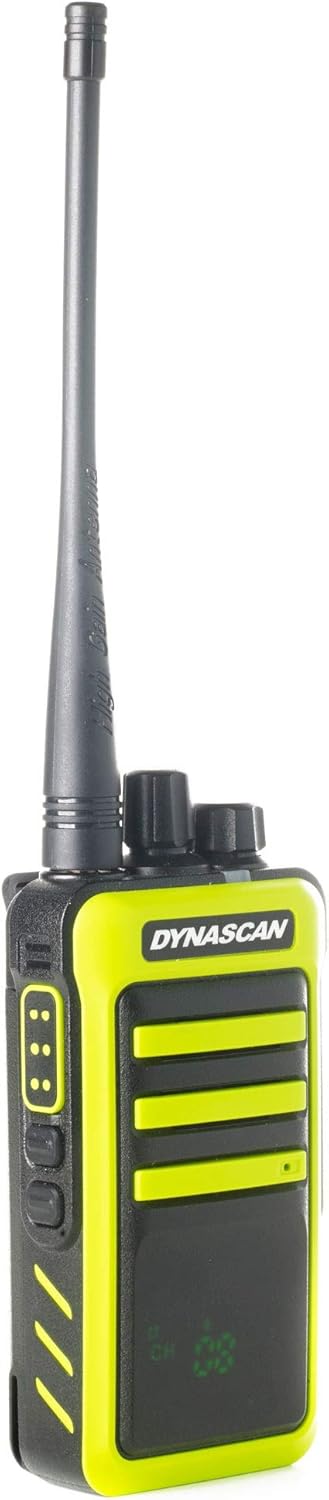
ຮູບທີ 4.2: ຂ້າງ view of the transceiver, highlighting the Push-To-Talk (PTT) button and two programmable function buttons.

ຮູບທີ 4.3: ຂ້າງ view showing the attachment point for the belt clip, allowing for convenient carrying.

ຮູບທີ 4.4: ກົງກັນຂ້າມ view, typically featuring the accessory port for external audio devices or programming cables.
5. ຕັ້ງຄ່າ
5.1. ການຕິດຕັ້ງຫມໍ້ໄຟ
- Ensure the transceiver is powered off.
- Align the Lithium-Ion battery pack with the battery compartment on the back of the transceiver.
- ຍູ້ແບັດເຕີລີ່ໃສ່ບ່ອນຄ່ອຍໆຈົນກ່ວາມັນຄລິກຢ່າງປອດໄພ.
- If applicable, secure the battery latch.
5.2. ການສາກແບັດເຕີຣີ
Before first use, fully charge the battery. The transceiver charges via its dedicated charging base.
- Connect the power adapter to the charging base and plug it into a standard electrical outlet.
- Place the transceiver (with battery installed) into the charging base. Ensure the charging contacts align.
- The charging indicator light on the base will illuminate, typically red for charging and green for fully charged.
- A full charge usually takes several hours. Do not overcharge the battery for extended periods.
5.3. ຕິດເສົາອາກາດ
- Screw the antenna clockwise onto the connector on the top of the transceiver until it is finger-tight. Do not overtighten.
6. ຄໍາແນະນໍາການດໍາເນີນງານ
6.1. ການເປີດ/ປິດ ແລະ ການປັບລະດັບສຽງ
- To power on the transceiver, rotate the top-left knob (Power/Volume knob) clockwise until you hear a click and the display illuminates.
- ສືບຕໍ່ໝຸນປຸ່ມຕາມເຂັມໂມງເພື່ອເພີ່ມລະດັບສຽງ, ແລະ ໝຸນທວນເຂັມໂມງເພື່ອຫຼຸດລະດັບສຽງ.
- ເພື່ອປິດເຄື່ອງ, ໝຸນປຸ່ມທວນເຂັມໂມງຈົນກວ່າທ່ານຈະໄດ້ຍິນສຽງຄລິກ.
6.2. ການເລືອກຊ່ອງ
The Dynascan R-400 features 8 PMR-446 channels.
- Rotate the top-right knob (Channel Selector knob) to choose your desired channel from 1 to 8.
- Ensure all transceivers you wish to communicate with are set to the same channel.
6.3. ການສົ່ງແລະການຮັບ
- ເຖິງ ຮັບ a transmission, simply ensure the transceiver is powered on and set to the correct channel. The speaker will output incoming audio.
- ເຖິງ ຖ່າຍທອດ, press and hold the Push-To-Talk (PTT) button located on the side of the transceiver. Speak clearly into the microphone.
- ປ່ອຍປຸ່ມ PTT ເພື່ອຢຸດການຖ່າຍທອດ ແລະກັບຄືນສູ່ໂໝດຮັບ.
6.4. ຟັງຊັນ VOX (ລະບົບສົ່ງສັນຍານດ້ວຍສຽງ)
The VOX function allows hands-free transmission by detecting your voice.
- Refer to the full programming software (requires optional cable) for enabling and adjusting VOX sensitivity.
- When VOX is active, the radio will automatically transmit when you speak and stop when you cease speaking.
6.5. CTCSS/DCS Tones (Subtones)
The R-400 supports 50 CTCSS and 104 DCS subtones. These tones help filter out unwanted conversations on the same channel.
- To use CTCSS/DCS, all transceivers in your group must be programmed with the same channel and sub-tone.
- Programming of CTCSS/DCS tones typically requires the optional programming cable and software.
7. ບໍາລຸງຮັກສາ
7.1. ທໍາຄວາມສະອາດ
- Wipe the transceiver with a soft, damp ຜ້າ. ຢ່າໃຊ້ສານເຄມີທີ່ຮຸນແຮງຫຼືເຄື່ອງເຮັດຄວາມສະອາດຂັດ.
- Ensure the charging contacts on both the radio and the base are clean and free of debris.
7.2. ການດູແລຫມໍ້ໄຟ
- ເພື່ອເພີ່ມອາຍຸແບັດເຕີຣີໃຫ້ສູງສຸດ, ຫຼີກລ່ຽງການປົດສາກແບັດເຕີຣີໃຫ້ເຕັມທີ່ເລື້ອຍໆ.
- ເກັບຮັກສາແບັດເຕີຣີໄວ້ໃນບ່ອນທີ່ເຢັນແລະແຫ້ງເມື່ອບໍ່ໄດ້ໃຊ້ງານເປັນເວລາດົນ.
- If the battery will not be used for a long time, charge it to about 50% before storage.
7.3. ການເກັບຮັກສາ
- Store the transceiver in a dry, dust-free environment away from direct sunlight and extreme temperatures.
- ເອົາແບັດເຕີຣີອອກຖ້າເກັບຮັກສາໄວ້ຫຼາຍກວ່າໜຶ່ງເດືອນ.
8. ການແກ້ໄຂບັນຫາ
| ບັນຫາ | ສາເຫດທີ່ເປັນໄປໄດ້ | ການແກ້ໄຂ |
|---|---|---|
| Transceiver does not power on | Battery discharged or improperly installed | Charge the battery. Reinstall the battery correctly. |
| ບໍ່ສາມາດສົ່ງ ຫຼື ຮັບໄດ້ | Incorrect channel selected; Out of range; Low battery | Verify channel setting. Move closer to other transceivers. Charge battery. |
| ຄຸນນະພາບສຽງບໍ່ດີ ຫຼື ສຽງບໍ່ສະຖຽນ | Weak signal; Interference; Antenna loose | Move to an open area. Check for sources of interference. Ensure antenna is securely attached. |
| ຕົວຊີ້ວັດການສາກໄຟບໍ່ເຮັດວຽກ | Charging base or adapter faulty; Poor contact | Check power connections. Clean charging contacts. Try a different outlet. |
9. ຂໍ້ມູນຈໍາເພາະ
| ຄຸນສົມບັດ | ຂໍ້ມູນຈໍາເພາະ |
|---|---|
| ຕົວແບບ | R 400 |
| ຊ່ວງຄວາມຖີ່ | 446.00625 - 446.09375 MHz |
| ຈໍານວນຊ່ອງ | 8 |
| Max. Radiated Power | 500mW |
| ປະເພດຫມໍ້ໄຟ | Lithium-Ion (7.4 Volts) |
| ຂະໜາດ (H x W x D) | 12.4 x 5.9 x 3.7 cm |
| ນ້ຳໜັກ | 218 g |
| ການຕໍ່ຕ້ານນ້ໍາ / ຝຸ່ນ | IP55 (ກັນນ້ໍາ / ຝຸ່ນ) |
| ຄຸນນະສົມບັດພິເສດ | Voice Operated Transmission (VOX), Encrypted Channels (programmable) |
| ສຽງຍ່ອຍ | CTCSS 50 / DCS 104 |
| ການໂຕ້ຕອບຮາດແວ | USB (ສຳລັບການຂຽນໂປຣແກຣມ) |
10. ຂໍ້ມູນການຮັບປະກັນ
The Dynascan R-400 transceiver is covered by a manufacturer's warranty. For specific warranty terms, conditions, and duration, please refer to the warranty card included with your product or contact Dynascan customer support directly. Keep your proof of purchase for warranty claims.
11. ສະຫນັບສະຫນູນ
For technical assistance, troubleshooting beyond this manual, or inquiries about accessories, please contact Dynascan customer support. You can typically find contact information on the manufacturer's official webສະຖານທີ່ຫຼືຢູ່ໃນການຫຸ້ມຫໍ່ຜະລິດຕະພັນ.
Please visit the official Dynascan webເວັບໄຊທ໌ສຳລັບຊັບພະຍາກອນສະໜັບສະໜູນລ່າສຸດ ແລະ ລາຍລະອຽດການຕິດຕໍ່.