
ແນະນຳ
This manual provides essential information for the safe and efficient operation of your QFX SBX-213 12-inch Portable Bluetooth Speaker. Please read it thoroughly before using the product and retain it for future reference.
ຄໍາແນະນໍາຄວາມປອດໄພ
ເພື່ອຮັບປະກັນການເຮັດວຽກທີ່ປອດໄພ ແລະປ້ອງກັນຄວາມເສຍຫາຍ, ກະລຸນາປະຕິບັດຕາມຂໍ້ຄວນລະວັງດ້ານຄວາມປອດໄພຕໍ່ໄປນີ້:
- ຫ້າມບໍ່ໃຫ້ອຸປະກອນຖືກຝົນ, ຄວາມຊຸ່ມຊື່ນ, ຫຼືອຸນຫະພູມທີ່ຮຸນແຮງ.
- ຫ້າມເປີດລຳໂພງ ຄasing. ອ້າງອີງການບໍລິການທັງໝົດໃຫ້ກັບບຸກຄະລາກອນທີ່ມີຄຸນວຸດທິ.
- Keep the speaker away from heat sources, direct sunlight, and open flames.
- Use only the specified power adapter and charging cable provided with the unit.
- ຮັບປະກັນການລະບາຍອາກາດທີ່ເຫມາະສົມຮອບລໍາໂພງເພື່ອປ້ອງກັນຄວາມຮ້ອນເກີນໄປ.
- ຫຼີກເວັ້ນການວາງວັດຖຸຫນັກໃສ່ລໍາໂພງ.
ເນື້ອໃນຊຸດ
ພາຍຫຼັງການຫຸ້ມຫໍ່, ກະລຸນາກວດສອບວ່າລາຍການທັງໝົດທີ່ລະບຸໄວ້ຂ້າງລຸ່ມນີ້ແມ່ນມີຢູ່ ແລະຢູ່ໃນສະພາບດີ:
- QFX SBX-213 Portable Bluetooth Speaker
- ສາຍໄຟ
- ການຄວບຄຸມໄລຍະໄກ
- ຄູ່ມືຜູ້ໃຊ້ (ເອກະສານນີ້)
ສິນຄ້າເກີນview
The QFX SBX-213 is a 12-inch portable speaker designed for versatile audio playback. It features Bluetooth connectivity for wireless streaming, an FM radio tuner, and a USB input for playing audio files ຈາກ flash drive.
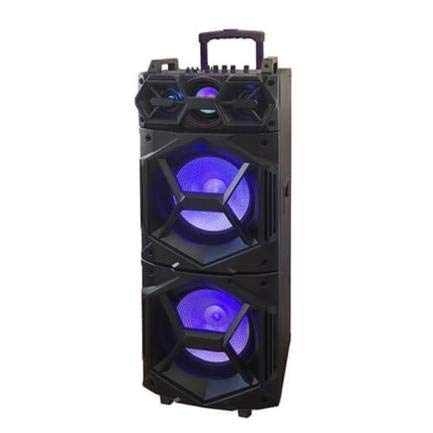
ຮູບພາບ: ທາງຫນ້າ view of the QFX SBX-213 Portable Bluetooth Speaker, showcasing its 12-inch driver and robust design. The speaker features a black finish and a protective grille over the main driver.
The speaker's control panel and ports typically include:
- ສະວິດເປີດ/ປິດ
- Mode Button (to switch between Bluetooth, FM, USB inputs)
- Volume Control Knobs or Buttons
- Play/Pause, Previous/Next Track Buttons
- ພອດ USB ສຳລັບການຫຼິ້ນສື່ຕ່າງໆ
- Charging Port for power cable connection
- LED Indicator Lights for power, charging, and Bluetooth status
ຕັ້ງຄ່າ
- ກຳລັງສາກລຳໂພງ: Before first use, connect the provided power cable to the speaker's charging port and plug it into a standard electrical outlet. Allow the speaker to fully charge. The charging indicator light will typically change color or turn off when charging is complete.
- ການຈັດວາງ: Place the speaker on a stable, flat surface. For optimal sound dispersion, avoid placing it in enclosed spaces or directly against walls.
ຄໍາແນະນໍາການດໍາເນີນງານ
1. ເປີດ/ປິດ
To power on the speaker, locate the power switch, usually on the back or side panel, and slide it to the "ON" position. To power off, slide the switch to the "OFF" position.
2. ການຈັບຄູ່ Bluetooth
- Turn on the speaker. It will typically enter Bluetooth pairing mode automatically, indicated by a flashing LED light and an audible prompt.
- ເປີດໃຊ້ Bluetooth ໃນອຸປະກອນມືຖືຂອງທ່ານ (ໂທລະສັບສະຫຼາດ, ແທັບເລັດ, ແລະອື່ນໆ).
- ຊອກຫາ available Bluetooth devices. You should see "QFX SBX-213" or a similar name in the list.
- Select the speaker to pair. Once connected, you will hear a confirmation sound, and the LED indicator will stop flashing.
- ດຽວນີ້ທ່ານສາມາດຫຼິ້ນສຽງຈາກອຸປະກອນຂອງທ່ານຜ່ານລຳໂພງໄດ້.
3. ການດໍາເນີນງານວິທະຍຸ FM
- Press the "MODE" button on the speaker or remote control until "FM" mode is selected.
- Press the "Play/Pause" button to initiate an automatic scan for FM stations. The speaker will save all found stations.
- Use the "Previous/Next Track" buttons to navigate between saved FM stations.
4. ການຫຼິ້ນ USB
- ໃສ່ USB flash drive ທີ່ບັນຈຸສຽງ MP3 files ເຂົ້າໄປໃນພອດ USB ໃນລໍາໂພງ.
- Press the "MODE" button until "USB" mode is selected. The speaker will automatically begin playing audio files ຈາກ USB drive.
- Use the "Play/Pause" and "Previous/Next Track" buttons to control playback.
5. ການຄວບຄຸມປະລິມານ
Adjust the master volume using the dedicated volume knob or buttons on the speaker. You can also control the volume from your connected Bluetooth device or the remote control.
ບໍາລຸງຮັກສາ
- ທໍາຄວາມສະອາດ: Use a soft, dry cloth to clean the speaker's exterior. Do not use abrasive cleaners, waxes, or solvents, as these may damage the finish.
- ການເກັບຮັກສາ: ເມື່ອບໍ່ໄດ້ໃຊ້ເປັນເວລາດົນ, ໃຫ້ເກັບຮັກສາລຳໂພງໄວ້ໃນບ່ອນເຢັນ, ແຫ້ງ, ຫ່າງຈາກແສງແດດໂດຍກົງ ແລະ ອຸນຫະພູມທີ່ຮ້າຍກາດ.
- ການດູແລຫມໍ້ໄຟ: To prolong battery life, avoid fully discharging the battery frequently. Charge the speaker regularly, even if not in use for long periods, to maintain battery health.
ການແກ້ໄຂບັນຫາ
If you encounter any issues with your QFX SBX-213 speaker, please refer to the following table for common problems and solutions:
| ບັນຫາ | ສາເຫດທີ່ເປັນໄປໄດ້ | ການແກ້ໄຂ |
|---|---|---|
| ບໍ່ມີພະລັງງານ | Battery discharged; Power cable not connected securely | Charge the speaker fully; Ensure power cable is securely connected to both the speaker and the power outlet. |
| ບໍ່ມີການເຊື່ອມຕໍ່ Bluetooth | Bluetooth not enabled on device; Speaker not in pairing mode; Device too far from speaker | Enable Bluetooth on your device; Put the speaker into Bluetooth pairing mode; Move your device closer to the speaker (within 10 meters). |
| ບໍ່ມີສຽງອອກ | Volume too low; Incorrect mode selected; Device or speaker is muted | Increase the volume on both the speaker and your connected device; Press the MODE button to select the correct input (Bluetooth, USB, FM); Check if the speaker or device is muted. |
| FM radio static or poor reception | Weak signal; Interference | Relocate the speaker to an area with better reception; Perform an auto-scan for stations again; Avoid placing near other electronic devices that may cause interference. |
ຂໍ້ມູນຈໍາເພາະ
- ຍີ່ຫໍ້: QFX
- ຕົວແບບ: SBX-213
- ຂະໜາດລຳໂພງ: 12 ນິ້ວ
- ເຕັກໂນໂລຍີການເຊື່ອມຕໍ່: USB, Bluetooth
- ຄຸນນະສົມບັດພິເສດ: Lightweight, Portable, FM Radio
- ປະເພດການຕິດຕັ້ງ: Floor, Table Mount
- ປະເພດຄວບຄຸມ: ການຄວບຄຸມໄລຍະໄກ
- ແຫຼ່ງພະລັງງານ: ສາຍໄຟຟ້າ
- ຂະໜາດ (H x W x D): ຂະໜາດປະມານ 113 x 42 x 42 cm
- ນ້ຳໜັກ: ປະມານ 4 ກິໂລ
- UPC: 606540036341
- ASIN: B08GL3SHQP
ການຮັບປະກັນແລະການສະຫນັບສະຫນູນ
QFX products are designed for reliability and performance. For detailed warranty information or technical support, please refer to the warranty card included with your purchase or visit the official QFX webເວັບໄຊ. ຮັກສາຫຼັກຖານການຊື້ຂອງທ່ານສໍາລັບການຮຽກຮ້ອງການຮັບປະກັນໃດໆ.
For further assistance, please contact QFX customer service through their official channels.


