
PowerPac PPFS212B 2-in-1 Dual-Usage Stand Fan Instruction Manual
Model: PPFS212B
1. ຂໍ້ມູນຄວາມປອດໄພທີ່ສໍາຄັນ
ກະລຸນາອ່ານຄໍາແນະນໍາທັງໝົດຢ່າງລະອຽດກ່ອນການນໍາໃຊ້ເຄື່ອງໃຊ້ໄຟຟ້ານີ້ ແລະ ເກັບຮັກສາໄວ້ເພື່ອອ້າງອີງໃນອະນາຄົດ. ການບໍ່ປະຕິບັດຕາມຄໍາແນະນໍາເຫຼົ່ານີ້ອາດຈະເຮັດໃຫ້ເກີດໄຟຟ້າຊັອດ, ໄຟໄໝ້ ຫຼື ການບາດເຈັບສາຫັດ.
- ຮັບປະກັນ voltage ຊີ້ບອກຢູ່ໃນປ້າຍການຈັດອັນດັບກົງກັບການສະຫນອງຕົ້ນຕໍຂອງທ່ານ voltage.
- ຢ່າເອົາພັດລົມ, ປລັກສຽບ ຫຼືສາຍໄຟໃສ່ໃນນໍ້າ ຫຼືຂອງແຫຼວອື່ນໆ.
- ຖອດປລັກພັດລົມອອກຈາກປລັກໄຟກ່ອນທີ່ຈະທຳຄວາມສະອາດ, ປະກອບ ຫຼື ຖອດຊິ້ນສ່ວນຕ່າງໆ.
- Keep fingers, pencils, or any other objects out of the fan grille when it is running.
- ຢ່າໃຊ້ພັດລົມໃນຂະນະທີ່ສາຍໄຟ ຫຼື ປລັກໄຟເສຍຫາຍ. ຕິດຕໍ່ພະນັກງານບໍລິການທີ່ມີຄຸນວຸດທິເພື່ອສ້ອມແປງ.
- This appliance is equipped with thermal fuse protection against overheating. If the fan stops working unexpectedly, unplug it and allow it to cool before attempting to restart.
- ເຄື່ອງໃຊ້ນີ້ບໍ່ໄດ້ມີຈຸດປະສົງເພື່ອໃຊ້ໂດຍບຸກຄົນ (ລວມທັງເດັກນ້ອຍ) ທີ່ມີຄວາມສາມາດທາງຮ່າງກາຍ, ຄວາມຮູ້ສຶກ, ຫຼືຈິດໃຈທີ່ຫຼຸດລົງ, ຫຼືຂາດປະສົບການ ແລະຄວາມຮູ້, ເວັ້ນເສຍແຕ່ວ່າພວກເຂົາໄດ້ຮັບການຊີ້ນໍາ ຫຼືຄໍາແນະນໍາກ່ຽວກັບການໃຊ້ເຄື່ອງໃຊ້ໂດຍບຸກຄົນທີ່ຮັບຜິດຊອບຄວາມປອດໄພຂອງເຂົາເຈົ້າ. .
2. ຜະລິດຕະພັນເກີນview
The PowerPac PPFS212B is a versatile 2-in-1 dual-usage stand fan designed for efficient cooling in indoor environments. It features 7 blades for maximum airflow, 3-speed settings, and an oscillation function for wider air distribution. The fan is equipped with thermal fuse protection for enhanced safety.
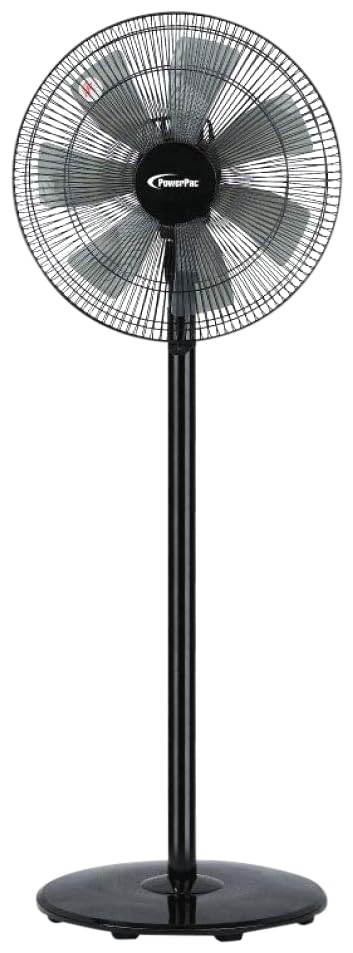
Image: PowerPac PPFS212B 2-in-1 Dual-Usage Stand Fan, showcasing its black finish and stand configuration.
3. ເນື້ອໃນຊຸດ
ກະລຸນາກວດເບິ່ງເນື້ອໃນຂອງແພັກເກັດເມື່ອເປີດເພື່ອຮັບປະກັນວ່າທຸກພາກສ່ວນແມ່ນຢູ່ ແລະ ບໍ່ເສຍຫາຍ:
- 1 x PowerPac PPFS212B Stand Fan (includes fan head, stand pole, and base)
4. ຄໍາແນະນໍາຂອງສະພາແຫ່ງ
Follow these steps to assemble your PowerPac PPFS212B fan:
- ຖອດສ່ວນປະກອບທັງໝົດອອກຈາກເຄື່ອງຫຸ້ມຫໍ່ຢ່າງລະມັດລະວັງ.
- Attach the stand pole to the fan base. Ensure it is securely fastened according to the markings or locking mechanism.
- Mount the fan head assembly onto the top of the stand pole. Align the connection points and secure it firmly.
- Ensure all screws and fasteners are tightened to prevent wobbling during operation.
- Place the assembled fan on a stable, flat surface.
Image: Illustrative diagram of the PowerPac PPFS212B fan assembly, showing the base, stand, and fan head components.
5. ຄໍາແນະນໍາການດໍາເນີນງານ
To operate your PowerPac PPFS212B fan:
- ສຽບສາຍໄຟເຂົ້າໄປໃນບ່ອນສຽບໄຟຟ້າທີ່ເຫມາະສົມ.
- ເປີດ/ປິດ: Press the 'ON/OFF' button (or corresponding button) on the control panel to turn the fan on or off.
- ການປັບຄວາມໄວ: Press the 'SPEED' button repeatedly to cycle through the 3 available speed settings (Low, Medium, High).
- ຫນ້າທີ່ Oscillation: Press the 'OSC' button (or corresponding button) to activate or deactivate the oscillation feature, which allows the fan head to sweep from side to side.
- When finished, press the 'ON/OFF' button to turn off the fan and unplug it from the power outlet.
6. ການບໍາລຸງຮັກສາແລະການທໍາຄວາມສະອາດ
Regular cleaning and maintenance will help ensure optimal performance and longevity of your fan:
- ຖອດພັດລົມອອກຈາກບ່ອນຈ່າຍໄຟກ່ອນທຳຄວາມສະອາດທຸກຄັ້ງ.
- ໃຊ້ອ່ອນ, ງamp cloth to wipe the exterior surfaces of the fan. Do not use abrasive cleaners, solvents, or harsh chemicals.
- To clean the fan blades, carefully remove the front grille (if detachable) according to the product design. Wipe the blades with a soft cloth. Ensure all parts are dry before reassembling.
- ຢ່າປ່ອຍໃຫ້ນໍ້າໄຫຼເຂົ້າໄປໃນເຮືອນມໍເຕີ.
- Store the fan in a cool, dry place when not in use for extended periods.
7. ການແກ້ໄຂບັນຫາ
If you encounter issues with your fan, refer to the following table for common problems and solutions:
| ບັນຫາ | ສາເຫດທີ່ເປັນໄປໄດ້ | ການແກ້ໄຂ |
|---|---|---|
| ພັດລົມບໍ່ເປີດ. | ບໍ່ມີການສະຫນອງພະລັງງານ. Thermal fuse activated. | ກວດເບິ່ງວ່າປລັກສຽບສຽບເຂົ້າຢ່າງປອດໄພຫຼືບໍ່. ໃຫ້ແນ່ໃຈວ່າປລັກສຽບໄຟເຮັດວຽກໄດ້. Unplug and allow the fan to cool down for 30 minutes before restarting. |
| ອາກາດອ່ອນ ຫຼື ບໍ່ມີກະແສລົມ. | ຕັ້ງຄວາມໄວພັດລົມຕໍ່າເກີນໄປ. ແຜ່ນພັດລົມເປື້ອນ. | ເພີ່ມຄວາມໄວຂອງພັດລົມ. Unplug the fan and clean the blades as per maintenance instructions. |
| ພັດລົມບໍ່ສັ່ນ. | ຟັງຊັນ Oscillation ປິດ. | ກົດປຸ່ມ 'OSC' ເພື່ອເປີດໃຊ້ການສັ່ນ. |
| ສິ່ງລົບກວນຜິດປົກກະຕິໃນລະຫວ່າງການປະຕິບັດງານ. | ພາກສ່ວນວ່າງ. ການຂັດຂວາງ. | Unplug the fan and check for any loose components or obstructions around the blades or motor. Tighten any loose parts. |
ຖ້າບັນຫາຍັງຄົງຢູ່ຫຼັງຈາກພະຍາຍາມແກ້ໄຂເຫຼົ່ານີ້, ກະລຸນາຕິດຕໍ່ຝ່າຍຊ່ວຍເຫຼືອລູກຄ້າ.
8. ຂໍ້ມູນຈໍາເພາະ
| ຄຸນສົມບັດ | ຂໍ້ມູນຈໍາເພາະ |
|---|---|
| ຍີ່ຫໍ້ | PowerPac |
| ໝາຍເລກຕົວແບບ | PPFS212B |
| ປະເພດ | 2-in-1 Dual-Usage Stand Fan |
| ຈໍານວນແຜ່ນໃບ | 7 |
| ຈໍານວນຄວາມໄວ | 3 |
| ແຫຼ່ງພະລັງງານ | ໄຟຟ້າສາຍ |
| ວັດtage | 50 ວັດ |
| ວິທີການຄວບຄຸມ | ປຸ່ມກົດ |
| ຄຸນນະສົມບັດພິເສດ | Oscillating, Thermal Fuse Protection |
| ວັດສະດຸ | ພາດສະຕິກ |
| ການນຳໃຊ້ພາຍໃນ/ນອກ | ພາຍໃນ |
| ສີ | ດຳ |
9. ການຮັບປະກັນແລະການສະຫນັບສະຫນູນ
This PowerPac PPFS212B fan comes with a ຮັບປະກັນ 2 ປີ ຈາກວັນທີ່ຊື້. ການຮັບປະກັນນີ້ກວມເອົາຄວາມບົກຜ່ອງດ້ານການຜະລິດພາຍໃຕ້ເງື່ອນໄຂການນໍາໃຊ້ປົກກະຕິ.
For warranty claims, technical support, or any inquiries regarding your product, please contact PowerPac customer service. Keep your proof of purchase for warranty validation.