
ELECDER D19
ຄູ່ມືຜູ້ໃຊ້ຫູຟັງໄຮ້ສາຍ ELECDER D19 ແທ້
Model: D19 | Brand: ELECDER
1. ບົດແນະນຳ
The ELECDER D19 True Wireless Earbuds are designed to provide a superior audio experience with advanced features such as Bluetooth 5.0 connectivity, noise cancellation, and IPX7 waterproofing. This manual provides comprehensive instructions for setting up, operating, and maintaining your earbuds to ensure optimal performance and longevity.
ຄຸນນະສົມບັດທີ່ສໍາຄັນ:
- Bluetooth 5.0: Fast and stable wireless transmission with CVC8.0 noise cancellation for clear calls.
- Premium Hi-Fi Stereo Audio: APTX audio for lossless transmission, delivering immersive sound with crystal clarity and deep bass.
- ກັນນ້ ຳ IPX7: Resistant to sweat, water, and rain, ideal for workouts and outdoor activities.
- ການອອກແບບ Ergonomic: Lightweight (5g per earbud) with flexible silicone ear-fins and S/M/L ear caps for a secure and comfortable fit.
- Quick Pairing Technology: Automatic power-on and pairing upon removal from the charging case.
- USB Quick Charge & Wireless Charging: Up to 4.5 hours of music on a single charge, with an additional 18 hours from the charging case, supporting both USB and wireless charging.
2. ຜະລິດຕະພັນເກີນview

Figure 2.1: ELECDER D19 True Wireless Earbuds in their charging case. The earbuds are black, sleek, and designed for in-ear use, while the compact charging case is also black with a smooth finish.
ມີຫຍັງຢູ່ໃນກ່ອງ:
- ELECDER D19 True Wireless Earbuds (Left and Right)
- ກ່ອງສາກ
- ສາຍສາກ USB
- ເຄັດລັບຫູ (ຂະໜາດ S/M/L)
- ຄູ່ມືຜູ້ໃຊ້ (ເອກະສານນີ້)
3. ຄູ່ມືການຕິດຕັ້ງ
3.1 ການສາກຫູຟັງ ແລະ ເຄສ
Before first use, fully charge the earbuds and the charging case. The charging case supports both USB cable charging and wireless charging.
- ການສາກ USB: Connect the provided USB cable to the charging port on the case and plug the other end into a USB power source (e.g., computer, wall adapter). The indicator light on the case will show charging status.
- ການສາກໄຟໄຮ້ສາຍ: Place the charging case on a compatible wireless charging pad. The indicator light will flash to confirm charging.

Figure 3.1: The ELECDER D19 charging case being charged wirelessly on a charging pad, also showing the Micro USB port for wired charging. This image highlights the dual charging capabilities of the case.
A full charge for the earbuds provides approximately 4.5 hours of music playback, and the charging case provides an additional 18 hours of battery life.
3.2 ການຈັບຄູ່ກັບອຸປະກອນຂອງທ່ານ
The ELECDER D19 earbuds feature quick pairing technology for seamless connection.
- ຂັ້ນຕອນທີ 1: Open the charging case and take out both earbuds. They will automatically power on and pair with each other.
- ຂັ້ນຕອນທີ 2: ໃນສະມາດໂຟນ ຫຼືອຸປະກອນທີ່ເປີດໃຊ້ Bluetooth ຂອງທ່ານ, ໃຫ້ໄປທີ່ການຕັ້ງຄ່າ Bluetooth.
- ຂັ້ນຕອນທີ 3: ຊອກຫາ available devices and select "Elecder D19" from the list to connect.
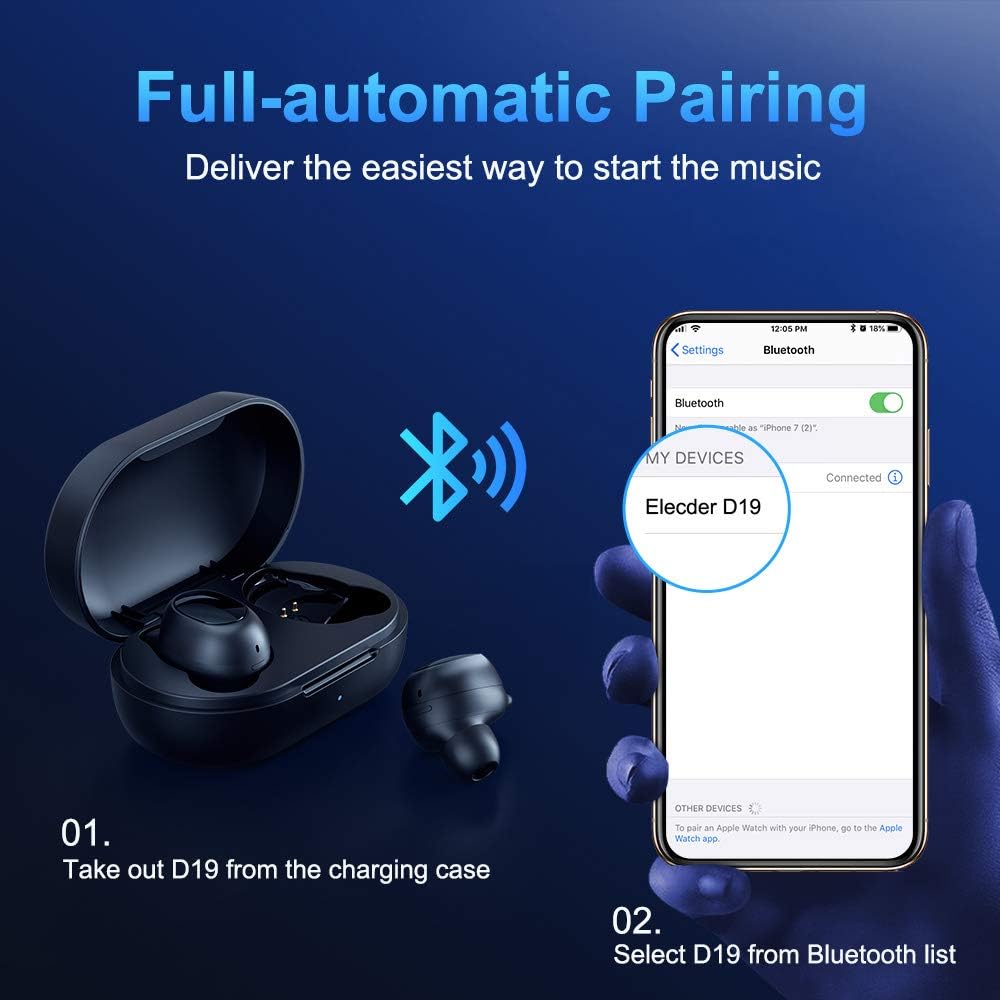
Figure 3.2: A visual guide demonstrating the automatic pairing process. The image shows the earbuds being taken out of the case and then the "Elecder D19" option appearing in a smartphone's Bluetooth settings for connection.
After the initial pairing, the earbuds will automatically connect to the last paired device when taken out of the charging case.

Figure 3.3: An illustration showing the stable Bluetooth connection between the ELECDER D19 earbuds and various smart devices, including smartphones and tablets.
4. ຄໍາແນະນໍາການດໍາເນີນງານ
4.1 ການໃສ່ຫູຟັງ
For optimal sound quality and comfort, choose the ear tips that best fit your ears. The earbuds come with S, M, and L sizes. Insert the earbuds into your ears and gently rotate them to find a secure and comfortable fit. The ergonomic ear-fin design helps ensure stability during movement.
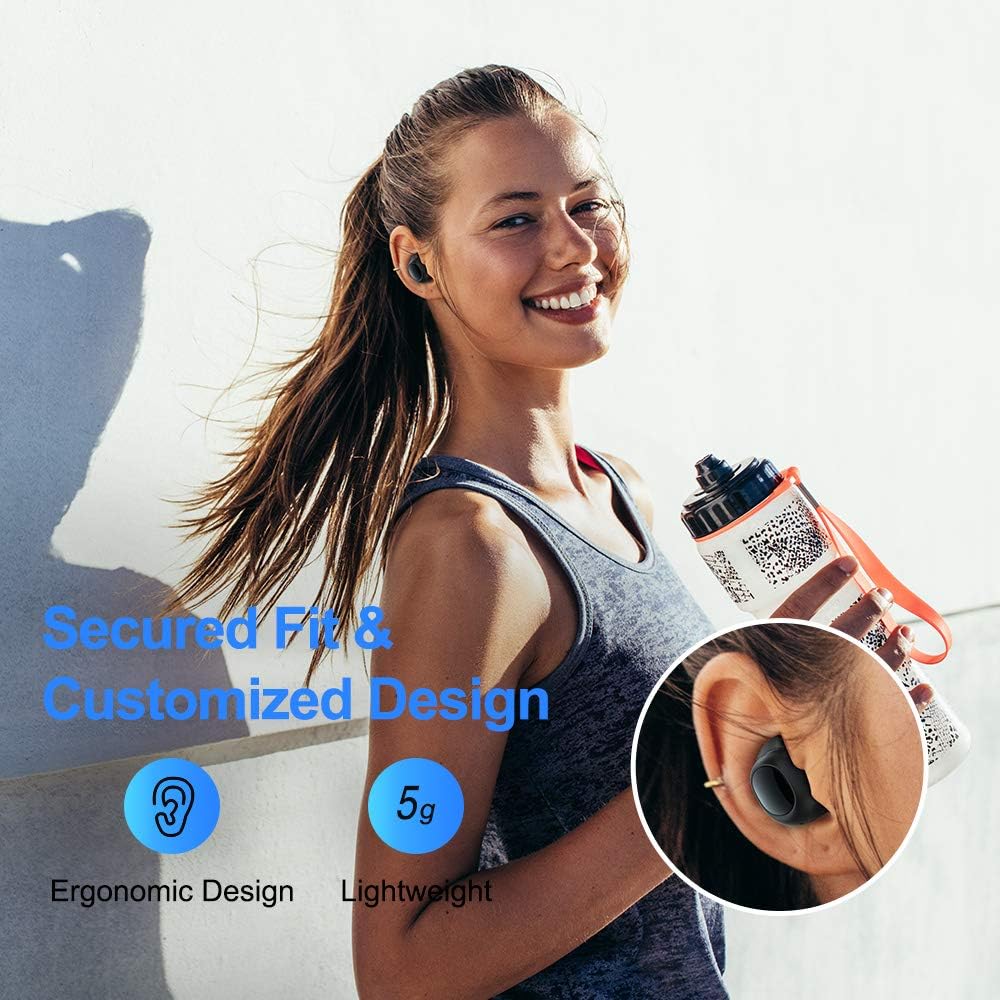
Figure 4.1: A person wearing the ELECDER D19 earbuds during a workout, demonstrating the secure and comfortable fit provided by the ergonomic design and customizable ear tips.
4.2 ການຄວບຄຸມສື່
The ELECDER D19 earbuds feature physical buttons for media control. Specific button functions may vary slightly based on the device and operating system, but common controls include:
- ຫຼິ້ນ/ຢຸດ: ກົດຄັ້ງດຽວໃສ່ຫູຟັງຫູຟັງ.
- ເພງຕໍ່ໄປ: ກົດສອງເທື່ອໃສ່ຫູຟັງຂ້າງຂວາ.
- ຕິດຕາມກ່ອນ ໜ້າ ນີ້: ກົດສອງເທື່ອໃສ່ຫູຟັງເບື້ອງຊ້າຍ.
- ປະລິມານຂຶ້ນ: Triple press on the right earbud.
- ປະລິມານລົງ: Triple press on the left earbud.
4.3 ການຄຸ້ມຄອງການໂທ
ຈັດການການໂທຂອງທ່ານໂດຍກົງຈາກຫູຟັງເອຍບັດ:
- ຮັບ/ສາຍໂທ: ກົດຄັ້ງດຽວໃສ່ຫູຟັງຫູຟັງ.
- ປະຕິເສດການໂທ: ກົດຫູຟັງອັນໃດອັນໜຶ່ງຄ້າງໄວ້ 2 ວິນາທີ.
- ກະຕຸ້ນຜູ້ຊ່ວຍສຽງ: ກົດຫູຟັງອັນໃດອັນໜຶ່ງຄ້າງໄວ້ 3 ວິນາທີ (ເຊັ່ນ: Siri, Google Assistant).
5. ການບໍາລຸງຮັກສາແລະການດູແລ
Proper maintenance ensures the longevity and optimal performance of your ELECDER D19 earbuds.
5.1 ການທໍາຄວາມສະອາດ
- ອະນາໄມຫູຟັງຫູຟັງ ແລະກະເປົ໋າສາກໄຟເປັນປະຈຳດ້ວຍຜ້າແພທີ່ອ່ອນ, ແຫ້ງ, ບໍ່ມີສານຂັດ.
- ຖອດປາຍຫູອອກ ແລະເຮັດຄວາມສະອາດດ້ວຍສະບູອ່ອນໆ ແລະນໍ້າ, ຈາກນັ້ນເຊັດໃຫ້ແຫ້ງກ່ອນຕິດໃໝ່.
- Use a cotton swab or small brush to gently clean the charging contacts on both the earbuds and the case.
- ຫຼີກເວັ້ນການນໍາໃຊ້ວັດສະດຸຂັດ, ເຫຼົ້າ, ຫຼືສານເຄມີທີ່ສະອາດ.
5.2 ກັນນ້ຳ (IPX7)
The ELECDER D19 earbuds are IPX7 waterproof, meaning they can withstand submersion in up to 1 meter of water for 30 minutes. This makes them suitable for protection against sweat, rain, and accidental splashes.

Figure 5.1: The ELECDER D19 earbuds shown with water droplets, illustrating their IPX7 waterproof rating, which protects them from sweat, rain, and splashes.
ໝາຍເຫດ: The charging case is not waterproof. Ensure earbuds are dry before placing them back into the charging case.
5.3 ການເກັບຮັກສາ
ເມື່ອບໍ່ໄດ້ໃຊ້, ໃຫ້ເກັບຫູຟັງເອຍບັດໃສ່ໃນກະເປົ໋າສາກໄຟເພື່ອປົກປ້ອງພວກມັນ ແລະ ສືບຕໍ່ສາກໄຟ. ເກັບຮັກສາກໍລະນີດັ່ງກ່າວໄວ້ໃນບ່ອນທີ່ເຢັນ, ແຫ້ງແລ້ງຫ່າງຈາກອຸນຫະພູມສູງສຸດແລະແສງແດດໂດຍກົງ.
6. ການແກ້ໄຂບັນຫາ
If you encounter issues with your ELECDER D19 earbuds, refer to the following common solutions:
| ບັນຫາ | ສາເຫດທີ່ເປັນໄປໄດ້ | ການແກ້ໄຂ |
|---|---|---|
| ຫູຟັງບໍ່ຈັບຄູ່ກັບອຸປະກອນ. | Bluetooth ປິດຢູ່ໃນອຸປະກອນ; ຫູຟັງບໍ່ຢູ່ໃນໂໝດຈັບຄູ່; ອຸປະກອນການຈັບຄູ່ກ່ອນຫນ້ານີ້ແຊກແຊງ. | Ensure Bluetooth is enabled. Place earbuds back in case, then take them out to re-enter pairing mode. Forget "Elecder D19" from your device's Bluetooth list and re-pair. |
| ຫູຟັງຫູຟັງອັນດຽວເຮັດວຽກໄດ້. | Earbuds not paired with each other; low battery on one earbud. | Place both earbuds back into the charging case, close the lid, wait a few seconds, then open and take them out again. Ensure both earbuds are charged. |
| ບໍ່ມີສຽງ ຫຼືສຽງຕໍ່າ. | Device volume too low; ear tips not properly sealed; debris in earbud nozzle. | Increase volume on your device. Adjust earbud position or try different sized ear tips for a better seal. Clean earbud nozzles. |
| ກ່ອງສາກບໍ່ສາກ. | Faulty cable/charger; improper placement on wireless charger. | Try a different USB cable and power adapter. Ensure the case is correctly aligned on the wireless charging pad. |
| ການເຊື່ອມຕໍ່ Bluetooth ບໍ່ສະຖຽນ. | Interference; distance from device; low earbud battery. | Reduce distance between earbuds and device. Avoid environments with strong Wi-Fi or other Bluetooth signals. Ensure earbuds are fully charged. |
7. ຂໍ້ມູນຈໍາເພາະ
Detailed technical specifications for the ELECDER D19 True Wireless Earbuds:
| ຄຸນສົມບັດ | ລາຍລະອຽດ |
|---|---|
| ຊື່ຕົວແບບ | ELECDER D19 |
| ເຕັກໂນໂລຊີການເຊື່ອມຕໍ່ | ໄຮ້ສາຍ (Bluetooth 5.0) |
| ຊ່ວງ Bluetooth | 33 ຟຸດ |
| ການຈັດວາງຫູ | ໃນຫູ |
| ປັດໄຈແບບຟອມ | ໃນຫູ |
| ການຄວບຄຸມສິ່ງລົບກວນ | Active Noise Cancellation (CVC8.0) |
| ໄມໂຄຣໂຟນ | ລວມ |
| ລະດັບຄວາມຕ້ານທານນ້ໍາ | ກັນນໍ້າ IPX7 |
| ອາຍຸແບັດເຕີຣີ (ຫູຟັງ) | Up to 4.5 hours (music) / 4 hours (calling) |
| Charging Case Additional Playtime | 18 ຊົ່ວໂມງ |
| ເວລາສາກໄຟ | ປະມານ 2 ຊົ່ວໂມງ |
| ການໂຕ້ຕອບການສາກໄຟ | Micro USB, Wireless Charging |
| ນ້ໍາຫນັກລາຍການ | 1.92 ounces (total) / 5g (each earbud) |
| ຂະໜາດສິນຄ້າ | 3.89 x 3.89 x 1.65 ນິ້ວ |
| ອຸປະກອນທີ່ເຂົ້າກັນໄດ້ | iOS and Android Smartphones |
| ວັດສະດຸ | ຊິລິໂຄນ (ຈຸກຫູ) |
| ສີ | ດຳ |

Figure 7.1: An infographic detailing the battery life of the ELECDER D19 earbuds and charging case, showing 4 hours for calls, 4.5 hours for music, and a total of 18 hours with the 500mAh charging case.
8. ການຮັບປະກັນແລະການສະຫນັບສະຫນູນ
ELECDER products are manufactured to high quality standards. For information regarding warranty coverage, technical support, or service inquiries, please refer to the contact information provided with your product packaging or visit the official ELECDER webເວັບໄຊ.
ສຳລັບການຊ່ວຍເຫຼືອເພີ່ມເຕີມ, ທ່ານຍັງສາມາດຕິດຕໍ່ຮ້ານຄ້າປີກບ່ອນທີ່ທ່ານຊື້ຜະລິດຕະພັນໄດ້.