
ແນະນຳ
Thank you for choosing the JBL Tune 225 TWS Wireless In-Ear Headphones. This manual provides essential information for setting up, operating, and maintaining your device. Please read it carefully to ensure optimal performance and longevity of your headphones.
ແມ່ນຫຍັງຢູ່ໃນກ່ອງ
Your JBL Tune 225 TWS package includes the following items:
- JBL Tune 225 TWS Wireless In-Ear Headphones (Left and Right earbuds)
- ຕູ້ສາກໄຟກະທັດຮັດ
- ສາຍສາກ USB-C

Image: JBL Tune 225 TWS earbuds and their charging case, showing the components included in the package.
ຕັ້ງຄ່າ
1. ການສາກຫູຟັງ ແລະ ເຄສ
Before first use, fully charge both the earbuds and the charging case. Connect the provided USB-C cable to the charging case and a power source. The LED indicators on the case will show the charging status. A full charge typically takes approximately 2 hours.
- ກໍລະນີສາກແບັດເຕີຣີ: Up to 20 hours capacity, providing an average of 25 hours of combined playtime with the earbuds.
- ອາຍຸແບັດເຕີຣີ Earbud: ສູງສຸດ 5 ຊົ່ວໂມງຕໍ່ການສາກໄຟຄັ້ງດຽວ.

Image: JBL Tune 225 TWS earbuds placed inside their open charging case, showing the LED battery indicators.
2. ການຈັບຄູ່ Bluetooth
- ເປີດກ່ອງສາກໄຟ. ຫູຟັງເອຍບັດຈະເຂົ້າສູ່ໂໝດຈັບຄູ່ໂດຍອັດຕະໂນມັດ.
- ໃນອຸປະກອນຂອງທ່ານ (ໂທລະສັບສະຫຼາດ, ແທັບເລັດ, ແລະອື່ນໆ), ໄປທີ່ການຕັ້ງຄ່າ Bluetooth.
- Select "JBL Tune 225 TWS" from the list of available devices.
- Once connected, you will hear an audible confirmation, and the LED on the earbuds will indicate a successful connection.
The JBL Tune 225 TWS uses Bluetooth version 5.0 for a stable connection up to 10 meters (33 feet).
ປະຕິບັດການຫູຟັງ
ແຕະການຄວບຄຸມ
The JBL Tune 225 TWS features touch controls on each earbud for managing audio playback and calls.
| ການປະຕິບັດ | Earbud ຊ້າຍ | Earbud ສິດ |
|---|---|---|
| ຫຼິ້ນ/ຢຸດຊົ່ວຄາວ | ບໍ່ມີ | ແຕະຄັ້ງດຽວ |
| ຕິດຕາມຕໍ່ໄປ | ແຕະສອງເທື່ອ | ບໍ່ມີ |
| ເພງກ່ອນໜ້າ | ແຕະສາມເທື່ອ | ບໍ່ມີ |
| ຕອບ/ວາງສາຍ | ແຕະຄັ້ງດຽວ | ແຕະຄັ້ງດຽວ |
| ປະຕິເສດການໂທ | ກົດຄ້າງໄວ້ (2ວິ) | ກົດຄ້າງໄວ້ (2ວິ) |
| ເປີດໃຊ້ຜູ້ຊ່ວຍສຽງ | ບໍ່ມີ | ແຕະສອງເທື່ອ |
Note: Volume control is not directly available on the earbuds and must be adjusted via your connected device.
Single or Dual Earbud Use
The JBL Tune 225 TWS allows for flexible use of either a single earbud or both earbuds simultaneously. Simply remove one or both from the charging case, and they will automatically connect to your paired device. If you place one earbud back into the case, the other will continue to play.

ຮູບພາບ: ໃກ້ຊິດ view of the left and right JBL Tune 225 TWS earbuds, highlighting their individual design.
ບໍາລຸງຮັກສາ
ທໍາຄວາມສະອາດ
Regular cleaning helps maintain sound quality and hygiene. Use a soft, dry, lint-free cloth to wipe the earbuds and charging case. Do not use harsh chemicals or abrasive materials. For earbud grilles, gently use a dry cotton swab to remove any debris.
ການເກັບຮັກສາ
When not in use, always store the earbuds in their charging case to protect them and keep them charged. Store the case in a cool, dry place, away from extreme temperatures and direct sunlight.
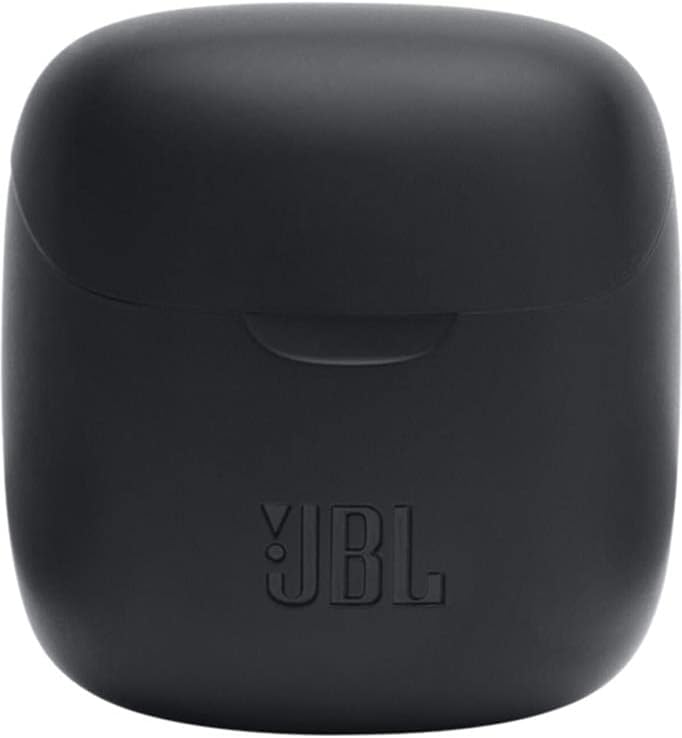
Image: The closed charging case for the JBL Tune 225 TWS, ready for storage or transport.
ການແກ້ໄຂບັນຫາ
- ບໍ່ມີບັນຫາສຽງ/ການເຊື່ອມຕໍ່: Ensure both earbuds are charged. Place them back in the case, close it, then reopen to re-initiate pairing. Check your device's Bluetooth settings to ensure "JBL Tune 225 TWS" is connected. Try forgetting the device and re-pairing.
- ຫູຟັງໜຶ່ງໜ່ວຍບໍ່ເຮັດວຽກ: Ensure both earbuds are charged. Try placing both back in the case, closing it, and then taking them out again. Sometimes a simple reset by placing them in the case can resolve this.
- ບັນຫາການສາກໄຟ: Ensure the USB-C cable is securely connected to both the case and the power source. Check if the charging port is clean and free of debris. Try a different USB-C cable or power adapter.
- ປະລິມານຕໍ່າ: Adjust the volume on your connected device. Ensure the earbuds are properly seated in your ears.
ຂໍ້ມູນຈໍາເພາະ
| ຄຸນສົມບັດ | ລາຍລະອຽດ |
|---|---|
| ຍີ່ຫໍ້ | JBL |
| ຊື່ຕົວແບບ | ປບັ 225TWS |
| ໝາຍເລກຕົວແບບ | ປບັ 225TWS |
| ສີ | ດຳ |
| ການຈັດວາງຫູ | ໃນຫູ |
| ປັດໄຈແບບຟອມ | ໃນຫູ |
| impedance | 32 ໂອມ |
| ປະເພດຄົນຂັບ | ໄດນາມິກໄດເວີ |
| ຂະໜາດຄົນຂັບ | 12.5 ມມ |
| ຊ່ວງຄວາມຖີ່ | 20 Hz - 20000 Hz |
| ຄວາມອ່ອນໄຫວ | 105 dB |
| ເຕັກໂນໂລຊີການເຊື່ອມຕໍ່ | ໄຮ້ສາຍ (Bluetooth) |
| ລຸ້ນ Bluetooth | 5.0 |
| ຊ່ວງ Bluetooth | 10 ແມັດ |
| ວິທີການຄວບຄຸມ | ແຕະ |
| ອາຍຸແບັດເຕີຣີ Earbud | 5 ຊົ່ວໂມງ |
| ອາຍຸການສາກແບັດ | ສູງສຸດ 20 ຊົ່ວໂມງ (ເພີ່ມເຕີມ) |
| Total Combined Playtime | ສູງສຸດ 25 ຊົ່ວໂມງ |
| ເວລາສາກໄຟ | 2 ຊົ່ວໂມງ |
| ລະດັບຄວາມຕ້ານທານນ້ໍາ | ກັນນ້ຳ |
| ນ້ຳໜັກສິນຄ້າ | 57 ກຣາມ |
| ນ້ຳໜັກກ່ອງສາກ | 100 ກຣາມ |
| UPC | 050036374019 |
ການຮັບປະກັນແລະການສະຫນັບສະຫນູນ
ສຳລັບຂໍ້ມູນການຮັບປະກັນ ແລະ ການສະໜັບສະໜູນລູກຄ້າ, ກະລຸນາອ້າງອີງເຖິງ JBL ຢ່າງເປັນທາງການ website or contact your local JBL authorized dealer. Keep your proof of purchase for warranty claims.
ສໍາເນົາດິຈິຕອນຂອງຄູ່ມືຜູ້ໃຊ້ສາມາດໃຊ້ໄດ້ສໍາລັບການດາວໂຫຼດ: JBL Tune 225 TWS User Manual (PDF)