
1. ບົດແນະນຳ
The YOSUDA PRO Magnetic Exercise Bike 010C is designed for effective indoor cycling workouts. Featuring a hyper-quiet magnetic system and robust alloy steel construction, it offers a smooth and stable exercise experience. This manual provides essential information for assembly, operation, maintenance, and troubleshooting to ensure safe and optimal use of your exercise bike.
ຄຸນນະສົມບັດທີ່ສໍາຄັນ:
- Hyper Quiet Magnetic System: Operates at less than 20 dB for silent workouts.
- ຄວາມອາດສາມາດທີ່ເຂັ້ມແຂງ: Supports users up to 400 lbs with heavy alloy steel construction.
- ຄວາມຕ້ານທານທີ່ສາມາດປັບໄດ້: 50 lbs flywheel with 100 micro-adjustable magnetic resistance levels.
- ການເຊື່ອມຕໍ່ອັດສະລິຍະ: Bluetooth support for sports apps and real-time data tracking.
- Comfort & Customization: 4-way adjustable seat and 2-way adjustable handlebars for personalized fit.
- ຈໍສະແດງຜົນແບບປະສົມປະສານ: Large screen monitor displays RPM, time, speed, distance, calories, and odometer. Includes a tablet holder.
2. ຕັ້ງຄ່າ
2.1 ສະພາ
The YOSUDA PRO Magnetic Exercise Bike is designed for straightforward assembly, with most major components pre-assembled. Tools and a detailed guide are included to assist you.
- ການຫຸ້ມຫໍ່: ເອົາສ່ວນປະກອບທັງຫມົດອອກຈາກການຫຸ້ມຫໍ່ຢ່າງລະມັດລະວັງ. ໃຫ້ແນ່ໃຈວ່າທຸກພາກສ່ວນທີ່ລະບຸໄວ້ໃນຄູ່ມືມີຢູ່.
- ຕິດຕົວກັນສະຖຽນລະພາບ: ຍຶດແຖບກັນສະຖຽນລະພາບດ້ານໜ້າ ແລະ ດ້ານຫຼັງເຂົ້າກັບໂຄງຫຼັກໂດຍໃຊ້ສະກູ ແລະ ເຄື່ອງມືທີ່ໃຫ້ມາ.
- ຕິດຕັ້ງ pedals: Attach the pedals to the crank arms. Note that pedals are typically marked 'L' for left and 'R' for right. Ensure they are tightened securely.
- ຕິດຕັ້ງເສົາບ່ອນນັ່ງ: Insert the seat post into the main frame and adjust to an initial comfortable height.
- Install Handlebar Post: Insert the handlebar post into the main frame and adjust to an initial comfortable height.
- Connect Monitor Cables: Connect the monitor cables from the main frame to the display unit.
- Install Monitor: Secure the monitor onto the handlebar post.
- Install Water Bottle Holder: Attach the water bottle holder to the designated area on the frame.

ຮູບພາບ: ຫຼາຍກວ່າview of YOSUDA PRO Magnetic Exercise Bike components during assembly.
2.2 ການປັບຕົວເບື້ອງຕົ້ນ
ການປັບບ່ອນນັ່ງ ແລະ ແຮນຢ່າງຖືກຕ້ອງແມ່ນມີຄວາມສຳຄັນຫຼາຍຕໍ່ຄວາມສະດວກສະບາຍ ແລະ ການອອກກຳລັງກາຍທີ່ມີປະສິດທິພາບ.
- ການປັບບ່ອນນັ່ງ: The seat can be adjusted 4-ways (up/down and forward/backward). Loosen the adjustment knob, slide the seat to your desired position, and tighten the knob securely. Ensure your knees have a slight bend at the bottom of the pedal stroke.
- ການປັບແຖບຈັບ: The handlebars can be adjusted 2-ways (up/down). Loosen the adjustment knob, raise or lower the handlebars to a comfortable height, and tighten the knob. Your back should be straight and comfortable.
- ສາຍຮັດຄັນຖີບ: Adjust the toe-caged pedal straps to secure your feet firmly in place. This prevents your feet from slipping during intense workouts.
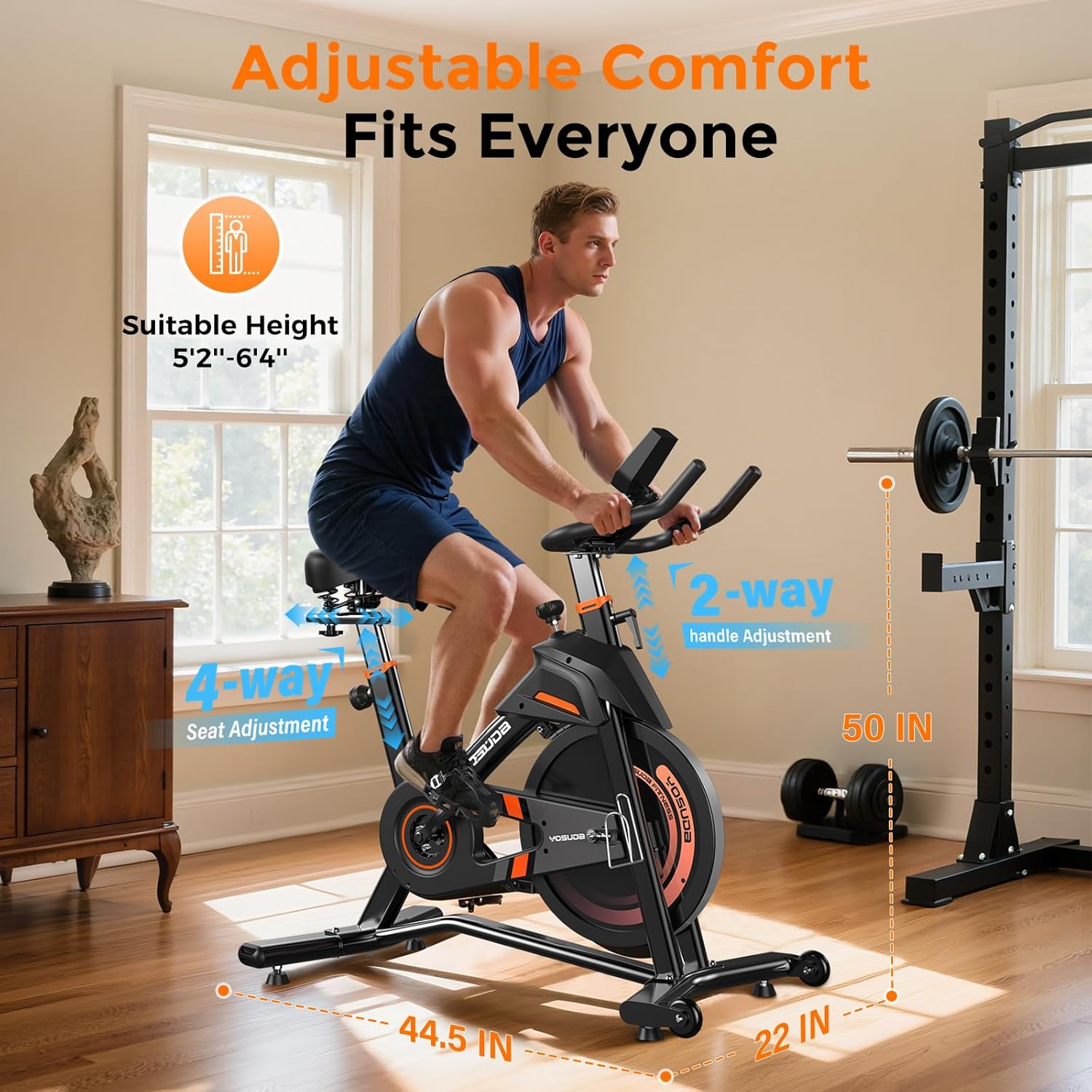
ຮູບພາບ: ລາຍລະອຽດ view of the adjustable seat and handlebars for personalized comfort.
3. ການດໍາເນີນງານ
3.1 Powering On and Monitor Functions
The exercise bike is pedal-powered and does not require an external power source for operation. The monitor is battery-operated.
- ການເປີດໃຊ້ໂດຍອັດຕະໂນມັດ: The monitor automatically turns on when you start pedaling.
- ຕົວຊີ້ວັດການສະແດງຜົນ: The large screen monitor displays:
- RPM: ການຫມຸນຕໍ່ນາທີ
- ເວລາ: Duration of your workout
- ຄວາມໄວ: Current speed in miles
- ໄລຍະຫ່າງ: Total distance covered in miles
- ກາລະໂອກາດ: ຄາດຄະເນການເຜົາຜານພະລັງງານ
- ODOMETER: Total accumulated distance
- Resetting Data: To clear workout data, press and hold the "RESET" button on the monitor.
- ຜູ້ຖືແທັບເລັດ: Utilize the integrated tablet holder to place your device for entertainment or to follow workout programs.

Image: Close-up of the exercise bike's monitor and tablet holder.
3.2 ການປັບຄວາມຕ້ານທານ
The YOSUDA PRO Magnetic Exercise Bike features 100 micro-adjustable magnetic resistance levels, allowing for precise control over your workout intensity.
- ເພີ່ມຄວາມຕ້ານທານ: Turn the resistance knob clockwise to increase the magnetic resistance, making pedaling harder.
- ຫຼຸດຄວາມຕ້ານທານ: Turn the resistance knob counter-clockwise to decrease the magnetic resistance, making pedaling easier.
- ການຢຸດສຸກເສີນ: Press down firmly on the resistance knob to engage the emergency brake and quickly stop the flywheel.

Image: The resistance knob and flywheel, illustrating the magnetic resistance system.
3.3 Smart Features and App Integration
This exercise bike is equipped with Bluetooth connectivity to enhance your workout experience.
- ເຊື່ອມຕໍ່ກັບແອັບ: Pair your device via Bluetooth with compatible sports apps to track your exercise data, participate in virtual courses, and monitor your progress.
- ຂໍ້ມູນເວລາຈິງ: Receive real-time recording of exercise data directly to your connected device.

Image: User engaging with virtual rides through top fitness applications.
4. ບໍາລຸງຮັກສາ
Regular maintenance ensures the longevity and safe operation of your YOSUDA PRO Magnetic Exercise Bike.
- ທໍາຄວາມສະອາດ: ເຊັດລົດຖີບດ້ວຍການໂຄສະນາamp ຜ້າຫຼັງຈາກແຕ່ລະການນໍາໃຊ້ເພື່ອເອົາເຫື່ອແລະຝຸ່ນ. ຫຼີກລ້ຽງການເຮັດຄວາມສະອາດຂັດ.
- ການກວດກາຄັນເບາະ: Inspect and re-tighten pedals every 1-2 months to ensure they remain secure for safe use. Loose pedals can cause injury or damage.
- ສາຍແອວ Drive: The silent belt drive system requires minimal maintenance. Keep the area around the belt clean and free of debris.
- ກວດສອບຄວາມໝັ້ນຄົງ: Periodically check all bolts and nuts to ensure they are tight. Re-tighten as necessary to maintain the bike's stability.
5. ການແກ້ໄຂບັນຫາ
If you encounter any issues with your exercise bike, refer to the following common solutions:
- ສຽງດັງ: Check all connection points and ensure they are tightened. Apply a small amount of lubricant to moving parts if necessary, avoiding the flywheel and brake system.
- Unstable Bike: Ensure the bike is placed on a flat, level surface. Adjust the leveling feet on the stabilizer bars until the bike is stable.
- ຈໍພາບບໍ່ສະແດງ: Check the batteries in the monitor and replace them if needed. Ensure the sensor cable is securely connected.
- ບັນຫາການຕໍ່ຕ້ານ: If resistance feels inconsistent or unresponsive, check the connection of the resistance cable to the knob and the magnetic brake system.
6. ຂໍ້ມູນຈໍາເພາະ
| ຄຸນສົມບັດ | ລາຍລະອຽດ |
|---|---|
| ຍີ່ຫໍ້ | YOSUDA |
| ຊື່ຕົວແບບ | L-007C |
| ຄຸນນະສົມບັດພິເສດ | Light Commercial, Magnetic, Smart with Bluetooth |
| ສີ | ສີສົ້ມດຳ |
| ແຫຼ່ງພະລັງງານ | ໃຊ້ພະລັງງານດ້ວຍຕີນ (ບໍ່ແມ່ນໄຟຟ້າ) |
| ການນໍາໃຊ້ທີ່ແນະນໍາ | ພາຍໃນ |
| ນ້ໍາຫນັກລາຍການ | 37.65 ກິໂລກຣາມ (ປະມານ 83 lbs) |
| ວັດສະດຸ | ເຫຼັກໂລຫະປະສົມ |
| ກົນໄກການຕໍ່ຕ້ານ | ແມ່ເຫຼັກ |
| ຂະໜາດສິນຄ້າ | 50"D x 22"W x 44.5"H |
| ຄໍາແນະນໍານ້ໍາຫນັກສູງສຸດ | 400 ປອນ |
| ຈໍານວນລະດັບຄວາມຕ້ານທານ | 100 |
| ລະບົບຂັບ | ສາຍແອວ |
7. ການຮັບປະກັນແລະການສະ ໜັບ ສະ ໜູນ
YOSUDA is committed to providing excellent customer service and product support.
- ບໍລິການດ້ານເຕັກນິກ: Enjoy 24/7 technical support for any inquiries or assistance you may need with your exercise bike.
- ຂໍ້ມູນຕິດຕໍ່: For specific warranty details or to reach customer support, please refer to the contact information provided in your product packaging or visit the official YOSUDA webເວັບໄຊ.
8. ວິດີໂອຜະລິດຕະພັນຢ່າງເປັນທາງການ
ບໍ່ມີວິດີໂອຜູ້ຂາຍຢ່າງເປັນທາງການສໍາລັບການຝັງໃນເວລານີ້.