
1. ຜະລິດຕະພັນເກີນview
The Festool OF 1010 EBQ Router Set is a versatile and powerful tool designed for precision routing tasks. This compact and lightweight router is ideal for edge profiling, grooving, rebating, and decorative work, offering excellent control and accuracy for both professional and DIY users.

ຮູບທີ 1.1: The complete Festool OF 1010 EBQ Router Set, including the router unit, Systainer storage case, guide rail, and various accessories for diverse routing applications.
ຄຸນນະສົມບັດທີ່ສໍາຄັນ:
- ການບໍລິໂພກພະລັງງານ: 1010 ວ
- ຄວາມໄວບໍ່ໄດ້ເຮັດວຽກ: 10,000 - 24,000 rpm
- Collets: 6-8 ມມ
- Milling Stroke: 55 ມມ
- Milling Depth Fine Adjustment: 8 ມມ
- Max. Average: 50 ມມ
- ການເຊື່ອມຕໍ່ການສະກັດຝຸ່ນ: 27 ມມ
- ນ້ຳໜັກ: 2.7 ກິໂລ
2. ຄໍາແນະນໍາຄວາມປອດໄພ
Always observe the following safety precautions when operating the Festool OF 1010 EBQ Router to prevent injury and damage to the tool.
- ອ່ານຄູ່ມື: ເຮັດຄວາມຄຸ້ນເຄີຍກັບຄໍາແນະນໍາແລະຄໍາເຕືອນທັງຫມົດກ່ອນທີ່ຈະໃຊ້.
- ອຸປະກອນປ້ອງກັນສ່ວນບຸກຄົນ (PPE): ໃສ່ແວ່ນຕານິລະໄພ, ປ້ອງກັນການໄດ້ຍິນ, ແລະໜ້າກາກຂີ້ຝຸ່ນສະເໝີ.
- ພື້ນທີ່ເຮັດວຽກ: ຮັກສາພື້ນທີ່ເຮັດວຽກຂອງທ່ານໃຫ້ສະອາດ, ມີແສງສະຫວ່າງດີ, ແລະ ບໍ່ມີສິ່ງຂອງກີດຂວາງ. ຮັບປະກັນໃຫ້ມີລະບາຍອາກາດທີ່ເໝາະສົມ.
- ວຽກງານທີ່ປອດໄພ: ສະເຫມີ clamp ຫຼື ຮັກສາຊິ້ນວຽກໃຫ້ປອດໄພເພື່ອປ້ອງກັນການເຄື່ອນໄຫວໃນລະຫວ່າງການປະຕິບັດງານ.
- Proper Bit Selection: Use only router bits designed for the tool and the material being worked on. Ensure bits are sharp and free of damage.
- ຖອດປລັກເມື່ອບໍ່ໄດ້ໃຊ້: Disconnect the router from the power source before making adjustments, changing bits, or performing maintenance.
- ຫຼີກລ້ຽງການເກີນໄປ: ຮັກສາຄວາມດຸ່ນດ່ຽງແລະຕີນທີ່ຖືກຕ້ອງຕະຫຼອດເວລາ.
- ການສະກັດຂີ້ຝຸ່ນ: Connect the router to a suitable dust extraction system to minimize dust exposure and maintain a clear view ຂອງ workpiece ໄດ້.
- ຄວາມປອດໄພທາງໄຟຟ້າ: Do not expose power tools to rain or wet conditions. Do not abuse the cord.
3. ຕັ້ງຄ່າ
Proper setup ensures safe and efficient operation of your Festool router.
- ການຫຸ້ມຫໍ່: Carefully remove all components from the Systainer case. Inspect for any shipping damage.
- Collet and Router Bit Installation:
- ກວດໃຫ້ແນ່ໃຈວ່າໄດ້ຖອດປລັກເຣົາເຕີແລ້ວ.
- Insert the appropriate collet (6mm or 8mm) into the spindle.
- ສຽບ router bit ເຂົ້າໄປໃນ collet, ຮັບປະກັນຢ່າງຫນ້ອຍ 3/4 ຂອງ shank ແມ່ນນັ່ງ.
- Tighten the collet nut firmly with the provided wrench. Do not overtighten.

ຮູບທີ 3.1: ລາຍລະອຽດ view of the Festool OF 1010 EBQ router, highlighting the collet area and the precision depth adjustment mechanism.
- ການປັບຄວາມເລິກ:
- Place the router on a flat surface with the bit touching the surface.
- Loosen the depth stop locking lever.
- Adjust the depth stop to the desired routing depth using the fine adjustment knob.
- Tighten the depth stop locking lever.
- ການເຊື່ອມຕໍ່ການສະກັດຝຸ່ນ: Attach a 27mm dust extraction hose to the router's dust port for efficient chip removal.
4. ຄໍາແນະນໍາການດໍາເນີນງານ
Follow these steps for safe and effective operation of your Festool OF 1010 EBQ Router.
- ການເຊື່ອມຕໍ່ພະລັງງານ: ສຽບ router ເຂົ້າໄປໃນປລັກສຽບໄຟທີ່ເຫມາະສົມ.
- ການປັບຄວາມໄວ: Use the variable speed dial to select the appropriate RPM for your router bit and material. Refer to bit manufacturer recommendations.
- ເລີ່ມ Router:
- Ensure the router bit is clear of the workpiece.
- Press the ON/OFF switch to start the motor. Allow the router to reach full speed before engaging the workpiece.
- ກຳນົດເສັ້ນທາງ:
- Apply gentle, consistent pressure. Move the router smoothly along the workpiece.
- For optimal results and safety, always feed the router against the rotation of the bit (climb cutting is generally not recommended for handheld routers).
- For deep cuts, make multiple passes, increasing ຄວາມເລິກກັບແຕ່ລະຜ່ານ.

ຮູບທີ 4.1: An operator using the Festool OF 1010 EBQ router in conjunction with a guide rail for precise and straight routing operations.
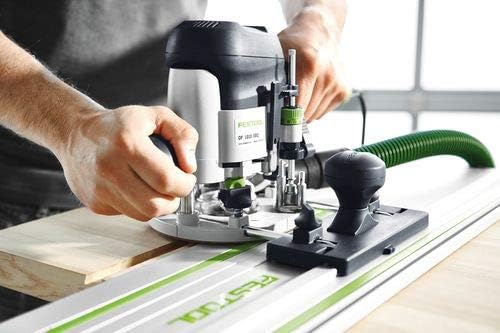
ຮູບທີ 4.2: Demonstrates the router being used on a workpiece, showing the user's grip and control during operation.
- ການຢຸດ Router: Release the ON/OFF switch. Wait for the bit to come to a complete stop before lifting the router from the workpiece.
5. ບໍາລຸງຮັກສາ
Regular maintenance ensures the longevity and optimal performance of your Festool router.
- ທໍາຄວາມສະອາດ: After each use, unplug the router and use a brush or compressed air to remove dust and debris from the motor vents, collet area, and base. Do not use solvents.
- ການກວດກາຄໍເລເຕີ: Regularly inspect the collet and collet nut for wear or damage. Replace if necessary to ensure proper bit gripping.
- ການກວດກາສາຍໄຟ: ກວດເບິ່ງສາຍໄຟສໍາລັບການຕັດ, fraying, ຫຼືຄວາມເສຍຫາຍໃດໆ. ຢ່າໃຊ້ເຄື່ອງມືຖ້າສາຍໄຟເສຍຫາຍ.
- ການເກັບຮັກສາ: Store the router and its accessories in the Systainer case in a dry, secure location, away from direct sunlight and extreme temperatures.
- ບໍລິການ: For any repairs or internal maintenance, contact an authorized Festool service center.
6. ການແກ້ໄຂບັນຫາ
This section addresses common issues you might encounter with your Festool OF 1010 EBQ Router.
| ບັນຫາ | ສາເຫດທີ່ເປັນໄປໄດ້ | ການແກ້ໄຂ |
|---|---|---|
| ເຣົາເຕີບໍ່ເລີ່ມຕົ້ນ. | ບໍ່ມີການສະຫນອງພະລັງງານ; ສາຍໄຟເສຍຫາຍ; ສະຫຼັບຜິດພາດ. | ກວດເບິ່ງປລັກສຽບໄຟແລະສາຍໄຟ. ຖ້າບັນຫາຍັງຄົງຢູ່, ໃຫ້ຕິດຕໍ່ບໍລິການ. |
| ການສັ່ນສະເທືອນຫຼາຍເກີນໄປ. | Loose router bit; damaged bit; worn bearings. | Ensure bit is securely tightened. Replace damaged bit. Contact service for bearing issues. |
| Poor cut quality / burning wood. | Dull bit; incorrect speed; too fast feed rate. | Replace or sharpen bit. Adjust speed. Reduce feed rate. |
| Dust extraction ineffective. | Hose clogged; dust bag full; improper connection. | Clear hose. Empty dust bag. Ensure secure hose connection. |
7. ຂໍ້ກໍານົດດ້ານວິຊາການ
Detailed specifications for the Festool OF 1010 EBQ Router.
| ຂໍ້ມູນຈໍາເພາະ | ມູນຄ່າ |
|---|---|
| ຍີ່ຫໍ້ | Festool |
| ໝາຍເລກຕົວແບບ | 576201 |
| ການບໍລິໂພກພະລັງງານ | 1010 ວ |
| ຄວາມໄວບໍ່ໄດ້ເຮັດວຽກ | 10,000 - 24,000 rpm |
| ຄໍເລັດ | 6-8 ມມ |
| Milling Stroke | 55 ມມ |
| Milling Depth Fine Adjustment | 8 ມມ |
| Max. Average | 50 ມມ |
| Dust Extraction Connection | 27 ມມ |
| ນ້ຳໜັກ | 2.7 ກິໂລ |
| ວັດສະດຸ | ໂລຫະ |
| ແຫຼ່ງພະລັງງານ | ໄຟຟ້າສາຍ |
| ຄວາມໄວການຫມຸນສູງສຸດ | 24000 RPM |
8. ການຮັບປະກັນແລະການສະຫນັບສະຫນູນ
Festool offers comprehensive service and support for your product.

ຮູບທີ 8.1: The Festool Service All-Inclusive program logo, signifying comprehensive customer support.
Festool Service All-Inclusive:
- 36 Months Free Repair: Enjoy free repairs for 36 months, including wear parts and labor.
- 36 Months Theft Protection: In case of theft, Festool will provide a new tool for a small excess fee.
- 10 Years Spare Parts Guarantee: Festool guarantees the availability of spare parts for at least 10 years after a product is discontinued.
- 15 Days Risk-Free Testing: Test your new Festool tool for 15 days without obligation.
For detailed terms and conditions, and to register your product, please visit the official Festool website or contact Festool customer support. Product registration is typically required within 30 days of purchase to activate the full warranty benefits.

ຮູບທີ 8.2: An image detailing the benefits of the Festool All-Inclusive Guarantee, emphasizing peace of mind for users.