
1. ບົດແນະນຳ
The Daytech Caregiver Pager Call Button System is a wireless alert solution designed to provide assistance and peace of mind for caregivers and individuals requiring support. This system enables quick communication when help is needed, enhancing safety and independence within various environments such as homes, hospitals, and nursing facilities.
This manual provides detailed instructions for setting up, operating, and maintaining your Daytech Caregiver Pager Call Button System.
2. ອົງປະກອບຂອງຜະລິດຕະພັນ
The Daytech Caregiver Pager Call Button System typically includes the following components:
- Receiver Units: These units plug into a standard electrical outlet and emit an audible and visual alert when a call button is pressed.
- ປຸ່ມໂທ: These can be worn as a pendant with a lanyard or mounted on a wall. They are splash-proof.
- Watch Pager: A wearable watch-style button for easy access. Note: The watch pager cannot be immersed in water.
- ສາຍເຊືອກ: For wearing call buttons as pendants.
- ກາວສອງດ້ານ: For wall-mounting call buttons.
- ແບັດເຕີຣີ: 12V batteries are included for the call buttons and watch pager.

ຮູບພາບ: ຫຼາຍກວ່າview of the Daytech Caregiver Pager System components.
3. ຄໍາແນະນໍາການຕິດຕັ້ງ
Follow these steps to set up your Daytech Caregiver Pager System:
3.1. ການສະໜອງພະລັງງານໃຫ້ເຄື່ອງຮັບ
- Plug the receiver unit into a standard electrical wall socket. The receiver will power on.
3.2. Battery Installation (Call Buttons/Watch Pager)
The call buttons and watch pager come with pre-installed 12V batteries. If replacement is needed, refer to the Maintenance section.
3.3. Pairing Call Buttons with Receiver
To ensure the call buttons communicate with the receiver, they must be paired:
- Plug the receiver into a socket.
- On the receiver, use the Forward (▲) or Backward (▼) buttons to select your desired ringtone.
- Press and hold the Volume Control button on the receiver until it makes a "ding-dong" sound. This indicates the receiver is in pairing mode.
- Immediately press the call button (either the pendant button or the watch pager SOS button). The receiver will make another "ding-dong" sound, confirming successful pairing.

Image: Step-by-step guide for pairing call buttons with the receiver.
4. ຄໍາແນະນໍາການດໍາເນີນງານ
4.1. Initiating a Call
When assistance is needed, simply press the large button on the call button unit or the SOS button on the watch pager. This will send a wireless signal to the paired receiver(s).

Image: Demonstrates how pressing a call button alerts the receiver.
4.2. Receiving an Alert
Upon receiving a signal, the receiver unit will:
- Emit an audible alert (ringtone).
- Illuminate its LED light, providing a visual alert.
4.3. Adjusting Ringtone and Volume
The receiver offers customization options for alerts:
- ການເລືອກສຽງເອີ້ນເຂົ້າ: Use the Forward (▲) and Backward (▼) buttons on the side of the receiver to cycle through 20 unique ringtones.
- ການປັບລະດັບສຽງ: Press the Volume Control button to select from 5 adjustable volume levels, ranging from 0dB (mute) to 110dB.
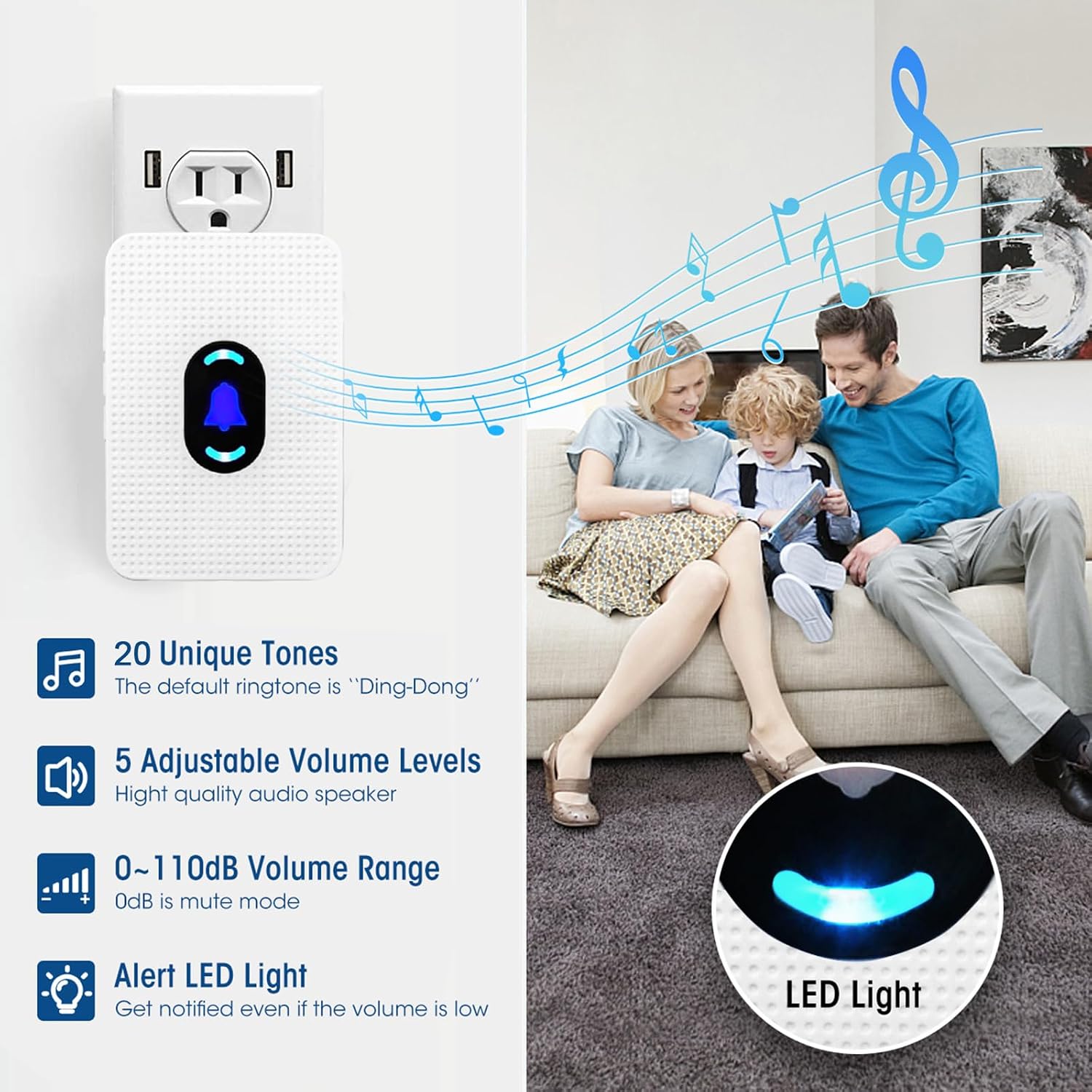
Image: Receiver features including ringtone and volume options.
4.4. Night Light Mode
To activate or deactivate the night light feature on the receiver, press and hold the middle button (bell icon) for 5 seconds.
5. ການຈັດວາງແລະການນໍາໃຊ້
The Daytech Caregiver Pager System offers flexible placement options:
- Wearable Call Buttons: The call buttons can be worn around the neck using the provided lanyard. The watch pager is worn on the wrist.
- ຕິດຝາ: Call buttons can be affixed to a wall using the included double-sided adhesive. This is particularly useful in areas like bathrooms, as the call button unit is splash-proof (IP55 rated).

Image: Various attachment options for the call buttons.
5.1. ຂອບເຂດການປະຕິບັດ
The wireless system has an operating range of up to 300 feet (90 meters) in open areas, allowing caregivers to move freely around the house while remaining alert.

Image: Illustration of the system's wireless operating range within a home.
6. ບໍາລຸງຮັກສາ
6.1. ການທົດແທນຫມໍ້ໄຟ
The call buttons and watch pager are powered by 12V batteries. If the signal becomes intermittent or the device stops responding, it may be time to replace the battery. Refer to the device's casing for instructions on how to open and replace the battery.
6.2. ທໍາຄວາມສະອາດ
Wipe the receiver and call buttons with a soft, dry cloth. Avoid using abrasive cleaners or submerging any part of the system in water.
6.3. Water Resistance
The call button unit is IP55 splash-proof, meaning it can withstand splashes of water, making it suitable for bathroom installation. However, the watch pager and call button units are not designed to be immersed in water and should be removed before bathing or showering.

Image: Demonstrates water resistance of the call button and proper usage.
7. ການແກ້ໄຂບັນຫາ
If you encounter issues with your Daytech Caregiver Pager System, consider the following:
- No Alert from Receiver:
- Ensure the receiver is properly plugged into a working electrical outlet.
- Check if the call button or watch pager battery needs replacement.
- Verify that the call button/watch pager is paired with the receiver (refer to Section 3.3).
- Ensure the call button/watch pager is within the operating range of the receiver.
- Intermittent Alerts:
- This often indicates a low battery in the call button or watch pager. Replace the battery.
- Check for potential signal interference from other wireless devices or thick walls/obstructions.
- Receiver Not Responding to Button Presses:
- Re-pair the call button/watch pager with the receiver (refer to Section 3.3).
8. ຂໍ້ມູນຈໍາເພາະ
| ຄຸນສົມບັດ | ຂໍ້ມູນຈໍາເພາະ |
|---|---|
| ໝາຍເລກຕົວແບບ | E-01W |
| ຍີ່ຫໍ້ | ເດເທັກ |
| ຜູ້ຜະລິດ | DAYTECH GROUP CO.,LTD |
| ແຫຼ່ງພະລັງງານ | Battery Powered (Call Buttons/Watch), AC Powered (Receiver) |
| ໝໍ້ໄຟ | 3 x 12V batteries required (included) |
| ລາຍລະອຽດຫມໍ້ໄຟ | ດ່າງ |
| ວິທີການຄວບຄຸມ | ແຕະ |
| ລະດັບສຽງ | 0 - 110 ເດຊີບີ |
| ປະເພດການຕິດຕັ້ງ | Wall Mount (Call Button) |
| ຂອບເຂດສູງສຸດ | 300 ຟຸດ (90 ແມັດ) |
| ເຕັກໂນໂລຢີເຊັນເຊີ | ເຊັນເຊີຕິດຕໍ່ |
| ຂະໜາດສິນຄ້າ | 2.44 x 3.54 x 1.97 ນິ້ວ |
| ນ້ໍາຫນັກລາຍການ | 13.7 ອອນ |
| ສີ | ສີຂາວ |
| UPC | 779584901118 |
9. ການຮັບປະກັນແລະການສະຫນັບສະຫນູນ
Daytech provides a full year's warranty and a money-back guarantee for this product. For any questions, troubleshooting assistance, or support, please contact Daytech customer service. Round-the-clock customer service is available to assist you.