
1. ບົດແນະນຳ
Welcome to the user manual for your Orbic Journey V Verizon Postpaid 4G LTE Flip Phone. This guide provides essential information on setting up, operating, maintaining, and troubleshooting your device. The Orbic Journey V is a compact and reliable flip phone designed for clear communication and essential smart features, running on the KaiOS operating system and supporting 4G LTE connectivity.
Please read this manual thoroughly to ensure proper use and to maximize the performance and longevity of your phone.
2. ຕັ້ງຄ່າ
2.1. Unboxing ແລະ Package Contents
Upon opening your Orbic Journey V package, verify that all components are present:
- Orbic Journey V Flip Phone
- ແບັດເຕີຣີ Lithium Ion ສາມາດສາກໄດ້
- ເຄື່ອງສາກ
2.2. ການຕິດຕັ້ງຫມໍ້ໄຟ
- ຊອກຫາຝາປິດແບັດເຕີຣີຢູ່ດ້ານຫຼັງຂອງໂທລະສັບ.
- Gently pry open the battery cover using the designated notch.
- Align the battery's gold contacts with the terminals inside the battery compartment.
- ກົດແບັດເຕີຣີລົງໃຫ້ແໜ້ນຈົນກວ່າມັນຈະເຂົ້າທີ່.
- Replace the battery cover, ensuring it is securely latched.
2.3. ການຕິດຕັ້ງຊິມກາດ
Your Orbic Journey V requires a Nano-SIM card for cellular service. Ensure the phone is powered off before inserting or removing the SIM card.
- ເອົາຝາປິດແບັດເຕີຣີ ແລະ ແບັດເຕີຣີອອກຕາມທີ່ໄດ້ອະທິບາຍໄວ້ໃນພາກທີ 2.2.
- Locate the SIM card slot, typically near the battery compartment.
- Insert the Nano-SIM card into the slot with the gold contacts facing down and the notched corner aligned with the slot's guide.
- ຍູ້ SIM card ຄ່ອຍໆຈົນກ່ວາມັນລັອກເຂົ້າໄປໃນສະຖານທີ່.
- ຕິດຕັ້ງແບດເຕີລີ່ແລະຝາປິດຫມໍ້ໄຟໃຫມ່.
2.4. ການເປີດ ແລະສາກເບື້ອງຕົ້ນ
To power on your phone for the first time, press and hold the Power/End Call button until the screen illuminates. It is recommended to fully charge the phone before first use.
- ເຊື່ອມຕໍ່ສາຍສາກກັບຊ່ອງສາກໄຟຂອງໂທລະສັບ.
- ສຽບສາຍສາກເຂົ້າໄປໃນປລັກສຽບໄຟຟ້າມາດຕະຖານ.
- ຕົວຊີ້ວັດການສາກໄຟຈະປາກົດຢູ່ໃນຫນ້າຈໍ.
- ເມື່ອສາກເຕັມແລ້ວ, ໃຫ້ຖອດສາຍສາກອອກ.
3. ການປະຕິບັດໂທລະສັບຂອງທ່ານ
3.1. Phone Layout and Keys
Familiarize yourself with the physical components and buttons of your Orbic Journey V.
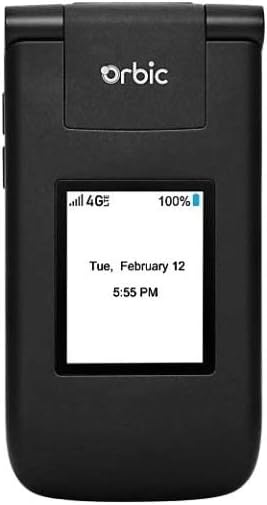
ຮູບ 3.1: ດ້ານຫນ້າ view of the Orbic Journey V, closed. The external display shows signal strength, battery level, and the current time and date.

Figure 3.2: Orbic Journey V in open position, revealing the main screen and the full alphanumeric keypad with navigation buttons.

ຮູບ 3.3: ດ້ານຫລັງ view of the Orbic Journey V, highlighting the main camera lens and the Verizon branding.
- ການສະແດງພາຍນອກ: Shows time, date, notifications, and caller ID when the phone is closed.
- Internal Display: Main screen for navigating menus, viewing content, and interacting with applications.
- Navigation Key (D-Pad): ໃຊ້ເພື່ອຍ້າຍຜ່ານເມນູຕ່າງໆ ແລະເລືອກຕົວເລືອກ.
- Center Select Key: ຢືນຢັນການເລືອກ.
- ໂທ/ສົ່ງລະຫັດ: Initiates calls and answers incoming calls.
- ສິ້ນສຸດການໂທ/Power Key: Ends calls, returns to the home screen, and powers the phone on/off.
- ປຸ່ມກັບຄືນ/ລຶບລ້າງ: Returns to the previous screen or deletes characters.
- ປຸ່ມລະດັບສຽງ: Adjusts call volume, media volume, and ringer volume.
- ກະແຈກ້ອງ: Quick access to the camera function.
3.2. ການນໍາທາງພື້ນຖານ
The Orbic Journey V operates on KaiOS. Use the Navigation Key to scroll through menu options and the Center Select Key to open applications or confirm actions.
- From the home screen, press the Navigation Key (up, down, left, right) to access shortcuts or navigate the main menu.
- Press the Center Select Key to open the main application menu.
- Press the Back/Clear key to go back to the previous screen.
3.3. ເຮັດ ແລະ ຮັບສາຍ
- ໂທອອກ: Enter the phone number using the keypad and press the Call/Send key. Alternatively, navigate to Contacts, select a contact, and press the Call/Send key.
- ເພື່ອຮັບສາຍ: ເມື່ອໂທລະສັບດັງຂຶ້ນ, ໃຫ້ກົດປຸ່ມໂທ/ສົ່ງ.
- ເພື່ອວາງສາຍ: ກົດສິ້ນສຸດການໂທ / ປຸ່ມພະລັງງານ.
3.4. ການສົ່ງ ແລະ ຮັບຂໍ້ຄວາມ
- ເພື່ອສົ່ງຂໍ້ຄວາມ: From the main menu, select 'Messages'. Choose 'New Message', enter the recipient's number or select from contacts, type your message using the keypad, and press 'Send'.
- To Receive a Message: New messages will typically display a notification on the screen. Navigate to the 'Messages' application to view ອິນບັອກຂອງເຈົ້າ.
3.5. ການນໍາໃຊ້ກ້ອງຖ່າຍຮູບ
The Orbic Journey V is equipped with front and rear cameras. The rear camera is located on the upper-right back of the phone.
- ເພື່ອເປີດກ້ອງຖ່າຍຮູບ: Press the dedicated Camera key or navigate to the 'Camera' application from the main menu.
- ຖ່າຍຮູບ: Frame your shot on the screen and press the Center Select key to capture the image.
- Viewໃນຮູບພາບ: Access your photos through the 'Gallery' application.
3.6. Connectivity (Bluetooth, Wi-Fi)
Your phone supports Bluetooth and Wi-Fi for wireless connectivity.
- Bluetooth: Go to 'Settings' > 'Network & Connectivity' > 'Bluetooth'. Turn Bluetooth on, and the phone will search for available devices. Select a device to pair.
- Wi-Fi: Go to 'Settings' > 'Network & Connectivity' > 'Wi-Fi'. Turn Wi-Fi on, select an available network, and enter the password if required.
4. ບໍາລຸງຮັກສາ
4.1. ທໍາຄວາມສະອາດໂທລະສັບຂອງທ່ານ
To keep your phone in optimal condition, clean it regularly:
- ໃຊ້ຜ້າແພທີ່ອ່ອນນຸ່ມ, ບໍ່ມີສານດ່າງເພື່ອເຊັດໜ້າຈໍ ແລະຮ່າງກາຍ.
- ຫຼີກລ່ຽງການໃຊ້ສານເຄມີທີ່ຮຸນແຮງ, ເຄື່ອງຂັດຂັດ, ຫຼືສີດ aerosol.
- ກວດໃຫ້ແນ່ໃຈວ່າໂທລະສັບຖືກປິດ ແລະຖອດປລັກອອກກ່ອນທຳຄວາມສະອາດ.
4.2. ການດູແລຫມໍ້ໄຟ
Proper battery care can extend its lifespan:
- ຫຼີກເວັ້ນອຸນຫະພູມທີ່ຮຸນແຮງ.
- ຢ່າປະໄວ້ສາກໂທລະສັບເປັນເວລາດົນເກີນໄປຫຼັງຈາກທີ່ມັນເຕັມ.
- If the phone will not be used for an extended period, store it with a partial charge (around 50%).
4.3. ການປັບປຸງຊອບແວ
ການອັບເດດຊອບແວເປັນປະຈຳຈະໃຫ້ຄຸນສົມບັດໃໝ່, ການປັບປຸງຄວາມປອດໄພ ແລະ ການແກ້ໄຂຂໍ້ຜິດພາດຕ່າງໆ.
- ເຊື່ອມຕໍ່ໂທລະສັບຂອງທ່ານກັບ Wi-Fi.
- Go to 'Settings' > 'Device' > 'Software Update'.
- ປະຕິບັດຕາມການເຕືອນໃນຫນ້າຈໍເພື່ອກວດເບິ່ງແລະຕິດຕັ້ງການອັບເດດທີ່ມີຢູ່.
5. ການແກ້ໄຂບັນຫາ
This section addresses common issues you might encounter with your Orbic Journey V.
5.1. ໂທລະສັບບໍ່ເປີດ
- Ensure the battery is correctly installed and charged. Connect the charger and wait a few minutes before attempting to power on.
- Try removing and reinserting the battery, then attempt to power on again.
5.2. Poor Call Quality or No Signal
- Check your location for network coverage. Move to an area with better signal.
- ໃຫ້ແນ່ໃຈວ່າໃສ່ SIM card ຂອງທ່ານຢ່າງຖືກຕ້ອງ.
- ຣີສະຕາດໂທລະສັບ.
- Verify that your account with Verizon is active and in good standing.
5.3. ແບັດເຕີຣີໝົດໄວ
- ປິດແອັບພລິເຄຊັນທີ່ບໍ່ໄດ້ໃຊ້ທີ່ເຮັດວຽກຢູ່ໃນພື້ນຫຼັງ.
- ຫຼຸດຄວາມສະຫວ່າງໜ້າຈໍ.
- ປິດ Wi-Fi, Bluetooth ຫຼື GPS ເມື່ອບໍ່ໄດ້ໃຊ້.
- Check for and install any available software updates, as these often include battery optimizations.
5.4. Software or Navigation Issues
- If the phone is unresponsive, try a soft reset by removing and reinserting the battery.
- Ensure the phone's software is up to date.
- ຖ້າບັນຫາຍັງຄົງຢູ່, ໃຫ້ພິຈາລະນາການຕັ້ງໂຮງງານຄືນໃໝ່ (Note: This will erase all data on the phone. Back up important information first.). Navigate to 'Settings' > 'Device' > 'Reset Phone'.
6. ຂໍ້ມູນຈໍາເພາະ
| ຄຸນສົມບັດ | ລາຍລະອຽດ |
|---|---|
| ຊື່ຕົວແບບ | ການເດີນທາງ Orbic V |
| ຍີ່ຫໍ້ | ໂຄນ |
| ASIN | B08971YYM1 |
| ລະບົບປະຕິບັດການ | KaiOS |
| ຜູ້ໃຫ້ບໍລິການໄຮ້ສາຍ | Verizon |
| ເຕັກໂນໂລຊີໂທລະສັບມືຖື | LTE |
| ເຕັກໂນໂລຊີການເຊື່ອມຕໍ່ | Bluetooth, WiFi |
| ປັດໄຈແບບຟອມ | ພິກ |
| ສີ | ດຳ |
| ຂະໜາດໜ້າຈໍ | 5.8 inches (Standing screen display size) |
| ຄວາມລະອຽດ | 1520 x 720 |
| ຄຸນນະສົມບັດກ້ອງຖ່າຍຮູບ | ດ້ານ ໜ້າ, ດ້ານຫລັງ |
| ສຽງ Jack | ບໍ່ມີຊ່ອງສຽບຫູຟັງ |
| ໝໍ້ໄຟ | ແບັດເຕີຣີ Lithium Ion 1 ອັນ (ລວມ) |
| ນ້ໍາຫນັກລາຍການ | 12.8 ອອນ |
| ຂະໜາດແພັກເກັດ | 5 x 3 x 3 ນິ້ວ |
| ວັນທີທໍາອິດທີ່ມີ | ວັນທີ 26 ພຶດສະພາ 2020 |
7. ການຮັບປະກັນແລະການສະຫນັບສະຫນູນ
For warranty information and technical support regarding your Orbic Journey V phone, please refer to the documentation provided with your purchase or contact Orbic directly. You can also visit the official Orbic webເວັບໄຊສໍາລັບການສະຫນັບສະຫນູນ.
For service-related inquiries, please contact your wireless carrier, Verizon.
- ຜູ້ຜະລິດ: ໂຄນ
- ຜູ້ໃຫ້ບໍລິການໄຮ້ສາຍ: Verizon