
ແມັກຄອມ MM471
Maxcom MM471 Senior Portable Phone User Manual
1. ບົດແນະນຳ
This manual provides detailed instructions for the safe and efficient use of your Maxcom MM471 Senior Portable Phone. Designed with ease of use in mind, this device features large characters, big buttons, and an ergonomic design, making it ideal for seniors. Please read this manual thoroughly before operating your phone.

ຮູບ 1: ດ້ານຫນ້າ view of the Maxcom MM471 Senior Portable Phone.
2. ຕັ້ງຄ່າ
2.1 ເນື້ອໃນຊຸດ
ໃຫ້ແນ່ໃຈວ່າທຸກລາຍການຢູ່ໃນຊຸດ:
- Maxcom MM471 Senior Portable Phone
- ແບັດເຕີຣີ
- ອະແດບເຕີການສາກໄຟ
- ຄູ່ມືຜູ້ໃຊ້
2.2 ການໃສ່ຊິມກາດ ແລະ ແບັດເຕີຣີ
The Maxcom MM471 supports dual SIM cards. Follow these steps to install your SIM card(s) and battery:
- Turn off the phone and disconnect it from any power source.
- ເອົາຝາປິດຫຼັງຂອງໂທລະສັບອອກຢ່າງລະມັດລະວັງ.
- Insert your SIM card(s) into the designated slot(s) with the gold contacts facing down.
- ໃສ່ແບັດເຕີລີ, ຮັບປະກັນວ່າລາຍຊື່ຕິດຕໍ່ຖືກສອດຄ່ອງ.
- ປ່ຽນຝາຫຼັງໃໝ່ຈົນກວ່າມັນຈະກົດເຂົ້າທີ່ປອດໄພ.

ຮູບ 2: ກັບຄືນໄປບ່ອນ view with battery and SIM card area.
2.3 ການສາກແບັດເຕີຣີ
ກ່ອນທີ່ຈະໃຊ້ຄັ້ງທໍາອິດ, ສາກແບັດເຕີຣີໂທລະສັບໃຫ້ເຕັມ:
- Connect the charging adapter to the phone's charging port or place the phone in its charging dock.
- ສຽບອະແດບເຕີເຂົ້າໄປໃນປລັກສຽບໄຟ.
- ຕົວຊີ້ບອກແບັດເຕີຣີຢູ່ໜ້າຈໍຈະສະແດງສະຖານະການສາກໄຟ.
- ເມື່ອສາກເຕັມແລ້ວ, ໃຫ້ຖອດສາຍສາກອອກ.
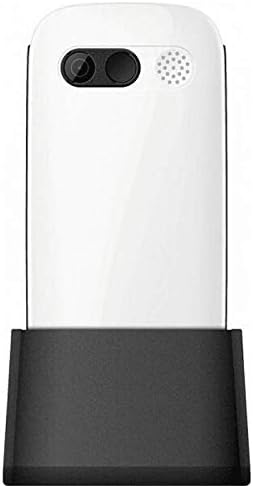
Figure 3: Phone in charging dock.
3. ຄໍາແນະນໍາການດໍາເນີນງານ
3.1 ການເປີດ/ປິດ
- ເພື່ອເປີດເຄື່ອງ: ກົດຄ້າງໄວ້ ເປີດ/ປິດການໂທ ກົດປຸ່ມຈົນກ່ວາຫນ້າຈໍສະຫວ່າງ.
- ປິດເຄື່ອງ: ກົດຄ້າງໄວ້ ເປີດ/ປິດການໂທ button until the power-off options appear, then select 'Power Off'.
3.2 ໂທອອກ
- ຈາກໜ້າຈໍຫຼັກ, ໃສ່ເບີໂທລະສັບໂດຍໃຊ້ແປ້ນພິມ.
- ກົດ ໂທ ປຸ່ມ (ປຸ່ມສີຂຽວ) ເພື່ອເລີ່ມການໂທ.
- ເພື່ອສິ້ນສຸດການໂທ, ກົດປຸ່ມ ເປີດ/ປິດການໂທ ປຸ່ມ (ປຸ່ມສີແດງ).
3.3 ການຮັບສາຍ
- When a call comes in, the phone will ring and display the caller's number or name.
- ກົດ ໂທ button (green button) to answer.
- ເພື່ອປະຕິເສດການໂທ, ກົດປຸ່ມ ເປີດ/ປິດການໂທ ປຸ່ມ (ປຸ່ມສີແດງ).
3.4 ການສົ່ງ ແລະ ຮັບຂໍ້ຄວາມ
- ທ່ອງໄປຫາເມນູ 'ຂໍ້ຄວາມ' ຈາກໜ້າຈໍຫຼັກ.
- ເລືອກ 'ຂໍ້ຄວາມໃໝ່' ເພື່ອຂຽນຂໍ້ຄວາມ.
- ໃສ່ໝາຍເລກຜູ້ຮັບ ແລະຂໍ້ຄວາມຂອງເຈົ້າ.
- ກົດ 'ສົ່ງ'.
- Received messages will appear in your 'Inbox'.
3.5 Managing Contacts
The phonebook can store up to 300 names.
- Go to the 'Contacts' or 'Phonebook' menu.
- ເລືອກ 'ເພີ່ມຜູ້ຕິດຕໍ່ໃໝ່' ເພື່ອບັນທຶກເບີໂທໃໝ່.
- ໃສ່ຊື່ ແລະເບີໂທລະສັບ, ຈາກນັ້ນບັນທຶກ.
- To call a contact, select their name from the list and press the ໂທ ປຸ່ມ.
3.6 ການນໍາໃຊ້ Bluetooth
ເພື່ອເຊື່ອມຕໍ່ກັບອຸປະກອນ Bluetooth:
- ໄປທີ່ 'ການຕັ້ງຄ່າ' > 'ບູທູດ'.
- ເປີດ Bluetooth.
- ເລືອກ 'ຊອກຫາ devices' to find available Bluetooth accessories.
- Select the desired device and pair them.
3.7 ການນໍາໃຊ້ໄຟສາຍ
ໂທລະສັບມີໄຟສາຍໃນຕົວເພື່ອຄວາມສະດວກສະບາຍ.
- To turn on the flashlight, locate the dedicated flashlight button (if available) or access it through the 'Tools' menu.
- Press the button or select the option again to turn it off.
4. ການບໍາລຸງຮັກສາແລະການດູແລ
To ensure the longevity and optimal performance of your Maxcom MM471 phone, follow these maintenance guidelines:
- ທໍາຄວາມສະອາດ: ໃຊ້ຜ້າປຽກແຫ້ງເພື່ອເຮັດຄວາມສະອາດພື້ນຜິວຂອງໂທລະສັບ. ຫຼີກເວັ້ນການເຮັດຄວາມສະອາດຂອງແຫຼວຫຼືວັດສະດຸຂັດ.
- ອຸນຫະພູມ: ຢ່າປ່ອຍໃຫ້ໂທລະສັບຢູ່ໃນອຸນຫະພູມທີ່ຮຸນແຮງ (ຮ້ອນ ຫຼື ເຢັນ) ຫຼື ແສງແດດໂດຍກົງເປັນເວລາດົນ.
- ຄວາມຊຸ່ມ: Keep the phone dry. Do not immerse it in water or expose it to high humidity.
- ການເກັບຮັກສາ: When not in use for a long time, store the phone in a cool, dry place with the battery partially charged.
- ຜົນກະທົບ: ຫຼີກລ້ຽງການວາງໂທລະສັບຫຼືການຮັບຜົນກະທົບທີ່ເຂັ້ມແຂງ.
5. ການແກ້ໄຂບັນຫາ
If you encounter issues with your phone, refer to the table below for common problems and solutions:
| ບັນຫາ | ສາເຫດທີ່ເປັນໄປໄດ້ | ການແກ້ໄຂ |
|---|---|---|
| ໂທລະສັບບໍ່ເປີດ | ແບັດເຕີຣີໝົດ ຫຼື ບໍ່ໃສ່ຢ່າງຖືກຕ້ອງ. | ສາກແບັດເຕີຣີ. ກວດໃຫ້ແນ່ໃຈວ່າໃສ່ແບັດເຕີຣີຢ່າງຖືກຕ້ອງ. |
| ບໍ່ສາມາດໂທ ຫຼືຮັບສາຍໄດ້ | No network signal, SIM card not inserted, or SIM card faulty. | Check network coverage. Reinsert SIM card(s). Contact your service provider. |
| ຄຸນນະພາບການໂທບໍ່ດີ | Weak network signal, interference. | ຍ້າຍໄປພື້ນທີ່ທີ່ມີສັນຍານທີ່ດີກວ່າ. ຫຼີກເວັ້ນການຂັດຂວາງ. |
| ແບັດເຕີຣີໝົດໄວ | Excessive usage, background applications, old battery. | ຫຼຸດຄວາມສະຫວ່າງໜ້າຈໍ. ປິດແອັບພລິເຄຊັນທີ່ບໍ່ໄດ້ໃຊ້. ພິຈາລະນາປ່ຽນແບດເຕີຣີຖ້າມັນເກົ່າ. |
| ປຸ່ມກົດບໍ່ຕອບສະໜອງ | ຄວາມຜິດພາດຂອງຊອບແວ, ຄວາມເສຍຫາຍທາງດ້ານຮ່າງກາຍ. | ຣີສະຕາດໂທລະສັບ. ຖ້າບັນຫາຍັງຄົງຢູ່, ໃຫ້ຕິດຕໍ່ຝ່າຍຊ່ວຍເຫຼືອ. |
6. ຂໍ້ກໍານົດດ້ານວິຊາການ
Key technical details of the Maxcom MM471 Senior Portable Phone:
- ຕົວແບບ: MM471
- ຍີ່ຫໍ້: Maxcom
- ສີ: ສີຂາວ
- ການເຊື່ອມຕໍ່: Bluetooth
- ຮອງຮັບຊິມ: ຊິມສອງ
- ຄວາມອາດສາມາດຂອງປຶ້ມໂທລະສັບ: 300 names
- ເວລາສົນທະນາ: ສູງສຸດ 14 ຊົ່ວໂມງ
- ການໂຕ້ຕອບ: ປຸ່ມທາງດ້ານຮ່າງກາຍ
- ຄຸນນະສົມບັດພິເສດ: Large characters, Big buttons, Ergonomic design, Speaker, Flashlight
7. ຂໍ້ມູນການຮັບປະກັນ ແລະການຊ່ວຍເຫຼືອ
For detailed warranty information, please refer to the warranty card included with your product or visit the official Maxcom website. For technical support or service inquiries, please contact your retailer or the manufacturer's customer service department.
Ask a question about this manual
Ask about setup, troubleshooting, compatibility, parts, safety, or missing instructions. Manuals+ will review the question and use this page’s manual context to help answer it.