
1. ບົດແນະນຳ
Thank you for choosing the tectake Gaming Chair Model 403209. This ergonomic office and computer chair is designed to provide comfort and support for both focused work and intense gaming sessions. Featuring a robust construction, thick padding, adjustable armrests, and a continuously adjustable gas lift, this chair ensures a comfortable seating experience. The five smooth-rolling double casters are floor-friendly and highly wear-resistant. This manual provides essential information for assembly, operation, maintenance, and troubleshooting to ensure optimal use and longevity of your chair.

Image 1.1: The tectake Gaming Chair Model 403209 in a typical usage environment.
2. ຄໍາແນະນໍາຄວາມປອດໄພ
- ອ່ານຄໍາແນະນໍາທັງຫມົດຢ່າງລະອຽດກ່ອນທີ່ຈະປະກອບແລະນໍາໃຊ້.
- ເກັບຮັກສາອຸປະກອນການຫຸ້ມຫໍ່ທັງໝົດໃຫ້ຫ່າງຈາກເດັກນ້ອຍເພື່ອປ້ອງກັນອັນຕະລາຍຈາກການສຳຜັດ.
- ໃຫ້ແນ່ໃຈວ່າ screws ແລະ bolts ທັງຫມົດໄດ້ຖືກ tightened ຢ່າງປອດໄພກ່ອນທີ່ຈະນໍາໃຊ້. ກວດສອບເປັນໄລຍະ ແລະ ຮັດແໜ້ນຄືນໃໝ່ຕາມຄວາມຈຳເປັນ.
- Do not stand on the chair. Use it only for seating.
- ຢ່າໃຊ້ເກົ້າອີ້ຖ້າມີຊິ້ນສ່ວນໃດເສຍຫາຍ ຫຼື ຫາຍໄປ. ຕິດຕໍ່ຝ່າຍຊ່ວຍເຫຼືອລູກຄ້າເພື່ອຂໍຊິ້ນສ່ວນທົດແທນ.
- ຫຼີກລ້ຽງການເປີດຕັ່ງໃຫ້ຖືກແສງແດດໂດຍກົງ ຫຼືອຸນຫະພູມທີ່ສຸດ ເພື່ອປ້ອງກັນການເສື່ອມໂຊມຂອງວັດສະດຸ.
- ຄວາມອາດສາມາດນ້ໍາຫນັກສູງສຸດ: 120 kg (264 lbs). ບໍ່ເກີນຂອບເຂດຈໍາກັດນີ້.
- ໃຊ້ເກົ້າອີ້ຢູ່ເທິງພື້ນຜິວລະດັບເພື່ອປ້ອງກັນການບິດ.
3. ເນື້ອໃນຊຸດ
Before assembly, please ensure all components are present and undamaged. If any parts are missing or damaged, do not proceed with assembly. Contact tectake customer service for assistance.
- ຫລັງ
- ບ່ອນນັ່ງ
- ບ່ອນວາງແຂນ (2x)
- ຖານດາວ
- Casters (5x)
- ທໍ່ຍົກອາຍແກັສ
- Gas lift cover
- Mechanism plate
- Lumbar support cushion
- ເບາະຄໍ
- ຊຸດຮາດແວ (ສະກູ, ເຄື່ອງຊັກຜ້າ, ກະແຈ Allen)
- ຄໍາແນະນໍາການປະກອບ (ຄູ່ມືນີ້)

ຮູບພາບ 3.1: ດ້ານຫນ້າ view of the chair, illustrating the main components.
4. ຄໍາແນະນໍາຂອງສະພາແຫ່ງ
ປະຕິບັດຕາມຂັ້ນຕອນເຫຼົ່ານີ້ຢ່າງລະມັດລະວັງສໍາລັບການປະກອບທີ່ເຫມາະສົມ. ແນະນໍາໃຫ້ປະກອບເກົ້າອີ້ຢູ່ເທິງພື້ນຜິວທີ່ສະອາດແລະອ່ອນໆເພື່ອປ້ອງກັນຄວາມເສຍຫາຍ.
- ຕິດລໍ້ໃສ່ຖານດາວ: ສຽບແຕ່ລະ casters ຫ້າເຂົ້າໄປໃນຮູໃນຕອນທ້າຍຂອງຖານດາວໄດ້ຈົນກ່ວາພວກເຂົາເຈົ້າກົດເຂົ້າໄປໃນສະຖານທີ່ຢ່າງປອດໄພ.
- ໃສ່ Gas Lift: ວາງກະບອກຍົກອາຍແກັສເຂົ້າໄປໃນຮູກາງຂອງຖານຮູບດາວ. ປົກຫຸ້ມກະບອກຍົກອາຍແກັສດ້ວຍຝາປິດພາດສະຕິກແບບຍືດหยุ่น.
- ຕິດແຜ່ນກົນໄກໃສ່ບ່ອນນັ່ງ: Align the mechanism plate with the pre-drilled holes on the underside of the seat. Ensure the front of the mechanism plate faces the front of the seat. Secure with screws provided in the hardware kit.
- ຕິດທີ່ວາງແຂນໃສ່ບ່ອນນັ່ງ: Secure the armrests to the sides of the seat using the provided screws. Do not overtighten initially, allow for minor adjustments.
- ຄັດຕິດພື້ງຫຼັງໃສ່ບ່ອນນັ່ງ: Align the backrest with the mounting brackets on the seat. Secure with screws. Once all screws are in place, tighten all armrest and backrest screws firmly.
- ເຊື່ອມຕໍ່ບ່ອນນັ່ງກັບຍົກອາຍແກັສ: Carefully place the assembled seat and backrest onto the gas lift cylinder, ensuring the central hole of the mechanism plate aligns with the top of the gas lift. Press down firmly to secure.
- ແນບເບາະ: Place the lumbar support cushion and neck cushion onto the chair. The lumbar cushion typically attaches with straps around the backrest, and the neck cushion can be positioned as desired.
5. ຄໍາແນະນໍາການດໍາເນີນງານ
Your tectake Gaming Chair offers several adjustment options for personalized comfort.
5.1. ການປັບຄວາມສູງ
To adjust the chair height, locate the lever on the right side, beneath the seat (Image 5.1). While seated, pull the lever up to lower the chair. To raise the chair, stand up and pull the lever up. Release the lever to lock the height.

Image 5.1: Control levers for chair adjustments.
5.2. ເບາະນັ່ງ
To recline the backrest, pull the lever on the left side of the chair (Image 5.1). Lean back to the desired angle (88-125 degrees) and release the lever to lock the position. To return the backrest to an upright position, pull the lever and lean forward slightly.

Image 5.2: Illustration of the backrest recline mechanism.
5.3. ການປັບທີ່ວາງແຂນ
The armrests are height-adjustable. Locate the button or lever on the side of each armrest (Image 5.3). Press or lift it and move the armrest up or down to your preferred height. Release the button/lever to lock the armrest in place.

Image 5.3: Armrest height adjustment feature.
5.4. Lumbar and Neck Cushion Adjustment
The lumbar and neck cushions are removable and adjustable. The lumbar cushion can be moved up or down along the backrest to provide support where you need it most (Image 5.4). The neck cushion can be positioned for optimal head and neck support.

Image 5.4: Lumbar cushion adjustment for personalized support.
5.5. Swivel and Casters
The chair features a 360-degree swivel function for easy movement. The five double casters (Image 5.5) are designed for smooth gliding on various floor types, providing mobility within your workspace.
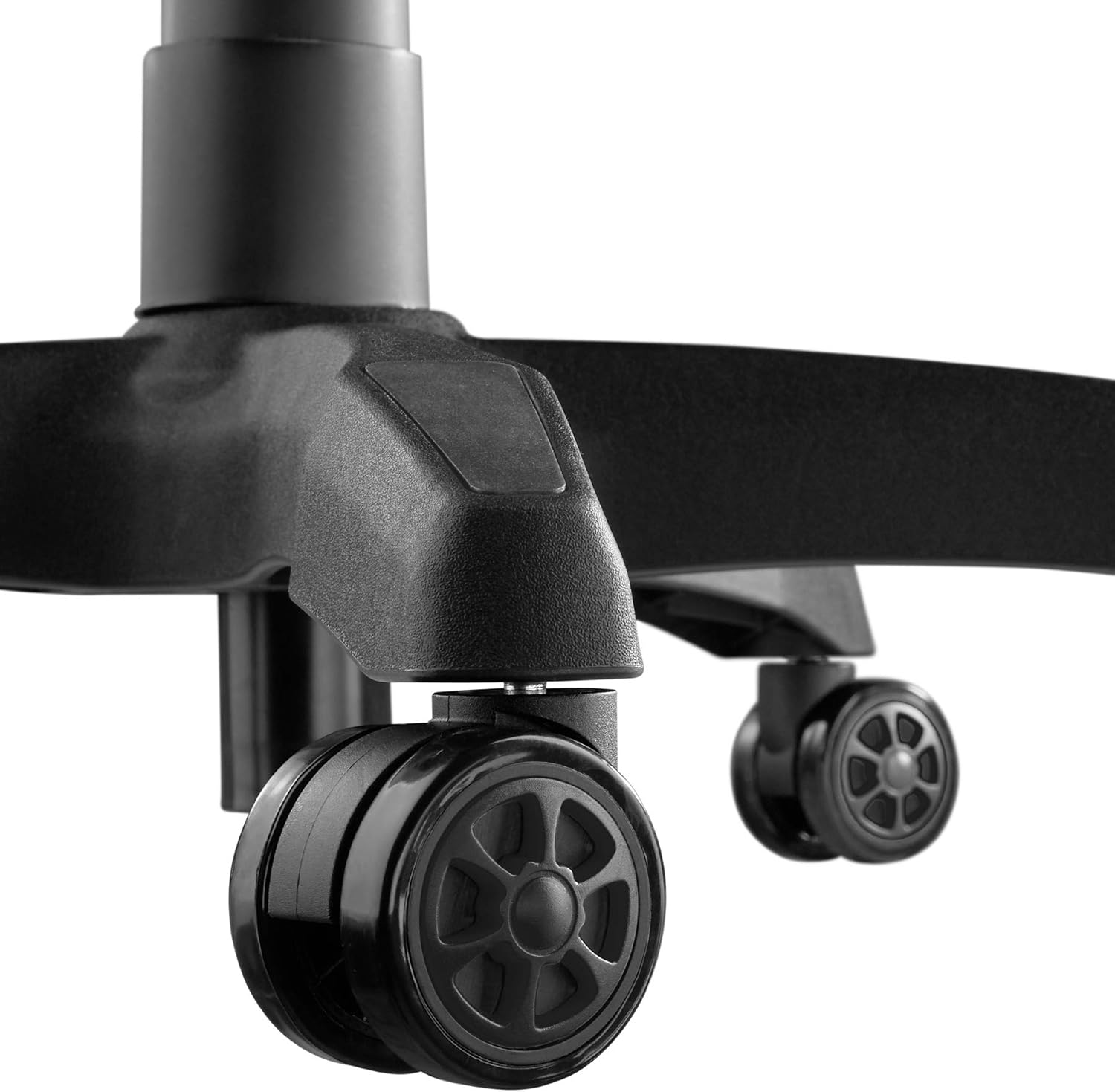
Image 5.5: Durable double casters for smooth mobility.
6. ບໍາລຸງຮັກສາ
6.1. ທໍາຄວາມສະອາດ
- ເຊັດພື້ນຜິວຂອງເກົ້າອີ້ໃຫ້ອ່ອນໆ, ງamp ຜ້າ.
- For stubborn stains, use a mild soap solution and wipe immediately with a clean, damp ຜ້າ, ຫຼັງຈາກນັ້ນແຫ້ງຢ່າງລະອຽດ.
- Avoid using abrasive cleaners, solvents, or harsh chemicals, as these can damage the PU/PVC material.
- Regularly vacuum or wipe the casters to remove dust and debris that could hinder smooth movement.
6.2. ການດູແລທົ່ວໄປ
- ກວດເບິ່ງທຸກສະກູແລະສະກູເປັນໄລຍະເພື່ອຮັບປະກັນວ່າພວກມັນແຫນ້ນ. ຮັດແໜ້ນຄືນໃໝ່ ຖ້າຈຳເປັນເພື່ອຮັກສາສະຖຽນລະພາບ ແລະຄວາມປອດໄພ.
- Avoid placing heavy objects on the armrests or backrest when not seated.
- Keep the chair away from sharp objects that could puncture or tear the upholstery.
7. ການແກ້ໄຂບັນຫາ
| ບັນຫາ | ສາເຫດທີ່ເປັນໄປໄດ້ | ການແກ້ໄຂ |
|---|---|---|
| ເກົ້າອີ້ສັ່ນສະເທືອນ ຫຼືຮູ້ສຶກບໍ່ໝັ້ນຄົງ. | screws ວ່າງຫຼືພື້ນທີ່ບໍ່ສະເຫມີກັນ. | ກວດເບິ່ງແລະແຫນ້ນ screws ປະກອບທັງຫມົດ. ໃຫ້ແນ່ໃຈວ່າເກົ້າອີ້ຢູ່ເທິງພື້ນຜິວທີ່ຮາບພຽງ. |
| ເກົ້າອີ້ບໍ່ໄດ້ປັບຄວາມສູງ. | Gas lift lever not engaged or gas lift cylinder faulty. | Ensure the height adjustment lever is fully pulled. If the issue persists, the gas lift may need replacement. Contact support. |
| Casters ບໍ່ມ້ວນກ້ຽງ. | ສິ່ງເສດເຫຼືອທີ່ຖືກຈັບຢູ່ໃນ casters ຫຼື casters ເສຍຫາຍ. | Clean casters to remove hair, dust, or other debris. If damaged, replace casters. |
| ເບາະຮອງບໍ່ນອນ ຫຼື ລັອກ. | Recline lever not engaged or mechanism faulty. | Ensure the recline lever is fully pulled/released. Check for any obstructions in the mechanism. |
| ສຽງດັງ. | ການເຊື່ອມຕໍ່ວ່າງຫຼື friction ລະຫວ່າງພາກສ່ວນ. | Tighten screws ທັງຫມົດ. ນຳໃຊ້ນໍ້າຫຼໍ່ລື້ນຊິລິໂຄນໜ້ອຍໜຶ່ງໃສ່ຊິ້ນສ່ວນທີ່ເຄື່ອນຍ້າຍ ຖ້າຈຳເປັນ, ຫຼີກລ້ຽງການໃສ່ຜ້າປູ. |
8. ຂໍ້ມູນຈໍາເພາະ

Image 8.1: Key dimensions of the tectake Gaming Chair.
| ຄຸນສົມບັດ | ລາຍລະອຽດ |
|---|---|
| ໝາຍເລກຕົວແບບ | 403209 |
| ຂະໜາດລວມ (W x D x H) | Approx. 68 x 69 x 117.5 - 125 cm (26.8 x 27.2 x 46.3 - 49.2 inches) |
| ຄວາມສູງບ່ອນນັ່ງ | Approx. 42.5 - 50 cm (16.7 - 19.7 inches) |
| ຂະໜາດບ່ອນນັ່ງ (ກວ້າງ x ກວ້າງ) | ປະມານ 51 x 50 ຊມ (20.1 x 19.7 ນິ້ວ) |
| ຄວາມໜາຂອງບ່ອນນັ່ງ | ປະມານ. 8 ຊມ (3.1 ນິ້ວ) |
| Lumbar Cushion Dimensions (W x D x H) | ປະມານ. 29 x 7.5 x 19 cm (11.4 x 3.0 x 7.5 ນິ້ວ) |
| Neck Cushion Dimensions (W x D x H) | ປະມານ. 26 x 10 x 17.5 cm (10.2 x 3.9 x 6.9 ນິ້ວ) |
| ຄວາມສູງຂອງເບດຫຼັງ | ປະມານ. 81 ຊມ (31.9 ນິ້ວ) |
| Backrest ມຸມ Recline | 88 - 125 ອົງສາ |
| ຂະໜາດທີ່ວາງແຂນ (ກວ້າງ x ກວ້າງ) | ປະມານ 7.5 x 28 ຊມ (3.0 x 11.0 ນິ້ວ) |
| Armrest Height from Floor | Approx. 57 - 71.5 cm (22.4 - 28.1 inches) |
| ຂອບເຂດການປັບຄວາມສູງຂອງບ່ອນວາງແຂນ | ປະມານ. 7 ຊມ (2.8 ນິ້ວ) |
| Star Base Diameter | ປະມານ. 70 ຊມ (27.6 ນິ້ວ) |
| Caster Diameter/Width | Approx. 6 cm / 5.6 cm (2.4 inches / 2.2 inches) |
| ຄວາມສາມາດໃນການໂຫຼດສູງສຸດ | 120 ກິໂລ (264 ປອນ) |
| ນ້ຳໜັກ | ປະມານ. 19 ກິໂລ (41.9 ປອນ) |
| ວັດສະດຸ | Polyurethane (PU), Polyvinyl Chloride (PVC), Plastic |
| ສີ | ດຳ |
9. ການຮັບປະກັນແລະການສະຫນັບສະຫນູນ
For warranty information, replacement parts, or technical support, please refer to the purchase documentation or contact tectake customer service directly. Keep your proof of purchase for any warranty claims.
Contact information for tectake can typically be found on their official webເວັບໄຊທ໌ຫຼືຜ່ານຮ້ານຂາຍຍ່ອຍບ່ອນທີ່ຜະລິດຕະພັນໄດ້ຖືກຊື້.