
1. ຂໍ້ມູນຄວາມປອດໄພທີ່ສໍາຄັນ
Before operating the Razor T25 Electric Scooter, please read and understand all safety warnings and instructions. Failure to follow these instructions may result in serious injury or property damage.
- ໃສ່ເຄື່ອງປ້ອງກັນທີ່ເໝາະສົມສະເໝີ, ລວມທັງໝວກກັນກະທົບ, ແຜ່ນຮອງເຂົ່າ, ແລະແຜ່ນສອກ.
- Observe all local laws and regulations regarding electric scooter use.
- ຢ່າຂີ່ໃນສະພາບທີ່ປຽກ, ເທິງໜ້າດິນທີ່ບໍ່ສະເໝີກັນ, ຫຼື ໃນຕອນກາງຄືນທີ່ບໍ່ມີແສງສະຫວ່າງທີ່ເໝາະສົມ.
- Ensure the battery is fully charged and all components are securely fastened before each ride.
- The scooter is designed for riders aged 18 and up, with a maximum weight limit of 220 pounds (100 kg).
2. ຜະລິດຕະພັນເກີນview
The Razor T25 Electric Scooter is a foldable and portable electric scooter designed for urban commuting and travel. It features a 250-watt brushless hub-driven motor and a 36V lithium-ion battery, offering a balance of speed and range for adult riders.
ຄຸນນະສົມບັດທີ່ສໍາຄັນ:
- ມໍເຕີ: 250-watt, kick-to-start, variable-speed, brushless, hub-driven motor.
- ແບັດເຕີຣີ: UL certified rechargeable 36V lithium-ion battery pack.
- ຄວາມໄວ: ສູງສຸດ 15.5 mph (25 km/h).
- ຊ່ວງ: ສູງເຖິງ 18 ໄມລ໌ (29 ກິໂລແມັດ) ຕໍ່ການສາກໄຟຄັ້ງໜຶ່ງ.
- ຮູບແບບການຂີ່: Three selectable modes (Pedestrian, Cruising, Sport).
- ເບກ: Hand-operated electronic front brake and rear disc brake.
- ການເບິ່ງເຫັນ: LED headlight, brake-activated taillight, and reflectors.
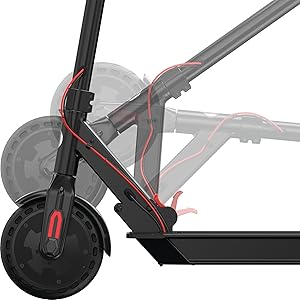
- ການພົກພາ: Folding design for easy storage and transport.

3. ຕັ້ງຄ່າ
3.1 Unboxing and Initial Assembly
The Razor T25 Electric Scooter comes partially assembled. Follow these steps to complete the setup:
- ເອົາສ່ວນປະກອບທັງຫມົດອອກຈາກການຫຸ້ມຫໍ່ຢ່າງລະມັດລະວັງ.
- ເປີດ scooter ໂດຍ releasing the folding mechanism. Ensure it locks securely into the upright position.
- Insert the handlebar assembly into the stem.
- Secure the handlebars using the provided four screws and Allen wrench. Ensure they are tightened firmly.
3.2 ການສາກແບັດເຕີຣີເບື້ອງຕົ້ນ
Before first use, fully charge the scooter's battery. The initial charge time is approximately 8 hours.
- Locate the charging port, typically on the bottom of the scooter deck.
- Connect the charger to the scooter and then to a standard wall outlet.
- The charger indicator light will change (e.g., red to green) when charging is complete.
- ຢ່າສາກແບັດເກີນ. ຕັດເຊື່ອມຕໍ່ສາຍສາກເມື່ອສາກໄຟສຳເລັດ.
4. ຄໍາແນະນໍາການດໍາເນີນງານ
4.1 ການເປີດ/ປິດ
To power on the scooter, press and hold the power button on the handlebar display until the display illuminates. To power off, press and hold the power button again until the display turns off.

4.2 ຮູບແບບການຂີ່
The T25 offers three riding modes to suit different preferences and environments:
- ຮູບແບບຄົນຍ່າງ: Approximately 9.3 mph (15 km/h) maximum speed. Suitable for crowded areas or when a slower pace is desired.
- ໂໝດການລ່ອງເຮືອ: Approximately 12.4 mph (20 km/h) maximum speed. A balanced mode for general riding.
- ໂໝດກິລາ: Approximately 15.5 mph (25 km/h) maximum speed. For maximum performance and speed.
Switch between modes using the dedicated button on the handlebar display.
4.3 ການເລັ່ງ
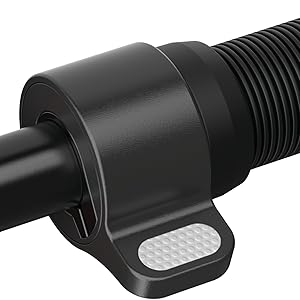
The scooter features a thumb-activated acceleration control. Gently press the thumb lever to engage the motor and increase speed. The scooter is kick-to-start, meaning you need to push off with your foot to initiate movement before the motor engages.
4.4 ເບກ
The T25 is equipped with a single hand-operated control that activates both the electronic front brake and the rear disc brake. Apply gentle pressure to the brake lever to slow down. Practice braking in a safe, open area to become familiar with its response, as the disc brake can be quite responsive.


5. ການສາກແບັດເຕີຣີ
The Razor T25 Electric Scooter is powered by a 36V lithium-ion battery. Proper charging procedures ensure battery longevity and safe operation.
- Use only the charger supplied with your Razor T25 scooter.
- Ensure the charging port is clean and dry before connecting the charger.
- Connect the charger to the scooter's charging port, then plug the charger into a standard 100-240V AC wall outlet.
- The charging indicator light on the charger will typically be red during charging and turn green when the battery is fully charged.
- A full charge from empty takes approximately 8 hours.
- Do not leave the scooter charging unattended for extended periods after the light indicates a full charge.
- Store the scooter and charger in a dry, well-ventilated area away from direct sunlight and extreme temperatures.
6. ບໍາລຸງຮັກສາ
Regular maintenance helps ensure the safety and longevity of your Razor T25 Electric Scooter.
6.1 ການດູແລ ແລະທໍາຄວາມສະອາດທົ່ວໄປ
- ເຊັດ scooter ສະອາດດ້ວຍການໂຄສະນາamp cloth after each use. Avoid using harsh chemicals or abrasive cleaners.
- Do not use a high-pressure washer or submerge the scooter in water.
- Inspect the frame for any cracks or damage before each ride.
6.2 ລໍ້ ແລະ ຢາງລົດ
The T25 features airless tires, which require less maintenance than pneumatic tires. However, regularly inspect them for wear, cuts, or embedded debris.
6.3 ເບກ
- Regularly check the brake lever for proper function and responsiveness.
- Ensure the rear disc brake is clean and free of obstructions.
- If the brakes feel too grabby or too loose, consult a qualified technician for adjustment.
6.4 ການເກັບຮັກສາ
When not in use, store the scooter in a cool, dry place. If storing for an extended period, ensure the battery is partially charged (around 50%) and recharge it every 30-60 days to prevent deep discharge.
7. ການແກ້ໄຂບັນຫາ
This section addresses common issues you might encounter with your Razor T25 Electric Scooter.
7.1 Scooter Not Powering On
- ກວດໃຫ້ແນ່ໃຈວ່າແບັດເຕີຣີເຕັມແລ້ວ.
- ກວດເບິ່ງການເຊື່ອມຕໍ່ສາຍເຄເບີ້ນທັງໝົດສໍາລັບການວ່າງ ຫຼືຄວາມເສຍຫາຍ.
- ຖ້າບັນຫາຍັງຄົງຢູ່, ໃຫ້ຕິດຕໍ່ຝ່າຍຊ່ວຍເຫຼືອລູກຄ້າ.
7.2 Loss of Power or Reduced Range
- Verify the battery is fully charged before each ride.
- Riding conditions (e.g., uphill, heavy loads, cold weather) can affect range and power.
- ປະສິດທິພາບຂອງຫມໍ້ໄຟອາດຈະຫຼຸດລົງຕາມເວລາທີ່ມີການນໍາໃຊ້ຢ່າງກວ້າງຂວາງ.
7.3 Throttle Malfunction
If the throttle is unresponsive or inconsistent, inspect the thumb lever for any physical damage or obstruction. Issues with the throttle may require professional service.
8. ຂໍ້ມູນຈໍາເພາະ
| ຄຸນສົມບັດ | ຂໍ້ມູນຈໍາເພາະ |
|---|---|
| ຍີ່ຫໍ້ | Razor |
| ຊື່ຕົວແບບ | T25 |
| ມໍເຕີ | 250-watt, brushless, hub-driven |
| ແບັດເຕີຣີ | 36V Lithium-ion |
| ຄວາມໄວສູງສຸດ | 15.5 mph (25 km/h) |
| ຂອບເຂດສູງສຸດ | 18 ໄມ (29 ກິໂລແມັດ) |
| ນ້ ຳ ໜັກ ຈຳ ກັດ | 220 ປອນ (100 ກິໂລ) |
| ນ້ໍາຫນັກລາຍການ | 27 ປອນ (12.2 ກິໂລ) |
| ວັດສະດຸກອບ | ອາລູມີນຽມ |
| ວັດສະດຸລໍ້ | ໂພລີຢູຣີເທນ |
| ຂະໜາດລໍ້ | 200 ມິນລິແມັດ |
| ຈັດການຄວາມສູງ | 42.5 ນິ້ວ (108 ຊມ) |
| ແບບເບກ | Hand-operated, electric front and rear disc |
| ຊ່ວງອາຍຸ (ລາຍລະອຽດ) | ຜູ້ໃຫຍ່ |
9. ການຮັບປະກັນແລະການສະຫນັບສະຫນູນ
9.1 ຂໍ້ມູນການຮັບປະກັນ
The Razor T25 Electric Scooter comes with a 90-day Limited Manufacturer Warranty. This warranty covers manufacturing defects and workmanship under normal use. Please retain your proof of purchase for warranty claims. For full details, refer to the warranty documentation included with your product or visit the official Razor webເວັບໄຊ.
9.2 ສະຫນັບສະຫນູນລູກຄ້າ
For technical assistance, troubleshooting not covered in this manual, or warranty inquiries, please contact Razor USA, LLC customer support.
- ຜູ້ຜະລິດ: Razor USA, LLC
- ສະຫນັບສະຫນູນອອນໄລນ໌: ຢ້ຽມຢາມ Razor Store on Amazon ສໍາລັບຂໍ້ມູນຜະລິດຕະພັນແລະຊັບພະຍາກອນສະຫນັບສະຫນູນ.