
1. ບົດແນະນຳ
This manual provides detailed instructions for the installation, operation, and maintenance of your Axis Communications M3064-V Mini Dome Camera. This camera is designed for indoor surveillance, offering HDTV 720p video quality, dust resistance, and IK08 impact protection. Please read this manual thoroughly before using the product to ensure proper functionality and safety.
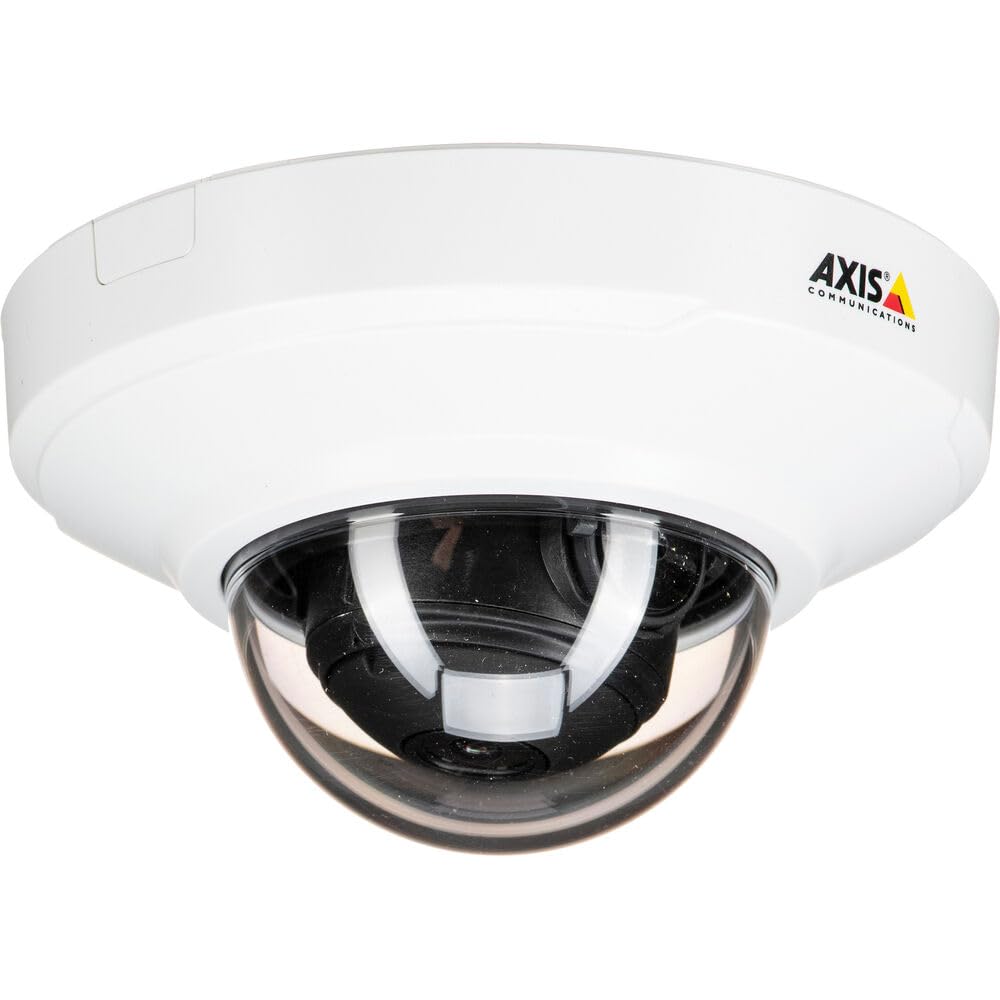
ຮູບ 1: ດ້ານຫນ້າ view of the Axis M3064-V Mini Dome Camera. This image shows the compact dome design suitable for discreet indoor surveillance.
2. ຂໍ້ມູນຄວາມປອດໄພ
- ການສະຫນອງພະລັງງານ: Use only the specified power supply (AC/DC, 220 Volts, 1.6 Watts) to prevent damage or fire.
- ການຕິດຕັ້ງ: Installation should be performed by qualified personnel and comply with all local electrical codes. Ensure the mounting surface can support the camera's weight.
- ສະພາບແວດລ້ອມ: This camera is designed for indoor use. While dust-resistant and IK08 rated, avoid exposing it to extreme temperatures, direct water spray, or corrosive substances.
- ທໍາຄວາມສະອາດ: ຕັດການເຊື່ອມຕໍ່ໄຟຟ້າກ່ອນທີ່ຈະທໍາຄວາມສະອາດ. ໃຊ້ຜ້າອ່ອນ, ແຫ້ງ. ຫ້າມໃຊ້ນໍ້າສະອາດ ຫຼື ແອໂຣໂຊລ.
- ການບໍລິການ: ຢ່າພະຍາຍາມບໍລິການຜະລິດຕະພັນນີ້ດ້ວຍຕົນເອງ. ອ້າງເຖິງການບໍລິການທັງtoົດໃຫ້ກັບພະນັກງານບໍລິການທີ່ມີຄຸນວຸດທິ.
3. ເນື້ອໃນຊຸດ
ກວດສອບວ່າລາຍການທັງຫມົດແມ່ນມີຢູ່ໃນຊຸດ. ຖ້າລາຍການໃດຂາດຫາຍໄປຫຼືເສຍຫາຍ, ຕິດຕໍ່ຜູ້ສະຫນອງຂອງທ່ານ.
- Axis M3064-V Mini Dome Camera (1 unit)
- ຄູ່ມືການຕິດຕັ້ງ
- ວົງເລັບຕິດຕັ້ງ
- screws mounting ແລະ plugs ຝາ
- Resistorx L-key
4. ການຕິດຕັ້ງແລະການຕິດຕັ້ງ
4.1 ຕິດຕັ້ງກ້ອງ
The Axis M3064-V camera can be mounted on a ceiling or wall. Ensure the mounting surface is stable and can support the camera's weight.
- ການກະກຽມຫນ້າດິນ: Choose a suitable location. Use the mounting bracket as a template to mark drill holes.
- ຮູເຈາະ: Drill pilot holes for the mounting screws. Insert wall plugs if necessary.
- ຕິດວົງເລັບ: ຍຶດຍຶດຍຶດຕິດກັບພື້ນຜິວໂດຍໃຊ້ສະກູທີ່ໃຫ້ມາ.
- ເຊື່ອມຕໍ່ສາຍ: Route the network cable (wired connectivity) through the bracket and connect it to the camera's Ethernet port.
- ຕິດກ້ອງ: Secure the camera body to the mounting bracket. Ensure it clicks into place or is fastened according to the specific bracket design.

Figure 2: Illustrative diagram of the camera mounting process on a ceiling. This shows the steps from marking holes to securing the camera.
4.2 ການເປີດເຄື່ອງ ແລະ ການເຊື່ອມຕໍ່ເຄືອຂ່າຍ
- ການເຊື່ອມຕໍ່ສາຍ: Connect an Ethernet cable from your network switch or router to the camera's Ethernet port. The camera supports Power over Ethernet (PoE), simplifying power delivery.
- ການເຊື່ອມຕໍ່ Wi-Fi: The camera supports Wi-Fi connectivity. After initial wired setup, you can configure wireless settings via the camera's web ການໂຕ້ຕອບ.
- ການສະຫນອງພະລັງງານ: If not using PoE, connect a compatible AC/DC power adapter (220V, 1.6W) to the camera's power input.
- ການເຂົ້າເຖິງເບື້ອງຕົ້ນ: Once powered, the camera will obtain an IP address from your network (DHCP). Use an Axis IP Utility tool or your network router's client list to find the camera's IP address.
5. ຄໍາແນະນໍາການດໍາເນີນງານ
5.1 ການເຂົ້າເຖິງການໂຕ້ຕອບຂອງກ້ອງຖ່າຍຮູບ
ເປີດ ກ web browser (e.g., Chrome, Firefox) and enter the camera's IP address in the address bar. You will be prompted to create a new password for the root user upon first access. Follow the on-screen instructions.
5.2 ດໍາລົງຊີວິດ View and Video Settings
- ດໍາລົງຊີວິດ View: The main interface provides a live video feed. You can adjust the viewing angle remotely if the camera supports pan/tilt/zoom (PTZ) functions, though this model features a fixed dome with 3x optical zoom.
- ຄວາມລະອຽດ: The camera supports HDTV 720p video capture resolution. You can configure streaming profiles for different quality and frame rate needs.
- ວິໄສທັດກາງຄືນ: The camera includes Night Color functionality, providing enhanced visibility in low-light conditions. This feature can be configured in the image settings.
- Optical Zoom: Utilize the 3x optical zoom feature through the web interface to focus on specific areas within the 83-degree viewມຸມ ing.
5.3 ການບັນທຶກແລະການເກັບຮັກສາ
ກ້ອງຖ່າຍຮູບຮອງຮັບຕົວເລືອກການບັນທຶກທີ່ຫຼາກຫຼາຍ:
- ບ່ອນເກັບຂໍ້ມູນຂອບ: The camera has 128 GB of flash memory installed for local recording. Insert a compatible microSD card (not included) for additional storage.
- Network Video Recorder (NVR): Integrate the camera with an NVR or video management system (VMS) for centralized recording and management.
- Event-Based Recording: Configure motion detection or other event triggers to start recording, saving storage space.
6. ບໍາລຸງຮັກສາ
6.1 ການທໍາຄວາມສະອາດກ້ອງຖ່າຍຮູບ
ການທໍາຄວາມສະອາດປົກກະຕິຈະຊ່ວຍຮັກສາຄຸນນະພາບຮູບພາບທີ່ດີທີ່ສຸດ.
- ປິດພະລັງງານ: Always disconnect the camera from its power source before cleaning.
- ເລນ: Gently wipe the lens cover with a soft, lint-free cloth. For stubborn dirt, slightly dampen the cloth with water or a mild lens cleaning solution. Avoid abrasive materials.
- ທີ່ຢູ່ອາໄສ: Wipe the camera housing with a soft, dry cloth. Do not use strong detergents or solvents.
6.2 ການອັບເດດເຟີມແວ
ກວດສອບ Axis Communications ເປັນໄລຍະ website for firmware updates. Keeping your camera's firmware up-to-date ensures optimal performance, security, and access to new features. Follow the instructions provided with the firmware update package.
7. ການແກ້ໄຂບັນຫາ
| ບັນຫາ | ສາເຫດທີ່ເປັນໄປໄດ້ | ການແກ້ໄຂ |
|---|---|---|
| ກ້ອງຖ່າຍຮູບບໍ່ເປີດ | No power supply; Faulty PoE switch/injector; Damaged cable. | Check power connection. Verify PoE functionality. Test with a different Ethernet cable or power adapter. |
| ບໍ່ມີຟີດວິດີໂອ | Network connectivity issue; Incorrect IP address; Firewall blocking access; Camera not configured. | Verify network connection. Confirm camera's IP address. Check firewall settings. Ensure camera is properly configured via its web ການໂຕ້ຕອບ. |
| ຄຸນນະພາບຮູບພາບບໍ່ດີ | Dirty lens; Incorrect focus; Low light conditions; Network bandwidth issues. | Clean the lens. Adjust focus settings in the web interface. Ensure adequate lighting or verify Night Color settings. Check network bandwidth. |
| ບໍ່ສາມາດເຂົ້າເຖິງໄດ້ web ການໂຕ້ຕອບ | Incorrect IP address; Network issue; Browser compatibility. | Confirm IP address. Ping the camera's IP. Try a different web ຕົວທ່ອງເວັບ. ລຶບ cache ຂອງຕົວທ່ອງເວັບ. |
8. ຂໍ້ມູນຈໍາເພາະ
| ຄຸນສົມບັດ | ລາຍລະອຽດ |
|---|---|
| ຊື່ຕົວແບບ | M3064-V |
| ໝາຍເລກຕົວແບບ | 01716-001 |
| ຍີ່ຫໍ້ | ການສື່ສານແກນ |
| ປັດໄຈແບບຟອມ | ຫໍ |
| ເຕັກໂນໂລຊີການເຊື່ອມຕໍ່ | ມີສາຍ, Wi-Fi |
| ຄວາມລະອຽດການຖ່າຍວິດີໂອ | 720p (HDTV) |
| ການແກ້ໄຂປະສິດທິພາບ | 64 MP (Note: This might refer to sensor resolution, actual video output is 720p) |
| ຄວາມລະອຽດເຊັນເຊີຮູບພາບ | 5 MP |
| Viewໃນມຸມ | 83 ອົງສາ |
| Optical Zoom | 3x |
| ວິໄສທັດກາງຄືນ | ສີກາງຄືນ |
| ການປະເມີນກັນນ້ໍາ | IP42 (Dust-resistant) |
| ການປົກປ້ອງຜົນກະທົບ | IK08 |
| ແຫຼ່ງພະລັງງານ | AC/DC, PoE |
| ສະບັບtage | 220 ໂວນ |
| ວັດtage | 1.6 ວັດ |
| Flash Memory ຂະຫນາດຕິດຕັ້ງ | 128 GB |
| ຂະໜາດລາຍການ (LxWxH) | 3.98 x 3.98 x 2.2 ນິ້ວ |
| ນ້ໍາຫນັກລາຍການ | 150 ກຣາມ |
| ສີ | ດຳ/ຂາວ |
9. ການຮັບປະກັນແລະການສະຫນັບສະຫນູນ
9.1 ການຮັບປະກັນຜະລິດຕະພັນ
Axis Communications products typically come with a limited manufacturer's warranty. Please refer to the warranty card included with your product or visit the official Axis Communications website for detailed warranty terms and conditions specific to the M3064-V model. Keep your proof of purchase for warranty claims.
9.2 ສະຫນັບສະຫນູນດ້ານວິຊາການ
For technical assistance, troubleshooting beyond this manual, or service inquiries, please contact Axis Communications customer support. You can find contact information, FAQs, and additional resources on the official Axis Communications support website. When contacting support, please have your product model number (M3064-V or 01716-001) and serial number ready.
ຊັບພະຍາກອນອອນໄລນ໌: www.axis.com/support