

ແນະນຳ
Thank you for choosing the XO B24 Foldable Bluetooth Headphones. This manual provides essential information for the safe and efficient use of your device. Please read it carefully before use and retain it for future reference.
The XO B24 headphones are designed for comfort and portability, featuring high-quality materials and a secure fit for an optimal audio experience.
ສິນຄ້າເກີນview
The XO B24 headphones offer both wired and wireless connectivity, a built-in microphone for calls, and a foldable design for easy storage and transport.
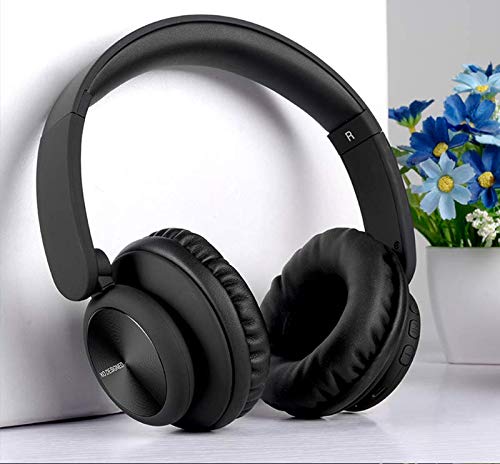
Image: XO B24 Foldable Bluetooth Headphones, showcasing their over-ear design and black color.
ຂໍ້ມູນຈໍາເພາະ
| ຄຸນສົມບັດ | ລາຍລະອຽດ |
|---|---|
| ຊື່ຍີ່ຫໍ້ | XO |
| ຊື່ຕົວແບບ | B24 |
| ໝາຍເລກຕົວແບບ | XO-B24 |
| ສີ | ດຳ |
| ປັດໄຈແບບຟອມຫູຟັງ | On-Ear |
| ເຕັກໂນໂລຊີການເຊື່ອມຕໍ່ | ມີສາຍ, ໄຮ້ສາຍ (Bluetooth) |
| Jack ຫູຟັງ | Jack ຂະ ໜາດ 3.5 ມມ |
| ເຕັກໂນໂລຊີການສື່ສານໄຮ້ສາຍ | Bluetooth |
| ຄຸນນະສົມບັດພິເສດ | Includes Microphone, Foldable Design |
| ໄມໂຄຣໂຟນ | ແມ່ນແລ້ວ |
| ການຍົກເລີກສິ່ງລົບກວນ | ບໍ່ |
| ປະເພດການຄວບຄຸມ | ການຄວບຄຸມລະດັບສຽງ, ການຄວບຄຸມແບບສຳຜັດ |
| ອຸປະກອນທີ່ເຂົ້າກັນໄດ້ | ຫຼາຍອຸປະກອນ |
| ຕ້ອງການແບັດເຕີຣີ | ແມ່ນແລ້ວ |
ຕັ້ງຄ່າ
1. ການສາກຫູຟັງ
- ເຊື່ອມຕໍ່ສາຍສາກໄຟ USB ທີ່ໃຫ້ມາເຂົ້າກັບພອດສາກໄຟໃນຫູຟັງ.
- ສຽບປາຍອີກດ້ານໜຶ່ງຂອງສາຍ USB ໃສ່ກັບແຫຼ່ງພະລັງງານ USB ທີ່ເຂົ້າກັນໄດ້ (ເຊັ່ນ: ຄອມພິວເຕີ, ອະແດບເຕີຕິດຝາ).
- The LED indicator will illuminate during charging and turn off or change color once fully charged.
2. ການຈັບຄູ່ Bluetooth
- ກວດໃຫ້ແນ່ໃຈວ່າຫູຟັງຖືກສາກເຕັມແລ້ວ.
- Press and hold the Power button on the headphones until the LED indicator flashes rapidly, indicating pairing mode.
- ໃນອຸປະກອນຂອງທ່ານ (ໂທລະສັບສະຫຼາດ, ແທັບເລັດ, ຄອມພິວເຕີ), ເປີດ Bluetooth ແລະຊອກຫາອຸປະກອນທີ່ມີຢູ່.
- Select "XO B24" from the list of found devices.
- Once paired, the LED indicator will stop flashing and may show a solid light or flash slowly.
3. ການເຊື່ອມຕໍ່ແບບມີສາຍ (ທາງເລືອກ)
- Insert one end of the 3.5mm audio cable into the headphone jack on the XO B24.
- ສຽບປາຍອີກດ້ານໜຶ່ງຂອງສາຍສຽງ 3.5 ມມ ເຂົ້າກັບຊ່ອງສຽບສຽງອອກຂອງອຸປະກອນຂອງທ່ານ.
- The headphones will operate in wired mode, conserving battery life.
ຄໍາແນະນໍາການດໍາເນີນງານ
ເປີດ/ປິດ
- ເປີດ: ກົດປຸ່ມເປີດປິດຄ້າງໄວ້ປະມານ 3 ວິນາທີຈົນກວ່າໄຟ LED ຈະສະຫວ່າງຂຶ້ນ.
- ປິດພະລັງງານ: ກົດປຸ່ມເປີດປິດຄ້າງໄວ້ປະມານ 3-5 ວິນາທີຈົນກວ່າໄຟ LED ຈະປິດ.
ເພັງ Playback
- ຫຼິ້ນ/ຢຸດ: ກົດປຸ່ມຫຼາຍຟັງຊັນ (ມັກປຸ່ມເປີດປິດ) ຄັ້ງດຽວ.
- ເພງຕໍ່ໄປ: Press and hold the Volume Up button or a dedicated 'Next' button.
- ຕິດຕາມກ່ອນ ໜ້າ ນີ້: Press and hold the Volume Down button or a dedicated 'Previous' button.
ການຄວບຄຸມປະລິມານ
- ເພີ່ມປະລິມານ: ກົດປຸ່ມ Volume Up.
- ຫຼຸດລະດັບສຽງລົງ: ກົດປຸ່ມປະລິມານລົງ.
ການຄຸ້ມຄອງການໂທ
- ຮັບ/ສາຍໂທ: ກົດປຸ່ມ Multi-function ຄັ້ງດຽວ.
- ປະຕິເສດການໂທ: ກົດປຸ່ມຫຼາຍຟັງຊັນຄ້າງໄວ້ປະມານ 2 ວິນາທີ.
ກົນໄກການພັບ
- To fold the headphones for storage, gently rotate the earcups inwards towards the headband until they are compact.
- To unfold, reverse the process, ensuring the earcups click securely into place.
ບໍາລຸງຮັກສາ
- ທໍາຄວາມສະອາດ: ໃຊ້ຜ້າອ່ອນ, ແຫ້ງເພື່ອເຮັດຄວາມສະອາດຫູຟັງ. ຢ່າໃຊ້ເຄື່ອງເຮັດຄວາມສະອາດຂັດຫຼືສານລະລາຍ.
- ການເກັບຮັກສາ: ເມື່ອບໍ່ໄດ້ໃຊ້ງານ, ໃຫ້ເກັບຮັກສາຫູຟັງໄວ້ໃນບ່ອນທີ່ເຢັນແລະແຫ້ງ, ຫ່າງຈາກແສງແດດໂດຍກົງ ແລະ ອຸນຫະພູມທີ່ຮຸນແຮງ. ໃຊ້ການອອກແບບທີ່ສາມາດພັບໄດ້ເພື່ອການເກັບຮັກສາທີ່ກະທັດຮັດ.
- ການດູແລຫມໍ້ໄຟ: ເພື່ອຍືດອາຍຸແບັດເຕີຣີ, ຫຼີກເວັ້ນການຖອດຫູຟັງອອກເຕັມທີ່ເລື້ອຍໆ. ໄລ່ໃຫ້ເຂົາເຈົ້າເປັນປົກກະຕິ, ເຖິງແມ່ນວ່າບໍ່ໄດ້ຢູ່ໃນການນໍາໃຊ້ຢ່າງຕໍ່ເນື່ອງ.
- ຫຼີກເວັ້ນຄວາມຊຸ່ມ: ຮັກສາຫູຟັງໃຫ້ຫ່າງຈາກນ້ໍາແລະຄວາມຊຸ່ມຊື່ນຫຼາຍເກີນໄປ.
ການແກ້ໄຂບັນຫາ
| ບັນຫາ | ການແກ້ໄຂ |
|---|---|
| ຫູຟັງບໍ່ເປີດ. | ກວດໃຫ້ແນ່ໃຈວ່າຫູຟັງຖືກສາກເຕັມແລ້ວ. ເຊື່ອມຕໍ່ຫາແຫຼ່ງພະລັງງານແລ້ວລອງໃໝ່ອີກຄັ້ງ. |
| ບໍ່ສາມາດຈັບຄູ່ຜ່ານ Bluetooth ໄດ້. | Make sure the headphones are in pairing mode (LED flashing rapidly). Disable and re-enable Bluetooth on your device. Move closer to the headphones. |
| ບໍ່ມີສຽງ ຫຼືສຽງຕໍ່າ. | Check the volume levels on both the headphones and your connected device. Ensure the headphones are properly paired or the 3.5mm cable is securely connected. |
| ຄຸນະພາບສຽງບໍ່ດີ. | Ensure there are no obstructions between the headphones and your device. Try moving closer to your device. Disconnect and reconnect the Bluetooth connection. |
| ໄມໂຄຣໂຟນບໍ່ເຮັດວຽກ. | Ensure the headphones are properly connected and selected as the audio input device on your system. Check if the microphone is muted on your device. |
ການຮັບປະກັນແລະການສະຫນັບສະຫນູນ
The XO B24 Foldable Bluetooth Headphones come with a standard manufacturer's warranty. Please refer to the warranty card included in your product packaging for specific terms and conditions.
For technical support, troubleshooting assistance, or warranty claims, please contact your retailer or the official XO customer service. Contact information can typically be found on the product packaging or the manufacturer's webເວັບໄຊ.