
1. ບົດແນະນຳ
This manual provides essential instructions for the installation, operation, and maintenance of your Comelit ET5001 Extra Series 4+N Audio Outdoor Panel. Please read this manual carefully before installation and use to ensure proper function and safety. Keep this manual for future reference.
2. ຂໍ້ມູນຄວາມປອດໄພ
- ຄວາມປອດໄພທາງໄຟຟ້າ: Installation must be performed by qualified personnel in accordance with local electrical codes and regulations. Disconnect power before performing any wiring or maintenance.
- ເງື່ອນໄຂສິ່ງແວດລ້ອມ: The outdoor panel is designed for outdoor use. Ensure it is installed in a location protected from extreme weather conditions if possible, and within its specified operating temperature range.
- ການຈັດການ: Handle the unit with care to avoid damage. Do not expose to excessive force or impact.
- ທໍາຄວາມສະອາດ: ໃຊ້ອ່ອນ, ງamp ຜ້າສໍາລັບການທໍາຄວາມສະອາດ. ຢ່າໃຊ້ເຄື່ອງເຮັດຄວາມສະອາດຂັດຫຼືສານລະລາຍ.
3. ເນື້ອໃນຊຸດ
ກວດສອບວ່າລາຍການທັງຫມົດແມ່ນມີຢູ່ໃນຊຸດ:
- Comelit ET5001 Extra Series 4+N Audio Outdoor Panel (1-button)
- ສະກູຕິດຕັ້ງ ແລະ ປລັກຕິດຝາ (ອາດແຕກຕ່າງກັນ)
- ຄູ່ມືຜູ້ໃຊ້ (ເອກະສານນີ້)
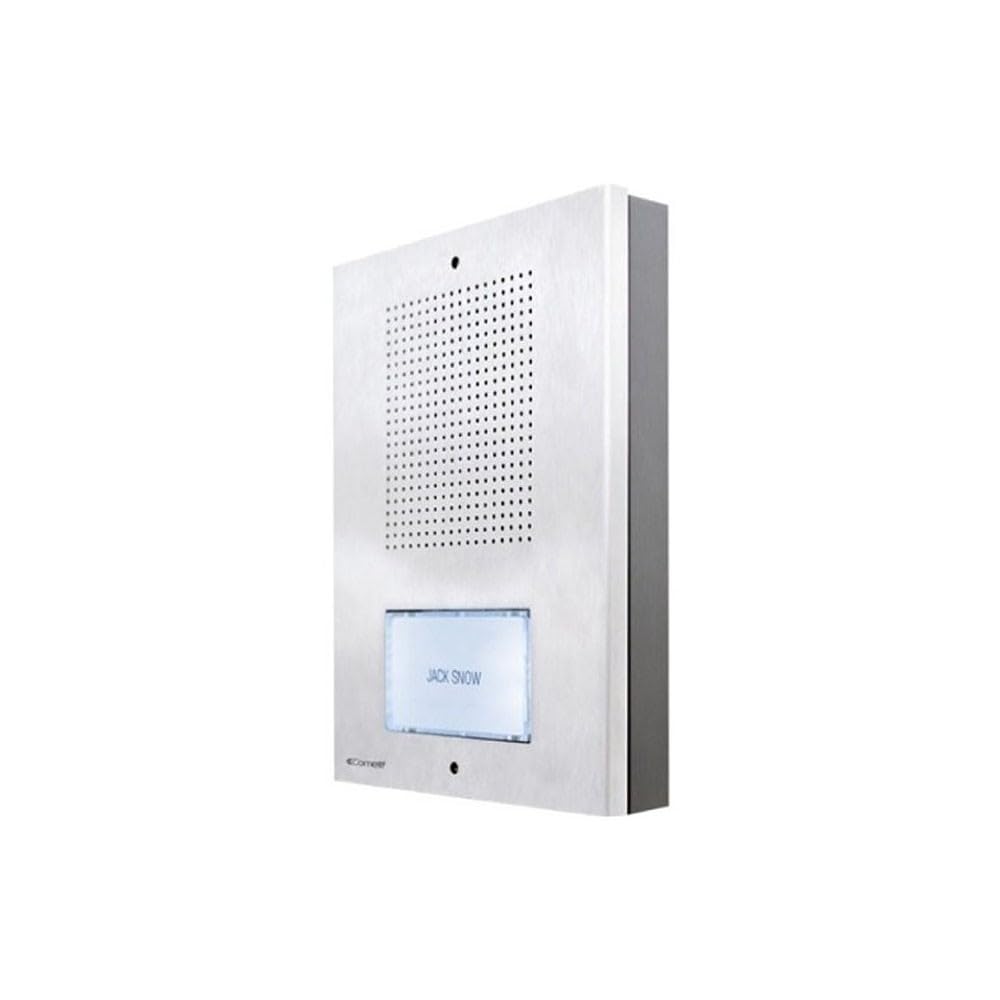
ຮູບພາບສະແດງໃຫ້ເຫັນທາງຫນ້າ view of the Comelit ET5001 Extra Series 4+N audio outdoor panel, featuring a single call button and speaker grille.
4. ການຕິດຕັ້ງແລະການຕິດຕັ້ງ
This section outlines the general steps for installing the ET5001 outdoor panel. Refer to the detailed wiring diagrams provided with your complete intercom system for specific connections.
4.1 Mounting the Outdoor Panel
- ເລືອກສະຖານທີ່: Select a suitable location near the entrance, ensuring it is at an appropriate height for users and protected from direct heavy rain if possible.
- ກະກຽມສາຍໄຟ: Ensure the necessary 4+N wiring (4 common wires + N call wires, where N is the number of buttons) is routed to the installation point.
- ຈຸດຂຸດເຈາະເຄື່ອງໝາຍ: Use the panel as a template to mark the drilling points on the wall.
- ຮູເຈາະ: Drill holes for the mounting screws and insert wall plugs if necessary.
- ແຜງຄວາມປອດໄພ: Mount the panel securely to the wall using the provided screws.
4.2 Wiring Connections (4+N System)
The ET5001 panel operates on a 4+N wiring system. This typically involves:
- Common Wires (4): These typically include audio common, speech common, power supply, and lock release common.
- Call Wire (N=1 for ET5001): A dedicated wire for the call button, connecting to the corresponding indoor unit.
ສຳຄັນ: Always refer to the specific wiring diagram supplied with your Comelit intercom system for accurate connection details. Incorrect wiring can damage the unit or the entire system.
5. ຄໍາແນະນໍາການດໍາເນີນງານ
The Comelit ET5001 is designed for simple and intuitive operation.
- ໂທອອກ: To call the indoor unit, press the single call button located on the front of the outdoor panel.
- ການສື່ສານສຽງ: Once the indoor unit answers, you can communicate hands-free through the speaker and microphone integrated into the outdoor panel.
- ການປ່ອຍປະຕູ: If connected to a door lock release system, the indoor unit operator can activate the door release function.
6. ບໍາລຸງຮັກສາ
Regular maintenance ensures the longevity and optimal performance of your outdoor panel.
- ທໍາຄວາມສະອາດ: Periodically clean the exterior of the panel with a soft, slightly damp ຜ້າ. ຢ່າໃຊ້ສານເຄມີທີ່ຮຸນແຮງ, ນໍ້າຢາທໍາຄວາມສະອາດທີ່ມີສີຂັດ, ຫຼື ຕົວລະລາຍ, ເພາະວ່າສິ່ງເຫຼົ່ານີ້ສາມາດທໍາລາຍຊັ້ນສໍາເລັດຮູບ ຫຼື ອົງປະກອບເອເລັກໂຕຣນິກໄດ້.
- ການກວດກາ: Occasionally check for any visible damage to the panel or wiring. If damage is found, contact a qualified technician for repair.
- ການກວດສອບການທໍາງານ: Test the call button and audio communication periodically to ensure proper operation.
7. ການແກ້ໄຂບັນຫາ
If you encounter issues with your ET5001 outdoor panel, refer to the following common problems and solutions:
| ບັນຫາ | ສາເຫດທີ່ເປັນໄປໄດ້ | ການແກ້ໄຂ |
|---|---|---|
| No audio from outdoor panel | Incorrect wiring; faulty speaker/microphone; power issue. | Check wiring connections (refer to system diagram). Ensure power supply is active. Contact support if problem persists. |
| ປຸ່ມໂທບໍ່ເຮັດວຽກ | Incorrect wiring; faulty button; indoor unit not powered. | Verify call button wiring. Check power to indoor unit. Test button continuity if possible. |
| ຄຸນະພາບສຽງບໍ່ດີ | Interference; damaged wiring; faulty components. | Check for sources of electrical interference. Inspect wiring for damage. Contact support. |
For issues not listed here or if solutions do not resolve the problem, please contact Comelit technical support.
8. ຂໍ້ມູນຈໍາເພາະ
- ຍີ່ຫໍ້: Comelit
- ຕົວແບບ: ET5001
- ປະເພດ: Audio Outdoor Panel
- ລະບົບ: Extra Series 4+N
- ປຸ່ມ: 1
- ຜູ້ຜະລິດອ້າງອີງ: ET5001
- ASIN: B083ZNSP14
- ການມີອາໄຫຼ່: ບໍ່ມີຂໍ້ມູນ
- ຮັບປະກັນການປັບປຸງຊອບແວຈົນກ່ວາ: ບໍ່ມີຂໍ້ມູນ
- Date first available on Amazon.com.be: ວັນທີ 18 ມັງກອນ 2020
9. ການຮັບປະກັນແລະການສະຫນັບສະຫນູນ
For warranty information, please refer to the warranty card included with your product or visit the official Comelit website. For technical support, service, or spare parts, please contact your local Comelit distributor or customer service department.
Comelit Official Webເວັບໄຊ: www.comelitgroup.com