
GLIdiC TW-5000s
GLIDiC Sound Air TW-5000s True Wireless Earbuds Instruction Manual
Model: TW-5000s
1. ບົດແນະນຳ
ຂອບໃຈສໍາລັບການຊື້asing the GLIDiC Sound Air TW-5000s True Wireless Earbuds. This manual provides essential information for the safe and effective use of your device. Please read it thoroughly before use and retain it for future reference.
2. ຂໍ້ມູນຄວາມປອດໄພ
- ຢ່າເປີດຫູຟັງຫູຟັງ ຫຼືກ່ອງສາກໃສ່ກັບອຸນຫະພູມທີ່ຮຸນແຮງ, ແສງແດດໂດຍກົງ ຫຼືຄວາມຊຸ່ມຊື່ນສູງ.
- Avoid dropping, impacting, or disassembling the device. This may cause damage and void the warranty.
- Keep the device away from water and liquids. While sweatproof, immersion can cause damage.
- ໃຊ້ພຽງແຕ່ສາຍສາກທີ່ສະໜອງໃຫ້ ຫຼືສາຍທຽບເທົ່າທີ່ໄດ້ຮັບການຮັບຮອງ.
- ການຟັງດົນໆໃນລະດັບສຽງສູງສາມາດເຮັດໃຫ້ເກີດຄວາມເສຍຫາຍຕໍ່ການໄດ້ຍິນ. ປັບລະດັບສຽງໃຫ້ຢູ່ໃນລະດັບທີ່ປອດໄພ.
- Be aware of your surroundings when using earbuds, especially in traffic or hazardous environments.
3. ເນື້ອໃນຊຸດ
ກວດສອບວ່າລາຍການທັງຫມົດແມ່ນມີຢູ່ໃນຊຸດຂອງທ່ານ:
- GLIDiC Sound Air TW-5000s True Wireless Earbuds (Left and Right)
- ກ່ອງສາກ
- ສາຍສາກໄຟ USB (ປະເພດ A ຫາ Micro-USB)
- ປາຍຫູຫຼາຍຂະໜາດ (S, M, L)
- ຄູ່ມືແນະ ນຳ (ເອກະສານນີ້)
4. ຜະລິດຕະພັນເກີນview
Familiarize yourself with the components of your GLIDiC Sound Air TW-5000s earbuds and charging case.

Figure 4.1: GLIDiC Sound Air TW-5000s Earbuds and Charging Case. The image displays the black charging case with the GLIDiC logo on top, positioned next to the two black earbuds.
ອົງປະກອບຂອງຫູຟັງ
- ປຸ່ມ Multifunction: Located on the outer surface of each earbud, used for playback control, call management, and voice assistant activation.
- ຕົວຊີ້ວັດ LED: Provides status information (pairing, charging, power).
- ໄມໂຄຣໂຟນ: For voice calls and voice assistant commands.
- ຕິດຕໍ່ພົວພັນການສາກໄຟ: Located on the underside of each earbud, for charging within the case.
- ເຄັດລັບຫູ: Silicone tip for in-ear comfort and sound isolation.
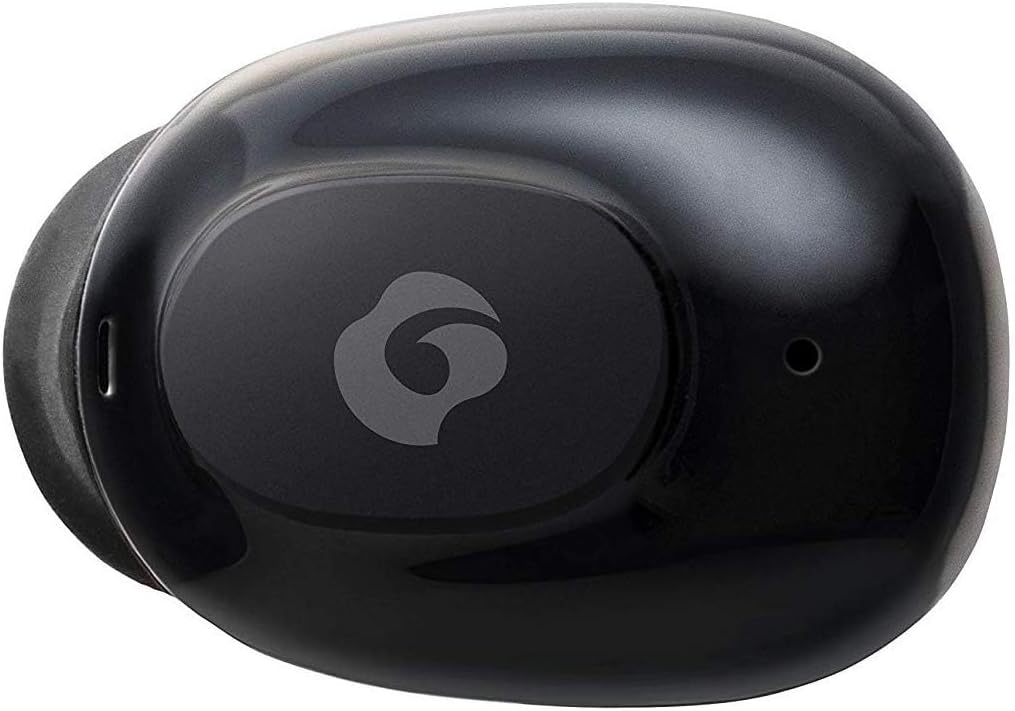
ຮູບທີ 4.2: ໄລຍະໃກ້ view of a single GLIDiC earbud, highlighting the multifunction button with the GLIDiC logo and the microphone opening.
Charging Case Components
- ຜອດສາກໄຟ: Internal contacts for earbuds, external port for case charging.
- ຕົວຊີ້ບອກກໍລະນີ LED: Shows charging status of the case.
- ຝາປິດ: Protects earbuds and secures them during charging.
5. ຕັ້ງຄ່າ
5.1 ການສາກໄຟເບື້ອງຕົ້ນ
- Place both earbuds into the charging case. Ensure they are correctly seated, and the LED indicators on the earbuds illuminate.
- ເຊື່ອມຕໍ່ສາຍສາກ USB ເຂົ້າກັບພອດສາກໄຟໃນເຄສ ແລະ ສຽບອີກສົ້ນໜຶ່ງເຂົ້າກັບແຫຼ່ງພະລັງງານ USB (ເຊັ່ນ: ຄອມພິວເຕີ, ອະແດບເຕີຕິດຝາ).
- The case LED indicator will show charging status. Allow approximately 2 hours for a full charge of both earbuds and the case.
- Once fully charged, disconnect the charging cable. The earbuds offer up to 60 days of standby time when stored in the fully charged case.
5.2 ການຈັບຄູ່ກັບອຸປະກອນ Bluetooth
- ກວດໃຫ້ແນ່ໃຈວ່າໄດ້ສາກຫູຟັງແລ້ວ.
- ເປີດກ່ອງສາກໄຟ. ຫູຟັງເອຍບັດຈະເຂົ້າສູ່ໂໝດຈັບຄູ່ໂດຍອັດຕະໂນມັດ, ແລະໄຟ LED ຂອງມັນຈະກະພິບ.
- ໃນອຸປະກອນທີ່ເປີດໃຊ້ Bluetooth ຂອງທ່ານ (ໂທລະສັບສະຫຼາດ, ແທັບເລັດ, ແລະອື່ນໆ), ໄປທີ່ການຕັ້ງຄ່າ Bluetooth.
- ຊອກຫາ available devices. Select "GLIDiC TW-5000s" from the list.
- Once connected, the earbud LED indicators will stop flashing and may show a solid light or turn off, depending on the model. A voice prompt may also confirm the connection.
- ຖ້າການຈັບຄູ່ລົ້ມເຫຼວ, ໃຫ້ໃສ່ຫູຟັງເອຍບັດກັບຄືນໃນເຄສ, ປິດຝາ, ລໍຖ້າສອງສາມວິນາທີ, ແລ້ວຈາກນັ້ນເຮັດຊ້ຳຂັ້ນຕອນຕ່າງໆ.
6. ຄໍາແນະນໍາການດໍາເນີນງານ
6.1 ເປີດ/ປິດ
- ເປີດ: Open the charging case, or press and hold the multifunction button on each earbud for approximately 3 seconds.
- ປິດພະລັງງານ: Place the earbuds back into the charging case and close the lid, or press and hold the multifunction button on each earbud for approximately 5 seconds.
6.2 ການຫລີ້ນດົນຕີ
- ຫຼິ້ນ/ຢຸດ: ກົດປຸ່ມມັລຕິຟັງຊັນໜຶ່ງຄັ້ງໃສ່ຫູຟັງຂ້າງໃດກໍໄດ້.
- ເພງຕໍ່ໄປ: ກົດປຸ່ມມັນຕິຟັງຊັນສອງຄັ້ງຢູ່ຫູຟັງຂ້າງຂວາ.
- ຕິດຕາມກ່ອນ ໜ້າ ນີ້: ກົດປຸ່ມມັນຕິຟັງຊັນສອງຄັ້ງຢູ່ຫູຟັງເບື້ອງຊ້າຍ.
- ປະລິມານຂຶ້ນ: Triple-press the multifunction button on the right earbud.
- ປະລິມານລົງ: Triple-press the multifunction button on the left earbud.
6.3 ການຄຸ້ມຄອງການໂທ
- ຮັບ/ສາຍໂທ: ກົດປຸ່ມມັລຕິຟັງຊັນໜຶ່ງຄັ້ງໃສ່ຫູຟັງຂ້າງໃດກໍໄດ້.
- ປະຕິເສດການໂທ: Press and hold the multifunction button on either earbud for approximately 2 seconds.
6.4 ຜູ້ຊ່ວຍສຽງ
- ກະຕຸ້ນຜູ້ຊ່ວຍສຽງ: Press and hold the multifunction button on either earbud for approximately 2 seconds (when not on a call).
6.5 Multi-Communication Mode
The GLIDiC Sound Air TW-5000s features a multi-communication mode that allows select ambient sounds to be heard without compromising audio quality. This enhances user awareness and safety.
- Activate/Deactivate Multi-Communication Mode: Consult the specific instructions provided with your device, as activation methods can vary. Typically, this involves a specific press sequence on the multifunction button or an option within a companion app if available.
7. ບໍາລຸງຮັກສາ
7.1 ການທໍາຄວາມສະອາດ
- ເຊັດຫູຟັງເອຍບັດ ແລະກະເປົ໋າສາກໄຟດ້ວຍຜ້າອ່ອນໆ, ແຫ້ງ, ບໍ່ມີສານຂັດ.
- ຢ່າໃຊ້ເຄື່ອງເຮັດຄວາມສະອາດຂັດ, ເຫຼົ້າ, ຫຼືສານລະລາຍສານເຄມີ.
- Gently remove ear tips and clean them with mild soap and water if necessary. Ensure they are completely dry before reattaching.
- ໃຊ້ຜ້າເຊັດຝ້າຍທີ່ແຫ້ງເພື່ອເຮັດຄວາມສະອາດບ່ອນຕິດຕໍ່ສາກໄຟຢ່າງລະມັດລະວັງທັງຫູຟັງຫູຟັງ ແລະກະສໍ.
7.2 ການເກັບຮັກສາ
- ເມື່ອບໍ່ໄດ້ໃຊ້, ໃຫ້ເກັບຮັກສາຫູຟັງໃສ່ໃນກະເປົ໋າສາກໄຟເພື່ອປົກປ້ອງພວກມັນ ແລະ ຮັບປະກັນວ່າພວກມັນຍັງຄົງສາກຢູ່.
- ເກັບຮັກສາອຸປະກອນໄວ້ໃນບ່ອນທີ່ເຢັນ, ແຫ້ງ, ຫ່າງຈາກແສງແດດໂດຍກົງ ແລະອຸນຫະພູມທີ່ຮ້າຍກາດ.
8. ການແກ້ໄຂບັນຫາ
If you encounter issues with your GLIDiC Sound Air TW-5000s, refer to the following common problems and solutions:
| ບັນຫາ | ການແກ້ໄຂທີ່ເປັນໄປໄດ້ |
|---|---|
| ຫູຟັງບໍ່ເປີດ. | Ensure earbuds are charged. Place them in the charging case and connect the case to a power source. |
| ຫູຟັງຫູຟັງບໍ່ໄດ້ຈັບຄູ່ກັບອຸປະກອນ. |
|
| ມີຫູຟັງຫູຟັງອັນດຽວເທົ່ານັ້ນທີ່ມີສຽງ. |
|
| ກ່ອງສາກບໍ່ສາກ. |
|
| ຄຸນນະພາບສຽງບໍ່ດີ ຫຼືເປັນໄລຍະໆ. |
|
9. ຂໍ້ມູນຈໍາເພາະ
| ຄຸນສົມບັດ | ລາຍລະອຽດ |
|---|---|
| ຊື່ຕົວແບບ | TW-5000s |
| ເຕັກໂນໂລຊີການເຊື່ອມຕໍ່ | ໄຮ້ສາຍ (Bluetooth) |
| ຊ່ວງ Bluetooth | 10 ແມັດ |
| ຊ່ວງຄວາມຖີ່ | 20 Hz - 20,000 Hz |
| Battery Life (Carrying Case Standby) | ສູງສຸດ 60 ມື້ |
| ລະດັບຄວາມຕ້ານທານນ້ໍາ | ກັນນ້ຳ (ກັນເຫື່ອ) |
| ປະເພດການຄວບຄຸມ | Media Control, Touch, Voice |
| ຄຸນນະສົມບັດພິເສດ | Microphone Included, Noise Cancellation, Multi-communication mode |
| ວັດສະດຸ | Plastic, TPE, and Silicone |
| ຂະໜາດ (ຫູຟັງ) | 0.98 x 0.67 x 0.91 ນິ້ວ (ໂດຍປະມານ) |
| ນ້ໍາຫນັກລາຍການ | 9.6 ອອນສ໌ (ນ້ຳໜັກລວມຂອງກ່ອງ) |
| UPC | 811559030024 |
10. ການຮັບປະກັນແລະການສະຫນັບສະຫນູນ
GLIDiC products are designed for reliability and performance. For specific warranty details, please refer to the warranty card included with your purchase or visit the official GLIDiC website. If you require technical support or have questions not covered in this manual, please contact GLIDiC customer service through their official channels.
ກະລຸນາຮັກສາຫຼັກຖານການຊື້ຂອງທ່ານສໍາລັບການຮຽກຮ້ອງການຮັບປະກັນ.
Ask a question about this manual
Ask about setup, troubleshooting, compatibility, parts, safety, or missing instructions. Manuals+ will review the question and use this page’s manual context to help answer it.