
ແນະນຳ
This manual provides essential information for the safe and efficient operation of your Dual MCR 4 Portable DAB+/FM Radio. This device offers both digital DAB+ and analog FM radio reception, ensuring a wide range of listening options. Its color TFT display enhances usability by showing station names and additional information. With intuitive controls, auxiliary input, and headphone jack, the MCR 4 is designed for versatile and enjoyable audio experiences.
ຂໍ້ມູນຄວາມປອດໄພ
- ອ່ານຄໍາແນະນໍາທັງຫມົດຢ່າງລະອຽດກ່ອນທີ່ຈະໃຊ້ອຸປະກອນ.
- ເກັບຮັກສາອຸປະກອນໃຫ້ຫ່າງຈາກນໍ້າ, ຄວາມຊຸ່ມ ແລະ ອຸນຫະພູມສູງ.
- ຢ່າພະຍາຍາມຖອດປະກອບຫຼືດັດແປງຫນ່ວຍງານ. ອ້າງອີງການບໍລິການທັງໝົດໃຫ້ກັບບຸກຄະລາກອນທີ່ມີຄຸນວຸດທິ.
- Use only the provided power adapter or recommended battery types.
- ຮັບປະກັນການລະບາຍອາກາດທີ່ເຫມາະສົມຮອບອຸປະກອນໃນລະຫວ່າງການປະຕິບັດງານ.
- ຖິ້ມແບດເຕີລີ່ຢ່າງມີຄວາມຮັບຜິດຊອບຕາມກົດລະບຽບທ້ອງຖິ່ນ.
ເນື້ອໃນຊຸດ
ກະລຸນາກວດເບິ່ງວ່າລາຍການທັງໝົດມີຢູ່ໃນຊຸດ:
- Dual MCR 4 Main Unit
- Power Adapter
- ຄູ່ມືຜູ້ໃຊ້
ສິນຄ້າເກີນview
The Dual MCR 4 features a compact design with intuitive controls for easy access to its functions. Key components include:
- Color TFT Display: ສະແດງຂໍ້ມູນສະຖານີ, ເວລາ ແລະຕົວເລືອກເມນູ.
- ລູກປືນ Rotary: For tuning, volume control, and menu navigation.
- ປຸ່ມຄວາມຈຳ: To save and recall your favorite radio stations.
- ເສົາອາກາດ Telescopic: For optimal radio signal reception.
- ອິນພຸດຊ່ວຍ (AUX-IN): Located at the back, for connecting external audio devices.
- ຫູຟັງ Jack: Located at the back, for private listening.
- Mechanical On/Off Switch: Located at the back, for direct power control.
- Passive Membrane: Located at the back, contributing to exceptional sound quality.
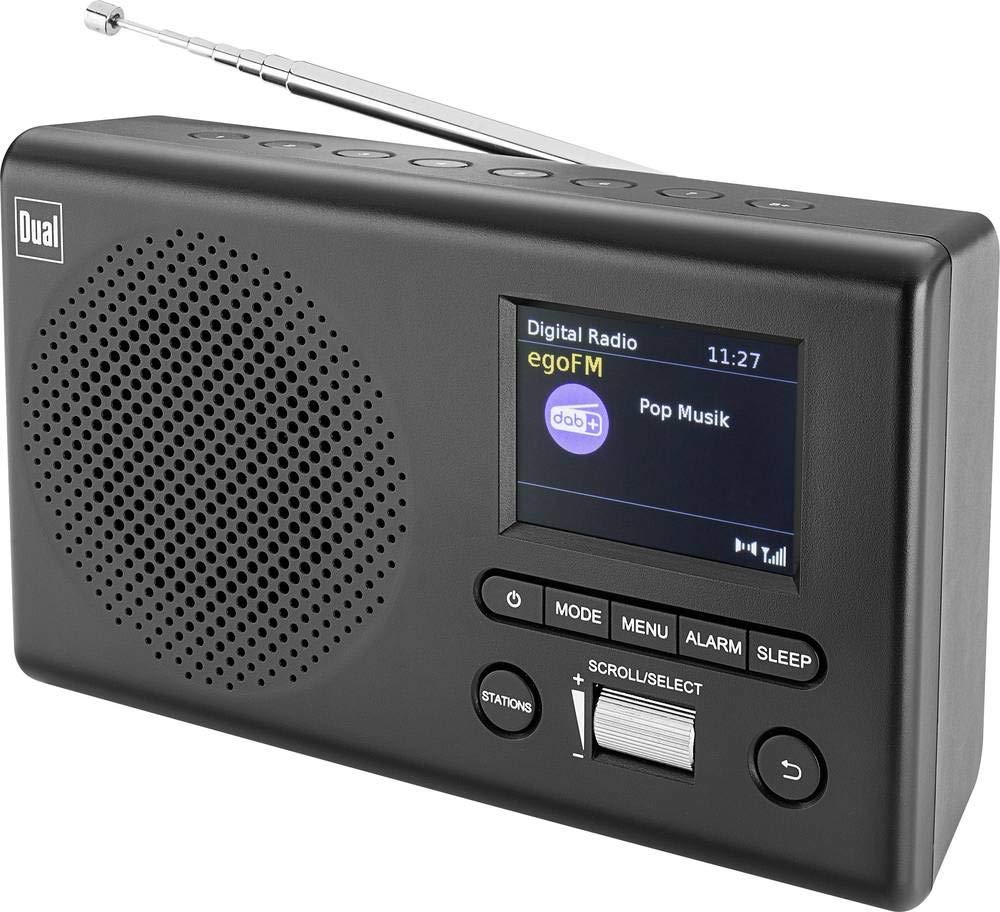
ຮູບພາບ: ທາງຫນ້າ view of the Dual MCR 4 Portable DAB+/FM Radio, showing the color TFT display, rotary knob, and control buttons. The radio has a black and silver finish.
ຕັ້ງຄ່າ
1. ການເປີດອຸປະກອນ
The Dual MCR 4 can be powered by either the included AC power adapter or batteries, offering portability.
- ການໃຊ້ເຄື່ອງປັບ AC: Connect the power adapter to the DC IN port on the back of the radio and plug the other end into a standard wall outlet.
- ການນໍາໃຊ້ຫມໍ້ໄຟ: Open the battery compartment on the bottom/back of the radio and insert the required batteries (type and quantity usually specified inside the compartment or in the full manual). Ensure correct polarity.
2. ການປັບເສົາອາກາດ
Extend the telescopic antenna fully for optimal reception of both DAB+ and FM radio signals. Adjust its position for the best signal quality.
3. Initial Power On and Station Scan
After connecting power, switch on the radio using the mechanical ON/OFF switch at the back. The radio will typically perform an automatic station scan upon first use, searching for available digital (DAB+) and analog (FM) radio stations. This process may take a few moments.
ຄໍາແນະນໍາການດໍາເນີນງານ
1. ການດໍາເນີນງານພື້ນຖານ
- ເປີດ/ປິດ: Use the mechanical switch at the back. For standby, a dedicated button on the front might be available (refer to physical unit).
- ການຄວບຄຸມລະດັບສຽງ: Rotate the main rotary knob to adjust the listening volume.
2. DAB+ Radio Mode
- Selecting DAB+ Mode: Press the MODE button (if available) or navigate through the menu using the rotary knob until DAB+ mode is selected.
- ການເລືອກສະຖານີ: After an automatic scan, use the rotary knob to scroll through the list of available DAB+ stations. Press the knob to confirm your selection.
- ບັນທຶກການຕັ້ງຄ່າໄວ້ລ່ວງໜ້າ: Tune to your desired station. Press and hold a memory button (e.g., 1-5) until the display confirms the station is saved.
- Presets ທີ່ລະລຶກ: Briefly press the corresponding memory button to recall a saved station.
- ຂໍ້ມູນສະແດງ: The color TFT display will show station name, program information (DLS), and potentially station logos or slideshows.
3. ໂໝດວິທະຍຸ FM
- ການເລືອກໂໝດ FM: Press the MODE button or navigate through the menu until FM mode is selected.
- ຄູ່ມືການປບັຄູ່ມື: Rotate the tuning knob to manually adjust the frequency.
- ສະແກນອັດຕະໂນມັດ: Press and hold the tuning knob or a dedicated scan button to automatically search for the next available FM station.
- ບັນທຶກການຕັ້ງຄ່າໄວ້ລ່ວງໜ້າ: Tune to your desired FM station. Press and hold a memory button until the display confirms the station is saved.
- Presets ທີ່ລະລຶກ: Briefly press the corresponding memory button to recall a saved station.
4. ຊ່ອງສຽບສຽງຊ່ວຍ (AUX-IN)
Connect an external audio device (e.g., smartphone, MP3 player) to the AUX-IN port on the back of the radio using a 3.5mm audio cable. Select AUX mode on the radio to play audio from the connected device.
5. ການໃຊ້ຫູຟັງ
For private listening, plug standard 3.5mm headphones into the headphone jack located on the back of the unit. The internal speaker will automatically mute.
ບໍາລຸງຮັກສາ
- ທໍາຄວາມສະອາດ: ເຊັດວິທະຍຸດ້ວຍຜ້າອ່ອນ, ແຫ້ງ. ຢ່າໃຊ້ເຄື່ອງເຮັດຄວາມສະອາດຂັດຫຼືສານລະລາຍ.
- ການເກັບຮັກສາ: If storing for an extended period, remove batteries and store the unit in a cool, dry place.
- ການດູແລເສົາອາກາດ: ຈັບເສົາອາກາດແບບຍືດหยุ่นຢ່າງອ່ອນໂຍນເພື່ອປ້ອງກັນຄວາມເສຍຫາຍ.
ການແກ້ໄຂບັນຫາ
| ບັນຫາ | ການແກ້ໄຂທີ່ເປັນໄປໄດ້ |
|---|---|
| ບໍ່ມີພະລັງງານ |
|
| ການຮັບວິທະຍຸທີ່ບໍ່ດີ |
|
| ບໍ່ມີສຽງຈາກ ລຳ ໂພງ |
|
ຂໍ້ມູນຈໍາເພາະ
| ຍີ່ຫໍ້ | ຄູ່ |
| ໝາຍເລກຕົວແບບ | 76074 |
| ສີ | ສີດຳ,ເງິນ |
| ເທັກໂນໂລຍີ Tuning | DAB+, FM |
| ເຕັກໂນໂລຊີການເຊື່ອມຕໍ່ | Auxiliary (AUX-IN) |
| ຄຸນນະສົມບັດພິເສດ | Portable, Color TFT Display |
| ອຸປະກອນທີ່ເຂົ້າກັນໄດ້ | Headphones, External Audio Devices (via AUX-IN) |
| ແຫຼ່ງພະລັງງານ | Mains (AC Adapter), Battery Powered |
| ອົງປະກອບລວມ | Main Unit, Power Adapter, User Manual |
| ການນໍາໃຊ້ທີ່ແນະນໍາ | ດົນຕີ |
ການຮັບປະກັນແລະການສະຫນັບສະຫນູນ
For warranty information and technical support, please refer to the specific warranty card included with your product or contact Dual customer service. The included user manual provides detailed instructions and contact information.