
1. ບົດແນະນຳ
ຂອບໃຈສໍາລັບການຊື້asing the Moukey MAMP1 220W Bluetooth Dual Channel Power Amplifier. ນີ້ amplifier is designed to provide powerful and versatile audio amplification for various applications, including karaoke, home theater systems, and general audio playback. It features multiple input options, Bluetooth 5.0 connectivity, and intuitive controls for an enhanced audio experience. Please read this manual thoroughly before use to ensure proper operation and to maximize the product's performance.
2. ຄໍາແນະນໍາຄວາມປອດໄພ
ເພື່ອປ້ອງກັນໄຟຟ້າຊັອດ, ໄຟໄໝ້ ຫຼື ຄວາມເສຍຫາຍຕໍ່ຕົວເຄື່ອງ, ກະລຸນາປະຕິບັດຕາມຂໍ້ຄວນລະວັງດ້ານຄວາມປອດໄພຕໍ່ໄປນີ້:
- ຢ່າເຮັດໃຫ້ເຄື່ອງນີ້ຖືກຝົນຫຼືຄວາມຊຸ່ມຊື່ນ.
- ຫ້າມເປີດຄasing. ບໍ່ມີສ່ວນທີ່ຜູ້ໃຊ້ບໍລິການພາຍໃນ. ອ້າງອີງການບໍລິການທັງໝົດໃຫ້ກັບບຸກຄະລາກອນທີ່ມີຄຸນວຸດທິ.
- ຮັບປະກັນການສະຫນອງພະລັງງານ voltage ກົງກັບຄວາມຕ້ອງການທີ່ລະບຸໄວ້ໃນຫນ່ວຍງານ.
- Place the unit on a stable, flat surface with adequate ventilation. Do not block ventilation openings.
- ເກັບຮັກສາເຄື່ອງໃຫ້ຫ່າງຈາກແຫຼ່ງຄວາມຮ້ອນ, ແສງແດດໂດຍກົງ ແລະ ຝຸ່ນຫຼາຍເກີນໄປ.
- Disconnect the power plug from the outlet if the unit will not be used for an extended period.
- ຫ້າມໃຊ້ເຄື່ອງມືດ້ວຍມືປຽກ.
3. ເນື້ອໃນຊຸດ
ກວດສອບວ່າລາຍການທັງຫມົດແມ່ນມີຢູ່ໃນຊຸດ:
- Moukey MAMP1 ພະລັງງານ Ampຫນ່ວຍສໍາເລັດຮູບ
- ການຄວບຄຸມໄລຍະໄກ
- ເສົາອາກາດ FM
- ຄູ່ມືຜູ້ໃຊ້ (ເອກະສານນີ້)
4. ຜະລິດຕະພັນເກີນview
4.1 ການຄວບຄຸມ ແລະ ໜ້າທີ່ຂອງແຜງດ້ານໜ້າ
The front panel provides access to all primary controls and input ports for easy operation.

Image: Detailed diagram of the Moukey MAMP1 front panel, highlighting each control and port with corresponding numbers.
- ສັບປ່ຽນພະລັງງານ: ເປີດ ຫຼືປິດເຄື່ອງ.
- USB / SD Slot: ສໍາລັບການຫຼິ້ນສຽງ files from USB drives (max 32GB) or SD cards (max 16GB).
- ປຸ່ມໂໝດ: Cycles through input modes (Bluetooth, USB, SD, AUX, FM).
- BT ປຸ່ມ: ປ່ຽນໄປໃຊ້ໂໝດ Bluetooth ໂດຍກົງ.
- Prev Button: ຂ້າມໄປຫາເພງ/ສະຖານີກ່ອນໜ້ານີ້.
- ຫຼີ້ນ / ປຸ່ມພັກໄວ້: ຫຼິ້ນ ຫຼືຢຸດການຫຼິ້ນສຽງຊົ່ວຄາວ.
- ປຸ່ມຕໍ່ໄປ: ຂ້າມໄປຫາເພງ/ສະຖານີຕໍ່ໄປ.
- ຈໍສະແດງຜົນ LED: Shows current mode, track information, or frequency.
- Folder / Track: Navigates through folders or tracks on USB/SD.
- ປຸ່ມປະລິມານຕົ້ນສະບັບ: ປັບປະລິມານຜົນຜະລິດໂດຍລວມ.
- ຫູຟັງ Jack: 3.5mm output for monitor headphones.
- Microphone 1 Input: ຊ່ອງສຽບ 6.35 ມມ ສຳລັບເຊື່ອມຕໍ່ໄມໂຄຣໂຟນ.
- Microphone 2 Input: 6.35mm jack for a second microphone connection.
- ປຸ່ມປັບລະດັບສຽງໄມໂຄຣໂຟນ: ປັບລະດັບສຽງຂອງໄມໂຄຣໂຟນທີ່ເຊື່ອມຕໍ່.
- Echo Knob: ຄວບຄຸມເອັບເຟັກສຽງສະທ້ອນສຳລັບໄມໂຄຣໂຟນ.
- ບິດເບດ: ປັບສຽງອອກຄວາມຖີ່ຕໍ່າ.
- ປຸ່ມ Treble: ປັບສຽງອອກຄວາມຖີ່ສູງ.
- ປຸ່ມດຸ່ນດ່ຽງ: ປັບສົມດຸນຂອງຊ່ອງຊ້າຍ/ຂວາ.
- ຊ່ອງສຽບ AUX: ສຽບ 3.5 ມມ ສຳລັບອຸປະກອນສຽງພາຍນອກ.
- ຜູ້ເລືອກຂາເຂົ້າ: Rotary switch to select between CD, AUX, DVD, and MP3/W inputs.
4.2 ການເຊື່ອມຕໍ່ແຜງດ້ານຫລັງ
ແຜງດ້ານຫຼັງເປັນບ່ອນເຊື່ອມຕໍ່ສຽງເຂົ້າ ແລະ ສຽງອອກຫຼັກ.

ຮູບພາບ: ດ້ານຫລັງ view of the Moukey MAMP1 ampເຄື່ອງຂະຫຍາຍສຽງ, ສະແດງພອດອິນພຸດ ແລະ ພອດອອກທັງໝົດ.

Image: Detailed diagram of the Moukey MAMP1 rear panel, highlighting each connection point.
- Audio Input for DVD (RCA): Connect DVD players or other audio sources.
- Audio Input for CD (RCA): Connect CD players or other audio sources.
- Line Out Jack (RCA): ສຳລັບການເຊື່ອມຕໍ່ຫາອັນອື່ນ ampຊີວິດຫຼືອຸປະກອນບັນທຶກສຽງ.
- ຊ່ອງສຽບເສົາອາກາດ FM: ເຊື່ອມຕໍ່ເສົາອາກາດ FM ທີ່ມີໃຫ້ສຳລັບການຮັບວິທະຍຸ.
- ຊ່ອງສຽບອອກຂອງລຳໂພງ: Connect passive speakers (4-16 Ohm impedance).
- ການປ້ອນສາຍໄຟຟ້າ: ເຊື່ອມຕໍ່ສາຍໄຟ AC.
5. ຕັ້ງຄ່າ
5.1 ການຈັດວາງ
ວາງ amplifier on a flat, stable surface. Ensure there is sufficient space around the unit for proper ventilation to prevent overheating.
5.2 ການເຊື່ອມຕໍ່ພະລັງງານ
Connect the power cable to the Power Cable Input on the rear panel of the amplifier, then plug the other end into a suitable AC power outlet (115V AC).
5.3 ການເຊື່ອມຕໍ່ ລຳ ໂພງ
ມAMP1 amplifier supports two sets of passive speakers with an impedance of 4-16 Ohms. Use appropriate speaker wire to connect your speakers to the Speaker Output Jacks on the rear panel.

Image: Diagram illustrating how to connect speakers to the amplifier's binding posts.
- Rotate and loosen the speaker knob on the binding post.
- Insert the bare wire (remove approximately 10mm of insulation) into the hole. Ensure correct polarity (+ to + and - to -).
- Tighten the knobs to secure the wires firmly.
5.4 Input Device Connection
Connect your audio sources (CD player, DVD player, tuner, etc.) to the corresponding RCA Audio Input jacks on the rear panel. For microphones, use the 6.35mm jacks on the front panel. For 3.5mm AUX devices, use the front panel AUX Input Jack.
6. ຄໍາແນະນໍາການດໍາເນີນງານ
6.1 ເປີດ/ປິດ
ກົດ ສະວິດໄຟ ຢູ່ແຜງດ້ານໜ້າເພື່ອໝຸນ ampເປີດ ຫຼື ປິດເຄື່ອງ. ຈໍສະແດງຜົນ LED ຈະສະຫວ່າງຂຶ້ນເມື່ອເຄື່ອງເປີດ.
6.2 ການຄັດເລືອກການປ້ອນຂໍ້ມູນ
ໃຊ້ ປຸ່ມໂໝດ on the front panel or the remote control to cycle through available input sources (Bluetooth, USB, SD, AUX, FM). Alternatively, use the ຕົວເລືອກການປ້ອນຂໍ້ມູນ knob on the front panel for RCA inputs (CD, AUX, DVD, MP3/W).
6.3 ການຄວບຄຸມປະລິມານ
- ປະລິມານໂທ: ໝຸນ ປຸ່ມລະດັບສຽງແມ່ບົດ to adjust the overall output level of the ampມີຊີວິດຊີວາ.
- ປະລິມານໄມໂຄຣໂຟນ: ໃຊ້ ປະລິມານໄມໂຄຣໂຟນ to control the volume of connected microphones independently.
6.4 ການຄວບຄຸມສຽງ
Adjust the audio characteristics using the ປຸ່ມ Bass ແລະ Knble Treble to suit your preference. The ດຸນການດຸ່ນດ່ຽງ allows adjustment of the left and right channel output levels.

Image: Close-up of the Moukey MAMP1 showing the Bass and Treble adjustment knobs.
6.5 Echo Control
ຫັນ ປຸ່ມ Echo to add or reduce the echo effect on the microphone inputs, suitable for karaoke applications.
6.6 ການຈັບຄູ່ Bluetooth
ເພື່ອເຊື່ອມຕໍ່ອຸປະກອນ Bluetooth:
- ກົດ ປຸ່ມ BT or cycle through modes until "BLUE" appears on the LED display.
- ເປີດໃຊ້ Bluetooth ໃນໂທລະສັບສະຫຼາດ, ແທັບເລັດ, ຫຼືຄອມພິວເຕີຂອງທ່ານ.
- ຊອກຫາ "Moukey MAMP1" in your device's Bluetooth settings and select it to pair.
- Once paired, you can stream audio wirelessly. Playback will temporarily pause during phone calls to protect privacy.
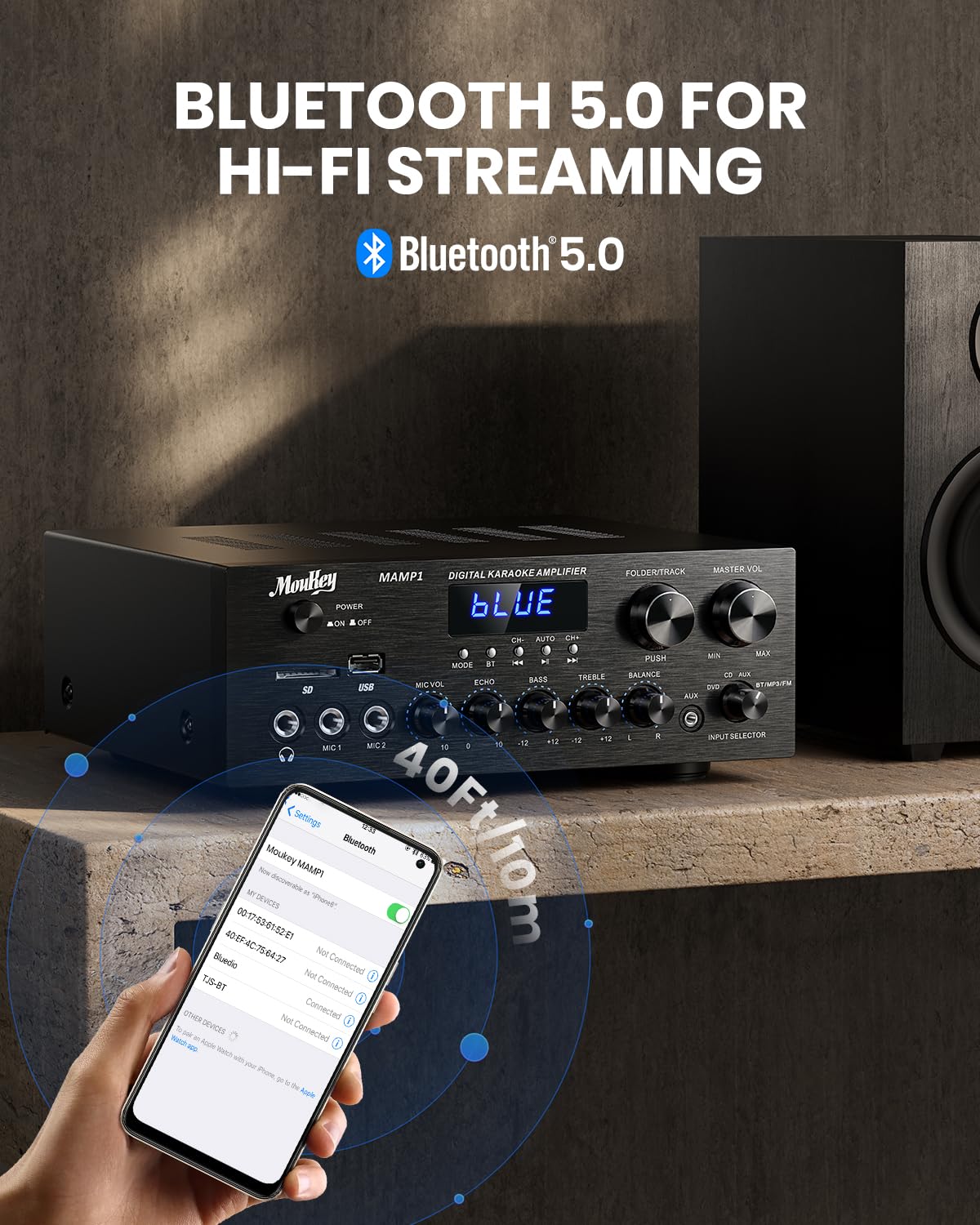
Image: The Moukey MAMP1 amplifier displaying "BLUE" on its screen, indicating Bluetooth mode, with a smartphone showing pairing options.
6.7 ການຫຼິ້ນ USB/SD
Insert a USB drive (max 32GB) or SD card (max 16GB) into the respective slot on the front panel. The amplifier will automatically switch to USB/SD mode and begin playback. Use the ກ່ອນໜ້າ, ຫຼິ້ນ/ຢຸດຊົ່ວຄາວ, ຕໍ່ໄປ, ແລະ Folder/Track ປຸ່ມເພື່ອຄວບຄຸມການຫຼິ້ນ.
ວິທະຍຸ 6.8 FM
Ensure the FM antenna is connected to the rear panel. Select FM mode using the ປຸ່ມໂໝດ. ໃຊ້ ກ່ອນໜ້າ ແລະ ຕໍ່ໄປ buttons to tune to radio stations. The LED display will show the current frequency.
7. ບໍາລຸງຮັກສາ
ເພື່ອຮັກສາປະສິດທິພາບ ແລະ ຮູບລັກສະນະຂອງທ່ານ ampມີຊີວິດຊີວາ:
- ທໍາຄວາມສະອາດ: Use a soft, dry cloth to wipe the exterior of the unit. Do not use liquid cleaners or abrasive chemicals.
- ການລະບາຍອາກາດ: ຮັບປະກັນວ່າຊ່ອງລະບາຍອາກາດມີຄວາມຊັດເຈນຂອງຂີ້ຝຸ່ນແລະສິ່ງເສດເຫຼືອ.
- ການເກັບຮັກສາ: ຖ້າເກັບຮັກສາເຄື່ອງສໍາລັບໄລຍະເວລາທີ່ຍາວນານ, ຖອດມັນອອກຈາກພະລັງງານແລະເກັບໄວ້ໃນບ່ອນທີ່ເຢັນ, ແຫ້ງ.
8. ການແກ້ໄຂບັນຫາ
If you encounter issues with your Moukey MAMP1 amplifier, refer to the following table for common problems and solutions:
| ບັນຫາ | ສາເຫດທີ່ເປັນໄປໄດ້ | ການແກ້ໄຂ |
|---|---|---|
| ບໍ່ມີພະລັງງານ | ສາຍໄຟບໍ່ໄດ້ເຊື່ອມຕໍ່; ປ່ຽງໄຟຟ້າຜິດພາດ; ປິດໄຟ. | Ensure power cable is securely connected. Try a different power outlet. Press the power switch to ON. |
| ບໍ່ມີສຽງອອກ | Incorrect input selected; Volume too low; Speakers not connected; Speaker wires loose; Mute function active. | Select the correct input source. Increase Master Volume. Check speaker connections and polarity. Ensure mute is off. |
| Bluetooth ບໍ່ເຊື່ອມຕໍ່ | Amplifier not in Bluetooth mode; Device too far; Device already paired to another unit. | ຮັບປະກັນ amplifier is in Bluetooth mode ("BLUE" on display). Move device closer to amplifier. Disconnect from other devices. |
| ໄມໂຄຣໂຟນບໍ່ເຮັດວຽກ | Microphone not connected; Mic volume too low; Echo knob set to minimum. | Connect microphone securely. Increase Microphone Volume. Adjust Echo knob. |
| ບັນຫາການຫຼິ້ນ USB/SD | ບໍ່ຮອງຮັບ file format; USB drive/SD card corrupted; Capacity exceeded. | ຮັບປະກັນສຽງ files are in supported formats (e.g., MP3). Try a different USB drive/SD card. Check capacity limits (USB max 32G, SD max 16G). |
ຖ້າບັນຫາຍັງຄົງຢູ່ຫຼັງຈາກພະຍາຍາມແກ້ໄຂເຫຼົ່ານີ້, ກະລຸນາຕິດຕໍ່ຝ່າຍຊ່ວຍເຫຼືອລູກຄ້າ.
9. ຂໍ້ມູນຈໍາເພາະ
| ຄຸນສົມບັດ | ຂໍ້ມູນຈໍາເພາະ |
|---|---|
| ຍີ່ຫໍ້ | Moukey |
| ຕົວແບບ | MAMP1 |
| ພະລັງງານຜົນຜະລິດ | 220 ວັດ |
| ຊ່ອງ | 2 |
| ສະບັບtage | 115 ໂວນ (AC) |
| ລຳໂພງ Impedance | 4-16 Ohms |
| ລຸ້ນ Bluetooth | 5.0 |
| ຊ່ວງ Bluetooth | ຫຼາຍກວ່າ 12 ແມັດ (40 ຟຸດ) |
| ຮອງຮັບ USB/SD Card | USB: Max 32GB, SD: Max 16GB |
| ຂະໜາດ (L x W x H) | 25 ຊມ x 21.3 ຊມ x 9.5 ຊມ (ປະມານ 10 ນິ້ວ x 8 ນິ້ວ x 4 ນິ້ວ) |
| UPC | 715802779039 |
| ປະເທດຕົ້ນກໍາເນີດ | ຈີນ |

Image: The Moukey MAMP1 amplifier with its dimensions labeled.
10. ການຮັບປະກັນແລະການສະຫນັບສະຫນູນ
This Moukey MAMP1 ພະລັງງານ Amplifier ມາພ້ອມກັບ a ຮັບປະກັນ 1 ປີ ຈາກວັນທີ່ຊື້. ການຮັບປະກັນນີ້ກວມເອົາຄວາມບົກຜ່ອງດ້ານການຜະລິດແລະການເຮັດວຽກພາຍໃຕ້ການນໍາໃຊ້ປົກກະຕິ.
ການຮັບປະກັນບໍ່ໄດ້ກວມເອົາ:
- Damage caused by accident, abuse, misuse, flood, fire, or other natural causes.
- Damage caused by unauthorized modification or repair.
- Damage caused by improper installation or connection.
- Cosmetic damage, such as scratches, dents, and broken plastic on ports.
For warranty claims or technical support, please contact the retailer where you purchased the product or visit the official Moukey website for contact information. Please have your purchase receipt and product model number (MAMP1) ready when contacting support.