
1. ບົດແນະນຳ
This manual provides detailed instructions for the Amazon Basics Aluminum Type-C Docking Station. This device expands the connectivity of your USB-C enabled laptop or tablet, offering a wide range of ports for various peripherals and external displays. Please read this manual thoroughly before use to ensure proper operation and to maximize the product's functionality.
2. ຄຸນລັກສະນະຂອງຜະລິດຕະພັນ
- 11-in-1 Multi-Port Design: Integrates Mini DisplayPort, HDMI, VGA, 3 USB-A ports, Ethernet, SD/TF card reader, 3.5mm audio jack, and a Type-C charging port (PD 100W).
- High-Resolution Video Output: Supports Ultra HD 4K output via Mini DisplayPort/HDMI and Full HD 1080P via VGA, allowing for mirroring or extending your display to HDTVs, monitors, or projectors. Note: 4K resolution is supported at 30Hz refresh rate.
- ໂອນຂໍ້ມູນໄວ: Three USB 3.0 A ports provide data transfer speeds up to 5Gbps, backward compatible with USB 2.0/1.0.
- Stable Network Connection: 1000Mbps RJ45 Ethernet port ensures a fast and reliable wired network connection.
- Universal Card Reader: Integrated SD and TF slots allow simultaneous reading of universal SD and Micro SD memory cards.
- ການຈັດສົ່ງພະລັງງານ: Type-C charging port supports Power Delivery (PD) up to 100 watts for charging your host device.
- ການເຊື່ອມຕໍ່ສຽງ: ຊ່ອງສຽບສຽງ 3.5 ມມ ສຳລັບຫູຟັງ ຫຼື ລຳໂພງ.
- ການກໍ່ສ້າງທົນທານ: Features an aluminum pedestal-style housing for enhanced durability and heat dissipation.
3. ເນື້ອໃນຊຸດ
- Amazon Basics Aluminum Type-C Docking Station
- ຄູ່ມືຜູ້ໃຊ້
4. ຜະລິດຕະພັນເກີນview and Port Layout
Familiarize yourself with the various ports and their functions on your docking station.

ຮູບພາບ: ໃກ້ຊິດ view of the Amazon Basics Type-C Docking Station's ports, including Ethernet, Mini DisplayPort, HDMI, VGA, and USB-C.
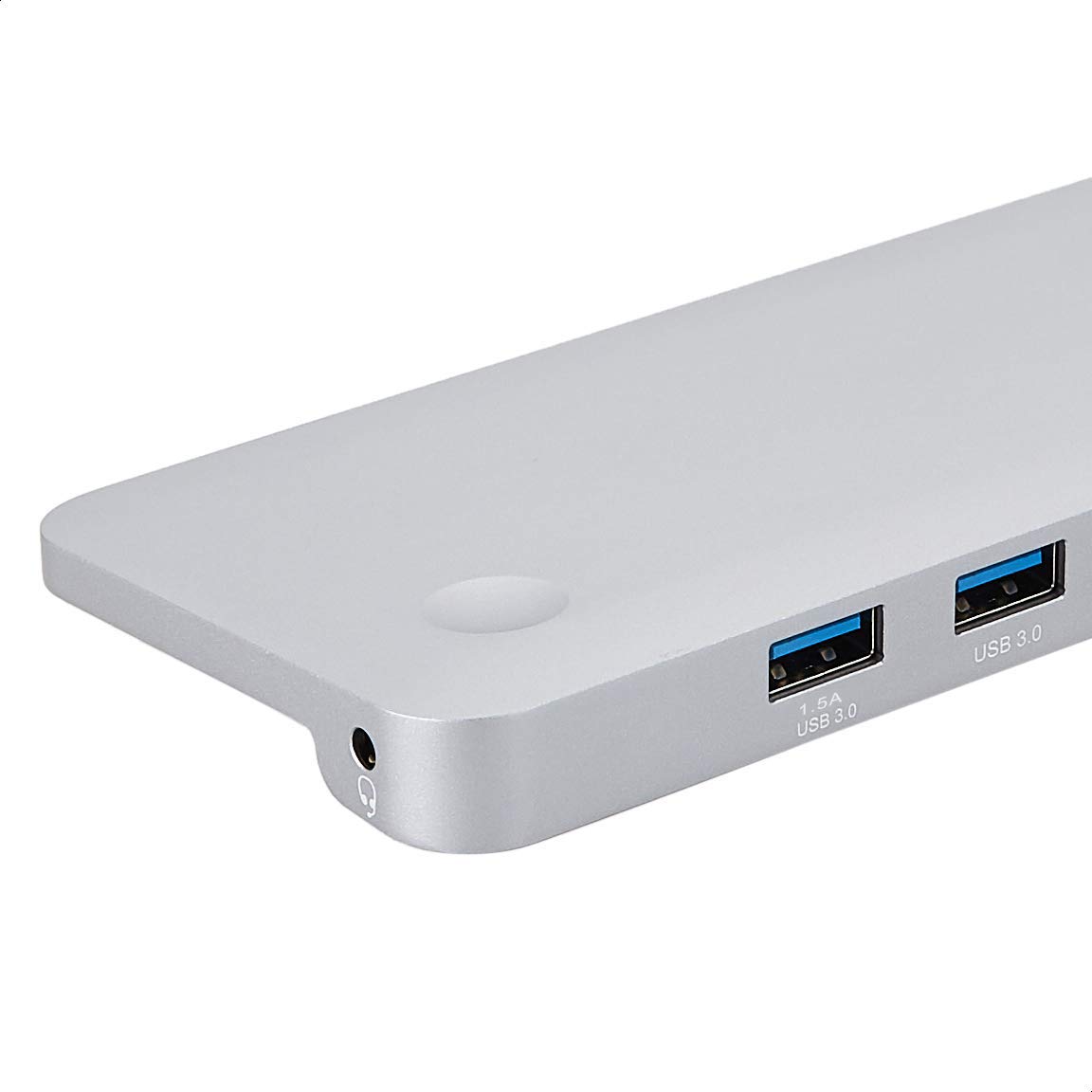
ຮູບພາບ: ລາຍລະອຽດ view of the USB 3.0 ports and 3.5mm audio jack on the Amazon Basics Type-C Docking Station.
- ຕົວເຊື່ອມຕໍ່ໂຮສ USB-C: Connects to your laptop or tablet's USB-C port.
- ຜອດ USB 3.0 (x3): For connecting USB devices such as external hard drives, keyboards, mice, or USB flash drives.
- ຊ່ອງໃສ່ບັດ SD: ສຳລັບການອ່ານບັດຄວາມຈຳ SD ມາດຕະຖານ.
- TF Card Slot (Micro SD): ສຳລັບການອ່ານກາດໜ່ວຍຄວາມຈຳ Micro SD.
- RJ45 Ethernet Port: ສໍາລັບການເຊື່ອມຕໍ່ເຄືອຂ່າຍມີສາຍ.
- Mini DisplayPort: ສໍາລັບການເຊື່ອມຕໍ່ກັບຈໍສະແດງຜົນພາຍນອກ.
- HDMI Port: ສໍາລັບການເຊື່ອມຕໍ່ກັບຈໍສະແດງຜົນພາຍນອກ.
- ຜອດ VGA: ສໍາລັບການເຊື່ອມຕໍ່ກັບຈໍສະແດງຜົນພາຍນອກ.
- Jack ສຽງ 3.5mm: ສໍາລັບການເຊື່ອມຕໍ່ຫູຟັງຫຼືລໍາໂພງ.
- ພອດສາກໄຟ USB-C PD: For connecting a USB-C power adapter to charge your host device and power the docking station.
5. ຄໍາແນະນໍາການຕິດຕັ້ງ
ປະຕິບັດຕາມຂັ້ນຕອນເຫຼົ່ານີ້ເພື່ອຕັ້ງຄ່າສະຖານີຈອດຂອງທ່ານ:
- ເຊື່ອມຕໍ່ຫາອຸປະກອນໂຮສ: Plug the integrated USB-C host connector cable from the docking station into an available USB-C port on your laptop or tablet. Ensure your host device's USB-C port supports DisplayPort Alt Mode (DP Alt Mode) for video output functionality.
- ເຊື່ອມຕໍ່ພະລັງງານ (ທາງເລືອກແຕ່ແນະນໍາ): If your host device requires charging or if you are connecting power-intensive peripherals, connect your USB-C power adapter (up to 100W) to the USB-C PD Charging Port on the docking station. This will charge your host device and provide stable power to the docking station and connected peripherals.
- ເຊື່ອມຕໍ່ອຸປະກອນຕໍ່ພ່ວງ: Connect your desired peripherals (e.g., external monitors, USB devices, Ethernet cable, SD/TF cards, audio devices) to the corresponding ports on the docking station.

Image: Amazon Basics Type-C Docking Station connected to a laptop, with multiple peripherals like a USB drive and external display cables plugged in.
6. ຄໍາແນະນໍາການດໍາເນີນງານ
6.1. ຜົນຜະລິດວິດີໂອ
- Connect your monitor or projector to the HDMI, Mini DisplayPort, or VGA port.
- Your operating system should automatically detect the external display. You may need to adjust display settings (e.g., extend, duplicate) in your computer's display preferences.
- The docking station supports 4K resolution at 30Hz refresh rate via HDMI and Mini DisplayPort. For optimal performance, ensure your display and cables support the desired resolution and refresh rate.
- Dual video display is supported, allowing you to mirror or expand your screen across multiple monitors.
6.2. ການໂອນຂໍ້ມູນຜ່ານ USB
- Plug your USB devices into the USB 3.0 ports.
- The ports support data transfer speeds up to 5Gbps.
6.3. ການເຊື່ອມຕໍ່ອີເທີເນັດ
- Connect an Ethernet cable from your router or modem to the RJ45 Ethernet port on the docking station.
- Your computer should automatically establish a wired network connection.
6.4. SD/TF Card Reader
- Insert your SD or TF (Micro SD) card into the corresponding slot.
- The cards will appear as removable drives on your computer, allowing you to access and transfer files. Both slots can be used simultaneously.
6.5. ສຽງອອກ
- Connect your headphones or speakers to the 3.5mm audio jack.
- You may need to select the docking station as the default audio output device in your computer's sound settings.
6.6. ການສົ່ງພະລັງງານ (PD)
- Connect your laptop's USB-C power adapter to the USB-C PD Charging Port on the docking station.
- This port supports up to 100W power delivery to charge your host device while using the docking station.
7. ຄວາມເຂົ້າກັນໄດ້
This docking station is compatible with a wide range of USB-C enabled devices, including but not limited to:
- MacBook Pro 2018/2017/2016
- iPad Pro 2018
- Mac mini 2018
- MacBook Air
- iMac 2017
- Samsung Note9
- HUAWEI MateBook X
- Dell XPS 13
- ThinkPad
- Chromebook
ສຳຄັນ: This product functions only with computers that support DisplayPort Alt Mode (DP Alt Mode) via their USB-C port. Please verify your computer's specifications for compatibility before use.
8. ການແກ້ໄຂບັນຫາ
- ບໍ່ມີການສະແດງຜົນອອກ:
- ໃຫ້ແນ່ໃຈວ່າຜອດ USB-C ຂອງອຸປະກອນແມ່ຂ່າຍຂອງທ່ານຮອງຮັບ DisplayPort Alt Mode.
- Check all cable connections (USB-C to host, video cable to monitor).
- Verify the external monitor is powered on and set to the correct input source.
- ລອງຣີສະຕາດຄອມພິວເຕີຂອງທ່ານ.
- 4K Resolution Not Working at 60Hz:
- This docking station supports 4K resolution at a maximum refresh rate of 30Hz. If your monitor is set to 4K@60Hz, it will not display correctly. Adjust your display settings to 4K@30Hz or a lower resolution with a higher refresh rate if desired.
- ອຸປະກອນ USB ບໍ່ໄດ້ຮັບການຮັບຮູ້ ຫຼື ກຳລັງຕັດການເຊື່ອມຕໍ່:
- Ensure the docking station is receiving sufficient power. Connect a USB-C power adapter to the PD port if you are using multiple power-intensive USB devices.
- Try connecting the USB device directly to your computer to confirm it is functional.
- Reconnect the docking station to your computer.
- No Network Connection via Ethernet:
- ກວດເບິ່ງການເຊື່ອມຕໍ່ສາຍ Ethernet ກັບທັງສະຖານີ docking ແລະ router/modem ຂອງທ່ານ.
- Verify your network settings on your computer.
- ໃຫ້ແນ່ໃຈວ່າ router/modem ຂອງທ່ານເຮັດວຽກຢ່າງຖືກຕ້ອງ.
- ບໍ່ມີສຽງອອກ:
- Ensure your headphones or speakers are properly connected to the 3.5mm audio jack.
- Check your computer's sound settings and select the docking station as the default audio output device.
- ອຸປະກອນໂຮດບໍ່ສາກໄຟ:
- Ensure a compatible USB-C power adapter is connected to the docking station's USB-C PD Charging Port.
- Verify that your host device supports USB-C Power Delivery.
- ກວດສອບອະແດບເຕີໄຟຟ້າ ແລະ ສາຍໄຟວ່າເສຍຫາຍຫຼືບໍ່.
9. ຂໍ້ມູນຈໍາເພາະ
| ຄຸນສົມບັດ | ຂໍ້ມູນຈໍາເພາະ |
|---|---|
| ຍີ່ຫໍ້ | ພື້ນຖານ Amazon |
| ໝາຍເລກຕົວແບບ | UTC-DOCK01-PRO |
| ສີ | ສີເທົາ |
| ຂະໜາດ (LxWxH) | 28 x 7.5 x 1.4 Centimeters (11.02 x 2.95 x 0.55 Inches) |
| ນ້ໍາຫນັກລາຍການ | 317 g (0.32 ກິໂລກຣາມ) |
| ທ່າເຮືອທັງໝົດ | 11 |
| ພອດ USB | 3 x USB 3.0 Type-A |
| ຜອດຜົນຜະລິດວິດີໂອ | 1 x HDMI, 1 x Mini DisplayPort, 1 x VGA |
| ຄວາມລະອຽດ HDMI | ສູງເຖິງ 4K@30Hz |
| Mini DisplayPort Resolution | ສູງເຖິງ 4K@30Hz |
| ຜອດອີເທີເນັດ | RJ45 Gigabit Ethernet (10/100/1000Mbps) |
| ເຄື່ອງອ່ານບັດ | SD and TF (Micro SD) slots, simultaneous read |
| Audio Port | ສຽງ Jack 3.5 ມມ |
| ພອດສາກ USB-C PD | ເຖິງ 100 ວັດ |
| ການໂຕ້ຕອບຮາດແວ | Ethernet, HDMI, Mini DisplayPort, VGA, USB-A, USB-C, SD/TF, Audio |
10. ບໍາລຸງຮັກສາ
- ທໍາຄວາມສະອາດ: ໃຊ້ຜ້າອ່ອນໆແຫ້ງເພື່ອທຳຄວາມສະອາດສະຖານີເຊື່ອມຕໍ່. ຫຼີກລ່ຽງການໃຊ້ນ້ຳຢາທຳຄວາມສະອາດ ຫຼື ນ້ຳຢາສີດ.
- ການເກັບຮັກສາ: ເກັບຮັກສາອຸປະກອນໄວ້ໃນບ່ອນທີ່ເຢັນ, ແຫ້ງ, ຫ່າງຈາກແສງແດດໂດຍກົງ ແລະອຸນຫະພູມທີ່ຮ້າຍກາດ.
- ການຈັດການ: ຫຼີກລ້ຽງການຫຼຸດລົງຫຼືການອຸປະກອນທີ່ມີຜົນກະທົບທີ່ເຂັ້ມແຂງ. ຢ່າພະຍາຍາມຖອດປະກອບ ຫຼືດັດແປງສະຖານີຈອດ.
11. ຂໍ້ມູນຄວາມປອດໄພ
- Keep the device away from water, fire, and high humidity environments.
- ຢ່າເຮັດໃຫ້ອຸປະກອນຢູ່ໃນອຸນຫະພູມທີ່ຮຸນແຮງ.
- Use only compatible power adapters and cables.
- ຮັກສາໃຫ້ໄກຈາກເດັກນ້ອຍ.
- If the device is damaged or malfunctions, discontinue use immediately and contact customer support.
12. ການຮັບປະກັນແລະການສະຫນັບສະຫນູນ
This Amazon Basics product comes with a ການຮັບປະກັນ 1 ປີຈໍາກັດ from the date of purchase. This warranty covers manufacturing defects and workmanship under normal use. It does not cover damage caused by misuse, accident, modification, or unauthorized repair.
For warranty claims, technical support, or further assistance, please contact Amazon Basics customer service through your Amazon purchase history or the official Amazon Basics support channels.