
ແນະນຳ
The Perel EDIN305N is a 230V 16A 3600W DIN-rail mount digital weekly timer designed for indoor use. This device allows for precise, programmable control of electrical circuits, enabling automatic switching ON and OFF of connected appliances or lighting systems over a weekly cycle. It features a clear digital display and multiple programming options to suit various scheduling needs.
ຂໍ້ຄວນລະວັງຄວາມປອດໄພ
ຄຳເຕືອນ: Electrical installation should only be performed by a qualified electrician. Incorrect wiring can lead to electric shock, fire, or damage to the device and connected equipment. Always disconnect power at the main circuit breaker before installation or maintenance.
- Ensure the power supply matches the device's specifications (230V~50Hz).
- ຢ່າໃຊ້ພະລັງງານເກີນ 16A / 3600W.
- This device is designed for indoor use only. Avoid exposure to moisture, dust, or extreme temperatures.
- ຢ່າພະຍາຍາມເປີດຫຼືສ້ອມແປງອຸປະກອນດ້ວຍຕົນເອງ. ອ້າງອີງການບໍລິການທັງໝົດໃຫ້ກັບບຸກຄະລາກອນທີ່ມີຄຸນວຸດທິ.
- ຮັກສາໃຫ້ໄກຈາກເດັກນ້ອຍ.
ສິນຄ້າເກີນview
The Perel EDIN305N digital timer consists of a main body with a digital display, control buttons, and terminal blocks for electrical connections. A transparent cover protects the display and buttons.
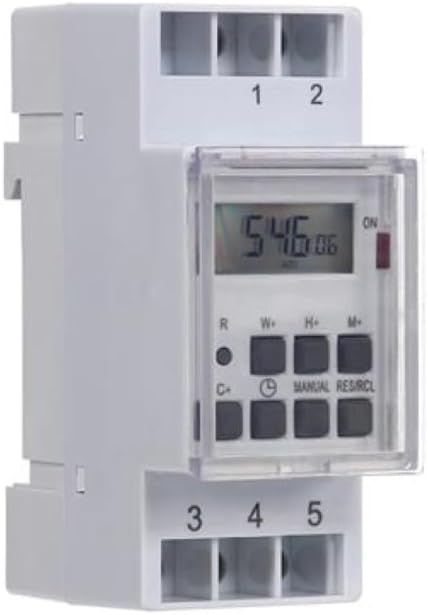
ຮູບທີ 1: ດ້ານໜ້າ view of the Perel EDIN305N Digital Weekly Timer. The image displays the LCD screen, control buttons (R, W+, H+, M+, C+, Clock, Manual, RES/RCL), and numbered terminal blocks (1, 2 at the top, 3, 4, 5 at the bottom).
ປຸ່ມຄວບຄຸມ:
- R: Reset button (recessed).
- W+: Weekday setting.
- H+: ການຕັ້ງຄ່າຊົ່ວໂມງ.
- M+: Minute setting.
- C+: Clear program.
- ໄອຄອນໂມງ: Used to set current time and day, and to exit programming mode.
- ຄູ່ມື: Manual override for ON/AUTO/OFF modes.
- RES/RCL: Reset/Recall program.
Terminal Blocks:
- 1, ປີ 2: Power supply input (N, L).
- ໑໐, ໑໑, ໑໒: Output terminals for controlled circuit (Common, Normally Open, Normally Closed).
ຂໍ້ມູນຈໍາເພາະ
| ພາລາມິເຕີ | ມູນຄ່າ |
|---|---|
| ໝາຍເລກຕົວແບບ | EDIN305N |
| ສະບັບtage | 230V ~ 50Hz |
| ສູງສຸດ. ປະຈຸບັນ | 16A |
| ສູງສຸດ. ພະລັງງານ | 3600W |
| ຈໍານວນການຕັ້ງຄ່າ | 7 (ໂປຣແກຣມເປີດ/ປິດ) |
| ປະເພດການຕິດຕັ້ງ | DIN-Rail |
| ຂະໜາດ (L x W x H) | 2.36 x 3.54 x 1.57 ນິ້ວ (60 x 90 x 40 ມມ) |
| ນ້ຳໜັກ | 0.12 ກິໂລ (4.2 ອອນສ໌) |
| ວັດສະດຸ | ພາດສະຕິກ |
| ສີ | ສີຂາວ |
| ຕ້ອງໃຊ້ແບັດເຕີຣີ | No (internal battery for memory backup) |
ການຕິດຕັ້ງ
1. ການຕິດຕັ້ງ
The Perel EDIN305N is designed for DIN-rail mounting. Securely attach the timer to a standard 35mm DIN-rail within an electrical enclosure. Ensure sufficient space for wiring and ventilation.
2. ສາຍໄຟ
ສຳຄັນ: Ensure power is disconnected at the main circuit breaker before proceeding with wiring. Follow local electrical codes and regulations.
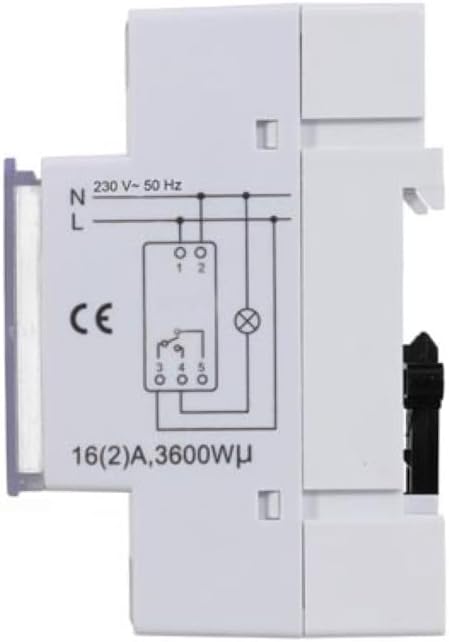
ຮູບທີ 2: ຂ້າງ view of the Perel EDIN305N Digital Weekly Timer showing the electrical wiring diagram. It illustrates connections for Neutral (N), Live (L), and the output contacts (1, 2, 3, 4, 5) for controlling a load.
Refer to the wiring diagram (Figure 2) and the terminal block labels on the device:
- Connect the Neutral (N) wire of your 230V AC supply to terminal 1.
- Connect the Live (L) wire of your 230V AC supply to terminal 2.
- For the controlled circuit:
- Terminal 3: Common contact for the relay output.
- Terminal 4: Normally Open (NO) contact. The circuit connected here will be ON when the timer is active.
- Terminal 5: Normally Closed (NC) contact. The circuit connected here will be OFF when the timer is active.
- Connect the load (e.g., light, appliance) between the Live (L) supply and either terminal 4 (for NO operation) or terminal 5 (for NC operation), with terminal 3 connected to the Live (L) supply. Alternatively, connect the load between terminal 4 or 5 and the Neutral (N) supply, with terminal 3 connected to the Live (L) supply. Consult a qualified electrician for specific load wiring configurations.
ການຕິດຕັ້ງແລະການດໍາເນີນການເບື້ອງຕົ້ນ
1. Power On and Reset
After wiring and restoring power, the display will illuminate. If the display is blank or shows erratic characters, press the recessed R (Reset) button using a pointed non-metallic object (e.g., a pen tip). This will clear all settings and restore default values.
2. ການກຳນົດເວລາ ແລະ ມື້ປັດຈຸບັນ
- ກົດຄ້າງໄວ້ ໄອຄອນໂມງ ປຸ່ມ.
- ໃນຂະນະທີ່ຖື ໄອຄອນໂມງ ປຸ່ມ, ກົດ W+ to set the current day of the week (1=Monday, 7=Sunday).
- ໃນຂະນະທີ່ຖື ໄອຄອນໂມງ ປຸ່ມ, ກົດ H+ ເພື່ອຕັ້ງຊົ່ວໂມງປັດຈຸບັນ (0-23).
- ໃນຂະນະທີ່ຖື ໄອຄອນໂມງ ປຸ່ມ, ກົດ M+ ເພື່ອຕັ້ງນາທີປັດຈຸບັນ (0-59).
- ປ່ອຍຕົວ ໄອຄອນໂມງ ປຸ່ມ. ເວລາ ແລະ ມື້ໄດ້ຖືກຕັ້ງແລ້ວຕອນນີ້.
3. ການຂຽນໂປຣແກຣມຮອບວຽນການເປີດ/ປິດ
ໂມງຈັບເວລາຮອງຮັບໂປຣແກຣມເປີດ/ປິດໄດ້ສູງສຸດ 7 ໂປຣແກຣມ. ແຕ່ລະໂປຣແກຣມປະກອບດ້ວຍເວລາເປີດ ແລະ ເວລາປິດ.
- ກົດ ໄອຄອນໂມງ button once to enter programming mode. The display will show "1 ON".
- ກົດ W+ to select the day(s) for this program. You can choose a single day, a block of days (e.g., Mon-Fri), or all days.
- ກົດ H+ to set the ON hour for program 1.
- ກົດ M+ to set the ON minute for program 1.
- ກົດ ໄອຄອນໂມງ ກົດປຸ່ມອີກຄັ້ງ. ໜ້າຈໍຈະສະແດງ "1 OFF".
- Repeat steps 2-4 to set the OFF day(s), hour, and minute for program 1.
- To set additional programs (2-7), press the ໄອຄອນໂມງ button to cycle through "2 ON", "2 OFF", etc., and repeat the setting process.
- ຫຼັງຈາກການຕັ້ງຄ່າໂຄງການທີ່ຕ້ອງການທັງຫມົດ, ໃຫ້ກົດປຸ່ມ ຄູ່ມື ເພື່ອອອກຈາກໂໝດການຂຽນໂປຣແກຣມ ແລະ ກັບຄືນໄປຫາການສະແດງເວລາປັດຈຸບັນ.
4. ການຍົກເລີກດ້ວຍຕົນເອງ
ກົດ ຄູ່ມື button repeatedly to cycle through the operating modes:
- ເປີດ: ຜົນຜະລິດຈະເປີດຢູ່ຕະຫຼອດເວລາ, ໂດຍຈະລົບລ້າງທຸກໂປຣແກຣມ.
- ອັດຕະໂນມັດ: The timer operates according to the programmed ON/OFF cycles.
- ປິດ: ຜົນຜະລິດຈະປິດຢູ່ຕະຫຼອດເວລາ, ໂດຍຈະລົບລ້າງໂປຣແກຣມທັງໝົດ.
ໃຫ້ແນ່ໃຈວ່າໂມງຈັບເວລາຖືກຕັ້ງໄວ້ທີ່ ອັດຕະໂນມັດ ສຳລັບການດໍາເນີນງານທີ່ຖືກວາງແຜນໄວ້.
5. Clearing Programs
To clear a specific program:
- ເຂົ້າສູ່ໂໝດການຂຽນໂປຣແກຣມໂດຍການກົດປຸ່ມ ໄອຄອນໂມງ button until the desired program number (e.g., "3 ON") is displayed.
- ກົດ C+ button. This will clear both the ON and OFF times for that specific program.
- Repeat for other programs as needed.
- ກົດ ຄູ່ມື ເພື່ອອອກຈາກໂຫມດການຂຽນໂປຼແກຼມ.
To clear all programs and reset the device, use the recessed R (Reset) button.
ບໍາລຸງຮັກສາ
- ເຮັດຄວາມສະອາດອຸປະກອນດ້ວຍຜ້າອ່ອນໆ, ແຫ້ງ. ຢ່າໃຊ້ເຄື່ອງເຮັດຄວາມສະອາດຂັດຫຼືສານລະລາຍ.
- Ensure the transparent cover is closed to protect the display and buttons from dust and splashes.
- Regularly check electrical connections for tightness, especially in high-vibration environments.
ການແກ້ໄຂບັນຫາ
| ບັນຫາ | ສາເຫດທີ່ເປັນໄປໄດ້ | ການແກ້ໄຂ |
|---|---|---|
| ຈໍສະແດງຜົນຫວ່າງເປົ່າ. | No power supply; internal battery depleted. | Check power connections (terminals 1 & 2). Ensure main power is ON. If power is present, press the R (Reset) button. The internal battery recharges when connected to power. |
| Timer not switching ON/OFF as programmed. | Incorrect program settings; timer in manual ON/OFF mode. | Verify program settings (time, day, ON/OFF). Ensure the timer is in ອັດຕະໂນມັດ ຮູບແບບໂດຍການກົດປຸ່ມ ຄູ່ມື ປຸ່ມ. |
| Connected appliance not receiving power. | Incorrect wiring; appliance fault; timer fault. | Check wiring according to Figure 2. Test the appliance directly. If wiring and appliance are fine, the timer may be faulty. |
| Buttons unresponsive or display erratic. | Software glitch; low internal battery. | ກົດບ່ອນທີ່ມີຮອຍຫຍັບ R (Reset) button. Ensure the timer has been connected to power for at least 24 hours to fully charge the internal battery. |
ການຖິ້ມຂີ້ເຫຍື້ອ
Do not dispose of this product with general household waste. This electronic device contains materials that can be recycled. Please dispose of it at a designated collection point for electrical and electronic equipment waste, in accordance with local regulations.
ການຮັບປະກັນແລະການສະຫນັບສະຫນູນ
Perel products are manufactured to high quality standards. For warranty information, technical support, or service inquiries, please refer to the documentation provided with your purchase or contact your local Perel distributor or retailer. Please have your model number (EDIN305N) and purchase details ready when contacting support.