
HoldPeak HP-870P
HoldPeak HP-870P KW Power Meter Clamp ຄູ່ມືຜູ້ໃຊ້ແມັດ
Model: HP-870P (YF-US-870P)
1. ບົດແນະນຳ
The HoldPeak HP-870P is a versatile and robust KW Power Meter Clamp Meter designed for comprehensive electrical testing. This device combines the functions of an AC/DC Voltmeter, Ammeter, and Multimeter, capable of measuring active power, apparent power, reactive power, active energy, temperature, and frequency. Its high accuracy, large LCD display with backlight, and auto power-off feature make it an essential diagnostic tool for professionals and enthusiasts in various fields, including electronic product manufacturing, computer component inspection, automobile maintenance, home appliance installation, and general electrical maintenance.
2. ຂໍ້ມູນຄວາມປອດໄພ
Please read and understand all safety information and operating instructions before using this meter. Failure to do so may result in injury or damage to the meter or equipment under test.
ຂໍ້ຄວນລະວັງຄວາມປອດໄພທົ່ວໄປ:
- ປະຕິບັດຕາມລະຫັດຄວາມປອດໄພຂອງທ້ອງຖິ່ນ ແລະ ລະດັບຊາດຢູ່ສະເໝີ.
- ຢ່າໃຊ້ມິເຕີຖ້າມັນເບິ່ງຄືວ່າເສຍຫາຍ ຫຼື ຖ້າຊັ້ນກັນຄວາມຮ້ອນຂອງສາຍທົດສອບຖືກທຳລາຍ.
- ຫ້າມໃຊ້ຫຼາຍກ່ວາ voltage, ຕາມທີ່ໝາຍໄວ້ເທິງເຄື່ອງວັດແທກ, ລະຫວ່າງ terminals ຫຼືລະຫວ່າງ terminal ແລະດິນແຜ່ນດິນໂລກ.
- ໃຊ້ຄວາມລະມັດລະວັງທີ່ສຸດໃນເວລາທີ່ເຮັດວຽກກັບ voltages ຂ້າງເທິງ 60V DC ຫຼື 30V AC RMS. vol ດັ່ງກ່າວtages ເຮັດໃຫ້ເກີດອັນຕະລາຍຊ໊ອກ.
- Keep your fingers behind the finger guards on the test leads during measurements.
- Remove the test leads from the meter before opening the battery cover.
- Ensure the rotary switch is in the correct position for the desired measurement before connecting the test leads.
- ຢ່າໃຊ້ມິເຕີໃນສະພາບແວດລ້ອມທີ່ມີອາຍແກັສ, ໄອນ້ຳ ຫຼື ຝຸ່ນລະອອງທີ່ລະເບີດໄດ້.
3. ຜະລິດຕະພັນເກີນview
ຄຸນນະສົມບັດທີ່ສໍາຄັນ:
- Multifunctionality: Measures active power, apparent power, reactive power, AC/DC voltage, AC/DC current, temperature, frequency, power factor, and active energy.
- ຈຳນວນການສະແດງຜົນສູງ: 9999 counts display for precise readings.
- LCD Backlight: Ensures clear visibility of data even in low-light conditions.
- ການຖືຂໍ້ມູນ: ຢຸດການອ່ານທີ່ສະແດງໄວ້ເພື່ອຄວາມສະດວກໃນການບັນທຶກ.
- ຊ່ວງອັດຕະໂນມັດ: ເລືອກລະດັບການວັດແທກທີ່ເໝາະສົມໂດຍອັດຕະໂນມັດ.
- ຟັງຊັນສູງສຸດ/ນາທີ: ບັນທຶກຄ່າສູງສຸດ ແລະ ຕໍ່າສຸດໃນລະຫວ່າງການວັດແທກ.
- ປິດເຄື່ອງອັດຕະໂນມັດ: ປະຢັດອາຍຸແບັດເຕີຣີໂດຍການປິດອັດຕະໂນມັດຫຼັງຈາກໄລຍະໜຶ່ງທີ່ບໍ່ມີການເຄື່ອນໄຫວ.
- Large Jaw Caliber: 1.77 inches (45mm) jaw opening to accommodate thick cables.
- ການຈັດອັນດັບຄວາມປອດໄພ: Double insulation safety rating.
ເນື້ອໃນຊຸດ:
The HoldPeak HP-870P package includes the following items:
- 1 x ດິຈິຕອລ Clamp Multimeter (HP-870P)
- ສາຍທົດສອບ 2 ເສັ້ນ (ສີແດງ ແລະ ສີດຳ)
- 1 x ກະເປົາຖື
- 1 x ການວັດອຸນຫະພູມ
- 1 x 9V (6F22) Battery

ຮູບທີ 3.1: The HoldPeak HP-870P Clamp Meter shown with its complete set of accessories, including test leads, temperature probe, 9V battery, and carrying bag.
ແຜນຜັງກະດານ:
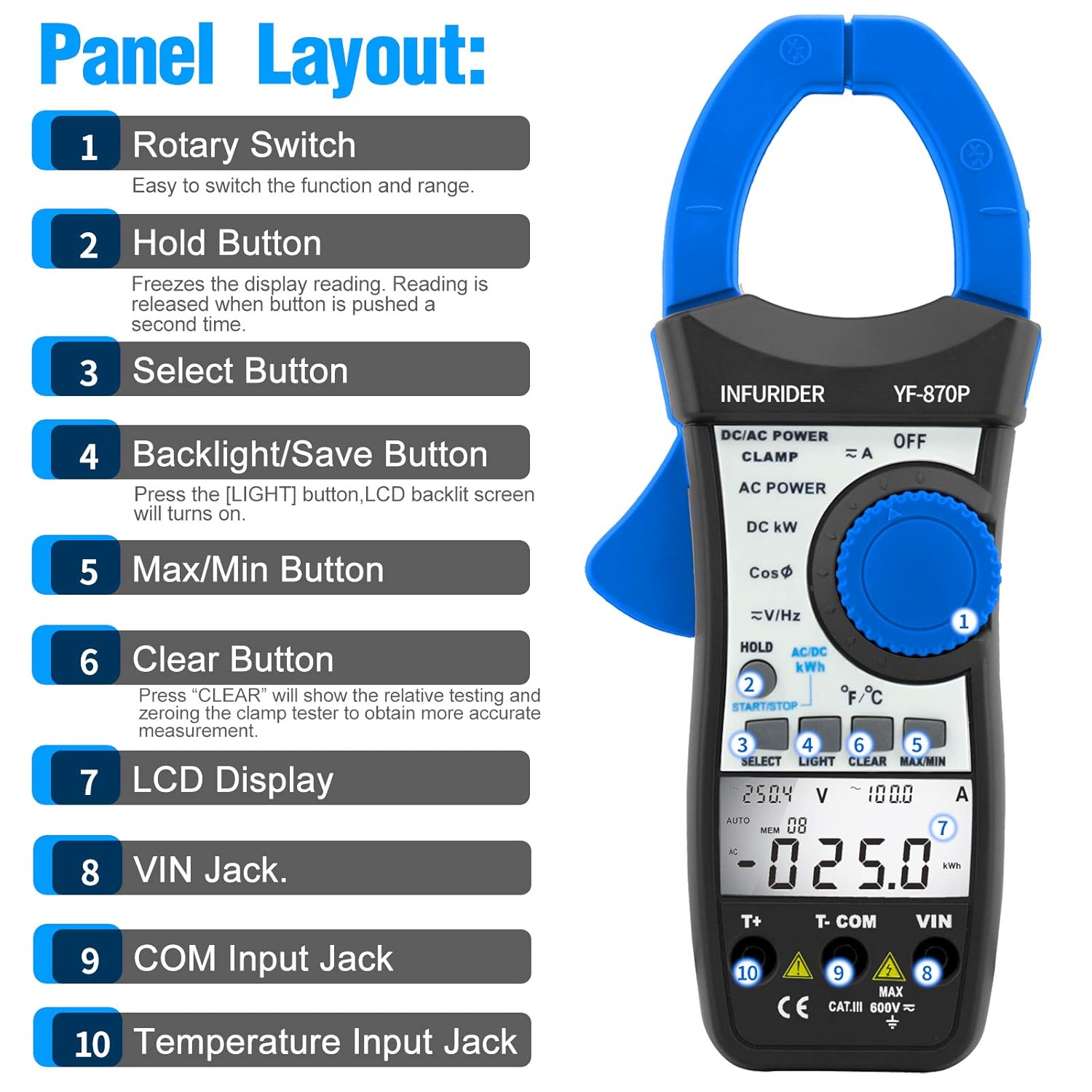
ຮູບທີ 3.2: ລະອຽດ view of the HP-870P clamp meter's front panel, indicating the location and function of each control and input jack.
- ສະວິດ Rotary: ໃຊ້ເພື່ອເລືອກຟັງຊັນການວັດແທກ ແລະ ຂອບເຂດທີ່ຕ້ອງການ.
- ຖືປຸ່ມ: Freezes the current display reading. Press again to release.
- ເລືອກປຸ່ມ: Toggles between different measurement modes within a single rotary switch position (e.g., AC/DC, temperature units).
- Backlight/Save Button: Press to turn on the LCD backlight.
- ປຸ່ມສູງສຸດ/ນາທີ: ສະຫຼັບລະຫວ່າງການອ່ານສູງສຸດ, ຕໍ່າສຸດ, ແລະ ການອ່ານປັດຈຸບັນ.
- ປຸ່ມລຶບ: Used to clear relative testing or zero the clamp tester for more accurate measurements.
- ຈໍ LCD: ສະແດງໃຫ້ເຫັນການອ່ານການວັດແທກ, ຫນ່ວຍງານ, ແລະຕົວຊີ້ວັດການເຮັດວຽກ.
- VIN Jack: ສະຖານີປ້ອນຂໍ້ມູນສໍາລັບ voltage and other measurements (typically for red test lead).
- COM Input Jack: Common input terminal (typically for black test lead).
- Temperature Input Jack: Dedicated input for the temperature probe.
4. ຕັ້ງຄ່າ
ການຕິດຕັ້ງຫມໍ້ໄຟ:
- ໃຫ້ແນ່ໃຈວ່າມິເຕີຖືກປິດ.
- ຊອກຫາຊ່ອງໃສ່ຫມໍ້ໄຟຢູ່ດ້ານຫຼັງຂອງເຄື່ອງວັດແທກ.
- ໃຊ້ screwdriver ເພື່ອເປີດຝາປິດຫມໍ້ໄຟ.
- Insert the provided 9V (6F22) battery, observing the correct polarity (+ and -).
- ປ່ຽນຝາປິດຫມໍ້ໄຟແລະຍຶດມັນດ້ວຍສະກູ.
ການເຊື່ອມຕໍ່ການທົດສອບນໍາພາ:
- ສໍາລັບ voltage, resistance, frequency, and other measurements requiring test leads: Insert the black test lead into the COM jack input ແລະການທົດສອບສີແດງນໍາໄປສູ່ການ ວີນ jack ປ້ອນຂໍ້ມູນ.
- For temperature measurements: Insert the temperature probe into the dedicated Jack ປ້ອນອຸນຫະພູມ.
5. ຄໍາແນະນໍາການດໍາເນີນງານ
ການດໍາເນີນງານທົ່ວໄປ:
- ເປີດ/ປິດ: Rotate the rotary switch from the OFF position to any desired function to turn the meter ON. To turn OFF, rotate the switch back to the OFF position.
- LCD Backlight: ກົດ ແສງສະຫວ່າງ button to activate the display backlight. Press again to turn it off.
- ການຖືຂໍ້ມູນ: ກົດ ຖື ປຸ່ມເພື່ອຢຸດການອ່ານປັດຈຸບັນຢູ່ໃນຈໍສະແດງຜົນ. ກົດອີກຄັ້ງເພື່ອປ່ອຍ.
- ປິດເຄື່ອງອັດຕະໂນມັດ: The meter will automatically power off after a period of inactivity to save battery. To disable this feature temporarily, refer to the full user manual.
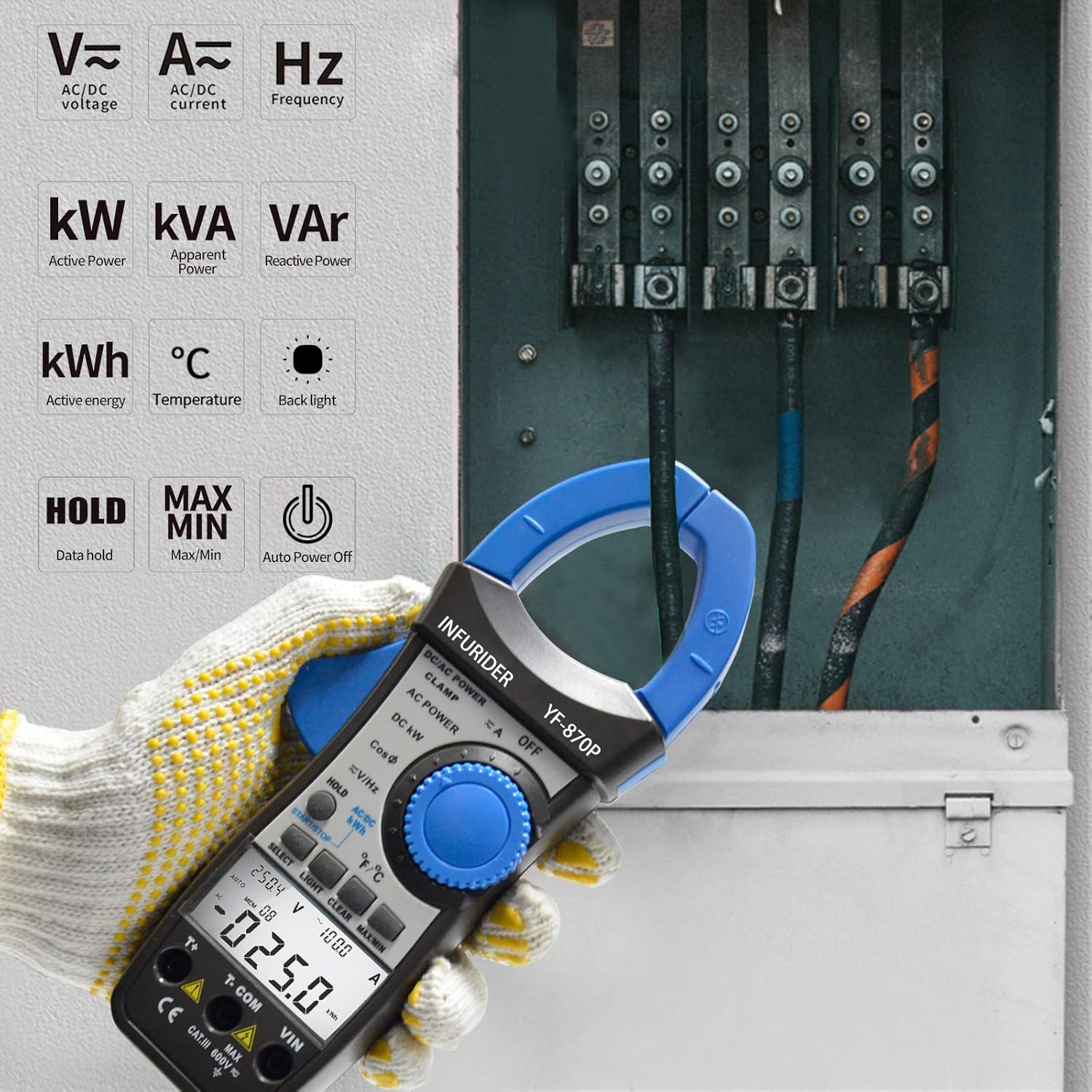
ຮູບທີ 5.1: The HP-870P clamp meter displaying various measurement functions such as AC/DC voltage, current, frequency, active power (kW), apparent power (kVA), reactive power (VAr), active energy (kWh), and temperature (°C).
ຟັງຊັນການວັດແທກ:
AC/DC Voltage ການວັດແທກ:
- ຕັ້ງຄ່າຫມຸນຫມຸນໄປ V≈ (AC Voltage) ຫຼື V— (DC Voltage) ຕໍາແໜ່ງ.
- ເຊື່ອມຕໍ່ຜູ້ ນຳ ທີ່ ດຳ ເນີນການທົດສອບ ດຳ COM jack ແລະ ສາຍທົດສອບສີແດງໄປຫາ ວີນ jack.
- ເຊື່ອມຕໍ່ໂພຣບທົດສອບຂະໜານກັບວົງຈອນ ຫຼື ອົງປະກອບທີ່ຢູ່ພາຍໃຕ້ການທົດສອບ.
- ອ່ານ voltage ມູນຄ່າຢູ່ໃນຈໍສະແດງຜົນ LCD.
ການວັດແທກກະແສໄຟຟ້າ AC/DC (Cl)amp ໜ້າທີ່):
- ຕັ້ງຄ່າຫມຸນຫມຸນໄປ A≈ (ກະແສໄຟຟ້າ AC) ຫຼື A— ຕຳແໜ່ງ (ກະແສໄຟຟ້າ DC).
- ເປີດ clamp ຄາງກະໄຕໂດຍການກົດຜົນກະທົບຕໍ່.
- ລ້ອມຮອບຕົວນຳພຽງອັນດຽວຂອງວົງຈອນພາຍໃນ clamp ຄາງກະໄຕ. ຮັບປະກັນວ່າຄາງກະໄຕປິດສະໜິດແລ້ວ.
- ອ່ານຄ່າປັດຈຸບັນຢູ່ໃນຈໍສະແດງຜົນ LCD.
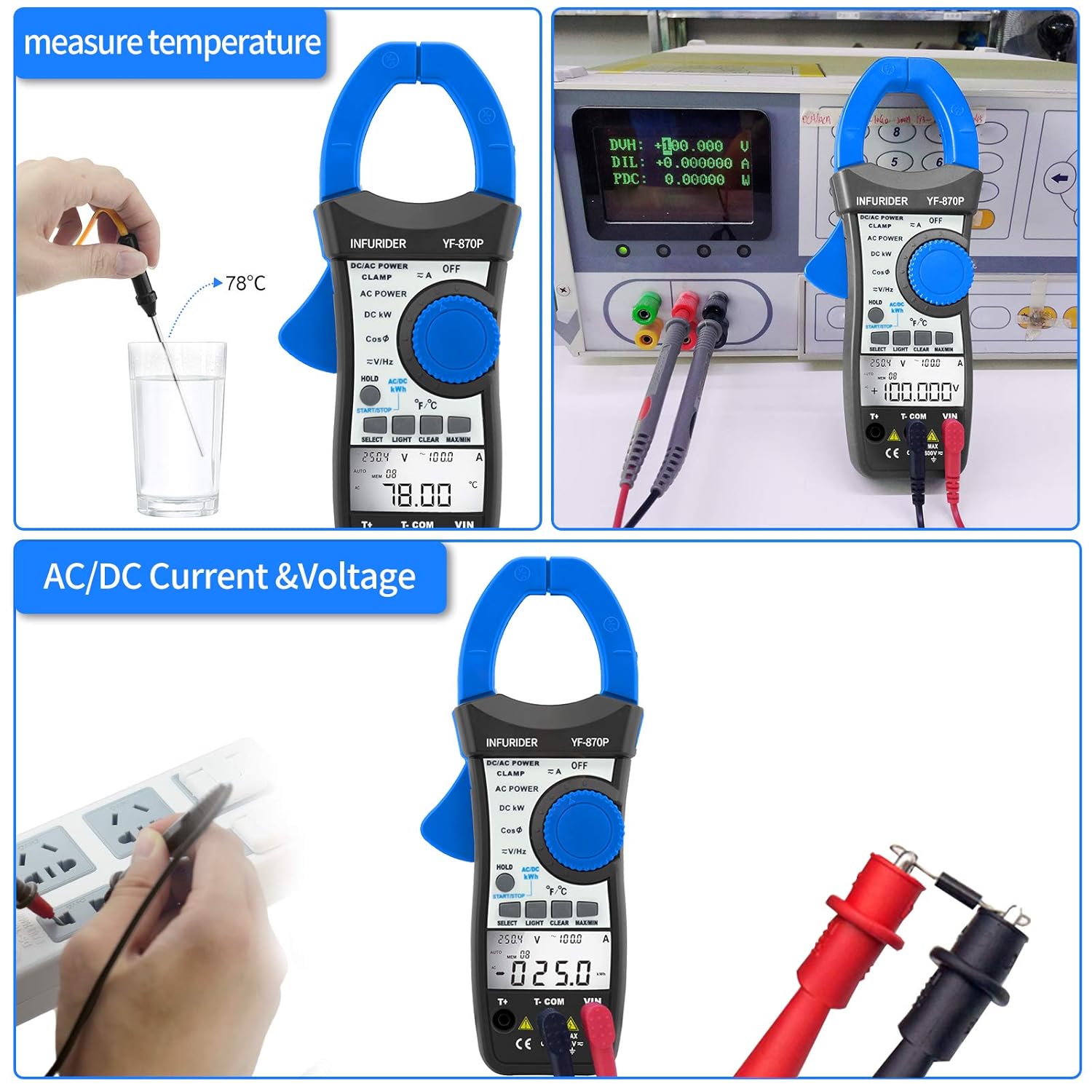
ຮູບທີ 5.2: Demonstrates the HP-870P's capability to measure temperature using the included probe and to measure AC/DC current and voltage by connecting the test leads to a power outlet.
Power Measurement (Active, Apparent, Reactive):
- ຕັ້ງຄ່າຫມຸນຫມຸນໄປ DC KW or ພະລັງງານ AC ຕໍາແຫນ່ງ.
- Connect the test leads as required for voltage measurement and clamp the jaws around the current-carrying conductor.
- ໃຊ້ ເລືອກ button to cycle through Active Power (KW), Apparent Power (KVA), and Reactive Power (KVAr) readings.
Active Energy Measurement (kWh):
- ຕັ້ງຄ່າຫມຸນຫມຸນໄປ AC/DC KWH ຕໍາແຫນ່ງ.
- ເຊື່ອມຕໍ່ສາຍທົດສອບ ແລະ clamp the jaws as for power measurement.
- The meter will display the accumulated active energy.
ການວັດແທກອຸນຫະພູມ:
- ຕັ້ງຄ່າຫມຸນຫມຸນໄປ ℃ / ℉ ຕໍາແຫນ່ງ.
- Insert the temperature probe into the dedicated temperature input jack.
- ວາງປາຍຂອງເຄື່ອງວັດອຸນຫະພູມໄວ້ເທິງ ຫຼື ໃນວັດຖຸທີ່ຈະວັດແທກອຸນຫະພູມ.
- ໃຊ້ ເລືອກ ປຸ່ມເພື່ອສະຫຼັບລະຫວ່າງເຊວຊຽດ (℃) ແລະຟາເຣນຮາຍ (℉).
ການວັດແທກຄວາມຖີ່:
- ຕັ້ງຄ່າຫມຸນຫມຸນໄປ V≈/Hz ຕໍາແຫນ່ງ.
- ເຊື່ອມຕໍ່ສາຍທົດສອບເຂົ້າກັບວົງຈອນທີ່ຈະວັດແທກຄວາມຖີ່.
- Read the frequency value in Hertz (Hz) on the LCD display.
Power Factor Measurement:
- ຕັ້ງຄ່າຫມຸນຫມຸນໄປ CosΦ ຕໍາແຫນ່ງ.
- ເຊື່ອມຕໍ່ສາຍທົດສອບ ແລະ clamp the jaws as for power measurement.
- The power factor value will be displayed.

ຮູບທີ 5.3: Illustrates the 40mm jaw caliber of the HP-870P, allowing measurement on larger conductors, and highlights the large LCD screen for clear observation of measurement data, along with the meter's overall dimensions.
6. ບໍາລຸງຮັກສາ
ທໍາຄວາມສະອາດ:
- ເຊັດກໍລະນີທີ່ມີໂຄສະນາamp ຜ້າແລະເຄື່ອງຊັກຜ້າອ່ອນ mild. ຢ່າໃຊ້ສານຂັດຫຼືສານລະລາຍ.
- Keep the terminals clean to ensure proper contact.
ການປ່ຽນແບັດເຕີຣີ:
When the battery symbol appears on the LCD display, the battery needs to be replaced. Refer to the Battery Installation section (4.1) for instructions.
ການເກັບຮັກສາ:
- If the meter is not to be used for a long period, remove the battery to prevent leakage and damage to the meter.
- ເກັບຮັກສາມິເຕີໄວ້ໃນບ່ອນທີ່ເຢັນ, ແຫ້ງ, ຫ່າງຈາກແສງແດດໂດຍກົງ ແລະ ອຸນຫະພູມສູງສຸດ.
- ໃຊ້ກະເປົ໋າທີ່ໃຫ້ໄວ້ເພື່ອປ້ອງກັນໃນລະຫວ່າງການເກັບຮັກສາ ແລະການຂົນສົ່ງ.
7. ການແກ້ໄຂບັນຫາ
If the meter does not operate correctly, check the following common issues before seeking service.
| ບັນຫາ | ສາເຫດທີ່ເປັນໄປໄດ້ | ການແກ້ໄຂ |
|---|---|---|
| ເຄື່ອງວັດແທກບໍ່ເປີດ. | ແບັດເຕີຣີຕາຍ ຫຼື ຕິດຕັ້ງບໍ່ຖືກຕ້ອງ. | ປ່ຽນແບັດເຕີຣີ ຫຼື ກວດສອບຂົ້ວ. |
| ບໍ່ມີການອ່ານ ຫຼື "OL" ສະແດງຢູ່. | Overload, incorrect range, or open circuit. | Select higher range (if not auto-ranging), check circuit continuity, ensure proper connection. |
| ການອ່ານບໍ່ຖືກຕ້ອງ. | Low battery, dirty terminals, or external interference. | Replace battery, clean terminals, move away from strong electromagnetic fields. |
| Backlight ບໍ່ເຮັດວຽກ. | Low battery or backlight function not activated. | Replace battery, press the LIGHT button. |
8. ຂໍ້ມູນຈໍາເພາະ
| ໜ້າ ທີ່ການວັດແທກ | ຂອບເຂດ / ຄວາມຖືກຕ້ອງ |
|---|---|
| ພະລັງງານທີ່ໃຊ້ວຽກ | 99.99KW / 100KW~300KW (3% of rdg + 12dgt) |
| ປາກົດຂື້ນພະລັງງານ | 99.99KVA~245KVA (3% of rdg + 15dgt) |
| ພະລັງງານປະຕິກິລິຍາ | 0.01VAr~120KVAr (3% of rdg + 15dgt) |
| AC/DC Voltage | 1.0~600V (1.0% of rdg + 8dgt) |
| AC / DC ກະແສໄຟຟ້າ | 1.0~999.9A (2.5% of rdg + 15dgt) |
| ອຸນຫະພູມ | -20℃~1370℃ (-4℉~2498℉) (3% of rdg + 2dgt) |
| ຄວາມຖີ່ | 45Hz~250MHz (0.1% + 5dgt) |
| ປັດໄຈພະລັງງານ | ±0.05 |
| ພະລັງງານທີ່ໃຊ້ວຽກ | 0~99.99kwh (3% of rdg + 10dgt), 100~700kwh (3% of rdg + 5dgt) |
ຂໍ້ມູນຈໍາເພາະທົ່ວໄປ:
- ຈໍສະແດງຜົນ: ຈໍ LCD 9999 ໜ່ວຍ
- Jaw Caliber: 1.77 ນິ້ວ (45 ມມ)
- ປະເພດຫມໍ້ໄຟ: 9V (6F22)
- ຂະໜາດ: 225 x 97 x 40 ມມ
- ນ້ຳໜັກ: 450g
- ມາດຕະຖານຄວາມປອດໄພ: CE
9. ຂໍ້ມູນການຮັບປະກັນ
ກະລຸນາອ້າງອີງເຖິງເຈົ້າຫນ້າທີ່ຂອງຜູ້ຜະລິດ website or the warranty card included with your product for detailed warranty terms and conditions. Typically, HoldPeak products come with a limited warranty covering defects in materials and workmanship for a specified period from the date of purchase.
10. ການຊ່ວຍເຫຼືອລູກຄ້າ
For technical assistance, troubleshooting beyond this manual, or service inquiries, please contact HoldPeak customer support through their official website or the contact information provided in your product packaging. When contacting support, please have your product model number (HP-870P) and purchase details ready.
Ask a question about this manual
Ask about setup, troubleshooting, compatibility, parts, safety, or missing instructions. Manuals+ will review the question and use this page’s manual context to help answer it.