
1. ບົດແນະນຳ
This manual provides essential information for the installation, operation, maintenance, and troubleshooting of your Chieftec Polaris 650W 80Plus Certified Power Supply Unit (PSU). Please read this manual thoroughly before installing and using the product to ensure proper function and safety. The Chieftec Polaris 650W PSU is designed to provide stable and efficient power to your personal computer system.
2. ຂໍ້ມູນຄວາມປອດໄພ
ປະຕິບັດຕາມຄວາມລະມັດລະວັງດ້ານຄວາມປອດໄພຕໍ່ໄປນີ້ສະເໝີເພື່ອປ້ອງກັນການບາດເຈັບ ຫຼືຄວາມເສຍຫາຍຕໍ່ອຸປະກອນຂອງທ່ານ:
- ບໍ່ open the PSU casing. ສູງ voltages inside can cause electric shock. There are no user-serviceable parts inside.
- ບໍ່ insert any objects into the PSU's ventilation openings.
- ບໍ່ expose the PSU to water, moisture, or high humidity.
- Ensure the PSU is installed in a well-ventilated area, free from obstructions to airflow.
- ສະເຫມີຖອດສາຍໄຟ AC ຈາກເຕົ້າສຽບໃສ່ຝາກ່ອນທີ່ຈະຕິດຕັ້ງ, ຖອດອອກ, ຫຼືທໍາຄວາມສະອາດ PSU.
- Use only the modular cables provided with your Chieftec Polaris 650W PSU. Using incompatible cables may damage the PSU or connected components.
- Ensure all cable connections are secure before powering on the system.
3. ເນື້ອໃນຊຸດ
ກວດສອບວ່າລາຍການທັງຫມົດແມ່ນມີຢູ່ໃນຊຸດຂອງທ່ານ:
- Chieftec Polaris 650W Power Supply Unit
- Modular Cable Set (e.g., 24-pin ATX, 8-pin EPS/CPU, PCIe, SATA, Molex)
- ສາຍໄຟ AC
- screws ການຕິດຕັ້ງ
- ຄູ່ມືຜູ້ໃຊ້ (ເອກະສານນີ້)
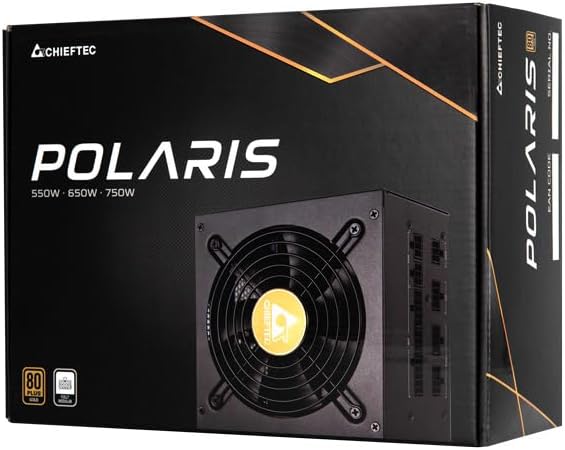
Image: The Chieftec Polaris 650W Power Supply Unit and its retail packaging.
4. ການຕິດຕັ້ງແລະການຕິດຕັ້ງ
Follow these steps to install your Chieftec Polaris 650W PSU into your personal computer system:
- ກະກຽມລະບົບຂອງທ່ານ: ໃຫ້ແນ່ໃຈວ່າຄອມພິວເຕີຂອງທ່ານປິດເຄື່ອງຢ່າງສົມບູນ ແລະ ໄດ້ຖອດປລັກອອກຈາກປລັກສຽບຝາ. ເປີດເຄສຄອມພິວເຕີຂອງທ່ານເພື່ອເຂົ້າເຖິງພື້ນທີ່ຕິດຕັ້ງ PSU.
- ເອົາ PSU ເກົ່າອອກ (ຖ້າມີ): If replacing an existing PSU, disconnect all cables from the components and motherboard, then unscrew and remove the old PSU.
- Mount PSU ໃຫມ່: Carefully slide the Chieftec Polaris 650W PSU into the designated PSU bay in your computer case. Ensure the fan faces the correct direction (typically downwards for bottom-mounted PSUs, or as per case design for optimal airflow). Secure the PSU with the provided mounting screws.
- ເຊື່ອມຕໍ່ສາຍໂມດູລາ: Identify the necessary modular cables for your system components (motherboard, CPU, graphics card, storage drives). Connect these cables to the corresponding ports on the back of the PSU. Refer to the image below for connector identification.
- ເຊື່ອມຕໍ່ກັບອົງປະກອບຕ່າງໆ: Connect the other end of the modular cables to your motherboard (24-pin ATX and 8-pin EPS/CPU), graphics card(s) (PCIe), and storage devices (SATA/Molex). Ensure all connections are firm and fully seated.
- ການຄຸ້ມຄອງສາຍໄຟ: ເຊື່ອມຕໍ່ສາຍໄຟໃຫ້ສະອາດເພື່ອປັບປຸງການໄຫຼວຽນຂອງອາກາດ ແລະ ຄວາມງາມພາຍໃນເຄສຂອງທ່ານ.
- ການກວດສອບຄັ້ງສຸດທ້າຍ: Double-check all connections. Ensure no loose cables are obstructing fans. Close your computer case.
- ເຊື່ອມຕໍ່ພະລັງງານ AC: Plug the AC power cord into the PSU's power inlet and then into a wall outlet.

ຮູບພາບ: ດ້ານຫລັງ view of the Chieftec Polaris 650W PSU showing modular cable connection ports for M/B, SATA, PCIe, and CPU.

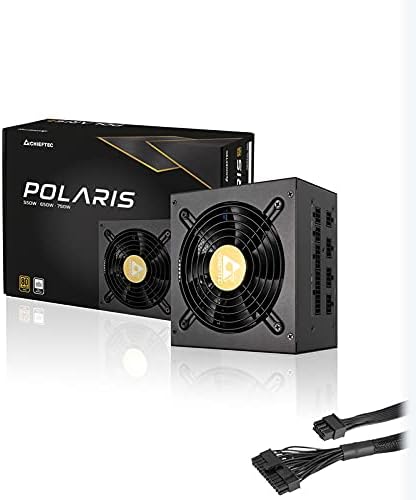
Image: The Chieftec Polaris 650W Power Supply Unit with its modular cables connected, ready for installation.
5. ຄໍາແນະນໍາການດໍາເນີນງານ
Once the Chieftec Polaris 650W PSU is correctly installed and all connections are secure:
- ເປີດ: Locate the power switch on the back of the PSU (next to the AC power inlet). Ensure it is in the 'I' (On) position.
- ການເລີ່ມຕົ້ນລະບົບ: Press the power button on your computer case. The system should power on, and the PSU fan will begin to spin, indicating normal operation.
- ປະຕິບັດການພັດລົມ: The PSU features an air cooling method. The fan will operate to dissipate heat generated by the power supply components. Its speed may vary depending on the load and temperature to maintain optimal cooling and noise levels.
- ປິດພະລັງງານ: To shut down your system, use the operating system's shutdown procedure. For a complete power cut, switch the PSU's power switch to the 'O' (Off) position and unplug the AC power cord.
ຮູບພາບ: ເທິງລົງລຸ່ມ view of the Chieftec Polaris 650W Power Supply, highlighting the cooling fan and protective grille.
6. ບໍາລຸງຮັກສາ
Proper maintenance ensures the longevity and optimal performance of your PSU:
- ທໍາຄວາມສະອາດຂີ້ຝຸ່ນ: Periodically (e.g., every 3-6 months), power off your computer, unplug the AC cord, and open the case. Use compressed air to gently blow dust out of the PSU's fan and ventilation grilles. ບໍ່ use a vacuum cleaner directly on the PSU as it can generate static electricity.
- ເງື່ອນໄຂສິ່ງແວດລ້ອມ: Ensure the computer operates in a clean, dry, and well-ventilated environment. Avoid extreme temperatures and direct sunlight.
- ຄວາມສົມບູນຂອງສາຍ: Occasionally check that all modular cables are securely connected and not frayed or damaged.
7. ການແກ້ໄຂບັນຫາ
If you encounter issues with your Chieftec Polaris 650W PSU, consider the following troubleshooting steps:
- ບໍ່ມີພະລັງງານ:
- ກວດໃຫ້ແນ່ໃຈວ່າໄດ້ສຽບສາຍໄຟ AC ໃສ່ທັງ PSU ແລະເຕົ້າສຽບຝາຢ່າງປອດໄພ.
- Check that the PSU's power switch on the back is in the 'I' (On) position.
- ກວດສອບວ່າປ່ຽງຕິດຝາໃຊ້ງານໄດ້ໂດຍການສຽບອຸປະກອນອື່ນ.
- Confirm all internal power cables (24-pin ATX, 8-pin EPS/CPU) are firmly connected to the motherboard.
- ຄວາມບໍ່ສະຖຽນຂອງລະບົບ/ການປິດແບບສຸ່ມ:
- Ensure the PSU is adequately ventilated and not overheating.
- Check all power connections to components (graphics card, storage) for looseness.
- If possible, test the PSU with a different set of components or in another system to rule out other hardware issues.
- ສິ່ງລົບກວນທີ່ຜິດປົກກະຕິ:
- A rattling or grinding noise may indicate a fan issue. Power off the system and inspect the PSU fan for obstructions (e.g., loose cables).
- If the noise persists and is not due to an obstruction, contact support.
If these steps do not resolve the issue, please refer to the Warranty and Support section.
8. ຂໍ້ມູນຈໍາເພາະ
| ຄຸນສົມບັດ | ຂໍ້ມູນຈໍາເພາະ |
|---|---|
| ຍີ່ຫໍ້ | Chieftec |
| ຊື່ຕົວແບບ | Polaris |
| ໝາຍເລກຕົວແບບ | IN-ACT-ZDLCHFOBU0087 |
| ຜົນຜະລິດວັດtage | 650 ວັດ |
| ປັດໄຈແບບຟອມ | ATX |
| ວິທີການເຮັດຄວາມເຢັນ | ອາກາດ |
| ປະເພດຕົວເຊື່ອມຕໍ່ | ATX |
| ອຸປະກອນທີ່ເຂົ້າກັນໄດ້ | ຄອມພິວເຕີສ່ວນບຸກຄົນ |
| ຂະໜາດສິນຄ້າ (L x W x H) | 8.66 x 3.15 x 1.18 ນິ້ວ (22 x 8 x 3 cm) |
| ນ້ໍາຫນັກລາຍການ | 4.4 ປອນ (2 ກິໂລກຣາມ) |
| ການຢັ້ງຢືນ | 80Plus ຮັບການຮັບຮອງ |
9. ການຮັບປະກັນແລະການສະຫນັບສະຫນູນ
Chieftec products are manufactured to high-quality standards. For specific warranty terms and conditions, please refer to the warranty card included with your product or visit the official Chieftec website. Warranty periods and coverage may vary by region and product.
For technical support, product inquiries, or warranty claims, please contact Chieftec customer service through their official website or the contact information provided in your product documentation. When contacting support, please have your product model number (IN-ACT-ZDLCHFOBU0087) and proof of purchase readily available.