
1. ບົດແນະນຳ
ຂອບໃຈສໍາລັບການຊື້asing the MUSE M-10 Red Radio Alarm Clock. This manual provides essential information for the safe and efficient operation of your device. Please read these instructions carefully before use and retain them for future reference.

Figure 1: MUSE M-10 Red Radio Alarm Clock. This image shows the front view of the red alarm clock with its digital LED display showing '12:00' and various control buttons on the top panel.
2. ຄໍາແນະນໍາຄວາມປອດໄພ
- ອ່ານ ຄຳ ແນະ ນຳ ທຸກຢ່າງກ່ອນທີ່ຈະປະຕິບັດເຄື່ອງ.
- Do not expose this appliance to rain or moisture to prevent fire or shock hazards.
- ໃຫ້ແນ່ໃຈວ່າອະແດບເຕີໄຟຟ້າສາມາດເຂົ້າເຖິງໄດ້ງ່າຍ.
- ໃຊ້ໄຟລ໌ແນບ/ອຸປະກອນເສີມທີ່ຜູ້ຜະລິດລະບຸໄວ້ເທົ່ານັ້ນ.
- ຢ່າວາງຜະລິດຕະພັນຢູ່ໃນແສງແດດໂດຍກົງຫຼືຢູ່ໃກ້ກັບແຫຼ່ງຄວາມຮ້ອນ.
- Avoid placing the product on surfaces that are unstable or subject to vibration.
- ຫ້າມເປີດຄasing; ສົ່ງການບໍລິການທັງໝົດໃຫ້ກັບບຸກຄະລາກອນທີ່ມີຄຸນວຸດທິ.
- ຖິ້ມແບັດເຕີລີທີ່ໃຊ້ແລ້ວຢ່າງມີຄວາມຮັບຜິດຊອບ, ປະຕິບັດຕາມກົດລະບຽບທ້ອງຖິ່ນ.
3. ຜະລິດຕະພັນເກີນview
3.1 ແຜງດ້ານໜ້າ ແລະ ຈໍສະແດງຜົນ
The front panel features a clear 0.6-inch white LED display for time and alarm indicators.
3.2 ການຄວບຄຸມແຜງເທິງ
The top panel houses all control buttons for easy access:
- MEM: Memory button for saving and recalling radio presets.
- ກຳ ນົດ: Button for setting time and alarm parameters.
- AL1: Alarm 1 setting button.
- AL2: Alarm 2 setting button.
- << HR: Hour adjustment button (backward).
- MIN >>: Minute adjustment button (forward).
- ເລື່ອນໄປ: Activates the snooze function during an alarm.
- ນອນ: ເປີດໃຊ້ຟັງຊັນໂມງຈັບເວລານອນ.
- DIMMER: ປັບຄວາມສະຫວ່າງຂອງຈໍສະແດງຜົນ.

ຮູບ 2: ເກີນview of the MUSE M-10 Red Radio Alarm Clock's functions, including its 0.6-inch white LED display, PLL radio, 20 FM presets, dimmer, dual alarm, snooze, and sleep features.
4. ຕັ້ງຄ່າ
4.1 ການເຊື່ອມຕໍ່ພະລັງງານ
Connect the provided AC adapter to the DC IN jack on the rear of the unit and then plug it into a standard wall outlet. The unit will power on and the display will light up.
4.2 ການຕິດຕັ້ງແບັດສຳຮອງ
For time and alarm settings backup during a power outage, install 2 x AAA batteries (not included) into the battery compartment located on the bottom of the unit. Ensure correct polarity (+/-) when inserting batteries.
5. ຄໍາແນະນໍາການດໍາເນີນງານ
5.1 ການ ກຳ ນົດເວລາ
- ກົດຄ້າງໄວ້ SET ກົດປຸ່ມຈົນກ່ວາຕົວເລກຊົ່ວໂມງກະພິບ.
- ໃຊ້ << HR or MIN >> ປຸ່ມເພື່ອປັບຊົ່ວໂມງ.
- ກົດ SET again, and the minute digits will flash.
- ໃຊ້ << HR or MIN >> ປຸ່ມເພື່ອປັບນາທີ.
- ກົດ SET ອີກເທື່ອໜຶ່ງເພື່ອຢືນຢັນ ແລະອອກຈາກໂໝດການຕັ້ງຄ່າເວລາ.
5.2 ການຕັ້ງໂມງປຸກ (ປຸກ 1 ແລະປຸກ 2)
ໜ່ວຍດັ່ງກ່າວມີສອງລະບົບເຕືອນໄພເອກະລາດ.
- ກົດຄ້າງໄວ້ AL1 (ຫຼື AL2) button until the alarm hour digits flash.
- ໃຊ້ << HR or MIN >> ປຸ່ມເພື່ອຕັ້ງໂມງປຸກທີ່ຕ້ອງການ.
- ກົດ AL1 (ຫຼື AL2) again, and the alarm minute digits will flash.
- ໃຊ້ << HR or MIN >> ປຸ່ມເພື່ອກໍານົດນາທີປຸກທີ່ຕ້ອງການ.
- ກົດ AL1 (ຫຼື AL2) ອີກເທື່ອຫນຶ່ງເພື່ອເລືອກແຫຼ່ງປຸກ: Buzzer or ວິທະຍຸ.
- ກົດ AL1 (ຫຼື AL2) once more to confirm and activate the alarm. An alarm icon will appear on the display.
5.3 ການດໍາເນີນງານວິທະຍຸ FM
The unit has a PLL FM radio with 20 preset stations.
- ປບັ: ກົດ << HR or MIN >> buttons to manually tune the radio frequency. Press and hold these buttons for automatic scanning to the next available station.
- ບັນທຶກການຕັ້ງຄ່າໄວ້ລ່ວງໜ້າ: ປັບແຕ່ງໄປຫາສະຖານີທີ່ທ່ານຕ້ອງການ. ກົດປຸ່ມຄ້າງໄວ້ MEM button until 'P01' (or the next available preset number) flashes. Use << HR or MIN >> ເພື່ອເລືອກຕົວເລກທີ່ກໍານົດໄວ້ກ່ອນ, ຈາກນັ້ນກົດ MEM ອີກເທື່ອຫນຶ່ງເພື່ອຊ່ວຍປະຢັດ.
- Presets ທີ່ລະລຶກ: ຫຍໍ້ໆ ກົດເຂົ້າ MEM ປຸ່ມເພື່ອວົງຈອນຜ່ານສະຖານີ preset ທີ່ບັນທຶກໄວ້.
5.4 Snooze ຟັງຊັນ
ເມື່ອມີສຽງປຸກ, ກົດປຸ່ມ ງອກ ເພື່ອປິດສຽງປຸກຊົ່ວຄາວປະມານ 9 ນາທີ. ສຽງປຸກຈະດັງອີກຄັ້ງຫຼັງຈາກໄລຍະເວລານີ້.
5.5 ຟັງຊັນຕັ້ງເວລານອນ
ກົດ ນອນ button repeatedly to set a sleep timer (e.g., 90, 60, 30, 15 minutes, or OFF). The radio will play for the selected duration and then automatically turn off.
5.6 ຈໍສະແດງຜົນ Dimmer
ກົດ ດີນ button repeatedly to cycle through display brightness levels: High, Low, or Off.

Figure 3: Key features of the MUSE M-10 Red Radio Alarm Clock, including snooze, radio or buzzer alarm, dimmable display, and FM PLL radio with 20 presets.
6. ບໍາລຸງຮັກສາ
- ທໍາຄວາມສະອາດ: ເຊັດເຄື່ອງດ້ວຍຜ້າອ່ອນ, ແຫ້ງ. ຢ່າໃຊ້ເຄື່ອງເຮັດຄວາມສະອາດຂັດຫຼືສານລະລາຍ.
- ການປ່ຽນແບັດເຕີຣີ: Replace backup batteries annually or when the display shows signs of dimming during power outages.
- ການເກັບຮັກສາ: ຖ້າເກັບຮັກສາເຄື່ອງໄວ້ເປັນເວລາດົນ, ໃຫ້ຖອດແບັດເຕີຣີສຳຮອງອອກເພື່ອປ້ອງກັນການຮົ່ວໄຫຼ.
7. ການແກ້ໄຂບັນຫາ
| ບັນຫາ | ສາເຫດທີ່ເປັນໄປໄດ້ | ການແກ້ໄຂ |
|---|---|---|
| ບໍ່ມີໄຟ / ຈໍສະແດງຜົນປິດ | ອະແດັບເຕີໄຟບໍ່ໄດ້ເຊື່ອມຕໍ່ ຫຼື ມີບັນຫາ. | ກວດເບິ່ງການເຊື່ອມຕໍ່ຕົວແປງໄຟ. ລອງຮ້ານອື່ນ. |
| ໂມງປຸກບໍ່ມີສຽງ | ປຸກບໍ່ໄດ້ເປີດໃຊ້ງານ ຫຼືຕັ້ງບໍ່ຖືກຕ້ອງ. | Ensure alarm icon is visible on display. Re-check alarm time and source settings. |
| ການຮັບວິທະຍຸທີ່ບໍ່ດີ | FM antenna not extended or poor signal area. | Fully extend the FM wire antenna. Adjust its position for better reception. |
| ເວລາ/ການຕັ້ງຄ່າເສຍຫຼັງຈາກພະລັງງານ outage | ແບັດເຕີຣີສຳຮອງບໍ່ໄດ້ຕິດຕັ້ງ ຫຼືໝົດ. | Install new AAA batteries for backup. |
8. ຂໍ້ມູນຈໍາເພາະ
- ຕົວແບບ: M-10 ສີແດງ
- ຍີ່ຫໍ້: MUSE
- ຈໍສະແດງຜົນ: 0.6-inch White LED, Digital
- ວິທະຍຸ: FM PLL Radio with 20 Presets
- ໂມງປຸກ: ສັນຍານເຕືອນຄູ່ (ສຽງກະພິບ ຫຼື ວິທະຍຸ)
- ຄຸນນະສົມບັດພິເສດ: Snooze, Sleep Timer, Display Dimmer (High/Low/Off)
- ແຫຼ່ງພະລັງງານ: AC Adapter (included), 2 x AAA batteries for backup (not included)
- ຂະໜາດ (L x W x H): 12 x 7 x 10.9 cm (ປະມານ 4.7 x 2.8 x 4.3 ນິ້ວ)
- ນ້ຳໜັກ: 200 ກຣາມ (ປະມານ 0.44 ປອນ)
- ວັດສະດຸ: ພາດສະຕິກ
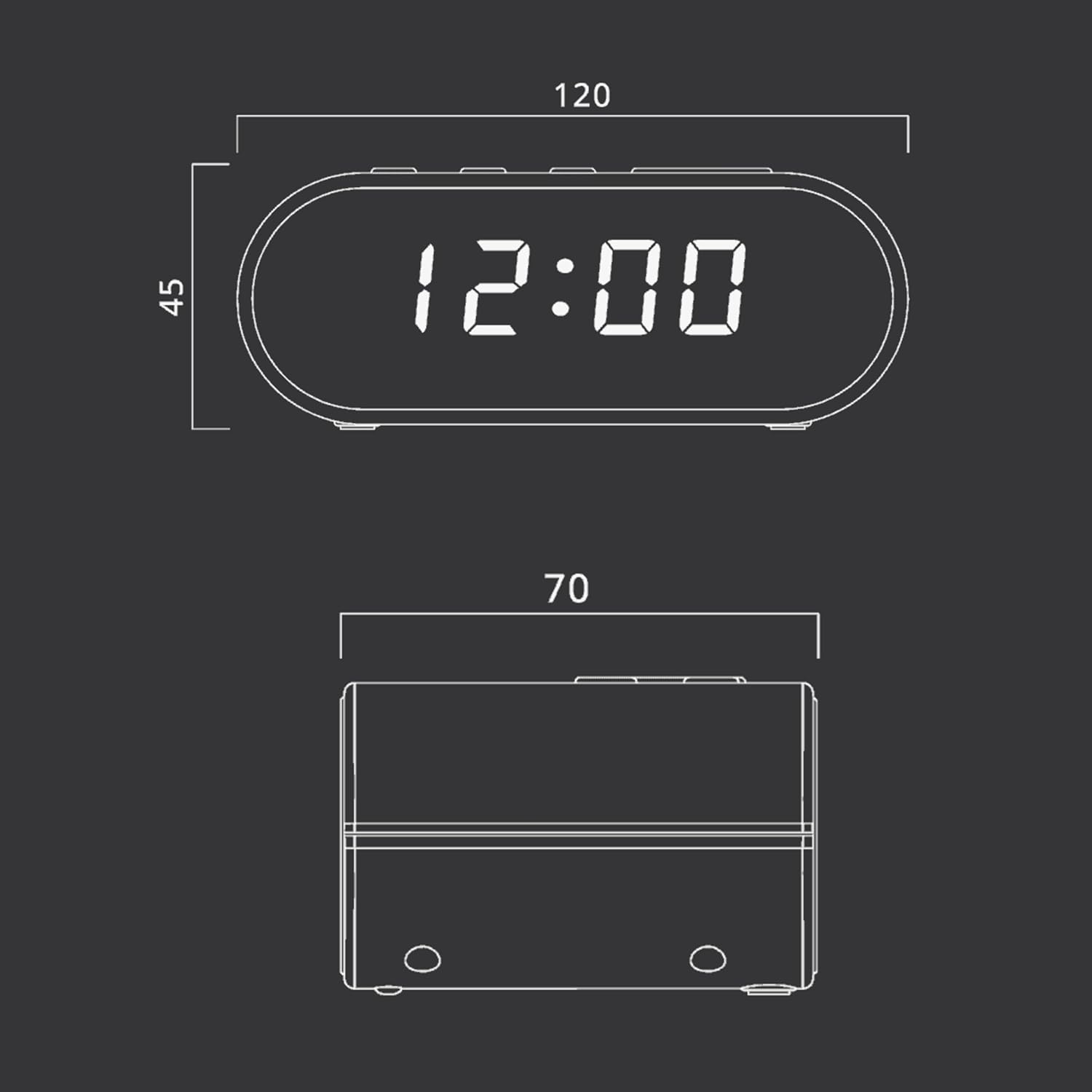
Figure 4: Dimensional drawing of the MUSE M-10 Red Radio Alarm Clock, showing its length (120mm), width (70mm), and height (45mm).
9. ການຮັບປະກັນແລະການສະຫນັບສະຫນູນ
For warranty information or technical support, please refer to the warranty card included with your product or contact your local MUSE distributor. Keep your purchase receipt as proof of purchase.