
1. ບົດແນະນຳ
This manual provides essential instructions for the installation, operation, maintenance, and troubleshooting of your VIVOTEK CC9381-HV 5MP Dome Camera. Please read this manual thoroughly before using the product to ensure proper setup and functionality. The CC9381-HV is a high-performance surveillance camera designed for reliable monitoring with a 180-degree field of view and advanced imaging capabilities.
2. ຂໍ້ມູນຄວາມປອດໄພ
ປະຕິບັດຕາມຄວາມລະມັດລະວັງດ້ານຄວາມປອດໄພຕໍ່ໄປນີ້ເພື່ອປ້ອງກັນຄວາມເສຍຫາຍຂອງຜະລິດຕະພັນແລະຮັບປະກັນຄວາມປອດໄພຂອງຜູ້ໃຊ້:
- Ensure the power source matches the camera's requirements (AC/DC, 220V).
- Do not expose the camera to extreme temperatures outside its operating range (Upper Temperature Rating: 50 Degrees Celsius).
- Avoid direct exposure to water or moisture unless the product's IP rating specifically allows it (International Protection Rating: IP21).
- ຢ່າພະຍາຍາມຖອດປະກອບ ຫຼືດັດແປງກ້ອງຖ່າຍຮູບ. ອ້າງອີງການບໍລິການທັງໝົດໃຫ້ກັບບຸກຄະລາກອນທີ່ມີຄຸນວຸດທິ.
- Mount the camera securely using appropriate hardware to prevent it from falling.
3. ເນື້ອໃນຊຸດ
ກວດສອບໃຫ້ແນ່ໃຈວ່າລາຍການທັງໝົດມີຢູ່ໃນການຫຸ້ມຫໍ່. ຖ້າມີລາຍການໃດຂາດຫາຍໄປ ຫຼື ເສຍຫາຍ, ໃຫ້ຕິດຕໍ່ຜູ້ຂາຍຂອງທ່ານທັນທີ.
- VIVOTEK CC9381-HV Dome Camera
- ວົງເລັບແລະຮາດແວ
- ຄູ່ມືການຕິດຕັ້ງ
- Accessory Kit (e.g., screws, anchors)
4. ຕັ້ງຄ່າ
4.1 ການຕິດຕັ້ງທາງດ້ານຮ່າງກາຍ
The VIVOTEK CC9381-HV camera is designed for bracket mounting. Choose a suitable location that provides the desired field of view and is within reach of power and network connections. The camera dimensions are approximately 8.5 x 7 x 3.5 inches.
- Mark the drilling points on the mounting surface using the provided template or bracket.
- ເຈາະຮູນັກບິນ ແລະ ໃສ່ບ່ອນຍຶດຕິດຝາ ຖ້າຈຳເປັນ.
- ຍຶດຍຶດຍຶດຕິດກັບພື້ນຜິວໂດຍໃຊ້ສະກູທີ່ໃຫ້ມາ.
- ຕິດກ້ອງຖ່າຍຮູບເຂົ້າກັບຂາຕັ້ງ, ຮັບປະກັນວ່າມັນລັອກໄວ້ຢ່າງແໜ້ນໜາແລ້ວ.
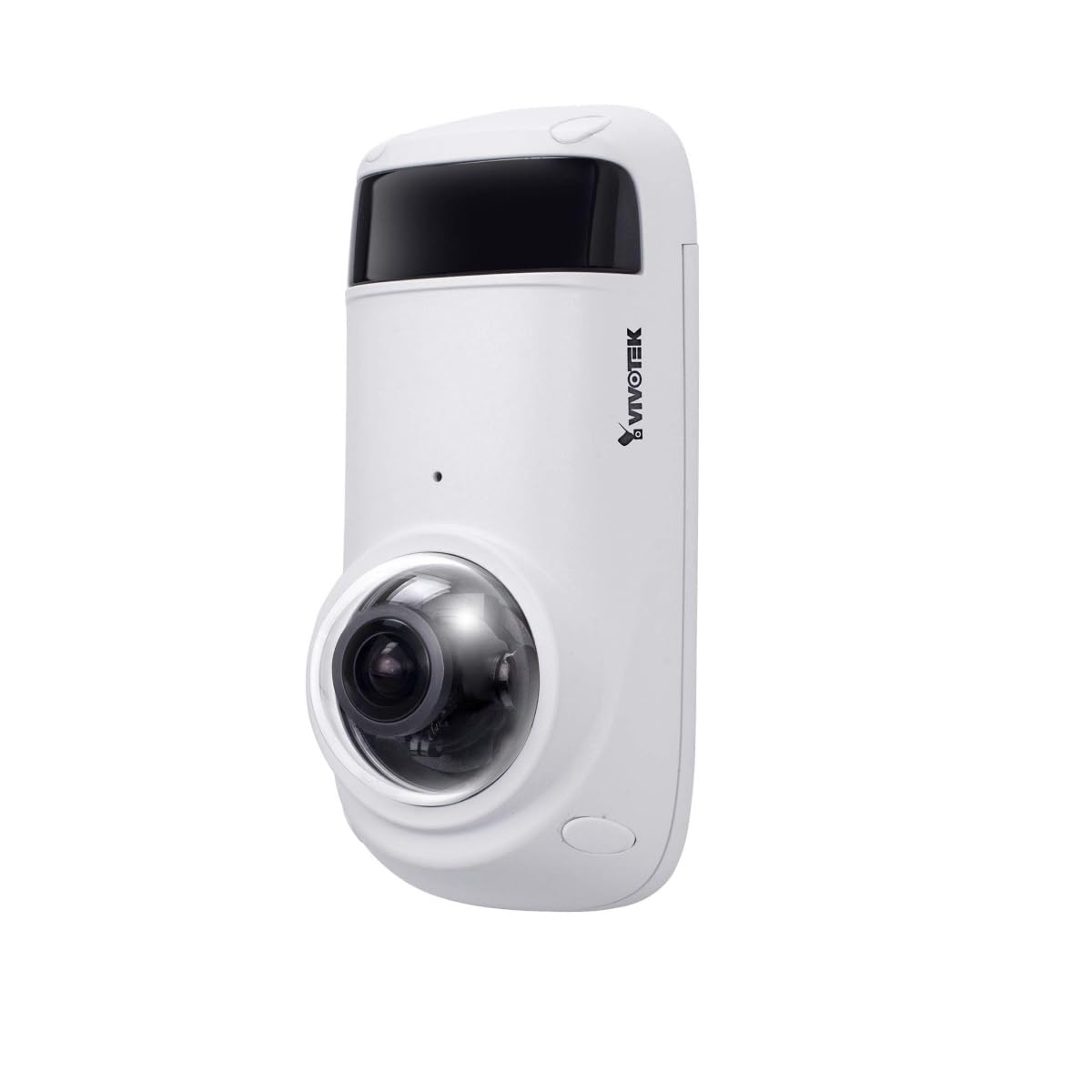
Figure 1: VIVOTEK CC9381-HV Dome Camera. This image shows the compact dome design of the surveillance camera, suitable for various indoor and outdoor installations.
4.2 ການເຊື່ອມຕໍ່ພະລັງງານ
Connect the camera to a suitable AC/DC power source. Ensure the voltage (220V) ແລະ ວັດtage (3600W) requirements are met to prevent damage.
4.3 ການເຊື່ອມຕໍ່ເຄືອຂ່າຍ
The CC9381-HV supports both wired and Wi-Fi connectivity. For wired connection, connect an Ethernet cable from your network router or switch to the camera's network port. For Wi-Fi setup, refer to the camera's web interface for wireless configuration after initial wired setup.
5. ຄໍາແນະນໍາການດໍາເນີນງານ
5.1 ການເຂົ້າເຖິງເບື້ອງຕົ້ນ ແລະການຕັ້ງຄ່າ
After connecting power and network, access the camera's web interface using its IP address. You may need to use a VIVOTEK utility to discover the camera's IP address on your network. Follow the on-screen prompts to set up a strong password and configure basic network settings.
5.2 ດໍາລົງຊີວິດ View ແລະການບັນທຶກ
The camera provides a 180-degree field of view with a maximum webcam image resolution of 5 MP and a frame rate of 30 fps. You can view ດໍາລົງຊີວິດ footage and configure recording settings through the web interface or compatible VIVOTEK software.
- ຮູບແບບການຖ່າຍຮູບວິດີໂອ: Supports MJPEG and MP4 formats.
- ເຕັກໂນໂລຊີແສງສະຫວ່າງ: Features Night Color technology for enhanced visibility in low-light conditions.
- ປະເພດການແຈ້ງເຕືອນ: Configurable for Motion Only alerts.
5.3 ການຄວບຄຸມໄລຍະໄກ
The camera supports remote control, allowing you to manage settings and view ຟູtage from a distance using compatible software or mobile applications. The controller type is Iris.
6. ບໍາລຸງຮັກສາ
ການບໍາລຸງຮັກສາເປັນປົກກະຕິຮັບປະກັນການປະຕິບັດທີ່ດີທີ່ສຸດແລະຄວາມທົນທານຂອງກ້ອງຖ່າຍຮູບຂອງທ່ານ.
- ທໍາຄວາມສະອາດ: Gently wipe the camera lens and housing with a soft, dry cloth. Do not use harsh chemicals or abrasive cleaners.
- ການອັບເດດເຟີມແວ: Periodically check the VIVOTEK webເວັບໄຊທ໌ສຳລັບການອັບເດດເຟີມແວເພື່ອຮັບປະກັນວ່າກ້ອງຖ່າຍຮູບຂອງທ່ານມີຄຸນສົມບັດ ແລະ ການປັບປຸງຄວາມປອດໄພລ້າສຸດ.
- ກວດສອບສິ່ງແວດລ້ອມ: Ensure the camera's environment remains within specified temperature and humidity ranges.
7. ການແກ້ໄຂບັນຫາ
If you encounter issues with your VIVOTEK CC9381-HV camera, refer to the following common problems and solutions:
| ບັນຫາ | ສາເຫດທີ່ເປັນໄປໄດ້ | ການແກ້ໄຂ |
|---|---|---|
| ບໍ່ມີຕົວຊີ້ບອກພະລັງງານ | Power cable disconnected; faulty power adapter | Check power connections; test with a known good power adapter. |
| ບໍ່ສາມາດເຂົ້າເຖິງກ້ອງຖ່າຍຮູບຜ່ານເຄືອຂ່າຍ | Incorrect IP address; network cable issue; Wi-Fi not configured | Verify IP address; check network cable; ensure Wi-Fi settings are correct. |
| ຄຸນນະພາບຮູບພາບບໍ່ດີ | Dirty lens; insufficient lighting; incorrect settings | Clean the lens; ensure adequate lighting or enable Night Color; adjust image settings. |
| ການກວດຈັບການເຄື່ອນໄຫວບໍ່ເຮັດວຽກ | Motion detection disabled; incorrect sensitivity settings | Enable motion detection in settings; adjust sensitivity levels. |
If the problem persists, contact VIVOTEK technical support for further assistance.
8. ຂໍ້ມູນຈໍາເພາະ
Detailed technical specifications for the VIVOTEK CC9381-HV Dome Camera:
| ຄຸນສົມບັດ | ຂໍ້ມູນຈໍາເພາະ |
|---|---|
| ໝາຍເລກຕົວແບບ | CC9381-HV |
| ສູງສຸດ Webcam ຄວາມລະອຽດຮູບພາບ | 5 MP |
| ຄວາມລະອຽດການຖ່າຍວິດີໂອ | 720p (Effective Video Resolution: 1920) |
| ອັດຕາເຟຣມ | 30 fps |
| ພາກສະຫນາມຂອງ View | 180 ອົງສາ |
| ເຕັກໂນໂລຊີແສງສະຫວ່າງຕ່ໍາ | ສີກາງຄືນ |
| ເຕັກໂນໂລຊີການເຊື່ອມຕໍ່ | ມີສາຍ, Wi-Fi |
| ອະນຸສັນຍາການເຊື່ອມຕໍ່ | Wi-Fi |
| ແຫຼ່ງພະລັງງານ | AC DC |
| ສະບັບtage | 220 |
| ວັດtage | 3600 |
| ປະເພດການຕິດຕັ້ງ | ວົງເລັບ |
| ຂະໜາດສິນຄ້າ | 8.5 x 7 x 3.5 ນິ້ວ |
| ນ້ໍາຫນັກລາຍການ | 2.42 ປອນ (1.1 ກິໂລກຣາມ) |
| ລະດັບອຸນຫະພູມສູງສຸດ | 50 ອົງສາ Celsius |
| ການຈັດອັນດັບການປົກປ້ອງສາກົນ | IP21 |
| ຮູບແບບການຖ່າຍຮູບວິດີໂອ | MJPEG, MP4 |
| ປະເພດ Alert | ການເຄື່ອນໄຫວເທົ່ານັ້ນ |
| ວິທີການຄວບຄຸມ | ໄລຍະໄກ |
| ປະເພດການຄວບຄຸມ | ໄອຣິສ |
| ເທັກໂນໂລຍີເຊັນເຊີຮູບພາບ | CMOS |
| Flash Memory ຂະຫນາດຕິດຕັ້ງ | 128 GB |
| Optical Zoom | 3 x |
| ການນໍາໃຊ້ທີ່ແນະນໍາ | Security, Surveillance |
9. ການຮັບປະກັນແລະການສະຫນັບສະຫນູນ
VIVOTEK products are covered by a limited warranty. For specific warranty terms and conditions, please refer to the warranty card included with your product or visit the official VIVOTEK website. For technical support, product registration, or service inquiries, please contact VIVOTEK customer service or your authorized dealer.
VIVOTEK ຢ່າງເປັນທາງການ Webເວັບໄຊ: www.vivotek.com